Annoying, weird crashes, CPU or GPU, need advice

bigbadwolf

New member
Local time
7:16 PM
Messages
21
Hello guys, I'll go straight to the point: for like 6 months, I am getting some systeam freezes/lockups, only hard reset helps. It means the screen will freeze with the last frame and the sound is buzzing, like BRRRRRRRRRRRRRR. That's the easiest way to describe it. 2 weeks ago, i made a post here: http://www.sevenforums.com/bsod-hel...ome-bsod-seems-random-please-give-advice.html
(read it for more info if you need)

So far, I did like 3-4 clean windows installs with original win7 x64, and swapped the motherboard and the RAM, so they are not faulty for sure. Also, due to the numerous reinstalls and driver/BIOS updates I doubt it's a software-related issue. To be honest, the two remaining componets are the CPU and the GPU which could be faulty, the only problem is, no matter how long i run CPU/GPU stress test, there will be no errors...

Please tell me in comment what would you do, and also which test programS shouild I try again?
These freezes are random btw, happens 1-2 times a week, sometimes 2 times a day, and sometimes happens watching youtube, sometimes playing battlefield 3.

CPU: Intel i7 3770K 3.5GHz
GPU: ATI HD 7870
mobo: P8H77-M
I have 8 GB RAM at 1333 Hz
I have an SSD and 1 HDD, OS on SSD
The PSU is in good condition, the whole system is 1.5 years old, and worked fine before the crashes.

ANY advice will be appreciated, please help me fix this annoying problem, I don't really have the money or time to play with CPU/GPU random swaps.
 

My Computer

Computer type
PC/Desktop
Computer Manufacturer/Model Number
custom build
OS
Windows 7 Home Premium 64bit
CPU
Intel Core i7-3770K 3.5GHz
Motherboard
ASUS P8H77-M
Memory
2x4 1333Mhz DDR3
Graphics Card(s)
ASUS HD7870
Hard Drives
90GB SSD
1000GB HDD
PSU
Coolermaster GX-Lite 700W RS700-ASABL3-EU(Ö1)
Antivirus
NOD32
Browser
Mozzilla Firefox
Hello guys, I'll go straight to the point: for like 6 months, I am getting some systeam freezes/lockups, only hard reset helps. It means the screen will freeze with the last frame and the sound is buzzing, like BRRRRRRRRRRRRRR. That's the easiest way to describe it. 2 weeks ago, i made a post here: http://www.sevenforums.com/bsod-hel...ome-bsod-seems-random-please-give-advice.html
(read it for more info if you need)

So far, I did like 3-4 clean windows installs with original win7 x64, and swapped the motherboard and the RAM, so they are not faulty for sure. Also, due to the numerous reinstalls and driver/BIOS updates I doubt it's a software-related issue. To be honest, the two remaining componets are the CPU and the GPU which could be faulty, the only problem is, no matter how long i run CPU/GPU stress test, there will be no errors...

Please tell me in comment what would you do, and also which test programS shouild I try again?
These freezes are random btw, happens 1-2 times a week, sometimes 2 times a day, and sometimes happens watching youtube, sometimes playing battlefield 3.

CPU: Intel i7 3770K 3.5GHz
GPU: ATI HD 7870
mobo: P8H77-M
I have 8 GB RAM at 1333 Hz
I have an SSD and 1 HDD, OS on SSD
The PSU is in good condition, the whole system is 1.5 years old, and worked fine before the crashes.

ANY advice will be appreciated, please help me fix this annoying problem, I don't really have the money or time to play with CPU/GPU random swaps.

I had the same problem, My RAM was over-clocked above the specifications of my motherboard which caused my screen to just freeze on whatever I was doing with the audio looping in a 1ms loop(brrrrrrrrrrr noise), I know it's not relevant nowadays with most motherboards promoting over-clocking, but stable OS is primary over anything else, I would consider just checking the FSB of your RAM, and setting it to what your motherboard considers not over-clocked and make sure your RAM can also handle it.
 

My Computer

Computer type
PC/Desktop
Computer Manufacturer/Model Number
Custom Build
OS
Windows 7 Ultimate x64 SP1
CPU
Intel Q6600 @ 2.6Ghz
Motherboard
Evga NF78-CK-132-A 3-Way SLI
Memory
4Gb DDR2 Corsair Dominator @ 800Mhz 5-5-5-15
Graphics Card(s)
EVGA 560 GTX SC FTW 1GB
Sound Card
Realtek HD 7.1 Audio, Plantronics GameCom780 7.1 Headset
Monitor(s) Displays
Dell S2409W
Screen Resolution
1920 x 1080
Hard Drives
SanDisk SDSSDHII-120G-G25 120GB SSD
Samsung 7200RPM 750Gb SATA
Samsung 850 EVO 120GB SSD
Western Digital Green 1TB 7200RPM
PSU
Xigmatek 750W Quad sli quad core 80% eff
Case
Antec 900 Gaming Case
Cooling
Zalman CNPS9700-NT NVIDIA Tritium
Keyboard
Logitech generic keyboard, MS wireless keyboard
Mouse
Razor Lachesis Banshee V2 Blue, 4000DPI, MS wireless mouse
Internet Speed
152Mb Virgin Media Fibre Optic
Antivirus
Microsoft Security Essentials
Browser
Google Chrome
Other Info
Wireless Gaming Receiver for Windows, Wireless Xbox 360 Pad
Hello guys, I'll go straight to the point: for like 6 months, I am getting some systeam freezes/lockups, only hard reset helps. It means the screen will freeze with the last frame and the sound is buzzing, like BRRRRRRRRRRRRRR. That's the easiest way to describe it. 2 weeks ago, i made a post here: http://www.sevenforums.com/bsod-hel...ome-bsod-seems-random-please-give-advice.html
(read it for more info if you need)

So far, I did like 3-4 clean windows installs with original win7 x64, and swapped the motherboard and the RAM, so they are not faulty for sure. Also, due to the numerous reinstalls and driver/BIOS updates I doubt it's a software-related issue. To be honest, the two remaining componets are the CPU and the GPU which could be faulty, the only problem is, no matter how long i run CPU/GPU stress test, there will be no errors...

Please tell me in comment what would you do, and also which test programS shouild I try again?
These freezes are random btw, happens 1-2 times a week, sometimes 2 times a day, and sometimes happens watching youtube, sometimes playing battlefield 3.

CPU: Intel i7 3770K 3.5GHz
GPU: ATI HD 7870
mobo: P8H77-M
I have 8 GB RAM at 1333 Hz
I have an SSD and 1 HDD, OS on SSD
The PSU is in good condition, the whole system is 1.5 years old, and worked fine before the crashes.

ANY advice will be appreciated, please help me fix this annoying problem, I don't really have the money or time to play with CPU/GPU random swaps.

I had the same problem, My RAM was over-clocked above the specifications of my motherboard which caused my screen to just freeze on whatever I was doing with the audio looping in a 1ms loop(brrrrrrrrrrr noise), I know it's not relevant nowadays with most motherboards promoting over-clocking, but stable OS is primary over anything else, I would consider just checking the FSB of your RAM, and setting it to what your motherboard considers not over-clocked and make sure your RAM can also handle it.

First of all, thanks for your fast reply, I'll just it right away when I arrive home, still, Im quite new to these overclocking stuff, could you please tell me how to check the RAM's clock and set it to my desired value? At the BIOS or with some software?
 

My Computer

Computer type
PC/Desktop
Computer Manufacturer/Model Number
custom build
OS
Windows 7 Home Premium 64bit
CPU
Intel Core i7-3770K 3.5GHz
Motherboard
ASUS P8H77-M
Memory
2x4 1333Mhz DDR3
Graphics Card(s)
ASUS HD7870
Hard Drives
90GB SSD
1000GB HDD
PSU
Coolermaster GX-Lite 700W RS700-ASABL3-EU(Ö1)
Antivirus
NOD32
Browser
Mozzilla Firefox
Hello guys, I'll go straight to the point: for like 6 months, I am getting some systeam freezes/lockups, only hard reset helps. It means the screen will freeze with the last frame and the sound is buzzing, like BRRRRRRRRRRRRRR. That's the easiest way to describe it. 2 weeks ago, i made a post here: http://www.sevenforums.com/bsod-hel...ome-bsod-seems-random-please-give-advice.html
(read it for more info if you need)

So far, I did like 3-4 clean windows installs with original win7 x64, and swapped the motherboard and the RAM, so they are not faulty for sure. Also, due to the numerous reinstalls and driver/BIOS updates I doubt it's a software-related issue. To be honest, the two remaining componets are the CPU and the GPU which could be faulty, the only problem is, no matter how long i run CPU/GPU stress test, there will be no errors...

Please tell me in comment what would you do, and also which test programS shouild I try again?
These freezes are random btw, happens 1-2 times a week, sometimes 2 times a day, and sometimes happens watching youtube, sometimes playing battlefield 3.

CPU: Intel i7 3770K 3.5GHz
GPU: ATI HD 7870
mobo: P8H77-M
I have 8 GB RAM at 1333 Hz
I have an SSD and 1 HDD, OS on SSD
The PSU is in good condition, the whole system is 1.5 years old, and worked fine before the crashes.

ANY advice will be appreciated, please help me fix this annoying problem, I don't really have the money or time to play with CPU/GPU random swaps.

I had the same problem, My RAM was over-clocked above the specifications of my motherboard which caused my screen to just freeze on whatever I was doing with the audio looping in a 1ms loop(brrrrrrrrrrr noise), I know it's not relevant nowadays with most motherboards promoting over-clocking, but stable OS is primary over anything else, I would consider just checking the FSB of your RAM, and setting it to what your motherboard considers not over-clocked and make sure your RAM can also handle it.

First of all, thanks for your fast reply, I'll just it right away when I arrive home, still, Im quite new to these over-clocking stuff, could you please tell me how to check the RAM's clock and set it to my desired value? At the BIOS or with some software?
Usually in your BOIS, under advanced chipset features on award BIOS or under advanced mode in UEFI and AI tweaker, memory timings are usually set to Auto, but some are pre-clocked.
 

My Computer

Computer type
PC/Desktop
Computer Manufacturer/Model Number
Custom Build
OS
Windows 7 Ultimate x64 SP1
CPU
Intel Q6600 @ 2.6Ghz
Motherboard
Evga NF78-CK-132-A 3-Way SLI
Memory
4Gb DDR2 Corsair Dominator @ 800Mhz 5-5-5-15
Graphics Card(s)
EVGA 560 GTX SC FTW 1GB
Sound Card
Realtek HD 7.1 Audio, Plantronics GameCom780 7.1 Headset
Monitor(s) Displays
Dell S2409W
Screen Resolution
1920 x 1080
Hard Drives
SanDisk SDSSDHII-120G-G25 120GB SSD
Samsung 7200RPM 750Gb SATA
Samsung 850 EVO 120GB SSD
Western Digital Green 1TB 7200RPM
PSU
Xigmatek 750W Quad sli quad core 80% eff
Case
Antec 900 Gaming Case
Cooling
Zalman CNPS9700-NT NVIDIA Tritium
Keyboard
Logitech generic keyboard, MS wireless keyboard
Mouse
Razor Lachesis Banshee V2 Blue, 4000DPI, MS wireless mouse
Internet Speed
152Mb Virgin Media Fibre Optic
Antivirus
Microsoft Security Essentials
Browser
Google Chrome
Other Info
Wireless Gaming Receiver for Windows, Wireless Xbox 360 Pad
Please check your BSOD thread again, I've analysed the single dump that was included in your logs and posted some steps for you to follow.
 

My Computer

Computer type
PC/Desktop
Computer Manufacturer/Model Number
Custom Build
OS
W7 Pro x64 SP1 | W10 Pro IP x64 | W8.1 Pro x64 VM | Linux Mint VM
CPU
i7-4790k @ 4GHz (4.4GHz Boost)
Motherboard
ASUS Sabertooth Z87 (BIOS Rev 2004)
Memory
16GB DDR3 Kingston HyperX Fury @ 1600MHz CL 9-9-9-27
Graphics Card(s)
EVGA GTX 980 Classified
Sound Card
Realtek Onboard
Monitor(s) Displays
Samsung S27D390
Screen Resolution
1920 x 1080
Hard Drives
240GB Intel 520 Series SSD |
Samsung 850 EVO 120GB SSD |
2TB WD Caviar Black |
2TB WD Caviar Green
PSU
Corsair HX850-80 Gold Modular
Case
Cooler Master Silencio 650
Cooling
Corsair H80i w/2 x Corsair SP120 | 2 x 120mm Noctua NF-S12B
Keyboard
Microsoft Sidewinder X4
Mouse
Gigabyte M6900 optical
Internet Speed
152mb
Antivirus
F-Secure
Browser
Firefox 38.0
Other Info
Backup Rig: Win 7 Pro 64-bit | AMD A10-5800k | ASUS F2A85-V Pro | 8GB Samsung DDR3 @1600MHz | 120GB Toshiba SDD | 2TB Seagate HDD | Cooler Master Silencio 550
I had the same problem, My RAM was over-clocked above the specifications of my motherboard which caused my screen to just freeze on whatever I was doing with the audio looping in a 1ms loop(brrrrrrrrrrr noise), I know it's not relevant nowadays with most motherboards promoting over-clocking, but stable OS is primary over anything else, I would consider just checking the FSB of your RAM, and setting it to what your motherboard considers not over-clocked and make sure your RAM can also handle it.

First of all, thanks for your fast reply, I'll just it right away when I arrive home, still, Im quite new to these over-clocking stuff, could you please tell me how to check the RAM's clock and set it to my desired value? At the BIOS or with some software?
Usually in your BOIS, under advanced chipset features on award BIOS or under advanced mode in UEFI and AI tweaker, memory timings are usually set to Auto, but some are pre-clocked.

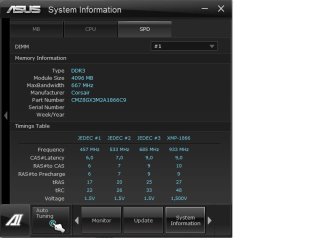
Okay, I've chcked these frequencies, and found that the DDR3 RAM 1333 MHz ios running at 667, which means 667*3=2000 for each module? (2x4) Is that okay? Also, in the BOIS the RAM frequency is at AUTO as you said, but i cannot find 1333, but like 1248, 1420, etc. There is no 1333, should I use the one nelow the 1333? I've attached a screenshot of my system info, pls check it, don't know if it helps.
 

Attachments

  • asd.jpg
    asd.jpg
    80.9 KB · Views: 0

My Computer

Computer type
PC/Desktop
Computer Manufacturer/Model Number
custom build
OS
Windows 7 Home Premium 64bit
CPU
Intel Core i7-3770K 3.5GHz
Motherboard
ASUS P8H77-M
Memory
2x4 1333Mhz DDR3
Graphics Card(s)
ASUS HD7870
Hard Drives
90GB SSD
1000GB HDD
PSU
Coolermaster GX-Lite 700W RS700-ASABL3-EU(Ö1)
Antivirus
NOD32
Browser
Mozzilla Firefox
667 is correct. 667 x 2 = 1333. All is good there.
 

My Computer

Computer type
PC/Desktop
Computer Manufacturer/Model Number
Custom Build
OS
W7 Pro x64 SP1 | W10 Pro IP x64 | W8.1 Pro x64 VM | Linux Mint VM
CPU
i7-4790k @ 4GHz (4.4GHz Boost)
Motherboard
ASUS Sabertooth Z87 (BIOS Rev 2004)
Memory
16GB DDR3 Kingston HyperX Fury @ 1600MHz CL 9-9-9-27
Graphics Card(s)
EVGA GTX 980 Classified
Sound Card
Realtek Onboard
Monitor(s) Displays
Samsung S27D390
Screen Resolution
1920 x 1080
Hard Drives
240GB Intel 520 Series SSD |
Samsung 850 EVO 120GB SSD |
2TB WD Caviar Black |
2TB WD Caviar Green
PSU
Corsair HX850-80 Gold Modular
Case
Cooler Master Silencio 650
Cooling
Corsair H80i w/2 x Corsair SP120 | 2 x 120mm Noctua NF-S12B
Keyboard
Microsoft Sidewinder X4
Mouse
Gigabyte M6900 optical
Internet Speed
152mb
Antivirus
F-Secure
Browser
Firefox 38.0
Other Info
Backup Rig: Win 7 Pro 64-bit | AMD A10-5800k | ASUS F2A85-V Pro | 8GB Samsung DDR3 @1600MHz | 120GB Toshiba SDD | 2TB Seagate HDD | Cooler Master Silencio 550
It's dual channel RAM, as Boozad has said, all good ;)
 

My Computer

Computer type
PC/Desktop
Computer Manufacturer/Model Number
Custom Build
OS
Windows 7 Ultimate x64 SP1
CPU
Intel Q6600 @ 2.6Ghz
Motherboard
Evga NF78-CK-132-A 3-Way SLI
Memory
4Gb DDR2 Corsair Dominator @ 800Mhz 5-5-5-15
Graphics Card(s)
EVGA 560 GTX SC FTW 1GB
Sound Card
Realtek HD 7.1 Audio, Plantronics GameCom780 7.1 Headset
Monitor(s) Displays
Dell S2409W
Screen Resolution
1920 x 1080
Hard Drives
SanDisk SDSSDHII-120G-G25 120GB SSD
Samsung 7200RPM 750Gb SATA
Samsung 850 EVO 120GB SSD
Western Digital Green 1TB 7200RPM
PSU
Xigmatek 750W Quad sli quad core 80% eff
Case
Antec 900 Gaming Case
Cooling
Zalman CNPS9700-NT NVIDIA Tritium
Keyboard
Logitech generic keyboard, MS wireless keyboard
Mouse
Razor Lachesis Banshee V2 Blue, 4000DPI, MS wireless mouse
Internet Speed
152Mb Virgin Media Fibre Optic
Antivirus
Microsoft Security Essentials
Browser
Google Chrome
Other Info
Wireless Gaming Receiver for Windows, Wireless Xbox 360 Pad
Since the GPU driver update no crahes, but ill give it another week to make sure its gone :)
 

My Computer

Computer type
PC/Desktop
Computer Manufacturer/Model Number
custom build
OS
Windows 7 Home Premium 64bit
CPU
Intel Core i7-3770K 3.5GHz
Motherboard
ASUS P8H77-M
Memory
2x4 1333Mhz DDR3
Graphics Card(s)
ASUS HD7870
Hard Drives
90GB SSD
1000GB HDD
PSU
Coolermaster GX-Lite 700W RS700-ASABL3-EU(Ö1)
Antivirus
NOD32
Browser
Mozzilla Firefox
It's dual channel RAM, as Boozad has said, all good ;)

the 2 referred to here

667 is correct. 667 x 2 = 1333. All is good there.

is the 2 from DDR ie double data rate
 

My Computer

Computer type
PC/Desktop
Computer Manufacturer/Model Number
self build
OS
Windows 7 pro x64 SP1
CPU
Intel i7-2600k o/c to 4.6GHz
Motherboard
MSI Z68-GD80
Memory
8GB Mushkin 1866MHz
Graphics Card(s)
Nvidia GTX 750 Ti 2GB
Sound Card
integrated
Monitor(s) Displays
Liyama ProLite 27"
Screen Resolution
1920*1080 px
Hard Drives
Seagate 2TB
PSU
Coolermaster GX 750W
Case
Antec 300 case + 5 fans
Cooling
Dark Rock Pro
Internet Speed
62Mbit down 18Mbit up
Antivirus
MSE
Browser
Firefox
Other Info
Blackgold BGT3650 Quad HD TV card. Also have various 3770 + 4770K render boxes.
It's dual channel RAM, as Boozad has said, all good ;)

the 2 referred to here

667 is correct. 667 x 2 = 1333. All is good there.

is the 2 from DDR ie double data rate

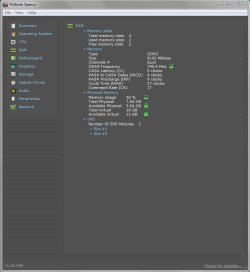
The 2 refers to the fact that the memory is running dual channel, so 2 channels of 667 gives you 1333MHz. My DDR3 RAM is running at 1600MHz in dual channel, this shot of Speccy shows how it is 800MHz x 2.

Capture.JPG
 

My Computer

Computer type
PC/Desktop
Computer Manufacturer/Model Number
Custom Build
OS
W7 Pro x64 SP1 | W10 Pro IP x64 | W8.1 Pro x64 VM | Linux Mint VM
CPU
i7-4790k @ 4GHz (4.4GHz Boost)
Motherboard
ASUS Sabertooth Z87 (BIOS Rev 2004)
Memory
16GB DDR3 Kingston HyperX Fury @ 1600MHz CL 9-9-9-27
Graphics Card(s)
EVGA GTX 980 Classified
Sound Card
Realtek Onboard
Monitor(s) Displays
Samsung S27D390
Screen Resolution
1920 x 1080
Hard Drives
240GB Intel 520 Series SSD |
Samsung 850 EVO 120GB SSD |
2TB WD Caviar Black |
2TB WD Caviar Green
PSU
Corsair HX850-80 Gold Modular
Case
Cooler Master Silencio 650
Cooling
Corsair H80i w/2 x Corsair SP120 | 2 x 120mm Noctua NF-S12B
Keyboard
Microsoft Sidewinder X4
Mouse
Gigabyte M6900 optical
Internet Speed
152mb
Antivirus
F-Secure
Browser
Firefox 38.0
Other Info
Backup Rig: Win 7 Pro 64-bit | AMD A10-5800k | ASUS F2A85-V Pro | 8GB Samsung DDR3 @1600MHz | 120GB Toshiba SDD | 2TB Seagate HDD | Cooler Master Silencio 550
I have a silly question.
What power supply (exactly) are you using?

Could you also include it in your system specs?
 

My Computer

Computer type
PC/Desktop
Computer Manufacturer/Model Number
Home made Desktop
OS
Windows 10 Pro. 64/ version 1709 Windows 7 Pro/64
CPU
Intel i7-6800K @ 4.3
Motherboard
ASUS X-99 Deluxe II
Memory
Corsair Platinum 16 gig @2400
Graphics Card(s)
EVGA GTX 1070 OC
Monitor(s) Displays
Asus 27" LED LCD/VE278Q
Screen Resolution
1920-1080 or 1280-720 HDMI
Hard Drives
INTEL SSD 730-240 Gb Sata 3.0/
PSU
EVGA Platium 1200W
Case
Phanteks Luxe Tempered Glass 8 fans/ one radiator
Cooling
XSPC/ Water Cooled CPU
Keyboard
Das 4 Professional
Mouse
Logitech M705/MX Anywhere 2-S
Internet Speed
100 mbits
Antivirus
Microsoft Security Essentials/ Malwarebytes Premium 3.0/ SAS
Browser
I.E. 11 default/Firefox/ ISP Time Warner Cable/Spectrum
Other Info
LG BluRay Burner/
Sound system-KLipsch-THX/
Icy Dock ssd Hot Swap bays.
The 2 refers to the fact that the memory is running dual channel, so 2 channels of 667 gives you 1333MHz. My DDR3 RAM is running at 1600MHz in dual channel, this shot of Speccy shows how it is 800MHz x 2.

DDR means double data rate. The data is transferred on the leading and trailing edges of the clock pulse. 1600MHz ram has a clock speed of 800MHz, but the DDR means this is equivalent to 1600MHz. I have built plenty of systems with a single stick of ram. Aida64 shows the clock speed as half that stated on the ram, but the ram has an effective speed of twice the clock speed. Dual channel doubles the bandwidth not the speed.

Google it - this is the 1st result i got:
For instance, DDR400 memories work at 400 MHz at the most, DDR2-800 can work up to 800 MHz, and DDR3-1333 can work up to 1,333 MHz. It is important to note that this is not the real clock speed of the memory. The real clock of the DDR, DDR2, and DDR3 memories is half of the labeled clock speed.

Understanding RAM Timings | Hardware Secrets

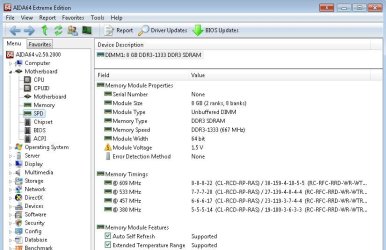
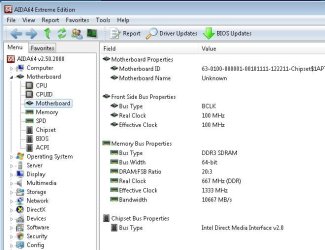
edit - 2 screenshots from a 3770 i7 with one stick of 8GB ram. Note the speeds (Aida64)

ddr01.JPG

ddr02.JPG

real clock 667, effective clock 1333
 

My Computer

Computer type
PC/Desktop
Computer Manufacturer/Model Number
self build
OS
Windows 7 pro x64 SP1
CPU
Intel i7-2600k o/c to 4.6GHz
Motherboard
MSI Z68-GD80
Memory
8GB Mushkin 1866MHz
Graphics Card(s)
Nvidia GTX 750 Ti 2GB
Sound Card
integrated
Monitor(s) Displays
Liyama ProLite 27"
Screen Resolution
1920*1080 px
Hard Drives
Seagate 2TB
PSU
Coolermaster GX 750W
Case
Antec 300 case + 5 fans
Cooling
Dark Rock Pro
Internet Speed
62Mbit down 18Mbit up
Antivirus
MSE
Browser
Firefox
Other Info
Blackgold BGT3650 Quad HD TV card. Also have various 3770 + 4770K render boxes.
So... after like 3 weeks, my comp got the freeze again, the same way it did earlier. As i know, I did not update myself any driver :( I just have no idea what to do. Someone tell me please.

Edit1: So far, I've checked if there are any new drivers avaiable, I've downloaded an audio driver, also found a beta GPU driver but I didn't downloaded that. Now checking things with driver verifier.... Let's suppose it's a driver-related issue.

Edit2: ndisrd.sys is crashing my system with the driver verifier, not the same way as the crash occurs, but its crashing my comp for sure. I found this driver earlier guilty, but it came to be with the latest ethernet driver installed, and the comp freeze occured with this and the older driver also. Still it could be interesting. (Realtek Semiconductor, driver helper, if I delete it , the internet connection is lost, no virus found).
 
Last edited:

My Computer

Computer type
PC/Desktop
Computer Manufacturer/Model Number
custom build
OS
Windows 7 Home Premium 64bit
CPU
Intel Core i7-3770K 3.5GHz
Motherboard
ASUS P8H77-M
Memory
2x4 1333Mhz DDR3
Graphics Card(s)
ASUS HD7870
Hard Drives
90GB SSD
1000GB HDD
PSU
Coolermaster GX-Lite 700W RS700-ASABL3-EU(Ö1)
Antivirus
NOD32
Browser
Mozzilla Firefox
I have a silly question.
What power supply (exactly) are you using?

Could you also include it in your system specs?

Coolermaster GX-Lite 700W RS700-ASABL3-EU(Ö1) :D
 

My Computer

Computer type
PC/Desktop
Computer Manufacturer/Model Number
custom build
OS
Windows 7 Home Premium 64bit
CPU
Intel Core i7-3770K 3.5GHz
Motherboard
ASUS P8H77-M
Memory
2x4 1333Mhz DDR3
Graphics Card(s)
ASUS HD7870
Hard Drives
90GB SSD
1000GB HDD
PSU
Coolermaster GX-Lite 700W RS700-ASABL3-EU(Ö1)
Antivirus
NOD32
Browser
Mozzilla Firefox
Back
Top