Solved Another case of failure with update KB2952664 - Error Code 8004402F

mattking1984

New member
Local time
3:25 PM
Messages
28
Hi, I am getting repeated failure of installation of the above package, necessary for the Windows 10 update next month. Every night the package tries to install, and then fails, reverting the changes and restarting a few times in the process. After Windows finally boots, in "Update History" it is shown as failed, however when I look at the list of installed updates it is there! But still regardless of this Windows Update tries to download and install.

What I have tried so far:

1) Uninstalling the update from Control Panel > Windows Update > List of Installed Updates
2) Uninstalling and re-installing .NET 4.5.2 (I saw this advice on a previous post)
3) After this Searching for updates again and installing

Unfortunately the same update failed and the same error code was reported.
I have downloaded the update file from Microsoft and was considering doing a manual install after uninstalling it again, but I'm not sure this is going to work, and it is frustrating seeing as the attempted install/failure/revert process takes about 30 mins. So I thought I would post here for help.

Here is a dropbox link to the CBS logs zip. (it's too large to attach)

https://www.dropbox.com/s/c4enq0gr4w96lae/CBS.zip?dl=0

In addition, here is a link to the C:\Windows\windowsupdate.log file should you require it:

https://www.dropbox.com/s/7gtr2l3fpv...pdate.log?dl=0

Any help would be gratefully received!

Thanks

Matt
 
Last edited:

My Computer My Computer

At a glance

Windows 7 Home Premium SP1 64BitAMD A6-3420M16GBRadeon HD 6520G
Computer type
Laptop
Computer Manufacturer/Model Number
ASUS x53z
OS
Windows 7 Home Premium SP1 64Bit
CPU
AMD A6-3420M
Memory
16GB
Graphics Card(s)
Radeon HD 6520G
Sound Card
onboard
Antivirus
AVG Free
Browser
Chrome

My Computer My Computer

At a glance

Windows 7 Home Premium SP1 64BitAMD A6-3420M16GBRadeon HD 6520G
Computer type
Laptop
Computer Manufacturer/Model Number
ASUS x53z
OS
Windows 7 Home Premium SP1 64Bit
CPU
AMD A6-3420M
Memory
16GB
Graphics Card(s)
Radeon HD 6520G
Sound Card
onboard
Antivirus
AVG Free
Browser
Chrome
anyone?
 

My Computer My Computer

At a glance

Windows 7 Home Premium SP1 64BitAMD A6-3420M16GBRadeon HD 6520G
Computer type
Laptop
Computer Manufacturer/Model Number
ASUS x53z
OS
Windows 7 Home Premium SP1 64Bit
CPU
AMD A6-3420M
Memory
16GB
Graphics Card(s)
Radeon HD 6520G
Sound Card
onboard
Antivirus
AVG Free
Browser
Chrome
This looks as if you have a hack installed to bypass the limitations on Group Policy in lower editions of Windows 7.
Code:
 Line 519536: 2015-06-27 15:57:54, Info                  CSI    00000503 [SR] Repairing 5 components
 Line 519537: 2015-06-27 15:57:54, Info                  CSI    00000504 [SR] Beginning Verify and Repair transaction
 Line 519540: 2015-06-27 15:57:54, Info                  CSI    00000506 [SR] Cannot repair member file [l:22{11}]"PINTLGB.IMD" of Microsoft-Windows-IME-Simplified-Chinese-Core, Version = 6.1.7601.17514, pA = PROCESSOR_ARCHITECTURE_AMD64 (9), Culture neutral, VersionScope = 1 nonSxS, PublicKeyToken = {l:8 b:31bf3856ad364e35}, Type neutral, TypeName neutral, PublicKey neutral in the store, hash mismatch
 Line 519543: 2015-06-27 15:57:54, Info                  CSI    00000508 [SR] Cannot repair member file [l:14{7}]"fde.dll" of Microsoft-Windows-fde, Version = 6.1.7601.17514, pA = PROCESSOR_ARCHITECTURE_INTEL (0), Culture neutral, VersionScope = 1 nonSxS, PublicKeyToken = {l:8 b:31bf3856ad364e35}, Type neutral, TypeName neutral, PublicKey neutral in the store, hash mismatch
 Line 519546: 2015-06-27 15:57:54, Info                  CSI    0000050a [SR] Cannot repair member file [l:22{11}]"fdeploy.dll" of Microsoft-Windows-fdeploy, Version = 6.1.7601.17514, pA = PROCESSOR_ARCHITECTURE_INTEL (0), Culture neutral, VersionScope = 1 nonSxS, PublicKeyToken = {l:8 b:31bf3856ad364e35}, Type neutral, TypeName neutral, PublicKey neutral in the store, hash mismatch
 Line 519549: 2015-06-27 15:57:54, Info                  CSI    0000050c [SR] Cannot repair member file [l:20{10}]"gptext.dll" of Microsoft-Windows-GroupPolicy-Gptext, Version = 6.1.7600.16385, pA = PROCESSOR_ARCHITECTURE_INTEL (0), Culture neutral, VersionScope = 1 nonSxS, PublicKeyToken = {l:8 b:31bf3856ad364e35}, Type neutral, TypeName neutral, PublicKey neutral in the store, hash mismatch
 Line 519552: 2015-06-27 15:57:54, Info                  CSI    0000050e [SR] Cannot repair member file [l:20{10}]"gpedit.dll" of Microsoft-Windows-GroupPolicy-Admin-Gpedit, Version = 6.1.7600.16385, pA = PROCESSOR_ARCHITECTURE_INTEL (0), Culture neutral, VersionScope = 1 nonSxS, PublicKeyToken = {l:8 b:31bf3856ad364e35}, Type neutral, TypeName neutral, PublicKey neutral in the store, hash mismatch

CheckSUR is clear.

I'll post a fix when I can get to it.
 

My Computer My Computer

At a glance

Win 7 x64 Home Premium (and x86 VirtualBox VM...i3 370M/i7 6500U8GB - finally :)/8GBit's an i3, dude!/dual Intel&nVidia
Computer type
Laptop
Computer Manufacturer/Model Number
Asus K52F or Lenovo B51-80
OS
Win 7 x64 Home Premium (and x86 VirtualBox VM)/Win10
CPU
i3 370M/i7 6500U
Motherboard
Asus/Lenovo
Memory
8GB - finally :)/8GB
Graphics Card(s)
it's an i3, dude!/dual Intel&nVidia
Sound Card
onboard
Monitor(s) Displays
15.6" built-in
Screen Resolution
1366x768/1920x1080
Hard Drives
750GB Seagate internal
Sundry external drives attached to other computers on the local network
1TB SSD on the Lenovo
PSU
n/a
Internet Speed
as much as I can get - usually on a dongle/phone, so <1MB/s
Antivirus
MSE/Defender
Browser
IE11/12/Edge/Chrome/FF(if I must)
Brilliant, thanks for replying. I perhaps should have mentioned in the original post, that I previously followed the instructions here: How to Enable ‘Get Windows 10′ App icon in the Windows 7/8.1 taskbar? | Techdows to enable the Get Windows 10 App to display, which had been installed but wasn't showing. I expect this may have been the root of the problem, although since I'm sure the package in question was a requirement for the app to download in the first place, i'm not 100% sure

Matt
 

My Computer My Computer

At a glance

Windows 7 Home Premium SP1 64BitAMD A6-3420M16GBRadeon HD 6520G
Computer type
Laptop
Computer Manufacturer/Model Number
ASUS x53z
OS
Windows 7 Home Premium SP1 64Bit
CPU
AMD A6-3420M
Memory
16GB
Graphics Card(s)
Radeon HD 6520G
Sound Card
onboard
Antivirus
AVG Free
Browser
Chrome
I've uploaded afile - mk4aa.zip - to my OneDrive at Noel'sOneDrive

Please downloadand save it.
Right-click onthe saved file and select Extract all...

Change the targetto C:\ and click on Extract

Close all windows(it would be a good idea to print these instructions!)

Now reboot to theRepair Environment - as soon as the machine restarts, start tapping F8 - this should bring up the Advanced BootMenu, at the top of which should be the option'Repair my Computer'

Pick that

You'll have tolog in with your username and password.

Pick the optionto use a Command Prompt
At the prompttype

DIR C:\mk4aa

hit the enter key- if you get a 'Not Found' error try

DIR D:\mk4aa

or

DIR E:\mk4aa


The drive letterin use when you find the folder will need to be substituted (for<drive>)into the following command...

XCOPY <drive>:\mk4aa <drive>:\windows\winsxs /y /i /s /v /h

(e.g. XCOPYP:\wfire P:\windows\winsxs /y /i /s /v /h )

run the command(it should take almost no time) and when the prompt returns, type

EXIT

and hit the Enterkey to exit Command Prompt - reboot to Normal Mode Windows.

Now run SFC /SCANNOW in an Elevated Command Prompt

then reboot andupload the new CBS.log file to your reply
 

My Computer My Computer

At a glance

Win 7 x64 Home Premium (and x86 VirtualBox VM...i3 370M/i7 6500U8GB - finally :)/8GBit's an i3, dude!/dual Intel&nVidia
Computer type
Laptop
Computer Manufacturer/Model Number
Asus K52F or Lenovo B51-80
OS
Win 7 x64 Home Premium (and x86 VirtualBox VM)/Win10
CPU
i3 370M/i7 6500U
Motherboard
Asus/Lenovo
Memory
8GB - finally :)/8GB
Graphics Card(s)
it's an i3, dude!/dual Intel&nVidia
Sound Card
onboard
Monitor(s) Displays
15.6" built-in
Screen Resolution
1366x768/1920x1080
Hard Drives
750GB Seagate internal
Sundry external drives attached to other computers on the local network
1TB SSD on the Lenovo
PSU
n/a
Internet Speed
as much as I can get - usually on a dongle/phone, so <1MB/s
Antivirus
MSE/Defender
Browser
IE11/12/Edge/Chrome/FF(if I must)
Sorry for taking so long to reply, I was away on business.

I have followed the steps as described and attached to this post is the new cbs.log file.

I have not yet tried to reinstall the update.

Regards

Matt
 

My Computer My Computer

At a glance

Windows 7 Home Premium SP1 64BitAMD A6-3420M16GBRadeon HD 6520G
Computer type
Laptop
Computer Manufacturer/Model Number
ASUS x53z
OS
Windows 7 Home Premium SP1 64Bit
CPU
AMD A6-3420M
Memory
16GB
Graphics Card(s)
Radeon HD 6520G
Sound Card
onboard
Antivirus
AVG Free
Browser
Chrome
The SFC scan is clear now .

Do a Check for Updates, then attempt to install only the oldest update found -
If it goes in OK, try the rest
If it fails, post the C:\Windows\windowsupdate.log file
 

My Computer My Computer

At a glance

Win 7 x64 Home Premium (and x86 VirtualBox VM...i3 370M/i7 6500U8GB - finally :)/8GBit's an i3, dude!/dual Intel&nVidia
Computer type
Laptop
Computer Manufacturer/Model Number
Asus K52F or Lenovo B51-80
OS
Win 7 x64 Home Premium (and x86 VirtualBox VM)/Win10
CPU
i3 370M/i7 6500U
Motherboard
Asus/Lenovo
Memory
8GB - finally :)/8GB
Graphics Card(s)
it's an i3, dude!/dual Intel&nVidia
Sound Card
onboard
Monitor(s) Displays
15.6" built-in
Screen Resolution
1366x768/1920x1080
Hard Drives
750GB Seagate internal
Sundry external drives attached to other computers on the local network
1TB SSD on the Lenovo
PSU
n/a
Internet Speed
as much as I can get - usually on a dongle/phone, so <1MB/s
Antivirus
MSE/Defender
Browser
IE11/12/Edge/Chrome/FF(if I must)
The only update found was the one that is failing. And it failed again :(

As requested, windowsupdate.log attached.
 

My Computer My Computer

At a glance

Windows 7 Home Premium SP1 64BitAMD A6-3420M16GBRadeon HD 6520G
Computer type
Laptop
Computer Manufacturer/Model Number
ASUS x53z
OS
Windows 7 Home Premium SP1 64Bit
CPU
AMD A6-3420M
Memory
16GB
Graphics Card(s)
Radeon HD 6520G
Sound Card
onboard
Antivirus
AVG Free
Browser
Chrome
It looks like it may be a problem with permissions on the various Temp files that may be used by the installer.

Please open an elevated COmmand Prompt, and run the following commands:

CD %TEMP%
ICACLS %TEMP%
ICACLS C:\Windows\Temp
ICACLS %userprofile%\AppData\Local\Temp


Post the results...


Here are some instructions to make lifeeasier :)

1) To open anElevated Command Prompt Window (the ECP window), click on Start, All Programs,Accessories – then right-click on Command Prompt, and select Run asAdministrator. Accept the UAC prompt.

2) To run thecommands easier, highlight the block of commands, and right-click on thehighlight – select Copy. In the CP Window, click on the black/white icon at topleft – select Paste. The commands will run but may not complete the lastcommand, so hit the Enter Key once.

3) To copy theresults... click on the Black/White icon in the top left, and select Edit...'Select All', and hit the Enter key - then use Ctrl+V or r-click+Paste to pasteit into your response.
 

My Computer My Computer

At a glance

Win 7 x64 Home Premium (and x86 VirtualBox VM...i3 370M/i7 6500U8GB - finally :)/8GBit's an i3, dude!/dual Intel&nVidia
Computer type
Laptop
Computer Manufacturer/Model Number
Asus K52F or Lenovo B51-80
OS
Win 7 x64 Home Premium (and x86 VirtualBox VM)/Win10
CPU
i3 370M/i7 6500U
Motherboard
Asus/Lenovo
Memory
8GB - finally :)/8GB
Graphics Card(s)
it's an i3, dude!/dual Intel&nVidia
Sound Card
onboard
Monitor(s) Displays
15.6" built-in
Screen Resolution
1366x768/1920x1080
Hard Drives
750GB Seagate internal
Sundry external drives attached to other computers on the local network
1TB SSD on the Lenovo
PSU
n/a
Internet Speed
as much as I can get - usually on a dongle/phone, so <1MB/s
Antivirus
MSE/Defender
Browser
IE11/12/Edge/Chrome/FF(if I must)
Microsoft Windows [Version 6.1.7601]
Copyright (c) 2009 Microsoft Corporation. All rights reserved.

C:\Windows\system32>CD %TEMP%

C:\Users\Matt\AppData\Local\Temp>ICACLS %TEMP%
C:\Users\Matt\AppData\Local\Temp BUILTIN\Users:(OI)(CI)(RX)
NT AUTHORITY\SYSTEM:(I)(OI)(CI)(F)
BUILTIN\Administrators:(I)(OI)(CI)(F)
BOSCO\Matt:(I)(OI)(CI)(F)

Successfully processed 1 files; Failed processing 0 files

C:\Users\Matt\AppData\Local\Temp>ICACLS C:\Windows\Temp
C:\Windows\Temp BUILTIN\Users:(CI)(S,WD,AD,X)
BUILTIN\Administrators:(F)
BUILTIN\Administrators:(OI)(CI)(IO)(F)
NT AUTHORITY\SYSTEM:(F)
NT AUTHORITY\SYSTEM:(OI)(CI)(IO)(F)
CREATOR OWNER:(OI)(CI)(IO)(F)
BUILTIN\Users:(OI)(CI)(RX)

Successfully processed 1 files; Failed processing 0 files

C:\Users\Matt\AppData\Local\Temp>ICACLS %userprofile%\AppData\Local\Temp
C:\Users\Matt\AppData\Local\Temp BUILTIN\Users:(OI)(CI)(RX)
NT AUTHORITY\SYSTEM:(I)(OI)(CI)(F)
BUILTIN\Administrators:(I)(OI)(CI)(F)
BOSCO\Matt:(I)(OI)(CI)(F)

Successfully processed 1 files; Failed processing 0 files

C:\Users\Matt\AppData\Local\Temp>
 
Last edited:

My Computer My Computer

At a glance

Windows 7 Home Premium SP1 64BitAMD A6-3420M16GBRadeon HD 6520G
Computer type
Laptop
Computer Manufacturer/Model Number
ASUS x53z
OS
Windows 7 Home Premium SP1 64Bit
CPU
AMD A6-3420M
Memory
16GB
Graphics Card(s)
Radeon HD 6520G
Sound Card
onboard
Antivirus
AVG Free
Browser
Chrome
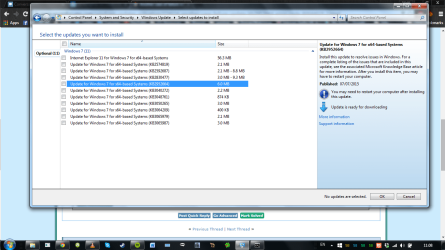
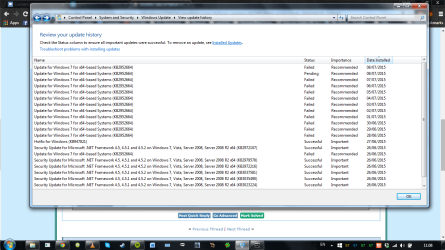
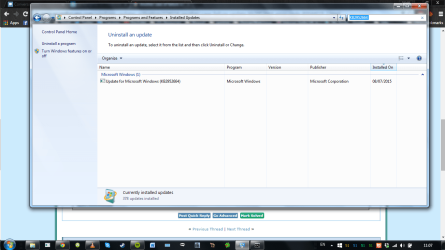
I've just done a Check for updates because I was curious, and the failing update (KB2952664) has moved from "Important" to "Optional" It still shows as both failed and pending (with yesterday's date) in the Update History, and as Installed (again with yesterday's date) in the Installed Updates screen.

I'm very confused. Screenshots attached
 

Attachments

  • Screenshot 2015-07-09 11.08.21.png
    Screenshot 2015-07-09 11.08.21.png
    74.1 KB · Views: 0
  • Screenshot 2015-07-09 11.08.03.png
    Screenshot 2015-07-09 11.08.03.png
    61.2 KB · Views: 0
  • Screenshot 2015-07-09 11.07.49.png
    Screenshot 2015-07-09 11.07.49.png
    68.4 KB · Views: 0

My Computer My Computer

At a glance

Windows 7 Home Premium SP1 64BitAMD A6-3420M16GBRadeon HD 6520G
Computer type
Laptop
Computer Manufacturer/Model Number
ASUS x53z
OS
Windows 7 Home Premium SP1 64Bit
CPU
AMD A6-3420M
Memory
16GB
Graphics Card(s)
Radeon HD 6520G
Sound Card
onboard
Antivirus
AVG Free
Browser
Chrome
For some reason all three files have unnecessary, and possible dangerous, User permissions granting limited access to any normal user account.

However, I don't believe that they would give rise to the errors we're seeing.
Let's see if the Event Logs give us a clue...


Open Event Viewer

click on theWindows logs entry in the left pane to expand it.

Now click on theApplication entry - wait while it loads.

Click on 'File'in the menu bar and select Save...

Save the file asAppevt.evtx

Repeat for theSystem log

then zip both,and upload them.


My Computer My Computer

At a glance

Win 7 x64 Home Premium (and x86 VirtualBox VM...i3 370M/i7 6500U8GB - finally :)/8GBit's an i3, dude!/dual Intel&nVidia
Computer type
Laptop
Computer Manufacturer/Model Number
Asus K52F or Lenovo B51-80
OS
Win 7 x64 Home Premium (and x86 VirtualBox VM)/Win10
CPU
i3 370M/i7 6500U
Motherboard
Asus/Lenovo
Memory
8GB - finally :)/8GB
Graphics Card(s)
it's an i3, dude!/dual Intel&nVidia
Sound Card
onboard
Monitor(s) Displays
15.6" built-in
Screen Resolution
1366x768/1920x1080
Hard Drives
750GB Seagate internal
Sundry external drives attached to other computers on the local network
1TB SSD on the Lenovo
PSU
n/a
Internet Speed
as much as I can get - usually on a dongle/phone, so <1MB/s
Antivirus
MSE/Defender
Browser
IE11/12/Edge/Chrome/FF(if I must)
There is no save option in the File menu. When i click on Application, on the right panel is "save all events as"...should I use this option? Will that give you the information you need?

I should point out that since the update is now marked as "recommended" Windows has stopped trying to install it every night, however I'd still like to know what the heck is going on :)

Matt
 

My Computer My Computer

At a glance

Windows 7 Home Premium SP1 64BitAMD A6-3420M16GBRadeon HD 6520G
Computer type
Laptop
Computer Manufacturer/Model Number
ASUS x53z
OS
Windows 7 Home Premium SP1 64Bit
CPU
AMD A6-3420M
Memory
16GB
Graphics Card(s)
Radeon HD 6520G
Sound Card
onboard
Antivirus
AVG Free
Browser
Chrome
I checked that option saved the logs as on screen by reopening the files, and yeah i guess it is. Attached are the logs.
 

My Computer My Computer

At a glance

Windows 7 Home Premium SP1 64BitAMD A6-3420M16GBRadeon HD 6520G
Computer type
Laptop
Computer Manufacturer/Model Number
ASUS x53z
OS
Windows 7 Home Premium SP1 64Bit
CPU
AMD A6-3420M
Memory
16GB
Graphics Card(s)
Radeon HD 6520G
Sound Card
onboard
Antivirus
AVG Free
Browser
Chrome
There appear to be a number of disk-related errors in the system log - please run CHKDSK C: /R from an Elevated Command Prompt, and reboot to allow it to run - it will take a while!
 

My Computer My Computer

At a glance

Win 7 x64 Home Premium (and x86 VirtualBox VM...i3 370M/i7 6500U8GB - finally :)/8GBit's an i3, dude!/dual Intel&nVidia
Computer type
Laptop
Computer Manufacturer/Model Number
Asus K52F or Lenovo B51-80
OS
Win 7 x64 Home Premium (and x86 VirtualBox VM)/Win10
CPU
i3 370M/i7 6500U
Motherboard
Asus/Lenovo
Memory
8GB - finally :)/8GB
Graphics Card(s)
it's an i3, dude!/dual Intel&nVidia
Sound Card
onboard
Monitor(s) Displays
15.6" built-in
Screen Resolution
1366x768/1920x1080
Hard Drives
750GB Seagate internal
Sundry external drives attached to other computers on the local network
1TB SSD on the Lenovo
PSU
n/a
Internet Speed
as much as I can get - usually on a dongle/phone, so <1MB/s
Antivirus
MSE/Defender
Browser
IE11/12/Edge/Chrome/FF(if I must)
OK, having come back from travels, I've noticed the update is marked as important again, so i'm back to the same problem. I will run the CHKDSK and get back to you. I didn't do it before I went away as it wasn't trying to install the update anymore, although I agree, disk-related errors are probably something I should look into in more detail!
 

My Computer My Computer

At a glance

Windows 7 Home Premium SP1 64BitAMD A6-3420M16GBRadeon HD 6520G
Computer type
Laptop
Computer Manufacturer/Model Number
ASUS x53z
OS
Windows 7 Home Premium SP1 64Bit
CPU
AMD A6-3420M
Memory
16GB
Graphics Card(s)
Radeon HD 6520G
Sound Card
onboard
Antivirus
AVG Free
Browser
Chrome
I ran CHKDSK and here is the output from the EventViewer logs. It doesn't look like it did much.7


Checking file system on C:
The type of the file system is NTFS.
Volume label is OS.

A disk check has been scheduled.
Windows will now check the disk.

CHKDSK is verifying files (stage 1 of 5)...
Cleaning up instance tags for file 0x4a81f.
472320 file records processed. File verification completed.
1574 large file records processed. 0 bad file records processed. 0 EA records processed. 2481 reparse records processed. CHKDSK is verifying indexes (stage 2 of 5)...
588946 index entries processed. Index verification completed.
CHKDSK is scanning unindexed files for reconnect to their original directory.
1 unindexed files scanned. Recovering orphaned file {CF020~1 (94226) into directory file 283060.
Recovering orphaned file {cf020cb5-5872-4262-b795-d7bce95ee58d} (94226) into directory file 283060.
0 unindexed files recovered. CHKDSK is verifying security descriptors (stage 3 of 5)...
472320 file SDs/SIDs processed. Cleaning up 6194 unused index entries from index $SII of file 0x9.
Cleaning up 6194 unused index entries from index $SDH of file 0x9.
Cleaning up 6194 unused security descriptors.
Security descriptor verification completed.
58314 data files processed. CHKDSK is verifying Usn Journal...
35975160 USN bytes processed. Usn Journal verification completed.
CHKDSK is verifying file data (stage 4 of 5)...
472304 files processed. File data verification completed.
CHKDSK is verifying free space (stage 5 of 5)...
8882778 free clusters processed. Free space verification is complete.
CHKDSK discovered free space marked as allocated in the
master file table (MFT) bitmap.
CHKDSK discovered free space marked as allocated in the volume bitmap.
Windows has made corrections to the file system.

210006015 KB total disk space.
173614112 KB in 373003 files.
274964 KB in 58315 indexes.
0 KB in bad sectors.
585823 KB in use by the system.
65536 KB occupied by the log file.
35531116 KB available on disk.

4096 bytes in each allocation unit.
52501503 total allocation units on disk.
8882779 allocation units available on disk.

Internal Info:
00 35 07 00 e0 94 06 00 98 af 0a 00 00 00 00 00 .5..............
3c 04 00 00 b1 09 00 00 00 00 00 00 00 00 00 00 <...............
00 00 00 00 00 00 00 00 00 00 00 00 00 00 00 00 ................

Windows has finished checking your disk.
Please wait while your computer restarts.
 

My Computer My Computer

At a glance

Windows 7 Home Premium SP1 64BitAMD A6-3420M16GBRadeon HD 6520G
Computer type
Laptop
Computer Manufacturer/Model Number
ASUS x53z
OS
Windows 7 Home Premium SP1 64Bit
CPU
AMD A6-3420M
Memory
16GB
Graphics Card(s)
Radeon HD 6520G
Sound Card
onboard
Antivirus
AVG Free
Browser
Chrome
Update still failing with the same error code :(
 

My Computer My Computer

At a glance

Windows 7 Home Premium SP1 64BitAMD A6-3420M16GBRadeon HD 6520G
Computer type
Laptop
Computer Manufacturer/Model Number
ASUS x53z
OS
Windows 7 Home Premium SP1 64Bit
CPU
AMD A6-3420M
Memory
16GB
Graphics Card(s)
Radeon HD 6520G
Sound Card
onboard
Antivirus
AVG Free
Browser
Chrome
There's nothing drastic in the CHKDSK results.

Try this...
Open an Elevated Command Prompt, and run the following command...

winmgmt /resetrepository

WAIT for it to complete, then reboot, and try Windows Update again.
 

My Computer My Computer

At a glance

Win 7 x64 Home Premium (and x86 VirtualBox VM...i3 370M/i7 6500U8GB - finally :)/8GBit's an i3, dude!/dual Intel&nVidia
Computer type
Laptop
Computer Manufacturer/Model Number
Asus K52F or Lenovo B51-80
OS
Win 7 x64 Home Premium (and x86 VirtualBox VM)/Win10
CPU
i3 370M/i7 6500U
Motherboard
Asus/Lenovo
Memory
8GB - finally :)/8GB
Graphics Card(s)
it's an i3, dude!/dual Intel&nVidia
Sound Card
onboard
Monitor(s) Displays
15.6" built-in
Screen Resolution
1366x768/1920x1080
Hard Drives
750GB Seagate internal
Sundry external drives attached to other computers on the local network
1TB SSD on the Lenovo
PSU
n/a
Internet Speed
as much as I can get - usually on a dongle/phone, so <1MB/s
Antivirus
MSE/Defender
Browser
IE11/12/Edge/Chrome/FF(if I must)
Back
Top