Solved Another Coprocessor Driver PROBLEM (Code 28) thread

Hiperreal

New member
Local time
3:50 PM
Messages
4
Hi!

Ive seen threads about this issue and did some things because of what i read there but the issue persists.

I have the "coproccesor" without drivers in the device manager, code 28 , Manufacturer unknown , Pci bus 0 , device 3, Function 5

My specs:

I have Windows 7 Ultimate SP1 64bit
Intel core 2quad CPU w/8gb ram
Motherboard: Zotac Geforce 9300 (micro atx , no wifi) of witch i cant find the drivers anywhere.
Chipset: Nvidia Geforce 9300 (MCP7A)

Videocard: Nvidia Geforce 9600 gt drivers up to date.

+ I installed some Nforce drivers because of what i read in other threads...i guess i should uninstall that.

Any help is appreciated
 
Last edited:

My Computer

Computer type
PC/Desktop
Computer Manufacturer/Model Number
Custom Build
OS
Win 7 64bits
CPU
QuadCore Intel Core 2 Quad Q8400, 2666 MHz (8 x 333)
Motherboard
Zotac GeForce 9300
Memory
8gb
Graphics Card(s)
Zotac Geforce 9600 GT
Antivirus
Avast / Spybot
Browser
Chrome / Firefox
Right click the device in device manager->Properties. Click Details tab. Select Hardware Ids in the pull down menu. Then copy/past the IDs you see into your next post
 

My Computer

Computer type
PC/Desktop
Computer Manufacturer/Model Number
Dell Optiplex 360 and Optiplex 755
OS
Desk 1: Win 7 Pro x32; Desk 2: Windows 10 x64
Hard Drives
500GB Crucial SSD in both Desktops
Other Info
Buffalo 6TB NAS, Raid 1
Sorry for the delay.

PCI\VEN_10DE&DEV_0AA3&SUBSYS_0AE519DA&REV_B1
PCI\VEN_10DE&DEV_0AA3&SUBSYS_0AE519DA
PCI\VEN_10DE&DEV_0AA3&CC_0B4000
PCI\VEN_10DE&DEV_0AA3&CC_0B40


Thanks for helping out !
 

My Computer

Computer type
PC/Desktop
Computer Manufacturer/Model Number
Custom Build
OS
Win 7 64bits
CPU
QuadCore Intel Core 2 Quad Q8400, 2666 MHz (8 x 333)
Motherboard
Zotac GeForce 9300
Memory
8gb
Graphics Card(s)
Zotac Geforce 9600 GT
Antivirus
Avast / Spybot
Browser
Chrome / Firefox
Been hunting for the driver. In meantime, I found these instructions that worked for some people on a different thread. See if it works for you:

1. Open Device Manager
2. Right click coprocessor
3. Update Driver Software
4. Don't let Windows search the internet. Instead, have it browse the computer for driver software
5. Select the entire C:\ - or whichever drive your local disk is located on. Include subfolders in search.
6. NVIDIA nForce System Management Controller driver will be installed.
 

My Computer

Computer type
PC/Desktop
Computer Manufacturer/Model Number
Dell Optiplex 360 and Optiplex 755
OS
Desk 1: Win 7 Pro x32; Desk 2: Windows 10 x64
Hard Drives
500GB Crucial SSD in both Desktops
Other Info
Buffalo 6TB NAS, Raid 1
Been hunting for the driver. In meantime, I found these instructions that worked for some people on a different thread. See if it works for you:

1. Open Device Manager
2. Right click coprocessor
3. Update Driver Software
4. Don't let Windows search the internet. Instead, have it browse the computer for driver software
5. Select the entire C:\ - or whichever drive your local disk is located on. Include subfolders in search.
6. NVIDIA nForce System Management Controller driver will be installed.

Yeah , tried that before opening a new thread , but sadly it didn't work for me
 

My Computer

Computer type
PC/Desktop
Computer Manufacturer/Model Number
Custom Build
OS
Win 7 64bits
CPU
QuadCore Intel Core 2 Quad Q8400, 2666 MHz (8 x 333)
Motherboard
Zotac GeForce 9300
Memory
8gb
Graphics Card(s)
Zotac Geforce 9600 GT
Antivirus
Avast / Spybot
Browser
Chrome / Firefox
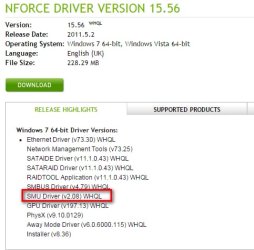
from your hardware id's i come up with this NVIDIA DRIVERS nForce Driver Version 15.56 WHQL
@oscer1: Great find!

If I may help further...

Hipperreal's hardware ID needs the nVidia SMU driver (footnote: after the SMU driver installs, it displays as device name "NVIDIA nForce System Management Controller" in Device Manager).

nForce install v15.56 is a collection of drivers for different devices (one of which is the SMU driver). The other driver files may not be a match for Hiperreal's h/w. So I extracted just the SMU driver from the nVidia file and put a copy to download HERE.

Hiperreal - download the SMU driver. Unzip to your Desktop. Right click on the device, select Install and then point Windows to the SMU driver folder on your Desktop to install
 

Attachments

  • 2015-11-16_231816.jpg
    2015-11-16_231816.jpg
    163.8 KB · Views: 20

My Computer

Computer type
PC/Desktop
Computer Manufacturer/Model Number
Dell Optiplex 360 and Optiplex 755
OS
Desk 1: Win 7 Pro x32; Desk 2: Windows 10 x64
Hard Drives
500GB Crucial SSD in both Desktops
Other Info
Buffalo 6TB NAS, Raid 1
Hi !!

It took me some days to have time to test it (was finishing a job in the pc and feared installing and having additional issues) , today i finally could follow ComputerGeek instructions and it worked !! :)

Thanks a lot to both of you !
 

My Computer

Computer type
PC/Desktop
Computer Manufacturer/Model Number
Custom Build
OS
Win 7 64bits
CPU
QuadCore Intel Core 2 Quad Q8400, 2666 MHz (8 x 333)
Motherboard
Zotac GeForce 9300
Memory
8gb
Graphics Card(s)
Zotac Geforce 9600 GT
Antivirus
Avast / Spybot
Browser
Chrome / Firefox
Good job good to hear
 

My Computer

Computer type
PC/Desktop
Computer Manufacturer/Model Number
dell xps 9000
OS
win 10
Glad we could help! :)
 

My Computer

Computer type
PC/Desktop
Computer Manufacturer/Model Number
Dell Optiplex 360 and Optiplex 755
OS
Desk 1: Win 7 Pro x32; Desk 2: Windows 10 x64
Hard Drives
500GB Crucial SSD in both Desktops
Other Info
Buffalo 6TB NAS, Raid 1
Back
Top