- Local time
- 8:22 PM
- Messages
- 260
Hi guys, something strange (gpedit? malicious entity lurking well hidden somewhere) is messing with my
[HKLM]Windows\CurrentVersion\Run content:
Autoruns, msconfig,WhatsInStartup, AdvancedUninstallerPro all report the same content, but, when navigating to the key, the only entry is the one for nusb3mon.exe (installed as advised, not sure what, if anything, it does). At first I thought all entries were being suppressed, but everything else appears to be starting (despite not being visible in regedit?)
KEYs are visible in most* programs

and when searching the Reg, they're there (all modified at 2:15 this morning... hmmm)

but when accessing the reg, they're not visible?

Normally, I'd uninstall and reinstall Synaptics (which is the only one which isn't starting), but the issue's affecting several registry keys...
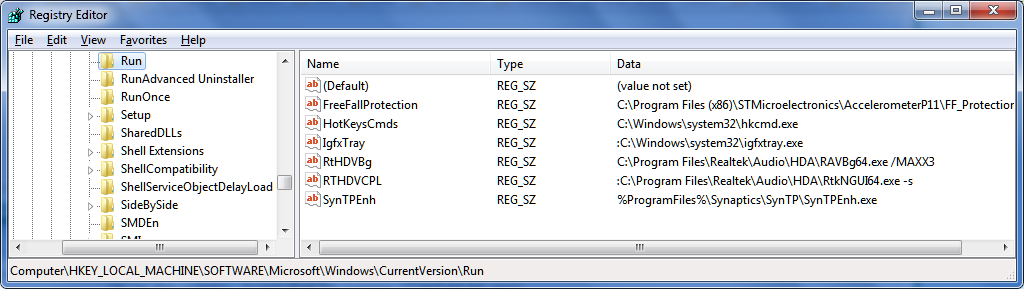
I started documenting the issue, and captured the moment the entries miraculously re-appeared. I tried re-tracing my steps on reboot, after confirming the issue was still there (invisible keys, run entries not running) but can't seem to get the keys to materialise (even after importing the .reg export I made when the keys were momentarily visible, and even that's not working! makes me think there may be a policy in place preventing (machine) Run entries...
Windows Registry Editor Version 5.00
[HKEY_LOCAL_MACHINE\SOFTWARE\Microsoft\Windows\CurrentVersion\Run]
"SynTPEnh"="%ProgramFiles%\\Synaptics\\SynTP\\SynTPEnh.exe"
"RtHDVBg"="C:\\Program Files\\Realtek\\Audio\\HDA\\RAVBg64.exe /MAXX3 "
"HotKeysCmds"="C:\\Windows\\system32\\hkcmd.exe"
"FreeFallProtection"="C:\\Program Files (x86)\\STMicroelectronics\\AccelerometerP11\\FF_Protection.exe"
"RTHDVCPL"=":C:\\Program Files\\Realtek\\Audio\\HDA\\RtkNGUI64.exe -s"
"IgfxTray"=":C:\\Windows\\system32\\igfxtray.exe"
compared to now, when I export, just in case the entries are there (like everyone else says!) but are... invisible.. NOPE.
Windows Registry Editor Version 5.00
[HKEY_LOCAL_MACHINE\SOFTWARE\Microsoft\Windows\CurrentVersion\Run]
"NUSB3MON"="\"C:\\Program Files (x86)\\Renesas Electronics\\USB 3.0 Host Controller Driver\\Application\\nusb3mon.exe\""
So... where to start?!
(No, I don't know what was done at 2:15)
Currently manually writing Reg.Strings
[HKLM]Windows\CurrentVersion\Run content:
Autoruns, msconfig,WhatsInStartup, AdvancedUninstallerPro all report the same content, but, when navigating to the key, the only entry is the one for nusb3mon.exe (installed as advised, not sure what, if anything, it does). At first I thought all entries were being suppressed, but everything else appears to be starting (despite not being visible in regedit?)
KEYs are visible in most* programs
and when searching the Reg, they're there (all modified at 2:15 this morning... hmmm)
but when accessing the reg, they're not visible?
Normally, I'd uninstall and reinstall Synaptics (which is the only one which isn't starting), but the issue's affecting several registry keys...
I started documenting the issue, and captured the moment the entries miraculously re-appeared. I tried re-tracing my steps on reboot, after confirming the issue was still there (invisible keys, run entries not running) but can't seem to get the keys to materialise (even after importing the .reg export I made when the keys were momentarily visible, and even that's not working! makes me think there may be a policy in place preventing (machine) Run entries...
Windows Registry Editor Version 5.00
[HKEY_LOCAL_MACHINE\SOFTWARE\Microsoft\Windows\CurrentVersion\Run]
"SynTPEnh"="%ProgramFiles%\\Synaptics\\SynTP\\SynTPEnh.exe"
"RtHDVBg"="C:\\Program Files\\Realtek\\Audio\\HDA\\RAVBg64.exe /MAXX3 "
"HotKeysCmds"="C:\\Windows\\system32\\hkcmd.exe"
"FreeFallProtection"="C:\\Program Files (x86)\\STMicroelectronics\\AccelerometerP11\\FF_Protection.exe"
"RTHDVCPL"=":C:\\Program Files\\Realtek\\Audio\\HDA\\RtkNGUI64.exe -s"
"IgfxTray"=":C:\\Windows\\system32\\igfxtray.exe"
compared to now, when I export, just in case the entries are there (like everyone else says!) but are... invisible.. NOPE.
Windows Registry Editor Version 5.00
[HKEY_LOCAL_MACHINE\SOFTWARE\Microsoft\Windows\CurrentVersion\Run]
"NUSB3MON"="\"C:\\Program Files (x86)\\Renesas Electronics\\USB 3.0 Host Controller Driver\\Application\\nusb3mon.exe\""
So... where to start?!
(No, I don't know what was done at 2:15)
Currently manually writing Reg.Strings
My Computer
At a glance
Windows 7 Ultimate 64bit2.28GbNVIDIA
- Computer type
- Laptop
- Computer Manufacturer/Model Number
- Dell
- OS
- Windows 7 Ultimate 64bit
- CPU
- 2.2
- Memory
- 8Gb
- Graphics Card(s)
- NVIDIA
- Screen Resolution
- 1280/762
- Mouse
- built in pad || iphone || MS wireless
- Internet Speed
- 100MB
- Antivirus
- Avast
- Browser
- Chrome, Chrome portable