another dual boot issue :D

AgentSmith5150

New member
Local time
8:19 PM
Messages
7
Hello all.

I have read through a few threads related to dual boot problems. I have made a few strides in the right direction. But I don't quite have things back to "normal".

Where things sit right now, I have a fresh install of XP Pro 32-bit on one drive, then I installed W7 64-bit on another drive. For some reason, I never got the boot choice during startup, it just went into W7.

Did all kinds of searching and playing around, 3 hours or so worth. Now it's time to ask, lol :)

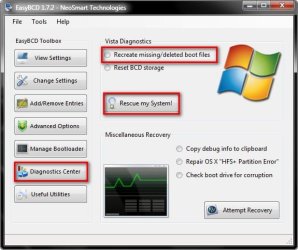
I have the EasyBCD program, and I have things to where startup gives me a choice between Windows 7 and Windows XP. I can chose W7 and it boots up fine. If I choose XP, it just reboots and brings me back to the Os select screen again. Here is what BCD setting screen shows:
BCDscreen.png


I feel like I am close to righting this wrong, but I am also possibly tired, anyway, any ideas?

PS: I also noticed in another thread people showing a screenshot of an "About" screen that shows an expiration date, where is that?
 

My Computer

OS
Windows 7, Vista, XP Pro
Hello AgentSmith.

The "about" page, for start, you get it if you type "winver" at Start-Search box

As for the dual boot, your BCDEDIT config seems ok, but it might have the wrong XP partition.

Could you post a screenshot of your Disk Management?
 

My Computer

Computer Manufacturer/Model Number
ENIAC
OS
Windows 7 RC 7100 32bit/64bit
CPU
Intel Core2Duo E4500 2.20 GHz
Motherboard
ASUS P5LD2-X/1333
Memory
2x1GB Kinsgston DDR2 800MHz
Graphics Card(s)
Nvidia 8500GT
Sound Card
Onboard High Definition Audio Device
Monitor(s) Displays
Sony Bravia 42"
Case
LINKW 2222
Cooling
Standard Intel
Keyboard
Some cheap one
Mouse
Microsoft Intellimouse something
Internet Speed
24MBps ADSL
XP (Dual)Boot Files Location

How to get a XP/W7 dualboot to work:

The XP boot loader files need to be in the W7 partition. XP bootloader files must be in the root folder of the first partition of the harddisk that boots the computer (usually known as drive "C:"). This is the harddisk that is listed first (in boot priority) in the BIOS, or that is booted first from an external harddisk adapter.

Copy (NOT move!) these 3 files from the XP root folder into the W7 root folder:
(assuming that your W7 is installed in the first partition)

ntdetect.com
ntldr
boot.ini

Now you must modify the boot.ini (in the W7 partition) to point back to the XP partition. DO NOT modify the boot.ini in the XP partition! This can be confusing and difficult but it should not affect your XP install in any way if you get it wrong. Getting it wrong just results in XP not booting.

In two lines in the boot.ini file is a reference to the drive and partition that the XP is installed on:

Code:
[boot loader]
timeout=30
default=multi(0)disk(0)rdisk(0)partition(1)\WINDOWS
[operating systems]
multi(0)disk(0)rdisk(0)partition(1)\WINDOWS="Microsoft Windows XP Home Edition" /FASTDETECT /NOEXECUTE=OPTIN
These two items in the above lines (line 3 and 5) in the boot.ini must be modified:

rdisk(x) points to the physical drive that XP is installed on, this is the order in BIOS that the harddisks are listed starting at 0 as the first harddisk.

partition(x) points to the partition that XP is installed on starting with 1 as the first partition.

Examples:
For XP on the first harddisk in the first partition the result is:
rdisk(0)partition(1)

For XP on the second harddisk in the first partition the result is:
rdisk(1)partition(1)

For XP on the third harddisk in the first partition the result is:
rdisk(2)partition(1)

And for XP on the first harddisk in the second partition the result is:
rdisk(0)partition(2)

You must modify "rdisk(x)partition(x)" in BOTH lines in the boot.ini, and both line's entries must be identical so that they refer to the same harddisk and partition.

Once you get this set up, start EasyBCD (inside W7), remove your "bad" XP entry and start over. "Add" a new Windows XP entry, select the "OS Type" entry as Windows XP and, if you got your boot.ini correct, you don't even need to select the drive letter, EasyBCD will detect the XP install and automatically configure the dualboot. You will see "C:" as the selected drive, that's correct since when XP boots it will be the "C:" drive no matter that it's now "F:" (or whatever).

On my system I have Vista 64 on the first harddisk in partition 1, W7 on the first harddisk in partition 2 and XP on the second harddisk in partition 1. So in the (XP) boot.ini file in the Vista partition I have:

Code:
[boot loader]
timeout=30
default=multi(0)disk(0)rdisk(1)partition(1)\WINDOWS
[operating systems]
multi(0)disk(0)rdisk(1)partition(1)\WINDOWS="Microsoft Windows XP Home Edition" /FASTDETECT /NOEXECUTE=OPTIN
Since I have a Vista/W7 dualboot my XP boot.ini file is in the Vista root folder because that's where the Vista/W7 bootloader is located. With only a W7 install you would put the XP boot files into the W7 root folder.

Without a Vista/W7 dualboot, using only a virgin W7 install, you might need to put the three XP boot files into that "hidden" W7 partition because that's where the W7 bootloader is found, or so I've read. I installed W7 from within Vista so I didn't get the extra "hidden" partition.

This works even if XP is 32bit and Vista or W7 is 64bit, the bootloader does not care what gets booted - 32bit or 64bit. It's even possible to use EasyBCD to boot into a Linux type OS like Ubuntu instead of using GRUB which is an adventure all by itself.
 

My Computer

OS
XP SP3 32bit, Vista HP 64bit, Seven Pro 64bit
CPU
Q6600 G0 @ 3.2GHz
Motherboard
GA-P965-DS3
Memory
4Gb OCZ
Graphics Card(s)
nVidia GTX275 896Mb
Sound Card
X-Fi Fatal1ty Platinum
Monitor(s) Displays
Acer H243H
Screen Resolution
1920x1080
Hard Drives
Samsung 1Tb SATA2
MAXTOR 1Tb SATA2
MAXTOR 500Gb SATA2
MAXTOR 300Gb SATA2
PSU
Antec 650 Trio
Cooling
Zalman 9700
Keyboard
G15,G13
Mouse
MX518
Internet Speed
330Kbps down
Thanks for the help.

Here is a screenshot of my disk management:
diskmgmt.png


and here is the 2 locations I find for both the ntdetect.com and the ntldr.
ntldrsearch.png


I can't locate the boot.ini
 

My Computer

OS
Windows 7, Vista, XP Pro
Click on Manage Bootloader and then click 'write mbr', but make sure that 'Reinstall the Vista bootloader' is checked. I had the same problem but there is another step to it.
 

My Computer

Computer Manufacturer/Model Number
Acer Aspire M7720
OS
Vista Home Premium x64 sp1-XP x64 sp2/Windows 7 x64
CPU
Intel I7 920 2.67 ghz
Motherboard
FX58m
Memory
6 gigs ddr3 triple channel
Graphics Card(s)
Radeon HD4850 1ghz
Sound Card
Realtek HD
Monitor(s) Displays
22 inch widescreen
Screen Resolution
1024*168 need glasses
Hard Drives
enuff...inbuilt two*500gig sata 2's and a plugin 1 terabyte sata 2
PSU
inbuilt dunno exactly what it is
Case
a good one
Cooling
very good and very quiet
Keyboard
Acer
Mouse
Acer
Internet Speed
20mbit
Tried shezz's idea, still the same problem. I get the choice of the 2 OSs to boot to, W7 boots up fine, but choosing XP just restarts the computer right back to the OS selection screen, rinse and repeat.

I appreciate the suggestion though :)
 

My Computer

OS
Windows 7, Vista, XP Pro
Tried shezz's idea, still the same problem. I get the choice of the 2 OSs to boot to, W7 boots up fine, but choosing XP just restarts the computer right back to the OS selection screen, rinse and repeat.

I appreciate the suggestion though :)

OK, I reckon the drive letter may be wrong where XP is installed, try changing that. Remember, it won't be the same drive letter as it is in Vista. By the look of it from your screenshots, I'd try D:\
 

My Computer

Computer Manufacturer/Model Number
Acer Aspire M7720
OS
Vista Home Premium x64 sp1-XP x64 sp2/Windows 7 x64
CPU
Intel I7 920 2.67 ghz
Motherboard
FX58m
Memory
6 gigs ddr3 triple channel
Graphics Card(s)
Radeon HD4850 1ghz
Sound Card
Realtek HD
Monitor(s) Displays
22 inch widescreen
Screen Resolution
1024*168 need glasses
Hard Drives
enuff...inbuilt two*500gig sata 2's and a plugin 1 terabyte sata 2
PSU
inbuilt dunno exactly what it is
Case
a good one
Cooling
very good and very quiet
Keyboard
Acer
Mouse
Acer
Internet Speed
20mbit
Have you tried having a play with this option to see if it helps.

2009-01-27_104040.jpg
 

My Computer

Computer Manufacturer/Model Number
Home Brew
OS
Windows 7 Ultimate Vista Ultimate x64
CPU
Core 2 Duo E8500 3.16Ghz @ 3.8Ghz
Motherboard
eVGA 750i FTW
Memory
2x2Gigs Patriot PC2-6400 LL
Graphics Card(s)
Inno3D GeForce GTX260 216 SP
Monitor(s) Displays
ASUS VW222U 22" 2ms Response time
Screen Resolution
1680x1050
Hard Drives
SATA 150GB
SATA II 250GB
USB IDE 750GB Ext.
PSU
HYTEC 600W & Thermaltake 650W Toughpower Power Exp
Case
Thermaltake Armor LCS (Liquid Cooling System)
Cooling
Liquid Cooling System
Keyboard
Logitech G15 Gaming Keyboard
Mouse
Logitech G9 Gaming Mouse
From the disk management screenshot he posted he only has two drives/partitions. If XP was installed after Vista then logically XP will inhabit the D:\ drive/partition as recognized from dos. He has it set as F:\ because that is what it is in Vista....in dos mode however the drive with XP on it will be drive D:\. However it may be drive E:\ if your DVD/CDROM is allocated D;\, but it will most certainly not be F:\
 

My Computer

Computer Manufacturer/Model Number
Acer Aspire M7720
OS
Vista Home Premium x64 sp1-XP x64 sp2/Windows 7 x64
CPU
Intel I7 920 2.67 ghz
Motherboard
FX58m
Memory
6 gigs ddr3 triple channel
Graphics Card(s)
Radeon HD4850 1ghz
Sound Card
Realtek HD
Monitor(s) Displays
22 inch widescreen
Screen Resolution
1024*168 need glasses
Hard Drives
enuff...inbuilt two*500gig sata 2's and a plugin 1 terabyte sata 2
PSU
inbuilt dunno exactly what it is
Case
a good one
Cooling
very good and very quiet
Keyboard
Acer
Mouse
Acer
Internet Speed
20mbit
Yeah, two seperate drives, not two partitions on the same drive. For the drive ID for the XP drive, under "change settings" I can choose C:\, F:\, or BOOT.

Or should I do "add/remove entries" and remove the XP entry and re-add as a different letter?

And about Grim's idea, should I do that before or after I try anything else?

Thanks again for the help
 

My Computer

OS
Windows 7, Vista, XP Pro
Yeah, two seperate drives, not two partitions on the same drive. For the drive ID for the XP drive, under "change settings" I can choose C:\, F:\, or BOOT.

Or should I do "add/remove entries" and remove the XP entry and re-add as a different letter?

OK...when I did it I found I was unable to select the correct drive letter..What you have to do is FIRST select the drive letter before you select which OS it is, otherwise the other options are blanked out. I feel pretty sure that it will be drive D:\. I hope you can understand what I mean, but in this diagram:

media_1221368988747.jpg


You have to choose the drive letter FIRST, and then choose which OS it is...it's a bug in the program I think. Also remove any usb drives before you write to mbr. I had a usb drive in which contained .net 2 to get the easy BCD to work in XP, and when I pressed write to mbr it destroyed my usb stick. The program does have bugs in it.

EDIT: make sure you click on Manage Bootloader/write MBR once you are done...it should work after that, if not D:\, then try E:\. If you boot from a Windows cd/dvd you will be able to see which drive is which, and determine which is D:\ or E:\. I'd bet my bottom dollar that your XP is installed on D:\ drive though.
 
Last edited:

My Computer

Computer Manufacturer/Model Number
Acer Aspire M7720
OS
Vista Home Premium x64 sp1-XP x64 sp2/Windows 7 x64
CPU
Intel I7 920 2.67 ghz
Motherboard
FX58m
Memory
6 gigs ddr3 triple channel
Graphics Card(s)
Radeon HD4850 1ghz
Sound Card
Realtek HD
Monitor(s) Displays
22 inch widescreen
Screen Resolution
1024*168 need glasses
Hard Drives
enuff...inbuilt two*500gig sata 2's and a plugin 1 terabyte sata 2
PSU
inbuilt dunno exactly what it is
Case
a good one
Cooling
very good and very quiet
Keyboard
Acer
Mouse
Acer
Internet Speed
20mbit

My Computers

System One System Two

  • Computer type
    PC/Desktop
    OS
    7 X64
    CPU
    i5 8400
    Motherboard
    gigabyte b365m ds3h
    Memory
    2x8gb 3200mhz
    Hard Drives
    various
    PSU
    pure power 11 400w cm
    Case
    Coolermaster
    Cooling
    cryorig m9i
  • Computer type
    PC/Desktop
    OS
    7x64
    CPU
    g5400
    Motherboard
    ga b365m ds3h
    Memory
    8gb ddr4 2400
    PSU
    xfx pro 450w

My Computer

Computer Manufacturer/Model Number
Acer Aspire M7720
OS
Vista Home Premium x64 sp1-XP x64 sp2/Windows 7 x64
CPU
Intel I7 920 2.67 ghz
Motherboard
FX58m
Memory
6 gigs ddr3 triple channel
Graphics Card(s)
Radeon HD4850 1ghz
Sound Card
Realtek HD
Monitor(s) Displays
22 inch widescreen
Screen Resolution
1024*168 need glasses
Hard Drives
enuff...inbuilt two*500gig sata 2's and a plugin 1 terabyte sata 2
PSU
inbuilt dunno exactly what it is
Case
a good one
Cooling
very good and very quiet
Keyboard
Acer
Mouse
Acer
Internet Speed
20mbit
Ok guys, I got the SOB done! Thank you Shezz for the link, that's what I had to do. I had seen that before I posted here, but I couldn't get EasyBCD to work on the XP side. I was hesitant about following the prompts it was giving me on the XP side to push through and make it work there.

But this time I pushed on through, it seems you basically have to "force" it to run on the XP install. But I guess we are all gluttons for punishment, that's why we're all here, right? :D

I also did check and DOS saw the XP drive as "D" and in W7 it I had it on "F", so I got that changed. I even got it to display what I wanted, lol

done.png


Thanks again to all for great, fast help! :)
 

My Computer

OS
Windows 7, Vista, XP Pro
Glad you got it sorted. :)
 

My Computer

Computer Manufacturer/Model Number
Acer Aspire M7720
OS
Vista Home Premium x64 sp1-XP x64 sp2/Windows 7 x64
CPU
Intel I7 920 2.67 ghz
Motherboard
FX58m
Memory
6 gigs ddr3 triple channel
Graphics Card(s)
Radeon HD4850 1ghz
Sound Card
Realtek HD
Monitor(s) Displays
22 inch widescreen
Screen Resolution
1024*168 need glasses
Hard Drives
enuff...inbuilt two*500gig sata 2's and a plugin 1 terabyte sata 2
PSU
inbuilt dunno exactly what it is
Case
a good one
Cooling
very good and very quiet
Keyboard
Acer
Mouse
Acer
Internet Speed
20mbit
Back
Top