Solved Another Freeze of Win 7

jsquareg

New member
Power User
Local time
3:43 PM
Messages
400
Several days ago I posted a problem with my Win 7 computer (see specs) freezing up and not responding to my mouse or keyboard. Only solution was to user the power button to shutdown and restart the system. The original post was entitled Win 7 Freezes (Event Log attached)

Well, it happened again this morning at 10:38 AM and I am attaching the zipped administrative log. I did notice something I had never noticed before. Just before the freeze I got the 'Device Disconnect' sound just before the freeze and I have no idea which device caused it. Nothing in the log shows any problem around that time.

I followed all the steps suggested in his response to the original thread again plus changed out both the KB and mouse.

Would someone more knowledgeable than I am please take a look at the log I have attached and see if they can determine what the problem might be?

Thank you.
 

Attachments

My Computer My Computer

At a glance

Windows 7 Home Premium (Retail) Full version ...3.10 Gig Intel Core i5-3350P8192 Megabytes Usable Installed Memory
Computer type
PC/Desktop
Computer Manufacturer/Model Number
Dell XPS-8500
OS
Windows 7 Home Premium (Retail) Full version - With SP1
CPU
3.10 Gig Intel Core i5-3350P
Motherboard
Dell 0NW73C A00
Memory
8192 Megabytes Usable Installed Memory
Monitor(s) Displays
Samsung SyncMaster [Monitor] (19.1"vis, s/n HVELA10194, Octo
Screen Resolution
1024 X 768
Hard Drives
INTEL SSDSA2CW120G3 ATA Device [Hard drive] (120.03 GB)
INTEL SSDSA2CW080G3 ATA Device [Hard drive] (80.02 GB)
Keyboard
HID Keyboard Device (HP)
Mouse
Dell (came with computer)
Internet Speed
cox high speed
Other Info
The above taken with Bel Arc Advisor
Hello jsquareg,

Not seeing anything in the log which would cause a lockup. But, not enough there to go on.

Would rather see a screen shot of your Administrative Events. Use snipping tool.

Have you added any new hardware or software lately?

Have you ran Antivirus, Malware, and Spyware scans to eliminate the possibility of infection?

Have you added any new Windows Updates?

Are there any Blue screens or error warnings?

Have you checked Device Manager?

John
 

My Computers My Computers

  • At a glance

    Win7, Win10, Win11
    Computer type
    PC/Desktop
    Computer Manufacturer/Model Number
    HP Pavilion 6751c
    OS
    Win7, Win10, Win11
    Internet Speed
    100 Mbps
    Antivirus
    Norton 360
    Browser
    IE 11
  • At a glance

    Win7, Win10, Win11
    Computer type
    PC/Desktop
    System Manufacturer/Model Number
    HP ENVY 750-514 & Dell XPS 8960
    OS
    Win7, Win10, Win11
    Antivirus
    Norton 360
Hello jsquareg,

Not seeing anything in the log which would cause a lockup. But, not enough there to go on.

Would rather see a screen shot of your Administrative Events. Use snipping tool.

Have you added any new hardware or software lately?

Have you ran Antivirus, Malware, and Spyware scans to eliminate the possibility of infection?

Have you added any new Windows Updates?

Are there any Blue screens or error warnings?

Have you checked Device Manager?

John

Thank you.

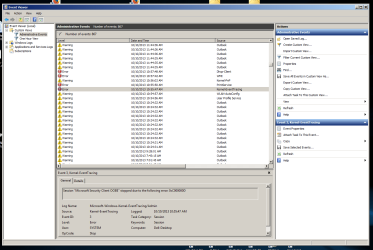
I have attached the 'snip' of Administrative Events as you suggested.

No new hardware has been added.

Yes, I've run MSE and Malware Bytes several times.

Have run the latest Windows Updates

There are no Blue Screens or error messages. Just now and then I get the 'device disconnect' sound right before the freeze. Oddly enough, I just heard the sound a few minutes ago but so far no freeze. Go figure!

Device manager shows nothing unusual.

Thanks again for your help.
 

Attachments

  • Capture.PNG
    Capture.PNG
    43.5 KB · Views: 4

My Computer My Computer

At a glance

Windows 7 Home Premium (Retail) Full version ...3.10 Gig Intel Core i5-3350P8192 Megabytes Usable Installed Memory
Computer type
PC/Desktop
Computer Manufacturer/Model Number
Dell XPS-8500
OS
Windows 7 Home Premium (Retail) Full version - With SP1
CPU
3.10 Gig Intel Core i5-3350P
Motherboard
Dell 0NW73C A00
Memory
8192 Megabytes Usable Installed Memory
Monitor(s) Displays
Samsung SyncMaster [Monitor] (19.1"vis, s/n HVELA10194, Octo
Screen Resolution
1024 X 768
Hard Drives
INTEL SSDSA2CW120G3 ATA Device [Hard drive] (120.03 GB)
INTEL SSDSA2CW080G3 ATA Device [Hard drive] (80.02 GB)
Keyboard
HID Keyboard Device (HP)
Mouse
Dell (came with computer)
Internet Speed
cox high speed
Other Info
The above taken with Bel Arc Advisor
Some more options to try:

Run System Restore, choose a restore point before the problem started.

Run sfc /scannow , see if the system file checker finds anything. Let us know if it does.

Try http://www.sevenforums.com/tutorials/3413-repair-install.html?ltr=R

Stress test CPU and RAM. After the above steps are completed.

Administrative Events has nothing I see which would cause the freeze ups. We can give that more attention once the larger issue has been resolved.

John
 
Last edited:

My Computers My Computers

  • At a glance

    Win7, Win10, Win11
    Computer type
    PC/Desktop
    Computer Manufacturer/Model Number
    HP Pavilion 6751c
    OS
    Win7, Win10, Win11
    Internet Speed
    100 Mbps
    Antivirus
    Norton 360
    Browser
    IE 11
  • At a glance

    Win7, Win10, Win11
    Computer type
    PC/Desktop
    System Manufacturer/Model Number
    HP ENVY 750-514 & Dell XPS 8960
    OS
    Win7, Win10, Win11
    Antivirus
    Norton 360
Some more options to try:

Run System Restore, choose a restore point before the problem started.

Run sfc /scannow , see if the system file checker finds anything. Let us know if it does.

Try http://www.sevenforums.com/tutorials/3413-repair-install.html?ltr=R

Stress test CPU and RAM. After the above steps are completed.

Administrative Events has nothing I see which would cause the freeze ups. We can give that more attention once the larger issue has been resolved.

John

John,

Thanks again for your suggestions.

I tried going back to my earliest restore point but that did not solve the problem. During all this episode I had been trying to get Microsoft Essentials set up so I could use Mail from it. For reasons having nothing to do with the freeze problem, I decided Mail was not for me -- inability to import my Calendar for Office 2010 and no notification pop up when new email arrived. So I decided to abandon Essentials and deleted it. Voila! No more freezes. Who would have thought it!

Anyway, thanks for your help and that of others who have tried to help.
 

My Computer My Computer

At a glance

Windows 7 Home Premium (Retail) Full version ...3.10 Gig Intel Core i5-3350P8192 Megabytes Usable Installed Memory
Computer type
PC/Desktop
Computer Manufacturer/Model Number
Dell XPS-8500
OS
Windows 7 Home Premium (Retail) Full version - With SP1
CPU
3.10 Gig Intel Core i5-3350P
Motherboard
Dell 0NW73C A00
Memory
8192 Megabytes Usable Installed Memory
Monitor(s) Displays
Samsung SyncMaster [Monitor] (19.1"vis, s/n HVELA10194, Octo
Screen Resolution
1024 X 768
Hard Drives
INTEL SSDSA2CW120G3 ATA Device [Hard drive] (120.03 GB)
INTEL SSDSA2CW080G3 ATA Device [Hard drive] (80.02 GB)
Keyboard
HID Keyboard Device (HP)
Mouse
Dell (came with computer)
Internet Speed
cox high speed
Other Info
The above taken with Bel Arc Advisor
This week, there were 3 other computers here @7, with the same exact MSE issue. :(

Try AVAST, has a free version.

Best regards!

John
 
Last edited:

My Computers My Computers

  • At a glance

    Win7, Win10, Win11
    Computer type
    PC/Desktop
    Computer Manufacturer/Model Number
    HP Pavilion 6751c
    OS
    Win7, Win10, Win11
    Internet Speed
    100 Mbps
    Antivirus
    Norton 360
    Browser
    IE 11
  • At a glance

    Win7, Win10, Win11
    Computer type
    PC/Desktop
    System Manufacturer/Model Number
    HP ENVY 750-514 & Dell XPS 8960
    OS
    Win7, Win10, Win11
    Antivirus
    Norton 360
Back
Top