another how to undo dual boot on 2 drives

jim4366

New member
Local time
6:19 AM
Messages
3
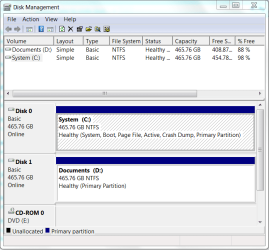
After a rash of hard drive failures first on d drive, then on c, I finally have things working again. But with dual boot. My choices are win7 and win7. The first choice works, the second fails to boot.
No idea how this happened. Fustration was setting in.
Capture.PNG

Can I do as described elsewhere? ie mark c drive as active in disk management, then run startup repair 3 times?
My question is, do I unplug the d drive, or just leave it in?
D is just for documents, should I do anything to clean it up?
thanks
 

My Computer My Computer

At a glance

7 Home Premium 32bit
OS
7 Home Premium 32bit
Hello Jim.


If C: (Disk 2) is the drive with the OS you want to keep and have it booting independently of the other then yes disconnect the other D: (Disk 0) drive and mark C: as active and do the 3 startup repairs with the restarts.

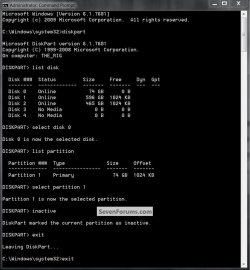
If there is no OS on D: that you need to use then use the snip below to see how to mark it "inactive", while it's still connected, then disconnect it for the repairs; so it won't cause issues when it's re-connected.

click to enlarge
Inactive2.jpg
 

My Computer My Computer

At a glance

W 7 64-bit UltimateIntel Q9550 Yorkfield8GB Dominator 8500C5DATI : XFX 5870
Computer Manufacturer/Model Number
* BFK Customs *
OS
W 7 64-bit Ultimate
CPU
Intel Q9550 Yorkfield
Motherboard
ASUS P5Q Pro
Memory
8GB Dominator 8500C5D
Graphics Card(s)
ATI : XFX 5870
Sound Card
Realtek HD Audio 7-1
Monitor(s) Displays
1x 47" LCD HDMI & 3x 26" LCD HDMI
Screen Resolution
1920x1080P & 1920x1200
Hard Drives
1x 80GB Intel X25-M G2 SSD : 1x 500GB & 1x 640GB WD Caviar Black(s)
PSU
Corsair 620HX
Case
Cooler Master RC-690
Cooling
Tuniq Tower 120, 2x 140mm and 3x 120mm case fans
Keyboard
Microsoft 500
Mouse
Razer Diamondback 3G
Internet Speed
14 Mb/s
Other Info
1x Koutech 3Gb/s SATA HDD Hot Swap Rack
Follow Barefoot's advice to mark Data drive Inactive using Diskpart, then mark Win7 drive Active, before unplugging data drive to run Startup Repair up to 3 separate times.

In addition I would swap the data drive's cable to the Win7 HD so it becomes DISK0 since this problem started because Win7 installer writes the System MBR to the first available Active drive. Be sure Win7 HD then is set as HD to boot first in BIOS setup, after DVD drive.
 
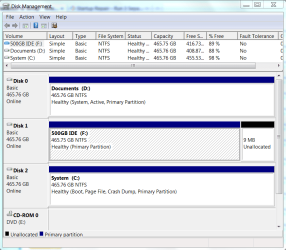
Good stuff. Thanks so much. Well, when I swapped out the drive cables, the F drive labelled 500GB IDE got in ahead and became Disk 0, not my system c drive. It is an IDE drive whereas the other 2 are Sata. Finally, I just disconnected it, went ahead with the repairs mentioned above. Everything went fine.

Capture.PNG

So far so good, everything works. Now that third IDE drive, I was thinking of using it as a Win 7 backup drive. Can I just plug it back in now?
 

My Computer My Computer

At a glance

7 Home Premium 32bit
OS
7 Home Premium 32bit
Yes, should be no problem as long as it doesn't bump WIn7 HD out of first HD to boot again.

If so, just set Win7 to boot first in BIOS setup (after DVD drive).
 
This works. And C:system is staying put at Disk 0.
In the future though, I'm not going to mix up sata and ide drives unless maybe the operating system is on an ide drive. And it also wasn't a good idea to make my system drive and data drive the exact same make and model, because now I can't tell the difference in bios. I have to guess at which is which by the order they come in.
It's been a good learning experience.
Thanks all.
 

My Computer My Computer

At a glance

7 Home Premium 32bit
OS
7 Home Premium 32bit
Hello again Jim!


Glad to see you got it sorted and thanks for the update.
 

My Computer My Computer

At a glance

W 7 64-bit UltimateIntel Q9550 Yorkfield8GB Dominator 8500C5DATI : XFX 5870
Computer Manufacturer/Model Number
* BFK Customs *
OS
W 7 64-bit Ultimate
CPU
Intel Q9550 Yorkfield
Motherboard
ASUS P5Q Pro
Memory
8GB Dominator 8500C5D
Graphics Card(s)
ATI : XFX 5870
Sound Card
Realtek HD Audio 7-1
Monitor(s) Displays
1x 47" LCD HDMI & 3x 26" LCD HDMI
Screen Resolution
1920x1080P & 1920x1200
Hard Drives
1x 80GB Intel X25-M G2 SSD : 1x 500GB & 1x 640GB WD Caviar Black(s)
PSU
Corsair 620HX
Case
Cooler Master RC-690
Cooling
Tuniq Tower 120, 2x 140mm and 3x 120mm case fans
Keyboard
Microsoft 500
Mouse
Razer Diamondback 3G
Internet Speed
14 Mb/s
Other Info
1x Koutech 3Gb/s SATA HDD Hot Swap Rack
Back
Top