Solved Another IconPackager Problem

austin0331

New member
Local time
5:29 PM
Messages
6
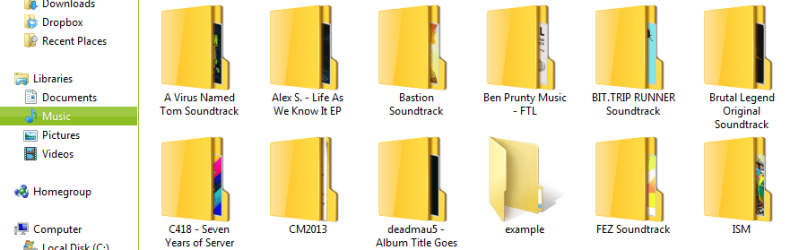
Was trying to customize my icons to something less bland than the original, but got bored quite quick of them and reverted back to default, but some icons stayed the same and nothing I do will revert them. The only 2 are the "Recent Places" and folder icons. They're not bad looking, but these are the only icons that have been affected. Zip folders and sometimes folders with images in them WILL look normal, which is why it bugs me. It doesn't look right to have a modified icon and an unmodified one right next to eachother.

I do NOT have a backup of before I installed IconPackager. Even if I did, I've done too many things since then that I would not like to lose. I've visited many help sites and none of their techniques have worked. I can't remember all the methods I tried, but if you name it, I'll try to remember if I've done it.
622a0353b4172ecbd070b7f06ce6a25f.png

Thank you in advance.
 
Last edited:

My Computer

Computer type
PC/Desktop
Computer Manufacturer/Model Number
Custom Build
OS
Windows 7 Ultimate x64
CPU
Intel Core i3 2100
Motherboard
ASUSTeK Computer Inc.
Memory
8 GB
Graphics Card(s)
NVIDIA GeForce GTX 650
Screen Resolution
1920x1080
Keyboard
Logitech K120
Mouse
Steelseries Kana (Wired)
Antivirus
AVG AntiVirus
Browser
Chrome
Was trying to customize my icons to something less bland than the original, but got bored quite quick of them and reverted back to default, but some icons stayed the same and nothing I do will revert them. The only 2 are the "Recent Places" and folder icons. They're not bad looking, but these are the only icons that have been affected. Zip folders and sometimes folders with images in them WILL look normal, which is why it bugs me. It doesn't look right to have a modified icon and an unmodified one right next to eachother.

I do NOT have a backup of before I installed IconPackager. Even if I did, I've done too many things since then that I would not like to lose. I've visited many help sites and none of their techniques have worked. I can't remember all the medthods I tried, but if you name it, I'll try to remember if I've done it.

View attachment 287721

Thank you in advance.

Hello Austin .

Have you tried uninstalling Icon Packager?, try that and let me know what happens.

Update : Follow This Guide if Uninstalling didn't work
http://www.youtube.com/watch?v=_fW9jk8QfzE
 

My Computer

Computer type
Laptop
Computer Manufacturer/Model Number
Acer Aspire M5100
OS
Windows 8.1 64 bit
CPU
Windows 8.1 64-bit
Motherboard
Toshiba L745D
Memory
4096 MB RAM
Graphics Card(s)
Microsoft Basic Display Adapter
Sound Card
High Definition Audio Device
Monitor(s) Displays
1366x768
Screen Resolution
1366x768
Keyboard
Logitech Keyboard K800
Antivirus
MalwareBytes
Browser
Google Chrome
Hello Austin .

Have you tried uninstalling Icon Packager?, try that and let me know what happens.

Update : Follow This Guide if Uninstalling didn't work
IconPackager messed up Windows icons Fix - YouTube

I uninstalled it and it didn't change anything. I'll restart my PC and see what happens. I'll get back to you.

EDIT: It didn't work. I'll try the tutorial now.
 

My Computer

Computer type
PC/Desktop
Computer Manufacturer/Model Number
Custom Build
OS
Windows 7 Ultimate x64
CPU
Intel Core i3 2100
Motherboard
ASUSTeK Computer Inc.
Memory
8 GB
Graphics Card(s)
NVIDIA GeForce GTX 650
Screen Resolution
1920x1080
Keyboard
Logitech K120
Mouse
Steelseries Kana (Wired)
Antivirus
AVG AntiVirus
Browser
Chrome
I tried the tutorial, and it didn't work. I followed every step precisely and the 2 icons are still the same.

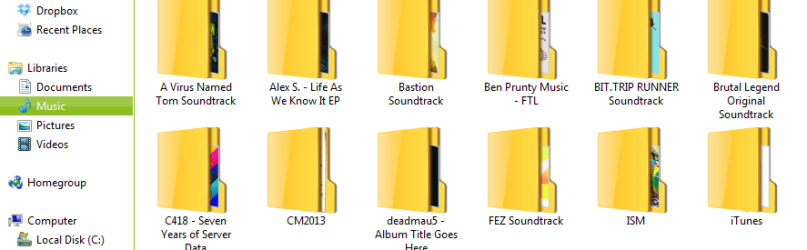
EDIT: I've manually changed the Recent Places icon back by editing it in properties, but the same doesn't go for the folder icons. Now they're the only ones broken.

b5f3cb8f67342938303f7a4fb98b367b.png

That's what it looks like now, and I've added an example file to show you why it can be irritating to look at.
 

My Computer

Computer type
PC/Desktop
Computer Manufacturer/Model Number
Custom Build
OS
Windows 7 Ultimate x64
CPU
Intel Core i3 2100
Motherboard
ASUSTeK Computer Inc.
Memory
8 GB
Graphics Card(s)
NVIDIA GeForce GTX 650
Screen Resolution
1920x1080
Keyboard
Logitech K120
Mouse
Steelseries Kana (Wired)
Antivirus
AVG AntiVirus
Browser
Chrome
I tried the tutorial, and it didn't work. I followed every step precisely and the 2 icons are still the same.

EDIT: I've manually changed the Recent Places icon back by editing it in properties, but the same doesn't go for the folder icons. Now they're the only ones broken.

View attachment 287727

That's what it looks like now, and I've added an example file to show you why it can be irritating to look at.

I know how irritating it can be , I had many issues with Iconpackager that's why I barely use it anymore . I will help you with your issue hang tight.

EDIT : Try this method
Go to the Start Menu , then run , in the search bar type in regedit , then go to hkey local machine >software and delete stardock folder.
 

My Computer

Computer type
Laptop
Computer Manufacturer/Model Number
Acer Aspire M5100
OS
Windows 8.1 64 bit
CPU
Windows 8.1 64-bit
Motherboard
Toshiba L745D
Memory
4096 MB RAM
Graphics Card(s)
Microsoft Basic Display Adapter
Sound Card
High Definition Audio Device
Monitor(s) Displays
1366x768
Screen Resolution
1366x768
Keyboard
Logitech Keyboard K800
Antivirus
MalwareBytes
Browser
Google Chrome
I know how irritating it can be , I had many issues with Iconpackager that's why I barely use it anymore . I will help you with your issue.
Thanks, it's nice that someone's going out of their way to help someone. Especially on the Internet. I'll be gone for a bit after 3:30pm, but I'll be back eventually. I'm not ignoring you.
 

My Computer

Computer type
PC/Desktop
Computer Manufacturer/Model Number
Custom Build
OS
Windows 7 Ultimate x64
CPU
Intel Core i3 2100
Motherboard
ASUSTeK Computer Inc.
Memory
8 GB
Graphics Card(s)
NVIDIA GeForce GTX 650
Screen Resolution
1920x1080
Keyboard
Logitech K120
Mouse
Steelseries Kana (Wired)
Antivirus
AVG AntiVirus
Browser
Chrome
I know how irritating it can be , I had many issues with Iconpackager that's why I barely use it anymore . I will help you with your issue.
Thanks, it's nice that someone's going out of their way to help someone. Especially on the Internet. I'll be gone for a bit after 3:30pm, but I'll be back eventually. I'm not ignoring you.

Glad to be helping.
 

My Computer

Computer type
Laptop
Computer Manufacturer/Model Number
Acer Aspire M5100
OS
Windows 8.1 64 bit
CPU
Windows 8.1 64-bit
Motherboard
Toshiba L745D
Memory
4096 MB RAM
Graphics Card(s)
Microsoft Basic Display Adapter
Sound Card
High Definition Audio Device
Monitor(s) Displays
1366x768
Screen Resolution
1366x768
Keyboard
Logitech Keyboard K800
Antivirus
MalwareBytes
Browser
Google Chrome

My Computer

Computer type
Laptop
Computer Manufacturer/Model Number
Sager NP9170
OS
Win 7 Pro x64 / Win 10 Pro
CPU
Intel(R) Core(TM) i7-3630QM CPU @ 2.40GHz
Motherboard
CLEVO P170EM
Memory
12 GB
Graphics Card(s)
(1) Intel(R) HD Graphics 4000 (2) NVIDIA GeForce GTX 675M
Sound Card
(1) Realtek High Definition Audio (2) Intel(R) Display Aud
Monitor(s) Displays
17.3
Screen Resolution
1920x1080
Hard Drives
(1) Samsung 860 EVO 500GB(OS) (1) Samsung 860 EVO 500GB(Data)
Keyboard
Backlite
Antivirus
MSE, Malwarebytes Pro
Browser
Firefox
Other Info
DESKTOP: Custom-built.
OS: Win 10 Pro x64.
CASE: Rosewill R5.
CPU: Intel I5 4670K CPU @ 3.40GHz.
CPU COOLER: Cool Master Hyper 212 EVO.
MOTHERBOARD: Asus Z87-A.
MEMORY: Kingston HyperX 2x4 GB.
GPU: Nvidia Geforce 650 TI.
PSU: Corsair TX750.
DRIVES: (1) Samsung 840 120 GB SSD (2) Western Digital blue 500 GB 7200 RPM.
Welcome to the Seven Forums

1st:
Do Option 2 of this tutorial http://www.sevenforums.com/tutorials/1538-sfc-scannow-command-system-file-checker.html it will not harm any data or programs you have installed it will try to find and repair any corrupt system files that you have. You may need to do this up to 3 times with a reboot after each scan.

2nd:
http://www.sevenforums.com/tutorials/49819-icon-cache-rebuild.html

Jerry

Yeaaah uh, about that. When I did the first thing, at the bottom of the screen, text at the bottom says "This copy of Windows is not genuine." I'll be honest. It's not. It wasn't me that built the computer, my dad built and bought all the parts. It only came up now though. What can I do? I know I'm basically asking how to fix a pirated operating system, but I don't have the money for the real thing, and I've been using it for a few years now.


Well honesty is always a good thing , however I believe on this forum that piracy is prohibited . Second the icon packager does not involve Windows 7 in anyway. Doesn't matter if it's not genuine.
 

My Computer

Computer type
Laptop
Computer Manufacturer/Model Number
Acer Aspire M5100
OS
Windows 8.1 64 bit
CPU
Windows 8.1 64-bit
Motherboard
Toshiba L745D
Memory
4096 MB RAM
Graphics Card(s)
Microsoft Basic Display Adapter
Sound Card
High Definition Audio Device
Monitor(s) Displays
1366x768
Screen Resolution
1366x768
Keyboard
Logitech Keyboard K800
Antivirus
MalwareBytes
Browser
Google Chrome
Welcome to the Seven Forums

1st:
Do Option 2 of this tutorial http://www.sevenforums.com/tutorials/1538-sfc-scannow-command-system-file-checker.html it will not harm any data or programs you have installed it will try to find and repair any corrupt system files that you have. You may need to do this up to 3 times with a reboot after each scan.

2nd:
http://www.sevenforums.com/tutorials/49819-icon-cache-rebuild.html

Jerry

Yeaaah uh, about that. When I did the first thing, at the bottom of the screen, text at the bottom says "This copy of Windows is not genuine." I'll be honest. It's not. It wasn't me that built the computer, my dad built and bought all the parts. It only came up now though. What can I do? I know I'm basically asking how to fix a pirated operating system, but I don't have the money for the real thing, and I've been using it for a few years now.


Well honesty is always a good thing , however I believe on this forum that piracy is prohibited . Second the icon packager does not involve Windows 7 in anyway. Doesn't matter if it's not genuine. Unfortunately I can't help you with your windows 7 problem.
 

My Computer

Computer type
Laptop
Computer Manufacturer/Model Number
Acer Aspire M5100
OS
Windows 8.1 64 bit
CPU
Windows 8.1 64-bit
Motherboard
Toshiba L745D
Memory
4096 MB RAM
Graphics Card(s)
Microsoft Basic Display Adapter
Sound Card
High Definition Audio Device
Monitor(s) Displays
1366x768
Screen Resolution
1366x768
Keyboard
Logitech Keyboard K800
Antivirus
MalwareBytes
Browser
Google Chrome
Get a valid genuine system and we can still offer our help.
 

My Computer

Computer type
PC/Desktop
Computer Manufacturer/Model Number
Home Built Desktop By DataTech
OS
Windows 7 Ultimate X64 SP1
CPU
Intel i5-2550K, Differing ~4.4-4.8GHz No built in GPU
Motherboard
ASUS P8Z68-V PRO/GEN3
Memory
16GB G.Skill Sniper 1866MHz @ 2133MHz 2x8GB
Graphics Card(s)
ASUS GTX650TIB-DC2OC-2GD5, (650TI Boost)
Sound Card
Onboard Realtek 5-1
Monitor(s) Displays
Samsung P2570HD
Screen Resolution
1920x1080
Hard Drives
Samsung 840 Pro 256GB SSD for OS, 500GB Seagate Constellation (Enterprise drive) for Data
PSU
Corsair HX650W
Case
Inwin Dragon Rider
Cooling
Hyper 212 EVO w/two Noctua fans, push-pull, @1300 RPM
Keyboard
E-Z Eyes, bright yellow keys with large characters
Mouse
steelseries SENSEI Laser Pro Gaming
Internet Speed
48-51Mbs Mbs down, 11 Mbs up Xfinity Cable
Antivirus
Norton Internet Security 2013
Browser
IE 10, Opera, Pale Moon if needed
Other Info
4 case fans, LG BluRay-RE, ASUS DVD-RW, Mr. Fusion power supply, 1.21 gigawatts.

My Computer

Computer type
Laptop
Computer Manufacturer/Model Number
Acer Aspire M5100
OS
Windows 8.1 64 bit
CPU
Windows 8.1 64-bit
Motherboard
Toshiba L745D
Memory
4096 MB RAM
Graphics Card(s)
Microsoft Basic Display Adapter
Sound Card
High Definition Audio Device
Monitor(s) Displays
1366x768
Screen Resolution
1366x768
Keyboard
Logitech Keyboard K800
Antivirus
MalwareBytes
Browser
Google Chrome
Back
Top