Another issue with RAM...

Stevemcnash

New member
Local time
4:21 PM
Messages
2
I recently installed the RC of Windows 7, pretty nice, but I am having a weird RAM issue. I have 4 1gig strips of RAM, all of which are seen during BIOS start up. But Windows is saying that my total physical memory is 2.75gig. And that my available physical memory is 1.91gigs. Now i have a 512mb video card, that along with my other hardware must eat some of that ram up, but here's the weird part, Windows says my installed Physical memory is 32g!? any ideas what is up? (FYI I am dual booting XP on a separate partition.)
 
Last edited by a moderator:

My Computer

OS
Windows 7 & XP (dual boot)
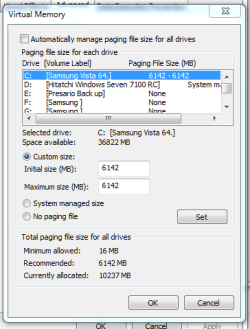
Hi,can you post a picture of this page. Start/right click Computer/Properties/Advanced System Settings/Advanced/ Performance/Settings Advanced/Virtual Memory /Change.
Capturekk.PNG
 

My Computer

Computer Manufacturer/Model Number
Self Build 64bit
OS
Vista Ult64, Win7600
CPU
Intel Core 2 Quad Q6600 @ 2400 MHz 64bit OS
Motherboard
Asus P5E3 Deluxe WiFi @p 64 bit OS
Memory
4096 MB DDR3-SDRAM
Graphics Card(s)
ATI Radeon HD 3870 Series x2 Crossfired
Sound Card
Realtek on board
Monitor(s) Displays
Samsung SyncMaster - 23 inches
Screen Resolution
1680x1050 pixels at 60 Hz in True Colors
Hard Drives
Hitachi (250 GB)/Samsung 750 GB. /Barracuda 160 GB.
My Book 1 TB external..
PSU
Cooler Master 1000w
Case
Cooler Master Cosmos 1000.
Cooling
Fans and fresh air,
Keyboard
Wireless
Mouse
Wireless
Internet Speed
Never fast enough
Other Info
I use a Magnum.
Here is the screen shot.
 

Attachments

  • RAM screen shot.jpg
    RAM screen shot.jpg
    179.9 KB · Views: 26

My Computer

OS
Windows 7 & XP (dual boot)
Back
Top