Another Remote Desktop Issue, a bit weird

neelapala

New member
Local time
12:13 PM
Messages
5
I have three computers(Desktop with W7, Laptop with W7 and another Desktop with XP) all on the network, I am trying to remote desktop into the W7 Desktop from W7 laptop. I put in the computer name and am taken to the login screen where I put in user name & password. When i hit enter I get to a windows sign in screen of the other computer (however the logo/image that is assigned to the user is wrong). When I try to put in the password(correct one) I get username password incorrect. The password is correct. No caps. I have tried this a bunch of times and no result.

I am admin on both computers. I have tried putting the computer name instead of username, tried computer name/username. Tried using guest. Removed the password from the desktop and a bunch of other things in the settings. Like allow other computers to remote desktop, etc. I have also tried to remote using the IP address and same result usename/password error

I am totally stumped. Any suggestions? as to why the password/username is wrong and why is the logo/image next to the username wrong?
 

My Computer

Computer Manufacturer/Model Number
Dell Inspiron and Gateway
OS
Win 7

My Computer

Computer Manufacturer/Model Number
Dell XPS 15 L502x
OS
Windows 7 Ultimate x64 SP1
CPU
Core i7-2670QM
Memory
8GB DDR3 PC3-10600
Graphics Card(s)
Intel HD Graphics 3000 + GeForce GT 540M
Screen Resolution
1920x1080
Hard Drives
1TB 5400RPM Seagate
Tried that

Yes, I tried all of that except changing the registry settings.
 

My Computer

Computer Manufacturer/Model Number
Dell Inspiron and Gateway
OS
Win 7
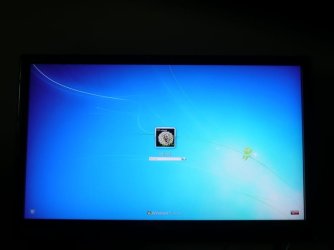
Can you post a screen shot of the login screen of the remote computer?
 

My Computer

OS
windows 7 enterprise
P1030981.jpg is the login screen of the computer I am trying to access.

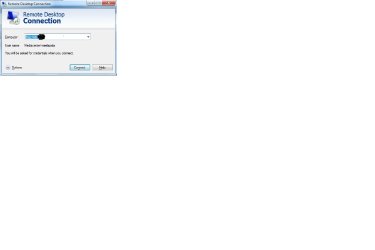
The next one RDTP_1 is the first screen initiating remote desktop from my laptop.
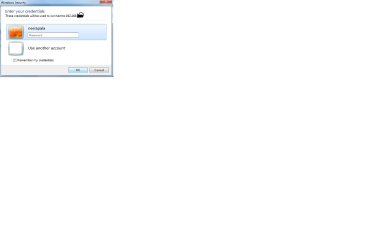
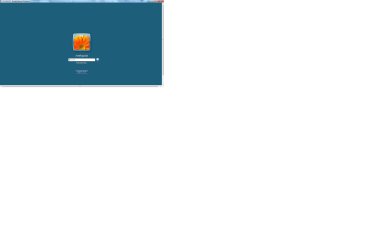
RDTP_2 is the next screen, RDTP_3 is the password wrong screen and RDTP_4 is the screen i get after I hit o.k at the RDTP_3 screen.

One other thing I just realized is the image next to the username is the image from my user profile of the laptop. This makes me wonder if the remote desktop screen I am getting is the correct one. The IP address is the correct one pointing to the Desktop.P1030981.jpg

RDTP_1.jpg

RDTP_2.jpg

RDTP_3.jpg

RDTP_4.jpg
 

My Computer

Computer Manufacturer/Model Number
Dell Inspiron and Gateway
OS
Win 7
Open a command prompt as administrator.

type: ipconfig /flushdns

retry your remote connection. When IP addresses change in relation to DNS information it can cause some crazy issues. It probably will not fix your issue but will not hurt either.

Also make sure that both machines have the same password. I would also make sure that both machines are in the same domain or workgroup which ever the case may be for you
 

My Computer

Computer Manufacturer/Model Number
Home Built
OS
Windows 7; Server 08; Window Home Server; Vista; XP
CPU
Intel E8400 @ 3.4Ghz
Motherboard
Gigabyte P35 DS3L
Memory
8 Gb Patriot DDr2 800
Graphics Card(s)
NVidia GTX460 OC
Sound Card
Onboard
Monitor(s) Displays
Samsung 21"
Screen Resolution
1920x1080
Hard Drives
Seagate 160Gb x2
Samsung 250Gb
PSU
Cooler Master 650w 52a on 12v
Case
Antec 300
Cooling
Stock
Keyboard
HP Standard USB
Mouse
Logitech 518
Internet Speed
25Mbit Down 1.5Mbit up
Other Info
http://www.speedtest.net/result/723924362.png
On the remote computer, on the last screenshot you posted, hit switch user and then try putting the name and password. If that dosent work, instead of putting the IP address try putting the remote computer name instead.
 

My Computer

OS
windows 7 enterprise
Tried flushing the DNS on both computers, no luck. They are in the same workgroup.

I also tried switching user and manually entering username password. Same result. i tried using the guest account as well.
 

My Computer

Computer Manufacturer/Model Number
Dell Inspiron and Gateway
OS
Win 7
Is the pc you're trying to remote in to on a domain? If so try:

Username: domain name\domain user name
Password: domain password
 

My Computer

Computer Manufacturer/Model Number
Dell E520
OS
Windows 7 Enterprise x64 SP1, Ubuntu 11.04 x64
CPU
Core2Quad Q6700 - 2.66 GHz
Motherboard
Whatever the heck Dell put in there...
Memory
8 Gig Mushkin DDR2 800 MHz
Graphics Card(s)
EVGA NVIDIA 9800GT - 512MB DDR3
Monitor(s) Displays
2 x 19" ViewSonic LCD
Screen Resolution
2560x1024
Hard Drives
1 Intel X25-M 120G SSD, 1 300G VelociRaptor, 1 WD Caviar Black 1TB
PSU
PCPower & Cooling Silencer 500 Watt
Internet Speed
15/2 Roadrunner Cable
Other Info
NOD32 AV - Malwarebytes
Is the pc you're trying to remote in to on a domain? If so try:

Username: domain name\domain user name
Password: domain password

Tried. No luck.
 

My Computer

Computer Manufacturer/Model Number
Dell Inspiron and Gateway
OS
Win 7
i had similar problems. i would remote in with the correct username and password but it would dump me at the login screen as if my credentials were wrong. turns out they were..

a new machine was setup about a year ago for a user named sharon. it was purchased from Office Depot and i guess instead of deleting the "office depot" user and recreating the "sharon" user, i just renamed office depot to sharon. so if you were to search the user folders, you would find "office depot" instead of "sharon"... if you rename a user, the original name stays in the registry.

so instead of using sharon as the user name, but "office depot" instead, i was able to remote straight into the box. you might check to see if that helps you out any. it did for me.
 

My Computer

OS
windows 7
Back
Top