Another unidentified network deboggle

rock1t

New member
Local time
5:40 PM
Messages
11
Location
Florida
Ok I know there is three thousand of these posts but Ive tried all the fixes that I could find, or at least i think.


Here is the situation:
I get unidentified network, on any router I plug into.
If I try to enable sharing I get an error.
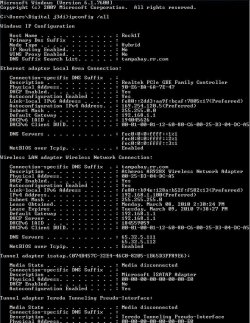
When I run ipconfig/all:
No connection-specific DNS Suffix
No Default Gateway
Media State : Media disonnected
DHCP Enabled : No
Autoconfiguration Enabled : Yes


Here is some details:
Im trying to use an 8 port switch Dynex dx-esw8
but have also attempted on a Linksys genaric wireless router.
AND on 5 different computers (all windows7)
The Main PC is
Asus G72gx windows7 Premium 64bit (PC registerd on the site)
and the adapter is Realtek PCIe GBE Family Controller

Here is what Ive tried:

Registry editing, that flag something something to 0
Disabling Ipv6 and trying
Disabling Ipv4 and trying
Updating, downgradeing, uninstalling/reinstalling the adapter.
Setting the network adress to random numbers
Setting the WOL & Shutdown Link Speed to 100 mbps first
Turing on/off any shutdown for power saving
Windows firewall is disabled, no other firewall is present
Diagnosing the connection
ipconfig/release
/renew
/dnsflush


Other Info:

When I run ipconfig/release I get An error has occured while reeleasing interface Local Area Connection : An adress has not yet been associated with teh network endpoint.

When I run /renew I get An error occured while renewing interface Local Area Connection : unable to contact your DHCP server. Request has timed out.


Thankyou :)!
 

My Computer

Computer Manufacturer/Model Number
Asus G72gx
OS
Windows 7 (64bit)
CPU
Core 2 duo 2.53 P8700
Memory
6.0 GB DDR2
Graphics Card(s)
NVIDIA Geforce GTX 260M CUDA
Screen Resolution
1600x900
Hard Drives
WD Scorpio Blue 1 TB 5200RPM
Mouse
Razer Mamba
Internet Speed
Bright House Wideband 40mbps
Welcome to Seven Forums!

The big clue is this: Media State : Media disconnected

That right there says you have no physical connection. Most of the time it's a simple thing like a bad ethernet cable. Sometimes is a case of the wrong type of cable like using a cross cable instead of a straight through when connecting to a switch.
 

My Computer

Computer Manufacturer/Model Number
Dell C521
OS
W7 Ultimate 64bit W7 Premium 64bit W7 Premium 32bit WXP Home 32bit
CPU
Athlon 64X2 5000+
Motherboard
Dell
Memory
4GB
Graphics Card(s)
ATI X1300
Sound Card
On Board
Monitor(s) Displays
Dell 19" Flat
Screen Resolution
1280x1024
Hard Drives
500GB Western Digital Caviar Green
Mouse
Microsoft Wireless Intellimouse Explorer 2.0
Internet Speed
SBC DSL - 6Mbps
Thats interesting because when I do ipconfig it always says Media Disconnected even though my connection is working perfectly. At any rate the Media Disconnected isn't a problem because it always says that on mine.

You may want to enable DHCP on what ever machines you are using and in the router configuration page. That is probably causing your default gateway not to show up which will definately cause problems. After that a router reset will get your DHCP assignments working again.

This post might help with the unidentified network problem.
Windows 7 Unidentified Network, Limited Access, No Internet Connection Problem Resolved
 

My Computer

Computer type
PC/Desktop
Computer Manufacturer/Model Number
Home built
OS
Windows 7 Ult, Windows 8.1 Pro,
CPU
Q9650-4.275GHz, E8600 4.5GHz, E6750-3.8GHz
Motherboard
Evga 780i FTW
Memory
G.Skill PC2 9600 1200Mhz 5 5 5 15 2T
Graphics Card(s)
GTX480
Sound Card
Asus Xonar D2
Monitor(s) Displays
HannsG
Screen Resolution
1680X1050
Hard Drives
GSkill Phoenix Pro 120GB SSD
PSU
ThermalTake Toughpower 1000Watt modular
Case
ThermalTake XaserV
Cooling
Xigmatek S1283
Keyboard
Logitech G15
Mouse
Logitech G9
Internet Speed
T1
Hey chev65, where've you been?

Mine doesn't show media disconnected . I checked all four of my systems and none show a media disconnected on the primary ethernet adapters.

The Teredo, tunnel and virtual adapters will show disconnected but the main ethernet adapters shouldn't.

Although I do see that he has DHCP disabled.

Windows IP Configuration

Host Name . . . . . . . . . . . . : Athlon64X2
Primary Dns Suffix . . . . . . . :
Node Type . . . . . . . . . . . . : Hybrid
IP Routing Enabled. . . . . . . . : No
WINS Proxy Enabled. . . . . . . . : No

Ethernet adapter Local Area Connection:

Connection-specific DNS Suffix . :
Description . . . . . . . . . . . : Broadcom 440x 10/100 Integrated Controller
Physical Address. . . . . . . . . : 00-XX-XX-XX-XX-ED
DHCP Enabled. . . . . . . . . . . : Yes
Autoconfiguration Enabled . . . . : Yes
Link-local IPv6 Address . . . . . : fe80::1998:b710:6853:74fd%11(Preferred)
IPv4 Address. . . . . . . . . . . : 172.16.17.20(Preferred)
Subnet Mask . . . . . . . . . . . : 255.255.255.0
Lease Obtained. . . . . . . . . . : Sunday, March 07, 2010 9:11:15 AM
Lease Expires . . . . . . . . . . : Monday, March 08, 2010 9:11:14 AM
Default Gateway . . . . . . . . . : 172.16.17.1
DHCP Server . . . . . . . . . . . : 172.16.17.1
DHCPv6 IAID . . . . . . . . . . . : 234886002
DHCPv6 Client DUID. . . . . . . . : 00-01-00-01-12-A2-2F-EB-00-13-72-30-36-ED

DNS Servers . . . . . . . . . . . : 172.16.17.1
208.67.222.222
NetBIOS over Tcpip. . . . . . . . : Enabled
 

My Computer

Computer Manufacturer/Model Number
Dell C521
OS
W7 Ultimate 64bit W7 Premium 64bit W7 Premium 32bit WXP Home 32bit
CPU
Athlon 64X2 5000+
Motherboard
Dell
Memory
4GB
Graphics Card(s)
ATI X1300
Sound Card
On Board
Monitor(s) Displays
Dell 19" Flat
Screen Resolution
1280x1024
Hard Drives
500GB Western Digital Caviar Green
Mouse
Microsoft Wireless Intellimouse Explorer 2.0
Internet Speed
SBC DSL - 6Mbps
Hey Red whats up, my truck broke down a couple weeks ago and I have been busy fixing all the broken stuff on it ever since, new rear brakes, axel seals, alternator,belt, anti lock brake problem, A/C recharge, suspension needed some work also.

Ok back on topic,... My ipconfig always says media disconnected LOL. Some day I'm gunna get to the bottom of this media disconnected thing! I have a feeling it's only referring to a secondary internet connection not being connected, doesn't seem to matter either way because everything works. :confused:

Does yours actually say "Media Connected" or does it just say nothing, I still want to see one that actually says Media Connected! :sarc:

At any rate that isn't the one that matters, I concure about the lack of having a default gateway being the real problem here but that's easy to fix. :)
 

My Computer

Computer type
PC/Desktop
Computer Manufacturer/Model Number
Home built
OS
Windows 7 Ult, Windows 8.1 Pro,
CPU
Q9650-4.275GHz, E8600 4.5GHz, E6750-3.8GHz
Motherboard
Evga 780i FTW
Memory
G.Skill PC2 9600 1200Mhz 5 5 5 15 2T
Graphics Card(s)
GTX480
Sound Card
Asus Xonar D2
Monitor(s) Displays
HannsG
Screen Resolution
1680X1050
Hard Drives
GSkill Phoenix Pro 120GB SSD
PSU
ThermalTake Toughpower 1000Watt modular
Case
ThermalTake XaserV
Cooling
Xigmatek S1283
Keyboard
Logitech G15
Mouse
Logitech G9
Internet Speed
T1
Glad to see you back. I feel your pain. My daughter's car needs $1,500 worth of work.:sa: Just did the first $500 of it.

There is no "Media Connected" that I've ever seen. Apparently Windows only throws up a "Media Disconnected".

A "Media Disconnected" on a real ethernet port (not a tunnel or virtual) has always meant no physical connection. No cable, bad cable or wrong type (cross vs straight) or a bad port on one side.
 

My Computer

Computer Manufacturer/Model Number
Dell C521
OS
W7 Ultimate 64bit W7 Premium 64bit W7 Premium 32bit WXP Home 32bit
CPU
Athlon 64X2 5000+
Motherboard
Dell
Memory
4GB
Graphics Card(s)
ATI X1300
Sound Card
On Board
Monitor(s) Displays
Dell 19" Flat
Screen Resolution
1280x1024
Hard Drives
500GB Western Digital Caviar Green
Mouse
Microsoft Wireless Intellimouse Explorer 2.0
Internet Speed
SBC DSL - 6Mbps
Yes it's getting expensive for me also, over 2 grand doing all the work myself and not quite done yet, it will be nice to have everything working again though. :eek:

I'm pretty sure the media disconnected is refering to an unused internet connection like my secondary network connection being unplugged, I'd be willing to bet that your machine doesn't have a secondary connection like mine does. Remember that guy who was so determined to have his IPv6 say media connected LOL.
 

My Computer

Computer type
PC/Desktop
Computer Manufacturer/Model Number
Home built
OS
Windows 7 Ult, Windows 8.1 Pro,
CPU
Q9650-4.275GHz, E8600 4.5GHz, E6750-3.8GHz
Motherboard
Evga 780i FTW
Memory
G.Skill PC2 9600 1200Mhz 5 5 5 15 2T
Graphics Card(s)
GTX480
Sound Card
Asus Xonar D2
Monitor(s) Displays
HannsG
Screen Resolution
1680X1050
Hard Drives
GSkill Phoenix Pro 120GB SSD
PSU
ThermalTake Toughpower 1000Watt modular
Case
ThermalTake XaserV
Cooling
Xigmatek S1283
Keyboard
Logitech G15
Mouse
Logitech G9
Internet Speed
T1
Mine says Media State -----Enabled on Windows 7 Ultimate
 

My Computer

Computer Manufacturer/Model Number
Custom Build
OS
Window's 7 Ultimate 64bit
CPU
E8400 Lapped
Motherboard
P5Q Pro Turbo Asus
Memory
Kingston 4 gig
Graphics Card(s)
2=ATI 5670Video Crossfire / HVR2250 TV Tuner Card
Sound Card
HDMI sound
Monitor(s) Displays
Sony 46"
Screen Resolution
1280x720
Hard Drives
1 WD 160gig YS, 1 Black Edition 320gig and one 250gig WD YS Model plus external Caviar Black 640gig Drives
PSU
Antec 550 Modular
Case
Antec Custom 180B
Cooling
X-1283 Lapped Artic Silver 5
Keyboard
Wave Combo Logitech
Mouse
Logitech LX-8
Internet Speed
5mb down 768 up
Other Info
Custom side fan in case, plus moved middle lower fan to the front of hard drives , also installed a second intake fan in lower two optical drive slots. Rear fans are controlled by Fan mate controllers. temps inside case are monitored by probe and temps coming out the top exhaust are also monitored, temps as of right now 20c inside and 22.7 out the exhaust. Front intake fans are controlled by Asu
Yes it's getting expensive for me also, over 2 grand doing all the work myself and not quite done yet, it will be nice to have everything working again though. :eek:

I'm pretty sure the media disconnected is refering to an unused internet connection like my secondary network connection being unplugged, I'd be willing to bet that your machine doesn't have a secondary connection like mine does. Remember that guy who was so determined to have his IPv6 say media connected LOL.

Actually I do have secondary connections, I just didn't include them in the list. Tunnel adapters and VM connections. the VM shows connected bu the tunnel adapters show media disconnected. Unless you're referring to a second physical ethernet port. That I don't have.
 

My Computer

Computer Manufacturer/Model Number
Dell C521
OS
W7 Ultimate 64bit W7 Premium 64bit W7 Premium 32bit WXP Home 32bit
CPU
Athlon 64X2 5000+
Motherboard
Dell
Memory
4GB
Graphics Card(s)
ATI X1300
Sound Card
On Board
Monitor(s) Displays
Dell 19" Flat
Screen Resolution
1280x1024
Hard Drives
500GB Western Digital Caviar Green
Mouse
Microsoft Wireless Intellimouse Explorer 2.0
Internet Speed
SBC DSL - 6Mbps
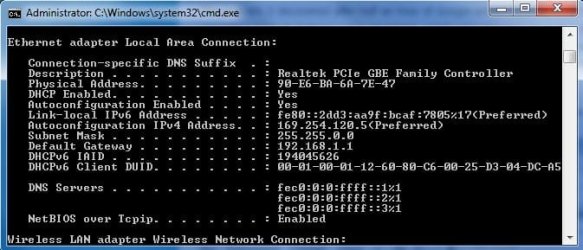
ok I got DHCP to display as enabled and as well as I got the default gateway to come up 192.168.1.1 but Still reads as undentified, I cant go into the 192.168.1.1, no internet and cant see any other computers connected as well.
 

Attachments

  • Capture.JPG
    Capture.JPG
    43.6 KB · Views: 33
Last edited:

My Computer

Computer Manufacturer/Model Number
Asus G72gx
OS
Windows 7 (64bit)
CPU
Core 2 duo 2.53 P8700
Memory
6.0 GB DDR2
Graphics Card(s)
NVIDIA Geforce GTX 260M CUDA
Screen Resolution
1600x900
Hard Drives
WD Scorpio Blue 1 TB 5200RPM
Mouse
Razer Mamba
Internet Speed
Bright House Wideband 40mbps
Make sure IPV4 is enabled and IPV6 is disabled. also is try turning off autoconfig maybe? on mine it just says IPaddress in the ipconfig window.
 

My Computer

Computer Manufacturer/Model Number
Self Build
OS
Vista Business x64
CPU
AMD Phenom II x3 720be @3.15ghz
Motherboard
Asus M4A77D
Memory
2x2GB A-Data DDR2 pc6400
Graphics Card(s)
Nvidia EVGA 8800gts (640MB,320bit)
Sound Card
Creative Sound Blaster
Monitor(s) Displays
Samsung 226bw
Screen Resolution
1680x1050
Hard Drives
Seagate 320gig, WD 80gig
PSU
Rosewill 500watt
Case
Dynex
Cooling
Thermaltake V1
Keyboard
G15
Mouse
Razor DeathAdder
Internet Speed
10.0Mb/896Kb
ok I got DHCP to display as enabled and as well as I got the default gateway to come up 192.168.1.1 but Still reads as undentified, I cant go into the 192.168.1.1, no internet and cant see any other computers connected as well.

Well, that's a little progress. You have a physical connection now. What did you do?

Anyway, the reason you still can't see any networks is the PC didn't get DHCP response from your router. If Windows sends out a request for an IP address and doesn't get a response, it assigns itself an address in the 169.154.x.x range.

How you got a 192.168.1.1 gateway is a mystery though. Did you set any addresses manually? When you configure the ethernet adapter in the PC make sure you don't set any manual addresses. The router will hand you an IP address, DNS and gateway addresses in the same range. Take a look at my post earlier. Your addresses will be different but you see what it should look like.

It's possible the registry entries for the adapter have become corrupted. As a last resort you can try uninstalling the adapter then do a reboot which will cause Windows to re-detect it and create fresh registry entries. At that point it's back to the defaults which is normal.
 

My Computer

Computer Manufacturer/Model Number
Dell C521
OS
W7 Ultimate 64bit W7 Premium 64bit W7 Premium 32bit WXP Home 32bit
CPU
Athlon 64X2 5000+
Motherboard
Dell
Memory
4GB
Graphics Card(s)
ATI X1300
Sound Card
On Board
Monitor(s) Displays
Dell 19" Flat
Screen Resolution
1280x1024
Hard Drives
500GB Western Digital Caviar Green
Mouse
Microsoft Wireless Intellimouse Explorer 2.0
Internet Speed
SBC DSL - 6Mbps
Make sure IPV4 is enabled and IPV6 is disabled. also is try turning off autoconfig maybe? on mine it just says IPaddress in the ipconfig window.

Normally you don't want to do that. The whole idea is to have the router hand you an IP address along with DNS and Gateway info. There are some scenarios where you'd do a static address but under normal conditions DHCP is preferred.

This really isn't an IPV6 issue even though IPV6 has caused problems in some areas. This is a basic connectivity problem so we need to at least get to the point where his ethernet adapter is getting an address. Normally IPV6 is pretty harmless and coexists with IPV4. My own network runs that way. I have both a Homegroup (IPV6) and a Workgroup (IPV4) on the same network with 5 PC's and they all play nice together.

To see more of the details do an "ipconfig /all" at a command prompt which displays a lot more info.
 

My Computer

Computer Manufacturer/Model Number
Dell C521
OS
W7 Ultimate 64bit W7 Premium 64bit W7 Premium 32bit WXP Home 32bit
CPU
Athlon 64X2 5000+
Motherboard
Dell
Memory
4GB
Graphics Card(s)
ATI X1300
Sound Card
On Board
Monitor(s) Displays
Dell 19" Flat
Screen Resolution
1280x1024
Hard Drives
500GB Western Digital Caviar Green
Mouse
Microsoft Wireless Intellimouse Explorer 2.0
Internet Speed
SBC DSL - 6Mbps
I tryed uninstalling the adapter and restarting and got no effect. To get this far I actually did nothing I went and made sure that DHCP was enabled like you guys had suggested and both the registry and the adapter said it was then I pluged it in and now I have what I have No I have Every possible option on automatic.


I did also try disabling IP6 and that made no difference.
 

Attachments

  • Capture.JPG
    Capture.JPG
    97.7 KB · Views: 25
  • Capture2.JPG
    Capture2.JPG
    18.4 KB · Views: 10

My Computer

Computer Manufacturer/Model Number
Asus G72gx
OS
Windows 7 (64bit)
CPU
Core 2 duo 2.53 P8700
Memory
6.0 GB DDR2
Graphics Card(s)
NVIDIA Geforce GTX 260M CUDA
Screen Resolution
1600x900
Hard Drives
WD Scorpio Blue 1 TB 5200RPM
Mouse
Razer Mamba
Internet Speed
Bright House Wideband 40mbps
What ISP do you have, DSL or Cable? Also what make amnd model modem/router?

When you uninstalled, did the system give you a "new hardware found" when you booted?
 

My Computer

Computer Manufacturer/Model Number
Dell C521
OS
W7 Ultimate 64bit W7 Premium 64bit W7 Premium 32bit WXP Home 32bit
CPU
Athlon 64X2 5000+
Motherboard
Dell
Memory
4GB
Graphics Card(s)
ATI X1300
Sound Card
On Board
Monitor(s) Displays
Dell 19" Flat
Screen Resolution
1280x1024
Hard Drives
500GB Western Digital Caviar Green
Mouse
Microsoft Wireless Intellimouse Explorer 2.0
Internet Speed
SBC DSL - 6Mbps
yeah new hardware found and all that good stuff,

The switch Ive been trying is included in original post and the seccond router is the linksys WRT54G

Our provider is Bright House, the 40mb wideband with the phone.
 

My Computer

Computer Manufacturer/Model Number
Asus G72gx
OS
Windows 7 (64bit)
CPU
Core 2 duo 2.53 P8700
Memory
6.0 GB DDR2
Graphics Card(s)
NVIDIA Geforce GTX 260M CUDA
Screen Resolution
1600x900
Hard Drives
WD Scorpio Blue 1 TB 5200RPM
Mouse
Razer Mamba
Internet Speed
Bright House Wideband 40mbps
yeah new hardware found and all that good stuff,

The switch Ive been trying is included in original post and the seccond router is the linksys WRT54G

Our provider is Bright House, the 40mb wideband with the phone.

Did this PC *ever* work on your network?
 

My Computer

Computer Manufacturer/Model Number
Dell C521
OS
W7 Ultimate 64bit W7 Premium 64bit W7 Premium 32bit WXP Home 32bit
CPU
Athlon 64X2 5000+
Motherboard
Dell
Memory
4GB
Graphics Card(s)
ATI X1300
Sound Card
On Board
Monitor(s) Displays
Dell 19" Flat
Screen Resolution
1280x1024
Hard Drives
500GB Western Digital Caviar Green
Mouse
Microsoft Wireless Intellimouse Explorer 2.0
Internet Speed
SBC DSL - 6Mbps
yeah new hardware found and all that good stuff,

The switch Ive been trying is included in original post and the seccond router is the linksys WRT54G

Our provider is Bright House, the 40mb wideband with the phone.

The WRT54G has some unique problems associated with it when it comes to working properly with Windows 7.

I'm not sure what you meant when you said there are two routers but you should only use one router per network or it will cause conflicts with the default IP.

Try using the MAC address clone option which should get that router working for you.

This post by AEM descibes how to do this. He is using the same router and had to use the MAC address clone option to get his WRT54G working with Windows 7.

http://www.sevenforums.com/network-sharing/54086-unindentified-network-router-port.html#post495887

There are 12 different versions of that same router, some work better than others for Windows 7. A firmware update might also help but you need to get the exact version number for that.
 

My Computer

Computer type
PC/Desktop
Computer Manufacturer/Model Number
Home built
OS
Windows 7 Ult, Windows 8.1 Pro,
CPU
Q9650-4.275GHz, E8600 4.5GHz, E6750-3.8GHz
Motherboard
Evga 780i FTW
Memory
G.Skill PC2 9600 1200Mhz 5 5 5 15 2T
Graphics Card(s)
GTX480
Sound Card
Asus Xonar D2
Monitor(s) Displays
HannsG
Screen Resolution
1680X1050
Hard Drives
GSkill Phoenix Pro 120GB SSD
PSU
ThermalTake Toughpower 1000Watt modular
Case
ThermalTake XaserV
Cooling
Xigmatek S1283
Keyboard
Logitech G15
Mouse
Logitech G9
Internet Speed
T1
Oh what I ment was I have tryied to connect via eathernet cable to both the dynex switch and that linksys router and I get the same "unidentified network" on both. Sence we have moved all of our computers to windows 7 the only way to connect to the internet is wirelessly.
 

My Computer

Computer Manufacturer/Model Number
Asus G72gx
OS
Windows 7 (64bit)
CPU
Core 2 duo 2.53 P8700
Memory
6.0 GB DDR2
Graphics Card(s)
NVIDIA Geforce GTX 260M CUDA
Screen Resolution
1600x900
Hard Drives
WD Scorpio Blue 1 TB 5200RPM
Mouse
Razer Mamba
Internet Speed
Bright House Wideband 40mbps
Oh what I ment was I have tryied to connect via eathernet cable to both the dynex switch and that linksys router and I get the same "unidentified network" on both. Sence we have moved all of our computers to windows 7 the only way to connect to the internet is wirelessly.

Did this PC run XP prior to this and connect by ethernet successfully? I'm trying to get a handle on if this ethernet port ever worked correctly.
 

My Computer

Computer Manufacturer/Model Number
Dell C521
OS
W7 Ultimate 64bit W7 Premium 64bit W7 Premium 32bit WXP Home 32bit
CPU
Athlon 64X2 5000+
Motherboard
Dell
Memory
4GB
Graphics Card(s)
ATI X1300
Sound Card
On Board
Monitor(s) Displays
Dell 19" Flat
Screen Resolution
1280x1024
Hard Drives
500GB Western Digital Caviar Green
Mouse
Microsoft Wireless Intellimouse Explorer 2.0
Internet Speed
SBC DSL - 6Mbps
Back
Top