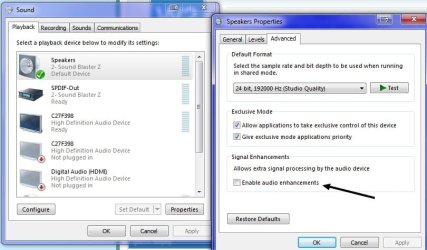
Okay, there is some stuff that sometimes I think happens only with my computer. I have this new issue with my W7 and that probably won't make any sense for mostly of you. Oh well...
A couple days ago I removed my external sound card (to use in another computer) and enabled back the onboard adapter. While it "works" it is presenting an annoying problem that is compressing the audio in an audible way.
As I know that many may not have the least idea what I am talking about (not kin to the term "compression") I will try to explain. The effect is audible when a loud sound is played in the tune - like the bass drum - then the overall sound is "compressed" (momentarily reduced). Since the bass drum is just a beat, in a tune where you have a rhythm bass drum like "thump-thump-thump" in every "thump" the volume of the whole tune becomes a bit quieter and then comes back to the normal volume and so on. The result is a tune which volume keeps turning high and low in the rhythm of the "thumps". Very annoying.
This is what happened to my audio when I moved from the external to the onboard card. I looked around and couldn't find any configuration that I could fix that.
Anyone has experienced it and have a clue how to fix?
A couple days ago I removed my external sound card (to use in another computer) and enabled back the onboard adapter. While it "works" it is presenting an annoying problem that is compressing the audio in an audible way.
As I know that many may not have the least idea what I am talking about (not kin to the term "compression") I will try to explain. The effect is audible when a loud sound is played in the tune - like the bass drum - then the overall sound is "compressed" (momentarily reduced). Since the bass drum is just a beat, in a tune where you have a rhythm bass drum like "thump-thump-thump" in every "thump" the volume of the whole tune becomes a bit quieter and then comes back to the normal volume and so on. The result is a tune which volume keeps turning high and low in the rhythm of the "thumps". Very annoying.
This is what happened to my audio when I moved from the external to the onboard card. I looked around and couldn't find any configuration that I could fix that.
Anyone has experienced it and have a clue how to fix?
My Computer
At a glance
Windows 7 Professional 64bitIntel i5-33308GBOnboard
- Computer type
- PC/Desktop
- Computer Manufacturer/Model Number
- Custom
- OS
- Windows 7 Professional 64bit
- CPU
- Intel i5-3330
- Motherboard
- GigaByte B75M-D3H
- Memory
- 8GB
- Graphics Card(s)
- Onboard
- Sound Card
- Behringer UCA222
- Monitor(s) Displays
- Samsung 22.5"
- Screen Resolution
- 1920x1080
- Hard Drives
- SSD Kingston 120GB
HDD Samsung 320GB
- Internet Speed
- 1M
- Antivirus
- ZoneAlarm FW + AV Free
- Browser
- Chrome