shankly769,
Would try a one-two

punch with the two programs that follow...
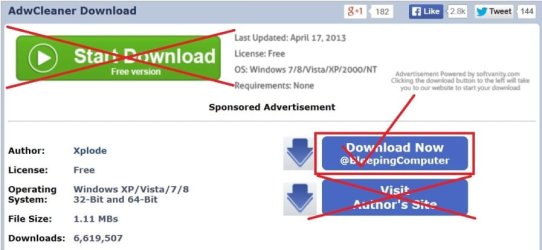
:info: Already suggested, please download
ADWCleaner:
AdwCleaner Download (by Xplode)
Save to the Desktop.
Right-click on AdwCleaner.exe and select: Run as Administrator
At the main window, press the [
Scan] button.
The Scan function does not delete anything. It just lists elements.
Once AdwCleaner completes its scan, it shows a list of entries.
You can uncheck any item(s) you do not want to remove from this list.
Next, click the [
Clean] button.
A small window appears to inform that all programs will close. Press: OK
AdwCleaner proceeds to delete all checked elements.
If a reboot is needed, a small window appears notifying of such. Please click: OK
:ar: Please attach the
AdwCleaner report in your reply.
ADWCleaner tutorial:
How to use AdwCleaner version 3.x - General Changelog Team
:info: Next, after using the above program, let the
Junkware Removal Tool take a shot at removing adware, toolbars, and potentially unwanted programs (PUPs) bundled with other programs.
Junkware Removal Tool Download (by thisisu)
Save to the Desktop.
Make sure you temporarily disable your AntiVirus, Firewall, and any other AntiSpyware applications. These programs may interfere with the running of JRT.
Info:
How To Temporarily Disable Your Anti-virus, Firewall And Anti-malware Programs - Security Mini-Guides
Next, right-click
JRT.exe and select: Run as Administrator
The tool opens and starts scanning the system. Please be patient as this can take a while...
When done, Junkware Removal Tool removes all traces of the aforementioned programs including their files, Registry keys, and folders.
A report,
JRT.txt, is saved on the Desktop.
:ar: Please post the contents of
JRT.txt in your reply.