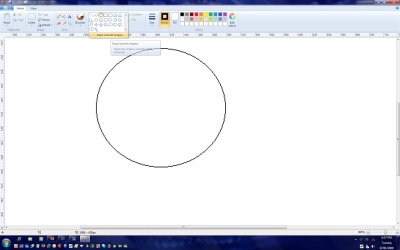
Anti-Alias in the new paint

ElGoorf

New member
Local time
10:58 AM
Messages
11
Why is it everywhere i look on the internet, everyone loves the new anti aliasing feature which in all honestly gets on my <<proverbial expletive>>.

Please oh please MS, at least give us the option to disable it! i can't do pixel like this!:(
 

My Computer My Computer

At a glance

Windows 7
OS
Windows 7
oh noes! i have not played around with paint enough yet to notice that. is it really on all the time? i use paint a lot for skinning, that's bad news!

well, i guess it's time to click that 'send feedback' link :)

in the meantime, i assume the mspaint.exe from vista/xp will run on 7. just copy it over if you've got a dual boot set up, that way you can still do pixel editing.
 

My Computer My Computer

At a glance

7600 x86Core 2 Duo e7200, 2.53 ghz2x DDR2 PC5300 1gb, 667 mhzGeForce 9500gt, 512mb
OS
7600 x86
CPU
Core 2 Duo e7200, 2.53 ghz
Motherboard
Micro-Star MS-7529
Memory
2x DDR2 PC5300 1gb, 667 mhz
Graphics Card(s)
GeForce 9500gt, 512mb
Monitor(s) Displays
22" LG Flatron w2234s
Screen Resolution
1680x1050
Hard Drives
Excelstor SATA-II 250gb 7200rpm, 8mb cache
PSU
CoolerMaster M520
Internet Speed
30/20 mbits
I just had a quick play and I found the option to take off the new anti aliasing feature.

2009-01-27_183733.jpg
 

My Computer My Computer

At a glance

Windows 7 Ultimate Vista Ultimate x64Core 2 Duo E8500 3.16Ghz @ 3.8Ghz2x2Gigs Patriot PC2-6400 LLInno3D GeForce GTX260 216 SP
Computer Manufacturer/Model Number
Home Brew
OS
Windows 7 Ultimate Vista Ultimate x64
CPU
Core 2 Duo E8500 3.16Ghz @ 3.8Ghz
Motherboard
eVGA 750i FTW
Memory
2x2Gigs Patriot PC2-6400 LL
Graphics Card(s)
Inno3D GeForce GTX260 216 SP
Monitor(s) Displays
ASUS VW222U 22" 2ms Response time
Screen Resolution
1680x1050
Hard Drives
SATA 150GB
SATA II 250GB
USB IDE 750GB Ext.
PSU
HYTEC 600W & Thermaltake 650W Toughpower Power Exp
Case
Thermaltake Armor LCS (Liquid Cooling System)
Cooling
Liquid Cooling System
Keyboard
Logitech G15 Gaming Keyboard
Mouse
Logitech G9 Gaming Mouse
wow, good call Mr Grim.

ps garbanzo, your solution didnt work :( i got some dll error..
 

My Computer My Computer

At a glance

Windows 7
OS
Windows 7
i just ran mspaint.exe off of my xp partition with no problems. but i suppose that doesn't matter now, does it :)
 

My Computer My Computer

At a glance

7600 x86Core 2 Duo e7200, 2.53 ghz2x DDR2 PC5300 1gb, 667 mhzGeForce 9500gt, 512mb
OS
7600 x86
CPU
Core 2 Duo e7200, 2.53 ghz
Motherboard
Micro-Star MS-7529
Memory
2x DDR2 PC5300 1gb, 667 mhz
Graphics Card(s)
GeForce 9500gt, 512mb
Monitor(s) Displays
22" LG Flatron w2234s
Screen Resolution
1680x1050
Hard Drives
Excelstor SATA-II 250gb 7200rpm, 8mb cache
PSU
CoolerMaster M520
Internet Speed
30/20 mbits
Antialiased brush = :'(

I just had a quick play and I found the option to take off the new anti aliasing feature.

View attachment 3718

That option arent there in my paint, this is like seven months later so probably they've removed it. Instead none of the shapes are antialiased. But, I dont really mind the shapes, its the brush i always use. And its impossible to use with antialiasing! :( Isnt it anyway to fix this?
 

My Computer My Computer

At a glance

Windows 7 Ultimate x64DualCore Intel Core 2 Duo, 2800 MHz (10.5 x 267)2 * 1 GB DDR2-800 DDR2 SDRAM (5-5-5-18 @ 400 ...ATI Radeon HD 4600 Series (512 MB)
OS
Windows 7 Ultimate x64
CPU
DualCore Intel Core 2 Duo, 2800 MHz (10.5 x 267)
Motherboard
Gigabyte GA-EP43-S3L (2 PCI, 4 PCI-E x1, 1 PCI-E x16, 4 DDR
Memory
2 * 1 GB DDR2-800 DDR2 SDRAM (5-5-5-18 @ 400 MHz) (4-4-4-1
Graphics Card(s)
ATI Radeon HD 4600 Series (512 MB)
Sound Card
Realtek ALC888 @ Intel 82801JB ICH10 - High Definition Audio
Monitor(s) Displays
BenQ G2220HD
Screen Resolution
1080p
Hard Drives
Maxtor 7Y250M0 ATA Device (sys)
SAMSUNG HD502HI ATA Device
WD 5000AAV External USB Device
I am really happy to see paint beefed up a bit. I think it is much faster and easier to do what I want now than it was before.

Anti-aliasing is great when you actually need it for something but it should never be a default.
 

My Computer My Computer

At a glance

Win7 64bit UltimateAMD Phenom II X6 1100T Black Edition Thuban 3...CORSAIR DOMINATOR GT 8GB (2 x 4GB) 1866 DDR3XFX HD-697A-CNDC Radeon HD6970 2GB 256-bit
Computer Manufacturer/Model Number
Custom
OS
Win7 64bit Ultimate
CPU
AMD Phenom II X6 1100T Black Edition Thuban 3.3GHz, 3.7GHz
Motherboard
Gigabyte GA-890FXA-UD5
Memory
CORSAIR DOMINATOR GT 8GB (2 x 4GB) 1866 DDR3
Graphics Card(s)
XFX HD-697A-CNDC Radeon HD6970 2GB 256-bit
Sound Card
Creative SoundBlaster X-Fi Platinum Fatal1ty Edition
Monitor(s) Displays
Dual 25 Inch Hanns-G HZ251
Screen Resolution
1920x1080 X 2
PSU
Corsair 850W Single Rail
Case
Thermaltake V9 BlacX w/ Dual HDD Docking Station
Cooling
Air lots and lots of air and copper...
Keyboard
Kensington (Low-Profile)
Mouse
Creative Fatal1ty
Internet Speed
15Gbit (15 Down 5 Up)
Other Info
XIGMATEK HDT-S1284F 120mm HYPRO Bearing CPU Cooler, LG Blu-Ray Burner.
Completely agree with podaa; the pencil is useless. The brushes are awesome because your mouse pointer actually gives a great preview of what you're about to put down. If somebody at Windows is listening, please make it able to use a brush to create pixel-precise work. Otherwise, the paint tool is completely useless.
 

My Computer My Computer

At a glance

Windows 7 RC
OS
Windows 7 RC
Actually i found a great solution for this, its possible to recreate the windows vista paint by only replace som few files with files from vista. :) search for it and you'll find it. dont have the link..
 

My Computer My Computer

At a glance

Windows 7 Ultimate x64DualCore Intel Core 2 Duo, 2800 MHz (10.5 x 267)2 * 1 GB DDR2-800 DDR2 SDRAM (5-5-5-18 @ 400 ...ATI Radeon HD 4600 Series (512 MB)
OS
Windows 7 Ultimate x64
CPU
DualCore Intel Core 2 Duo, 2800 MHz (10.5 x 267)
Motherboard
Gigabyte GA-EP43-S3L (2 PCI, 4 PCI-E x1, 1 PCI-E x16, 4 DDR
Memory
2 * 1 GB DDR2-800 DDR2 SDRAM (5-5-5-18 @ 400 MHz) (4-4-4-1
Graphics Card(s)
ATI Radeon HD 4600 Series (512 MB)
Sound Card
Realtek ALC888 @ Intel 82801JB ICH10 - High Definition Audio
Monitor(s) Displays
BenQ G2220HD
Screen Resolution
1080p
Hard Drives
Maxtor 7Y250M0 ATA Device (sys)
SAMSUNG HD502HI ATA Device
WD 5000AAV External USB Device
Thanks, but I've searched quite a bit and a link would be handy.

[Edit: I've found a way to bring back Vista's version, which should work for now. If you know a better method, please tell me.]
 
Last edited:

My Computer My Computer

At a glance

Windows 7 RC
OS
Windows 7 RC
How to Get the Good Old MS Paint (without Ribbons) Working in Windows 7? - Tweaking with Vishal

the magic link :)

IF YOU'RE USING ANOTHER LANGUAGE
The en-us folders that is mentioned in the guide is the language you have, swedish for me si sv-sv, spanish es-esp or something similiar. If you have a windows vista installation in your language you can copy the files from there. If someone need the swedish files please request them in thread.

IF YOU'RE RUNNING X64
As SCOTTBALL says: "if you are running x64 you have to repeat the process with the Windows/SysWOW64 folder
that will stop you from getting the error"
 

My Computer My Computer

At a glance

Windows 7 Ultimate x64DualCore Intel Core 2 Duo, 2800 MHz (10.5 x 267)2 * 1 GB DDR2-800 DDR2 SDRAM (5-5-5-18 @ 400 ...ATI Radeon HD 4600 Series (512 MB)
OS
Windows 7 Ultimate x64
CPU
DualCore Intel Core 2 Duo, 2800 MHz (10.5 x 267)
Motherboard
Gigabyte GA-EP43-S3L (2 PCI, 4 PCI-E x1, 1 PCI-E x16, 4 DDR
Memory
2 * 1 GB DDR2-800 DDR2 SDRAM (5-5-5-18 @ 400 MHz) (4-4-4-1
Graphics Card(s)
ATI Radeon HD 4600 Series (512 MB)
Sound Card
Realtek ALC888 @ Intel 82801JB ICH10 - High Definition Audio
Monitor(s) Displays
BenQ G2220HD
Screen Resolution
1080p
Hard Drives
Maxtor 7Y250M0 ATA Device (sys)
SAMSUNG HD502HI ATA Device
WD 5000AAV External USB Device
have found out that i can use virtual xp and use virtual xp's mspaint after turning off the font smoothing thing in desktop properties
 

My Computer My Computer

At a glance

Windows 7 Ultimate 64bitAMD Phenom II X4 9406gbBFG GTX 260
Computer Manufacturer/Model Number
CyberpowerPC
OS
Windows 7 Ultimate 64bit
CPU
AMD Phenom II X4 940
Motherboard
asus
Memory
6gb
Graphics Card(s)
BFG GTX 260
Sound Card
built in HD audio
Monitor(s) Displays
Gateway 17in flat panel
Hard Drives
500gb main and 320 gb storage
PSU
BFG 550 watt
Case
Collermaster Elite 310 w/window
Cooling
fans
Back
Top