Solved Anti Virus Software Question

Greyjoy

New member
Local time
3:45 AM
Messages
13
Location
Teesside UK
The licence for the AVG software I have installed on my original computer is due for renewal shortly.
I have almost completed the building of a 2nd machine which I intend to use solely for gaming & apart from an Internet (Steam) connection on the new machine will continue to use the original machine for everything else including the downloading of files etc to use on the gaming rig.
Pondering whether to purchase a multiple licence for AVG this time or just rely on it running on solely the "general use" machine & leave the gaming machine protected by Windows Defender.
Would like to hear words of ratification or caution on this proposed plan please.
Thanks
Keith
 

My Computer

OS
Windows 7 Home Premium 64 bit
Most people here would point you to a free solution of some type---most commonly Microsoft Security Essentials.

And I don't think AVG would be the top choice among paid software, but what's done is done.
 

My Computer

Computer type
PC/Desktop
Computer Manufacturer/Model Number
Ignatz Special; 4 speed manual gearbox; factory air conditioning; one of one
OS
Windows 7 Home Premium SP1, 64-bit
CPU
Intel Skylake i5-6600K, not overclocked
Motherboard
AsRock Z170M Extreme 4, micro ATX
Memory
8 GB HyperX DDR4-2666 (2 x 4 GB)
Graphics Card(s)
none; graphics are integrated on CPU
Sound Card
onboard: Realtek ALC1150; external: USB Behringer UF0-202
Monitor(s) Displays
Dell S2340M 23 inch IPS
Screen Resolution
1600 x 900
Hard Drives
System: Crucial MX100 series SSD, 128 GB;
Data: Samsung Spinpoint 103SJ, 1 TB;
Backup: WD Caviar Green WD30EZRX-00D8PB0, 3 TB
PSU
Rosewill SilentNight 500 watt fanless, semi-modular
Case
Antec Solo II
Cooling
Noctua NH-U12S; Noctua F12 intake, Noctua S12A exhaust
Keyboard
Microsoft 200 6JH-00001 USB
Mouse
Dell or Microsoft optical wired; USB
Antivirus
Microsoft Security Essentials and Malwarebytes Premium
Browser
Pale Moon
Other Info
All fans PWM; speeds at idle: CPU circa 500 rpm; intake circa 600 rpm; exhaust circa 600 rpm; CPU temps 27 idle and 47 C load in a warm room (27 C/81 F) when running Intel Extreme Tuning Utility stress test.

My Computer

Computer type
PC/Desktop
Computer Manufacturer/Model Number
Golden Mk. I.4
OS
Windows 10 Pro x64 ; Xubuntu x64
CPU
Intel i7 860 @ 2.80 GHz O/C'ed to 4.0GHz
Motherboard
Gigabyte P55A-UD3R Rev.1. Award BIOS F13
Memory
16GB Corsair Vengance DDR3 @ 661 MHz Dual Channel (9-9-9-24)
Graphics Card(s)
EVGA NVidia GTX 560 1024MB
Sound Card
Realtek Integrated
Monitor(s) Displays
Dual Samsung SyncMaster 2494HS
Screen Resolution
1920*1080 and 1920*1080
Hard Drives
1*Samsung 840 EVO 120GB SSD;
1*OCZ Vertex 2 60GB SSD;
2*Samsung F3 SpinPoint 1TB in RAID0;
1*Samsung F1 SpinPoint 1TB;
2*Western Digital 1TB External USB 3.0
1*Western Digital 500GB External USB 3.0
1*Seagate 500GB External USB 2.0
PSU
Thermaltake ToughPower QFan 750W
Case
Thermaltake Element S VK60001W2Z
Cooling
Corsair H60 Water Cooling, 2*230mm and 2*80mm case fans
Keyboard
Logitech G110
Mouse
Logitech MX518
Thanks for the quick reply folks.
I agree re: AVG, my personal opinion is that it's getting too bloated for what I need these days but the renewal costs are quite attractive.
NOD 32 was another contender & seems quite popular amongst some gamers.
Thanks for the link to MS security essentials quite interested in this. Does this incorporate Defender or is that something else altogether? & I also wonder
Why it is that MS_SE is not part of the initial setup.

Regards
Keith
 

My Computer

OS
Windows 7 Home Premium 64 bit
Win 7 comes essentially with DEFENDER and MS has decided to make MSE a bit later on.
When you download MSE and install it, MSE will turn off DEFENDER cause they don't coexists together but firewall will be doing his job and DEFENDER will be back with windows 8. Beside mentioned responses above, download MALWAREBYTES ANTIMALWARE to be more secure, and there is a free and a paid version of it.

Malwarebytes : Free anti-malware, anti-virus and spyware removal download
 
Last edited:

My Computer

Computer type
Laptop
Computer Manufacturer/Model Number
HP pavilion DV6
OS
win7 home premium-64bit-SP1-IE10
CPU
T6600 2.2Ghz
Motherboard
HP Model 3628
Memory
4 Gb
Graphics Card(s)
ATI Mobility Radeon HD 4530
Sound Card
IDT High Definition
Screen Resolution
1366x768 @ 60Hz
Hard Drives
500Gb Western Digital
Antivirus
MSE
Other Info
Malwarebytes Antimalware + Spybot-Search&Destroy
Appreciate the brief Hanna 1. Didn't realise MSE was only relatively recent program. I will give it a try & may even decide not to renew my AVG licence.

Thanks
Keith
 

My Computer

OS
Windows 7 Home Premium 64 bit
On that gaming computer you can install Avira it is very good I use it on my only computer that I use for everything (Game, Movie, Graphics, ...) and it is protecting it and it isn't slowing my computer. I Used Avast and AVG both of them but Avira is something really good but if you need high protection go for Kapsersky but for that gaming rig Avira is perfect.

Thank you.
~0UnknowN1
 

My Computer

OS
Windows 8 RTM Professional X64
CPU
Intel Core 2 Duo E8400 3.0GHz
Motherboard
Gigabyte EP43-DS3
Memory
4GB OCZ
Graphics Card(s)
EVGA GTX 275
Monitor(s) Displays
Samsung SyncMaster T200
Screen Resolution
1680x1050
Keyboard
Logitech
Mouse
Logitech
Nowadays, unless you visit risky sites that require you to have supurb protection, a free version of an antivirus (again, often MSE because of its compatability with windows) is all you really need.

If you browse the internet at all on both machines, i would highly recommend an antivirus. Defender is not an antivirus and will not protect you as well as one.

Interesting to note: Defender for Win8 IS going to be an antivirus software. MS is playing around with names once more. This software is scheduled to be included with Win8 upon its release.

Tip: some people are saying AVG is doing a lot better. I would stick with it (provided it is working well) until your license runs out. After that, I would switch to the free version of my favorite antivirus. Mine would be MSE because it has very high ratings for malware removal/protection and works great with my system.
 

My Computer

Computer type
PC/Desktop
Computer Manufacturer/Model Number
Custom Asus Build
OS
Microsoft Windows 8.1 Pro 64-bit
CPU
Intel(R) Core(TM) i3-4130 CPU @ 3.40GHz
Motherboard
B85M-E
Memory
8.00 GB
Graphics Card(s)
None
Sound Card
Realtek High Definition Audio
Monitor(s) Displays
Asus 23.6" Monitor
Screen Resolution
1920 x 1080 x 32 bits (4294967296 colors) @ 60 Hz
Hard Drives
INTEL SSDSC2BW180A4
Samsung SSD 840 PRO Series
PSU
Seasonic S12II-380Bronze
Case
Lian Li
Cooling
Fan, Passive
Keyboard
Logitech K120
Mouse
Microsoft Touch Mouse
Internet Speed
4ms Ping, 19.0 Mbps Download, 19.0 Mbps Upload
Antivirus
Eset Endpoint
Browser
Internet Explorer, Chrome
Dust Sailor

Nothing against AVG, I've got 15 days license left & rather than dive in & renew for a further 2 years I thought I would solicit the help of the "better informed" on this forum ( thank you all).

I don't go on risky sites (he says setting up for a fall) & believe my bells & whistles virus checker generally has an easy time of it.
I guess in summary, I want either one AV suite to protect me while I browse the web & download files etc on my general use machine but another to have a very low resource hit on a gaming rig which should get very little exposure to threats. Of course one which will cover both ends would be ideal. MSE sounds good & I'm all in favour of using an AV which has the backing of the OS makers. Can it be suspended so all resource goes towards running games? Most of the contenders now seem to have this facility including Avast & presumably Avira but I suspect this was not top of Microsoft's must have features.

Regards
Keith

Regards
Keith
 

My Computer

OS
Windows 7 Home Premium 64 bit
Better take the advice of our guru's here :)

I myself is using MSE and Malwarebytes ;)
 

My Computer

Computer type
PC/Desktop
Computer Manufacturer/Model Number
Gigabyte Technology Co. Ltd.
OS
Windows 10 Pro 64-Bit
CPU
Intel(R) Core(TM) i5-4460 CPU @ 3.20 GHz(4CPU's), ~3.2GHz
Motherboard
Gigabyte B85M-HD3-A
Memory
8192 RAM
Graphics Card(s)
NVIDIA GeForce 710
Sound Card
Integrated High Definition audio with Realtek ALC888 codec
Monitor(s) Displays
Acer V183HV Ab 18.5" LCD Display
Screen Resolution
1366 x 768
Keyboard
HP
Mouse
HP
Internet Speed
100mbps
Antivirus
Microsoft Security Essentials
Browser
Chrome, Firefox
Malewarebytes free is a good program that doesn't use resources unless you manually scan the system. A good extra scan to have to make sure you aren't infected, but it will not 'protect' you from anything.

MSE will, as it actively protects your system (both MSE and malwarebytes can be installed together). What I like most about it is how little the resource consumption is of it. I too play games now and again and it works very well with them running. You can disable MSE (turn off real-time protection) when you play games that aren't connected to the internet to get every last ounce of juice, but you probably won't see too much of any kind of benefit unless your computer's hardware is low or medium end.

MSE works well, but it isn't "the best" antivirus. If you are looking to put your computer into a vault against online attacks, there are other paid-for subscriptions that you may want to look into. However, because it rates very high, works well with the OS, gets updated with windows updates automatically, and uses few resources, I use it exclusively on computers that are for personal use, and I add malwarebytes with MSE on computers that require security (business computers).

Hope everyone here has given you enough ideas on what you might want to do. Keep in mind, everyone has an idea on what 'works for them', and what the 'best security solution' is. That is because everyone is different with different experiences.

In my opinion, most of the well-known antiviruses all protect against the same basic things. Every company will send out antivirus updates to protect against new malware. Some get the updates out faster than others, but for the most part, they will have your back, despite the "ratings system" invented by antivirus testers. Chances are, you will not need to worry about "zero day attacks" because they are brand new and not widely used yet. Once noticed, your antivirus should provide an update to protect against them. That is why I use an antivirus that is low on resources, such as MSE. Although I am sure there are others out there that are just as good.

Computers that are preyed upon most are ones with very old software (such as IE6 or old versions of Java). You might get a simple virus every now and again from a bad website, but usually your antivirus will stop it. If it doesn't stop it right away, the malware probably isn't effecting your computer very much. The antivirus should be monitoring incoming and outgoing data, so you needn't worry over it stealing your info. To be extra safe, the antiviruses come with full scans so that you might make sure nothing is residing in your computer.

Some people don't even use antivirus software because they believe 'safe browsing' is all you need to be protected. They also claim that they don't have any viruses on their computer. Problem is, even safe websites can get hacked. But it is true, the best way to avoid a virus is to avoid unknown websites.

Make sure you keep windows and all software on your computer updated. Have an antivirus running and stay away from unknown websites. Do this, and you shouldn't have to worry about a thing.
 
Last edited:

My Computer

Computer type
PC/Desktop
Computer Manufacturer/Model Number
Custom Asus Build
OS
Microsoft Windows 8.1 Pro 64-bit
CPU
Intel(R) Core(TM) i3-4130 CPU @ 3.40GHz
Motherboard
B85M-E
Memory
8.00 GB
Graphics Card(s)
None
Sound Card
Realtek High Definition Audio
Monitor(s) Displays
Asus 23.6" Monitor
Screen Resolution
1920 x 1080 x 32 bits (4294967296 colors) @ 60 Hz
Hard Drives
INTEL SSDSC2BW180A4
Samsung SSD 840 PRO Series
PSU
Seasonic S12II-380Bronze
Case
Lian Li
Cooling
Fan, Passive
Keyboard
Logitech K120
Mouse
Microsoft Touch Mouse
Internet Speed
4ms Ping, 19.0 Mbps Download, 19.0 Mbps Upload
Antivirus
Eset Endpoint
Browser
Internet Explorer, Chrome
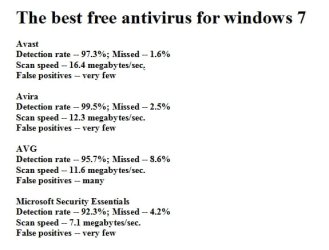
The Best Free AntiVirus for Windows 7 is Avira, and No WD...

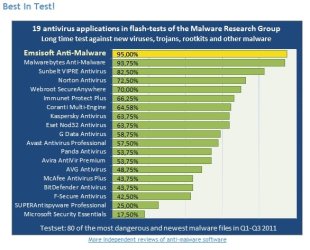
I don't know where people get their saying MSE has high detection rates, as all the independent tests I can find rate it Last!?
MSE also Only auto-updates once daily.
MSE scans are Very Slow.

-For Free I'd go with #1 Avira, and manually Schedule it to auto-update every 3hrs...
-For Paid I Really like my #1 Emsisoft Anti-Malware (no pesky SurfGuard, and daily Fast C: scans!).
EAM also has a Gaming Mode, for No interruptions...
I surf 99% surf with Safe/Virtual (no write to system...) free sandboxie!
Sandboxie - Sandbox software for application isolation and secure Web browsing

-No matter what AV you use, you need to Fully Disable ALL of Windows Defender Options for performance (WD never finds anything anyways)!

My Disable WD Procedure (Win All)-
[FONT=&quot]Windows Defender Not being Fully... Disabled, can also cause a Big performance hit (Win All)!-

Windows Defender has played havoc with my computers..., and is virtually worthless (on by default)!-

Just disabling WD does Not stop it from still monitoring/slowing most Everything, while running in the background (same with MBAM Pro!)!

To "completely" disable WD, you Must disable All of it's processes (Win All)-

You have to temp enable WD, & open All left Menu Options. Now un-tick Every option on the right...
Some options have to be disabled from bottom up..., to get the grayed checks too. Also scroll down, as some are off the page.

Open services.msc (in the Start Search box...), and be sure that WD is Disabled.
Reboot

You will be Amazed at how much faster, and less problematic your your system is! [/FONT];)
 

Attachments

  • TheBestFreeAntivirus.jpg
    TheBestFreeAntivirus.jpg
    26.5 KB · Views: 17
  • EmsisoftBest.jpg
    EmsisoftBest.jpg
    49.5 KB · Views: 20

My Computer

Computer Manufacturer/Model Number
ZT Desktop
OS
Windows 7 Pro (32)
CPU
i7/2600
Motherboard
Intel
Memory
4gb
Graphics Card(s)
512mg (add on card was less buggy than Intel direct driver)
Sound Card
Internal
Monitor(s) Displays
19" DELL Ultra Sharp
Hard Drives
C:= WD Raptor Sata6 10k rpm
D:/E:= WD Black Sata 3.0
Case
ZT Full
Cooling
ZT
Internet Speed
8000kbps cable
Other Info
Free Outpost Pro Internet Security, and no other active anti-malware.
Free On-Demand- SpyWareBlaster, MBAM, Emsisoft-Kit, and Kaspersky Anti-rootkit utility TDSSKiller.
Here is what I use, MSE, MAM Pro, password protected router. So far it works for me.
 

My Computer

Computer type
PC/Desktop
Computer Manufacturer/Model Number
Home made Desktop
OS
Windows 10 Pro. 64/ version 1709 Windows 7 Pro/64
CPU
Intel i7-6800K @ 4.3
Motherboard
ASUS X-99 Deluxe II
Memory
Corsair Platinum 16 gig @2400
Graphics Card(s)
EVGA GTX 1070 OC
Monitor(s) Displays
Asus 27" LED LCD/VE278Q
Screen Resolution
1920-1080 or 1280-720 HDMI
Hard Drives
INTEL SSD 730-240 Gb Sata 3.0/
PSU
EVGA Platium 1200W
Case
Phanteks Luxe Tempered Glass 8 fans/ one radiator
Cooling
XSPC/ Water Cooled CPU
Keyboard
Das 4 Professional
Mouse
Logitech M705/MX Anywhere 2-S
Internet Speed
100 mbits
Antivirus
Microsoft Security Essentials/ Malwarebytes Premium 3.0/ SAS
Browser
I.E. 11 default/Firefox/ ISP Time Warner Cable/Spectrum
Other Info
LG BluRay Burner/
Sound system-KLipsch-THX/
Icy Dock ssd Hot Swap bays.
Thanks for taking the trouble to put your sound advice into words. Reading these & the suggestions from other senior members here seems to come down strongly in favour of MSE for the "cautious user" I might qualify.

Glad I came here & asked you all have saved me forty + quid

Thanks
Keith
 

My Computer

OS
Windows 7 Home Premium 64 bit
I don't know where people get their saying MSE has high detection rates, as all the independent tests I can find rate it Last!?
That is probably because those tests are either sponsored by a specific antivirus company and/or are not rating the newest version of MSE (4.0). Many are testing the 2.0 version still. Trustworthy tests rate MSE close to the top, usually #3.
MSE also Only auto-updates once daily.
MSE scans are Very Slow.
Really? Once daily isn't enough? Alright, if someone prefers more frequent updates, choose another. In my experience, MSE scans fairly fast, even faster than malwarebytes. If you've found one a little bit faster, good for you! :D
I usually let mine scan in the background while I'm doing other things. You can also change how much CPU resources it uses (default is like 50%, which may be why you think it scans so slowly to begin with).

[...]-No matter what AV you use, you need to Fully Disable ALL of Windows Defender Options for performance (WD never finds anything anyways)!

My Disable WD Procedure (Win All)-
[FONT=&quot]Windows Defender Not being Fully... Disabled, can also cause a Big performance hit (Win All)!- [/FONT]

[FONT=&quot]Windows Defender has played havoc with my computers..., and is virtually worthless (on by default)!-[/FONT]

[FONT=&quot]Just disabling WD does Not stop it from still monitoring/slowing most Everything, while running in the background (same with MBAM Pro!)![/FONT]

[FONT=&quot]To "completely" disable WD, you Must disable All of it's processes (Win All)-[/FONT]

[FONT=&quot]You have to temp enable WD, & open All left Menu Options. Now un-tick Every option on the right...[/FONT]
[FONT=&quot]Some options have to be disabled from bottom up..., to get the grayed checks too. Also scroll down, as some are off the page.[/FONT]

[FONT=&quot]Open services.msc (in the Start Search box...), and be sure that WD is Disabled.[/FONT]
[FONT=&quot]Reboot[...][/FONT]
This alone would be cause for me to use MSE. Never had any problems and never had to do any of this 0.0
 

My Computer

Computer type
PC/Desktop
Computer Manufacturer/Model Number
Custom Asus Build
OS
Microsoft Windows 8.1 Pro 64-bit
CPU
Intel(R) Core(TM) i3-4130 CPU @ 3.40GHz
Motherboard
B85M-E
Memory
8.00 GB
Graphics Card(s)
None
Sound Card
Realtek High Definition Audio
Monitor(s) Displays
Asus 23.6" Monitor
Screen Resolution
1920 x 1080 x 32 bits (4294967296 colors) @ 60 Hz
Hard Drives
INTEL SSDSC2BW180A4
Samsung SSD 840 PRO Series
PSU
Seasonic S12II-380Bronze
Case
Lian Li
Cooling
Fan, Passive
Keyboard
Logitech K120
Mouse
Microsoft Touch Mouse
Internet Speed
4ms Ping, 19.0 Mbps Download, 19.0 Mbps Upload
Antivirus
Eset Endpoint
Browser
Internet Explorer, Chrome
scottis59901

Sure I read somewhere hereabouts that MSE disables Defender

Regards
Keith
 

My Computer

OS
Windows 7 Home Premium 64 bit
Thanks for taking the trouble to put your sound advice into words. Reading these & the suggestions from other senior members here seems to come down strongly in favour of MSE for the "cautious user" I might qualify.

Glad I came here & asked you all have saved me forty + quid

Thanks
Keith

Our pleasure Keith. If you have other queries, anti-virus or other, be sure to post back. :D

Regards,
Golden
 

My Computer

Computer type
PC/Desktop
Computer Manufacturer/Model Number
Golden Mk. I.4
OS
Windows 10 Pro x64 ; Xubuntu x64
CPU
Intel i7 860 @ 2.80 GHz O/C'ed to 4.0GHz
Motherboard
Gigabyte P55A-UD3R Rev.1. Award BIOS F13
Memory
16GB Corsair Vengance DDR3 @ 661 MHz Dual Channel (9-9-9-24)
Graphics Card(s)
EVGA NVidia GTX 560 1024MB
Sound Card
Realtek Integrated
Monitor(s) Displays
Dual Samsung SyncMaster 2494HS
Screen Resolution
1920*1080 and 1920*1080
Hard Drives
1*Samsung 840 EVO 120GB SSD;
1*OCZ Vertex 2 60GB SSD;
2*Samsung F3 SpinPoint 1TB in RAID0;
1*Samsung F1 SpinPoint 1TB;
2*Western Digital 1TB External USB 3.0
1*Western Digital 500GB External USB 3.0
1*Seagate 500GB External USB 2.0
PSU
Thermaltake ToughPower QFan 750W
Case
Thermaltake Element S VK60001W2Z
Cooling
Corsair H60 Water Cooling, 2*230mm and 2*80mm case fans
Keyboard
Logitech G110
Mouse
Logitech MX518
Greyjoy you make sure you come back and see us here. Don't make us come looking for you.
 

My Computer

Computer type
PC/Desktop
Computer Manufacturer/Model Number
Home made Desktop
OS
Windows 10 Pro. 64/ version 1709 Windows 7 Pro/64
CPU
Intel i7-6800K @ 4.3
Motherboard
ASUS X-99 Deluxe II
Memory
Corsair Platinum 16 gig @2400
Graphics Card(s)
EVGA GTX 1070 OC
Monitor(s) Displays
Asus 27" LED LCD/VE278Q
Screen Resolution
1920-1080 or 1280-720 HDMI
Hard Drives
INTEL SSD 730-240 Gb Sata 3.0/
PSU
EVGA Platium 1200W
Case
Phanteks Luxe Tempered Glass 8 fans/ one radiator
Cooling
XSPC/ Water Cooled CPU
Keyboard
Das 4 Professional
Mouse
Logitech M705/MX Anywhere 2-S
Internet Speed
100 mbits
Antivirus
Microsoft Security Essentials/ Malwarebytes Premium 3.0/ SAS
Browser
I.E. 11 default/Firefox/ ISP Time Warner Cable/Spectrum
Other Info
LG BluRay Burner/
Sound system-KLipsch-THX/
Icy Dock ssd Hot Swap bays.
That is probably because those tests are either sponsored by a specific antivirus company and/or are not rating the newest version of MSE (4.0). Many are testing the 2.0 version still. Trustworthy tests rate MSE close to the top, usually #3.
Would you please provide a screenshot or link to These "Trustworthy" tests on MSE 4.0 (I couldn't find one?)? :confused:
 
Last edited:

My Computer

Computer Manufacturer/Model Number
ZT Desktop
OS
Windows 7 Pro (32)
CPU
i7/2600
Motherboard
Intel
Memory
4gb
Graphics Card(s)
512mg (add on card was less buggy than Intel direct driver)
Sound Card
Internal
Monitor(s) Displays
19" DELL Ultra Sharp
Hard Drives
C:= WD Raptor Sata6 10k rpm
D:/E:= WD Black Sata 3.0
Case
ZT Full
Cooling
ZT
Internet Speed
8000kbps cable
Other Info
Free Outpost Pro Internet Security, and no other active anti-malware.
Free On-Demand- SpyWareBlaster, MBAM, Emsisoft-Kit, and Kaspersky Anti-rootkit utility TDSSKiller.
That is probably because those tests are either sponsored by a specific antivirus company and/or are not rating the newest version of MSE (4.0). Many are testing the 2.0 version still. Trustworthy tests rate MSE close to the top, usually #3.
Would you please provide a screenshot or link to These "Trustworthy" tests on MSE 4.0 (I couldn't find one?)? :confused:
Are we really doing this?

*Sigh* I assume you are talking to me. Keep in mind I am speaking of free solutions.

As I said, most tests are testing MSE 2.0 or 2.1. Here is a test that rated MSE at #5: Free Antivirus You Can Trust - Page 2 | PCWorld

Antivirus software will change position as "best" all the time. More recently, AVG has been scoring extremely well. Avast used to be rated #1, now it is #2. On top of all of this, the main reason MSE scored low was because it wasn't as good at detecting brand new threats. Really? These are lab tests, and in real life, the chances of someone actually getting infected by a brand new, barely known piece of malware is slim to none.

Let us put this topic back on course :focus:

Keith, hope you have everything you need to make a decision on a practical security solution. Let us know if there are any other questions you might have, and hopefully we don't scare you off ;) just kidding!

P.S. I found it especially entertaining how PCWorld characterized MSE's 7 minute scan as 'extremely slow' :D
 

My Computer

Computer type
PC/Desktop
Computer Manufacturer/Model Number
Custom Asus Build
OS
Microsoft Windows 8.1 Pro 64-bit
CPU
Intel(R) Core(TM) i3-4130 CPU @ 3.40GHz
Motherboard
B85M-E
Memory
8.00 GB
Graphics Card(s)
None
Sound Card
Realtek High Definition Audio
Monitor(s) Displays
Asus 23.6" Monitor
Screen Resolution
1920 x 1080 x 32 bits (4294967296 colors) @ 60 Hz
Hard Drives
INTEL SSDSC2BW180A4
Samsung SSD 840 PRO Series
PSU
Seasonic S12II-380Bronze
Case
Lian Li
Cooling
Fan, Passive
Keyboard
Logitech K120
Mouse
Microsoft Touch Mouse
Internet Speed
4ms Ping, 19.0 Mbps Download, 19.0 Mbps Upload
Antivirus
Eset Endpoint
Browser
Internet Explorer, Chrome
Back
Top