Antivirus Startup

WhiteJuly

New member
Local time
4:26 PM
Messages
11
Well I need help.. lemmie first start off by telling the story. Ok i brought an asus g71 laptop. I luv it. But my brother and the rest of my family always want to use use it. So i made an visitor account for them to get on. And i put avast and avg anti virus programs on the visitors profile, so i can make sure that when they get on ,that they dont get a virus or somethin on my stuff. But the thing is when i set it to start up on log on, it starts on both profiles (mines and the visitors profiles.). But i only want 1 of them to start up on mines. and both to start on the visitors profiles.. and i cant find a way to make it start up both on the visitors profile only. it makes it start on both...any clue?
 

My Computer

OS
windows 7
Hi, first of all make sure the AV you do not want to run on your account is not in the startup folder in the Start Menu in your account.
It may be the case that it is not in there in which case make sure the antivirus you don't want running on your account is not set to start when Windows starts (this can be found somewhere in preferences / settings within the AV).
Now go into the guest account and find the icon in the Start Menu for the guest only antivirus.
Copy this to the startup folder in the Start Menu of the guest account.

The guest only AV should now only open when the guest account is logged in and not in your account too.

May I just ask why you are using two antivirus programs in the first place? This can cause more problems with virtually no new benefits gained compared to having a single antivirus program.

I hope this is of some use.

Oli
 

My Computer

Computer Manufacturer/Model Number
Apple MacBook 5,1
OS
Windows 7 Profesional x86, Mac OS X 10.6 Snow Leopard
CPU
Intel Core 2 Duo 2.4Ghz
Memory
4GB DDR3
Graphics Card(s)
Nvidia 9400m
Monitor(s) Displays
13.3" Internal + 22" DVI + 21.5" USB
Screen Resolution
1280x800 + 1920x1080 + 1920x1080
Hard Drives
Internal SATA 2.5" 500GB (395GB Mac HFS+, 105GB Windows NTFS)
2.48TB RAID consisting of 5 disks (HFS+)
Case
Aluminium Unibody
Keyboard
Apple Late 2009 Wireless Keyboard (US)
Mouse
Apple Magic Mouse
Internet Speed
6.33Mb/s up. 0.36Mb/s down.
Other Info
Harman Kardon Soundsticks II Speakers
Avast is pretty good, AVG is pretty useless. And as osholt says, never run 2 AVs together.
 

My Computer

Computer Manufacturer/Model Number
HP, Dell, Gateway, Toshiba - 4 laptops and 2 desktops
OS
Vista, Windows7, Mint Mate, Zorin, Windows 8
CPU
from 1.6GHz Duo to i7
Monitor(s) Displays
2x HP w2207
Hard Drives
5x HDD, 7x SSD, 12x Externals
Keyboard
with trackball - no mices
Mouse
Trackball mice
Internet Speed
DSL 6000
Avast is pretty good, AVG is pretty useless.


Couldn't have said it better my self. :p

Arguably the best free antivirus program out right now is Microsoft Security Essentials. It is made by Microsoft and is considered by many on this forum to be the best day to day antivirus out there.
To find out more or download MSE go to http://www.microsoft.com/security_essentials/

Please note if you do wish to replace your antivirus programs with MSE you should uninstall them using the uninstaller package from the respective manufacturers web page and not through add/remove programs.

Oli
 

My Computer

Computer Manufacturer/Model Number
Apple MacBook 5,1
OS
Windows 7 Profesional x86, Mac OS X 10.6 Snow Leopard
CPU
Intel Core 2 Duo 2.4Ghz
Memory
4GB DDR3
Graphics Card(s)
Nvidia 9400m
Monitor(s) Displays
13.3" Internal + 22" DVI + 21.5" USB
Screen Resolution
1280x800 + 1920x1080 + 1920x1080
Hard Drives
Internal SATA 2.5" 500GB (395GB Mac HFS+, 105GB Windows NTFS)
2.48TB RAID consisting of 5 disks (HFS+)
Case
Aluminium Unibody
Keyboard
Apple Late 2009 Wireless Keyboard (US)
Mouse
Apple Magic Mouse
Internet Speed
6.33Mb/s up. 0.36Mb/s down.
Other Info
Harman Kardon Soundsticks II Speakers
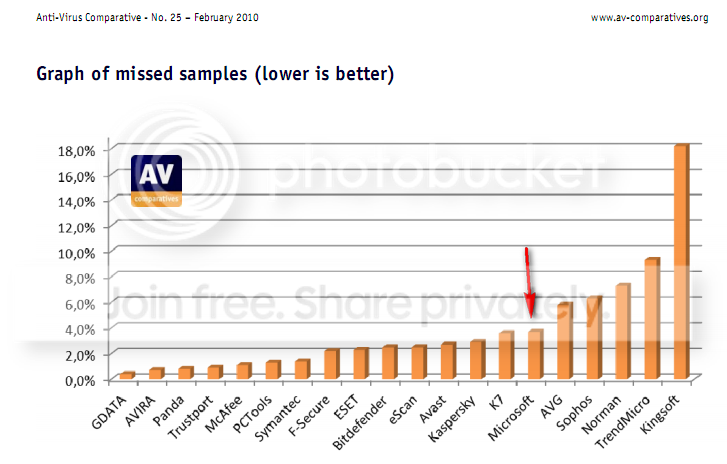
Arguably the best free antivirus program out right now is Microsoft Security Essentials.
That could be argued as per the latest AV test report. Note: The AVG shown is the paid version.

2010-03-22_193327.png
 

My Computer

Computer Manufacturer/Model Number
HP, Dell, Gateway, Toshiba - 4 laptops and 2 desktops
OS
Vista, Windows7, Mint Mate, Zorin, Windows 8
CPU
from 1.6GHz Duo to i7
Monitor(s) Displays
2x HP w2207
Hard Drives
5x HDD, 7x SSD, 12x Externals
Keyboard
with trackball - no mices
Mouse
Trackball mice
Internet Speed
DSL 6000
Have put Avast on over a hundred machines with no issues, but it began missing the newer serious fake-virus-scan Trojans even when run in boot mode. Meanwhile MSE found every one when run from desktop (it can now be run from Safe Mode).

What convinced me most is that Spybot in Safe Mode would flush the worst infections hiding in Memory, but also was missing these newer Trojans while MSE got em without even having to flush memory.

Have experienced fails with every free AV product but MSE so that along with ease of install and invisibility makes it an easy choice for now.
 
Hi, first of all make sure the AV you do not want to run on your account is not in the startup folder in the Start Menu in your account.
It may be the case that it is not in there in which case make sure the antivirus you don't want running on your account is not set to start when Windows starts (this can be found somewhere in preferences / settings within the AV).
Now go into the guest account and find the icon in the Start Menu for the guest only antivirus.
Copy this to the startup folder in the Start Menu of the guest account.

The guest only AV should now only open when the guest account is logged in and not in your account too.

May I just ask why you are using two antivirus programs in the first place? This can cause more problems with virtually no new benefits gained compared to having a single antivirus program.

I hope this is of some use.

Oli

Well im not useing two on my profile at all. I just wanted to use two on my visitors account so i could make double sure that i didnt get a virus while someone who dosn't kno what their doin is on. But i didnt kno that running two at the same time didnt work...my thoery was that if i ran two, then mabey one of them would catch a virus that the other one didnt. but i guess i was wrong. i guess ill just stick to avast only......

oh and i just figured out that i had mse and avast running at the same time.! i forgot that i had to dl it in order to access the wifi at my college...im so silly......i guess i will trun off avast and just run mse since its supposed to b better..but ill miss avast cuase it seems more user freindly and easier to use
 

My Computer

OS
windows 7
Arguably the best free antivirus program out right now is Microsoft Security Essentials.
Not a bad choice, but I think Avira's Antivir is much better.
 

My Computer

Computer Manufacturer/Model Number
NVIDIA
OS
Windows 7 Enterprise x64
CPU
AMD Athlon 64X2 Dual Core 3800+
Motherboard
GeForce 6100-M9
Memory
OCZ Platinum Dual Channel - 4x1Gb
Graphics Card(s)
NVIDIA GeForce 8800 GT PCI Express x16
Sound Card
Creative Audigy Sound Blaster Extreme PCI
Monitor(s) Displays
Compaq 7500
Screen Resolution
1024x768
Hard Drives
C: Seagate ST3250318AS SataII - 250Gb

D: Seagate ST3500418AS SataII - 500Gb
PSU
OCZ 600w Dual 12v Rails
Case
Thermaltake
Cooling
OCZ Heatsinks, Fans, and Thermal Paste on CPU & Chipsets
Keyboard
Logitech
Mouse
Radio Shack PS2
Internet Speed
Cable
Other Info
Dual Pioneer DVD/RW optical drives. LG CD/RW optical drive.
i guess i will trun off avast and just run mse since its supposed to b better..but ill miss avast cuase it seems more user freindly and easier to use
You should remove Avast, instead of disabling it, to ensure there's no conflicts with MSE.
 

My Computer

Computer Manufacturer/Model Number
NVIDIA
OS
Windows 7 Enterprise x64
CPU
AMD Athlon 64X2 Dual Core 3800+
Motherboard
GeForce 6100-M9
Memory
OCZ Platinum Dual Channel - 4x1Gb
Graphics Card(s)
NVIDIA GeForce 8800 GT PCI Express x16
Sound Card
Creative Audigy Sound Blaster Extreme PCI
Monitor(s) Displays
Compaq 7500
Screen Resolution
1024x768
Hard Drives
C: Seagate ST3250318AS SataII - 250Gb

D: Seagate ST3500418AS SataII - 500Gb
PSU
OCZ 600w Dual 12v Rails
Case
Thermaltake
Cooling
OCZ Heatsinks, Fans, and Thermal Paste on CPU & Chipsets
Keyboard
Logitech
Mouse
Radio Shack PS2
Internet Speed
Cable
Other Info
Dual Pioneer DVD/RW optical drives. LG CD/RW optical drive.
Back
Top