Any Backup Program Hangs OS When Chosen

Win7rap

New member
Member
VIP
Local time
2:16 PM
Messages
120
Just upgraded wife's laptop to Win7 from Vista (clean install) and almost everything works ... except (haven't tried everything)...when tried to create a repair disk - system hung.

First: typed 'repair' into start->search ... got 'link' to How to Create... clicked and system hung (rotating circle - nothing worked... C-A-D, Esc) Had to power off to recover.

Second: tried Control Panel-> Backup... chose Create Repair - nothing happened ... chose Create System Image - nothing happened. Chose Create Repair again - hang (same as above - C-A-D didn't work)

Third: tried to get to System Restore - HANG

What to do?

System: MSI VR420, 1.86 GHz, 2 Gb RAM, 200 Gb HDD (130 Gb free)
 

My Computer

OS
Win 7
You may have junk left from old install.

Try a full clean & full format.
http://www.sevenforums.com/tutorials/52129-disk-clean-clean-all-diskpart-command.html
http://www.sevenforums.com/tutorials/2668-partition-volume-delete.html?ltr=P
http://www.sevenforums.com/tutorials/2674-partition-volume-create-new.html?ltr=P
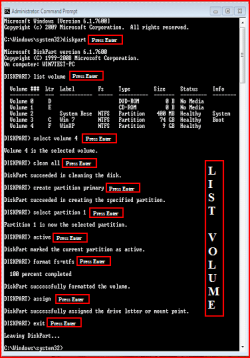
1) Boot DVD.
2) Press Shift+F10 (for command prompt)

Type in command line
DISKPART
LIST DISK OR List Volume (If you have partitions)
SELECT DISK # (win HD)
CLEAN ALL
CREATE PARTITION PRIMARY
SELECT PARTITION 1
ACTIVE
FORMAT=NTFS
ASSIGN
EXIT
EXIT

List Disk.PNG List Volume.PNG

http://www.sevenforums.com/tutorials/91339-ssd-optimize-windows-re-installation.html
 

My Computer

OS
ME/XP/Vista/Win7
Thank You

Any idea how many times I can activate Win 7 from Upgrade? ... have done it twice now.
 

My Computer

OS
Win 7
Thick headed/slow or just confused ... actually both.

When booted from DVD (the Upgrade DVD) and Shift+F10 got cmd prompt) ... but ...
when entered DISKPART result was that cmd was unknown.
What am I doing wrong?

Guess I don't really understand what's going on ... if I do this (CLEAN ALL, etc) when Windows\System32 exists, won't that 'wipe out' the directory?
 

My Computer

OS
Win 7
I realize that and it's not a problem (have backups) ... the thing I don't understand is how the 'CLEAN ALL' can be completed

Booting from Upgrade DVD -> shift+F10 ... then entering DISKPART results in CMD UNKNOWN
 

My Computer

OS
Win 7
I realize that and it's not a problem (have backups) ... the thing I don't understand is how the 'CLEAN ALL' can be completed

Booting from Upgrade DVD -> shift+F10 ... then entering DISKPART results in CMD UNKNOWN

Looking at the screenshots above, I would try lower case letters and see if that works.;)
 

My Computer

Computer type
PC/Desktop
Computer Manufacturer/Model Number
Self Built
OS
Win 10 Pro x64
CPU
Intel I5-2500K @3.3GHz
Motherboard
Asrock P67 Extreme4
Memory
16GB G.Skill Ripjaws X (4x4GB)
Graphics Card(s)
EVGA GeForce 750 Ti SC 2GB
Sound Card
ASUS Xonar DG 5.1 Channels 24-bit 96KHz PCI Interface Sound
Monitor(s) Displays
auria eq2367
Screen Resolution
1920 x 1080
Hard Drives
250GB Samsung 850 EVO SSD
1TB WD Blue
1TB Hitachi
PSU
SeaSonic X 650W 80 Plus Gold
Case
Corsair Obsidian 750D
Cooling
Corsair H60, Three 140mm case fans
Keyboard
Logitech Wireless Keyboard K520
Mouse
Logitech Wireless Mouse M310
Internet Speed
Wave Broadband ~ 100 dn 5 up
Antivirus
Windows Defender, Malwarebytes Premium
Browser
Edge, IE11, Chrome
Other Info
Laptop specs: HP g7-1365dx /
CPU: AMD A6-3420M APU with Radeon(tm) HD Graphics /
RAM: Crucial 8Gb (2x4Gb) /
SSD: Crucial M4-CT128M4SSD2 ATA Device/ FW 000F /
GFX: AMD Radeon HD 6520G /
OS: Windows 10 Pro x64
sheepish - lower case did it

will continue tomorrow
 

My Computer

OS
Win 7
Back
Top