
You are using an out of date browser. It may not display this or other websites correctly.
You should upgrade or use an alternative browser.
You should upgrade or use an alternative browser.
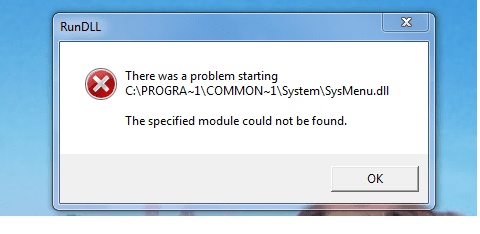
Any solution on this error message?
- Thread starter snarfman
- Start date

Have you just installed any software?
Run a System File Check in a elevated command.
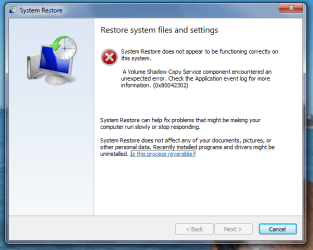
Run a System Restore to an earlier date.
Run a System File Check in a elevated command.
Run a System Restore to an earlier date.
My Computer
- Computer type
- PC/Desktop
- Computer Manufacturer/Model Number
- Owner Builder
- OS
- Windows 7 Ultimate x64 SP1 OEM
- CPU
- Intel i7 3930K
- Motherboard
- Asus X79 Deluxe
- Memory
- Kingston Genesis KHX2133C11D3K4/32G
- Graphics Card(s)
- Asus RTX 2070 Ti Turbo fan series
- Sound Card
- Creative Sound Blaster ZXR
- Monitor(s) Displays
- Samsung U32J39 UHD
- Screen Resolution
- 3840 x 2160
- Hard Drives
- Samsung 860 Pro 256 GB
OCZ Vertex 4 512GB
Western Digital Black 4TB
- PSU
- Corsair AX850
- Case
- Gigabyte
- Cooling
- Push - Pull 120 mm Noctua PWM, Scythe Big Shuriken 2 Rev. B
- Keyboard
- Logitech K800 Backlit
- Mouse
- Logitech MX2 Master
- Internet Speed
- NBN 25 Mbps
- Antivirus
- Kaspersky Internet Security
- Browser
- Mozilla FireFox
- Other Info
- TP-Link Archer VR600v
Sennheiser TR220 WiFi Head Phones.

My Computer
- Computer Manufacturer/Model Number
- HP, Dell, Gateway, Toshiba - 4 laptops and 2 desktops
- OS
- Vista, Windows7, Mint Mate, Zorin, Windows 8
- CPU
- from 1.6GHz Duo to i7
- Monitor(s) Displays
- 2x HP w2207
- Hard Drives
- 5x HDD, 7x SSD, 12x Externals
- Keyboard
- with trackball - no mices
- Mouse
- Trackball mice
- Internet Speed
- DSL 6000
My Computer
- OS
- windows 7 64 bit
Perhaps you should update your virus scanner and boot into Safe Mode and run a in depth scan.
What virus scanner do you use?
What virus scanner do you use?
My Computer
- Computer type
- PC/Desktop
- Computer Manufacturer/Model Number
- Owner Builder
- OS
- Windows 7 Ultimate x64 SP1 OEM
- CPU
- Intel i7 3930K
- Motherboard
- Asus X79 Deluxe
- Memory
- Kingston Genesis KHX2133C11D3K4/32G
- Graphics Card(s)
- Asus RTX 2070 Ti Turbo fan series
- Sound Card
- Creative Sound Blaster ZXR
- Monitor(s) Displays
- Samsung U32J39 UHD
- Screen Resolution
- 3840 x 2160
- Hard Drives
- Samsung 860 Pro 256 GB
OCZ Vertex 4 512GB
Western Digital Black 4TB
- PSU
- Corsair AX850
- Case
- Gigabyte
- Cooling
- Push - Pull 120 mm Noctua PWM, Scythe Big Shuriken 2 Rev. B
- Keyboard
- Logitech K800 Backlit
- Mouse
- Logitech MX2 Master
- Internet Speed
- NBN 25 Mbps
- Antivirus
- Kaspersky Internet Security
- Browser
- Mozilla FireFox
- Other Info
- TP-Link Archer VR600v
Sennheiser TR220 WiFi Head Phones.

- Local time
- 10:59 AM
- Messages
- 725
You have a registry reference to a file Windows is trying to load at startup (SysMenu.dll) that's no longer there. I've seen this usually occur when either:
Download and run autoruns from SysInternals. Click Ctl+F and search for SysMenu. Is there an entry? If so, you can uncheck it for now (disables the registry reference). After a few days when all still runs OK, you can then run autoruns again, right click the reference and select Delete to have autoruns remove it from the registry for you
- You've recently uninstalled something. The uninstaller deleted the file from disk but it failed to removed the startup reference to the file in the registry OR
- Your antivirus found malware (the file SysMenu.dll was a malicious file). It deleted the file from disk but failed to remove the registry reference that starts the malware file
Download and run autoruns from SysInternals. Click Ctl+F and search for SysMenu. Is there an entry? If so, you can uncheck it for now (disables the registry reference). After a few days when all still runs OK, you can then run autoruns again, right click the reference and select Delete to have autoruns remove it from the registry for you
My Computer
- Computer type
- PC/Desktop
- Computer Manufacturer/Model Number
- Dell Optiplex 360 and Optiplex 755
- OS
- Desk 1: Win 7 Pro x32; Desk 2: Windows 10 x64
- Hard Drives
- 500GB Crucial SSD in both Desktops
- Other Info
- Buffalo 6TB NAS, Raid 1