
Any themes out there that look like win 9x?

kackiz

New member
Local time
12:11 AM
Messages
25
I've been looking for custom "full conversion" windows 7 themes, but every time I come across any sort of list, the themes listed always have either sleek glass looks, are macOS wannabes, or look like KDE's Oxygen theme. I've been looking for a theme that looks more retro and boxy; not necessarily copies of old 90's desktops like CDE or windows 98. Linux has plenty of desktops and themes like this, but I have very use for Linux compared to Windows, and besides this is seven forums, so I'll just stick to Windows, because you cant spell Windows without WIN :D

Anyway, I'm looking for what I call "conversion packs", meaning themes that include custom sounds, icons, and of course, desktops (possibly even logon screen. I don't care about boot logo).

Thanks for any help in advance.
 

My Computer My Computer

At a glance

Windows 7 Ultimate x64; Ubuntu 18.04AMD FX-835016 GB DDR3 RAMNvidia GTX 1660ti
Computer type
PC/Desktop
Computer Manufacturer/Model Number
Custom Build
OS
Windows 7 Ultimate x64; Ubuntu 18.04
CPU
AMD FX-8350
Motherboard
ASUS ROG Crosshair IV Formula
Memory
16 GB DDR3 RAM
Graphics Card(s)
Nvidia GTX 1660ti
Sound Card
Internal Creative Soundblaster
Monitor(s) Displays
ASUS VS247
Screen Resolution
1920x1080 at 60Hz
Hard Drives
1 TB Seagate Hard drive formatted with standard Windows partitions; NTFS. 1 TB Western Digital Hard drive formatted for Ubuntu with a ext4 partition and a SWAP partition.
PSU
Thermaltake Smart Series 700W
Case
Thermaltake Level 20 GT
Cooling
3x Thermaltake fans; Proper AMD Wraith Cooler
Keyboard
Razor Ornata Chroma
Mouse
Generic Wireless mouse with 5 buttons
Internet Speed
100 Mbps LAN
Antivirus
None
Browser
Waterfox
Other Info
some parts of this build (Motherboard, GPU and CPU) are used, and will need an upgrade soon.
its looking like you may not get an answer so I'll give you half an answer. I just use a basic win7 aero theme however my machine does look like win98.

If you use Classic Shell you can use its "classic style" start menu which looks basically like win98. It will also allow you to use a custom start button like win95

Classic Shell • View topic - Windows 95/98 Start Button

If you download the original shell32.dll file for windows98 from this site
www.dll-downloads.com/dll_win98.asp- Download missing dll files immediately!

then rename it to be shell32win98.dll you can then change any icon on your system to the win98 version of that icon. Just browse to shell32win98.dll when using windows desktop "customize desktop icons" for instance. And for those cases where you need the actual ico file, you can extract all icon files from shell32win98.dll by using nirsoft icon extractor
IconsExtract - Extract icon/cursor stored in EXE, DLL, OCX, CPL files

I need win7 aero running all the time for the video performance so have sworn off basic (non-aero) themes so even if there is a win98 theme out there, chances are it is non-aero so I wouldn't use it myself.
 
Last edited:

My Computer My Computer

At a glance

Win7 pro x64stock i7 7700kCorsair Vengeance LPX 16GB (2x8GB) DDR4 @ 320...integrated Intel HD 630
Computer type
PC/Desktop
Computer Manufacturer/Model Number
diy
OS
Win7 pro x64
CPU
stock i7 7700k
Motherboard
Gigabyte Z270N-WIFI mini-ITX
Memory
Corsair Vengeance LPX 16GB (2x8GB) DDR4 @ 3200MHz
Graphics Card(s)
integrated Intel HD 630
Sound Card
onboard Realtek ALC1220
Monitor(s) Displays
two vertically mounted samsung 55" 4k un55mu8000
Screen Resolution
1920x1280
Hard Drives
256GB Samsung EVO 960 M.2 pci-e NVMe SSD
PSU
SilverStone Nightjar ST45NF 450Watt Fanless
Case
No case. Motherboard is mounted directly onto power supply
Cooling
Evercool low profile 815EP with Panaflow 12L fan at 7v
Keyboard
Ortek MCK-86 mini
Mouse
Belkin 5-button USB
Internet Speed
spectrum 400mbps
Thank you very much for the answer. Though it's not what I was quite looking for, it is part of what I wanted. I wish I could have context menus slide like the ones in older versions of windows, though I believe you can do that with Classic Shell.
 

My Computer My Computer

At a glance

Windows 7 Ultimate x64; Ubuntu 18.04AMD FX-835016 GB DDR3 RAMNvidia GTX 1660ti
Computer type
PC/Desktop
Computer Manufacturer/Model Number
Custom Build
OS
Windows 7 Ultimate x64; Ubuntu 18.04
CPU
AMD FX-8350
Motherboard
ASUS ROG Crosshair IV Formula
Memory
16 GB DDR3 RAM
Graphics Card(s)
Nvidia GTX 1660ti
Sound Card
Internal Creative Soundblaster
Monitor(s) Displays
ASUS VS247
Screen Resolution
1920x1080 at 60Hz
Hard Drives
1 TB Seagate Hard drive formatted with standard Windows partitions; NTFS. 1 TB Western Digital Hard drive formatted for Ubuntu with a ext4 partition and a SWAP partition.
PSU
Thermaltake Smart Series 700W
Case
Thermaltake Level 20 GT
Cooling
3x Thermaltake fans; Proper AMD Wraith Cooler
Keyboard
Razor Ornata Chroma
Mouse
Generic Wireless mouse with 5 buttons
Internet Speed
100 Mbps LAN
Antivirus
None
Browser
Waterfox
Other Info
some parts of this build (Motherboard, GPU and CPU) are used, and will need an upgrade soon.
My Computer My Computer

At a glance

Win7 pro x64stock i7 7700kCorsair Vengeance LPX 16GB (2x8GB) DDR4 @ 320...integrated Intel HD 630
Computer type
PC/Desktop
Computer Manufacturer/Model Number
diy
OS
Win7 pro x64
CPU
stock i7 7700k
Motherboard
Gigabyte Z270N-WIFI mini-ITX
Memory
Corsair Vengeance LPX 16GB (2x8GB) DDR4 @ 3200MHz
Graphics Card(s)
integrated Intel HD 630
Sound Card
onboard Realtek ALC1220
Monitor(s) Displays
two vertically mounted samsung 55" 4k un55mu8000
Screen Resolution
1920x1280
Hard Drives
256GB Samsung EVO 960 M.2 pci-e NVMe SSD
PSU
SilverStone Nightjar ST45NF 450Watt Fanless
Case
No case. Motherboard is mounted directly onto power supply
Cooling
Evercool low profile 815EP with Panaflow 12L fan at 7v
Keyboard
Ortek MCK-86 mini
Mouse
Belkin 5-button USB
Internet Speed
spectrum 400mbps
I'm referencing the animation context menus had on windows 98 through XP. When you clicked the right button, the menu would slide instead of fading, as it does since Vista.
 

My Computer My Computer

At a glance

Windows 7 Ultimate x64; Ubuntu 18.04AMD FX-835016 GB DDR3 RAMNvidia GTX 1660ti
Computer type
PC/Desktop
Computer Manufacturer/Model Number
Custom Build
OS
Windows 7 Ultimate x64; Ubuntu 18.04
CPU
AMD FX-8350
Motherboard
ASUS ROG Crosshair IV Formula
Memory
16 GB DDR3 RAM
Graphics Card(s)
Nvidia GTX 1660ti
Sound Card
Internal Creative Soundblaster
Monitor(s) Displays
ASUS VS247
Screen Resolution
1920x1080 at 60Hz
Hard Drives
1 TB Seagate Hard drive formatted with standard Windows partitions; NTFS. 1 TB Western Digital Hard drive formatted for Ubuntu with a ext4 partition and a SWAP partition.
PSU
Thermaltake Smart Series 700W
Case
Thermaltake Level 20 GT
Cooling
3x Thermaltake fans; Proper AMD Wraith Cooler
Keyboard
Razor Ornata Chroma
Mouse
Generic Wireless mouse with 5 buttons
Internet Speed
100 Mbps LAN
Antivirus
None
Browser
Waterfox
Other Info
some parts of this build (Motherboard, GPU and CPU) are used, and will need an upgrade soon.
I'm referencing the animation context menus had on windows 98 through XP. When you clicked the right button, the menu would slide instead of fading, as it does since Vista.
I'm afraid I still do not know what you mean. Right click where? Can you post a screenshot? On my system all animation is turned off - when you say both sliding and fading I think of animation.

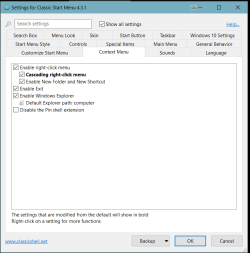
With classic shell I use what's called cascading menus, which was a feature introduced with win98.
 

Attachments

  • Clipboard01.png
    Clipboard01.png
    14.2 KB · Views: 0

My Computer My Computer

At a glance

Win7 pro x64stock i7 7700kCorsair Vengeance LPX 16GB (2x8GB) DDR4 @ 320...integrated Intel HD 630
Computer type
PC/Desktop
Computer Manufacturer/Model Number
diy
OS
Win7 pro x64
CPU
stock i7 7700k
Motherboard
Gigabyte Z270N-WIFI mini-ITX
Memory
Corsair Vengeance LPX 16GB (2x8GB) DDR4 @ 3200MHz
Graphics Card(s)
integrated Intel HD 630
Sound Card
onboard Realtek ALC1220
Monitor(s) Displays
two vertically mounted samsung 55" 4k un55mu8000
Screen Resolution
1920x1280
Hard Drives
256GB Samsung EVO 960 M.2 pci-e NVMe SSD
PSU
SilverStone Nightjar ST45NF 450Watt Fanless
Case
No case. Motherboard is mounted directly onto power supply
Cooling
Evercool low profile 815EP with Panaflow 12L fan at 7v
Keyboard
Ortek MCK-86 mini
Mouse
Belkin 5-button USB
Internet Speed
spectrum 400mbps
that is what mean, but for the context menu. E.G, when you right-click in the desktop.
 

My Computer My Computer

At a glance

Windows 7 Ultimate x64; Ubuntu 18.04AMD FX-835016 GB DDR3 RAMNvidia GTX 1660ti
Computer type
PC/Desktop
Computer Manufacturer/Model Number
Custom Build
OS
Windows 7 Ultimate x64; Ubuntu 18.04
CPU
AMD FX-8350
Motherboard
ASUS ROG Crosshair IV Formula
Memory
16 GB DDR3 RAM
Graphics Card(s)
Nvidia GTX 1660ti
Sound Card
Internal Creative Soundblaster
Monitor(s) Displays
ASUS VS247
Screen Resolution
1920x1080 at 60Hz
Hard Drives
1 TB Seagate Hard drive formatted with standard Windows partitions; NTFS. 1 TB Western Digital Hard drive formatted for Ubuntu with a ext4 partition and a SWAP partition.
PSU
Thermaltake Smart Series 700W
Case
Thermaltake Level 20 GT
Cooling
3x Thermaltake fans; Proper AMD Wraith Cooler
Keyboard
Razor Ornata Chroma
Mouse
Generic Wireless mouse with 5 buttons
Internet Speed
100 Mbps LAN
Antivirus
None
Browser
Waterfox
Other Info
some parts of this build (Motherboard, GPU and CPU) are used, and will need an upgrade soon.
that is what mean, but for the context menu. E.G, when you right-click in the desktop.
the below post #3 has it, but when I put in the link it may send you to the wrong post. So I'll post the link AND then quote the contents of post #3 just in case the link gets messed up.
https://www.sevenforums.com/tutorials/1908-visual-effects-settings-change.html#post431524
QUOTE:----------------------------------------------------
For anyone looking to change whether the popup / context menu animations are Fade or Slide (a dropdown that was available in XP), that tweak has been removed from the GUI in Windows 7.. another brilliant Microsoft change. This is particularly annoying since some remote desktop programs like LogMeIn change this setting.

It must now be manually changed in the registry if you wish to swap between Win98-style slide, or XP's fade. To do this, save either of the following as a .reg file using Notepad, and then double-click it to merge it into the registry.

For Win98 Slide effect:
___________________________________________
Windows Registry Editor Version 5.00

[HKEY_CURRENT_USER\Control Panel\Desktop]
"UserPreferencesMask"=hex:9e,28,07,80,12,00,00,00
____________________________________________
For the Default XP Fade effect:
____________________________________________
Windows Registry Editor Version 5.00

[HKEY_CURRENT_USER\Control Panel\Desktop]
"UserPreferencesMask"=hex:9e,3e,07,80,12,00,00,00
____________________________________________

You'll need to log off and log back on before changes will take place. If you're someone who likes the Win98-style slide (unlike myself), be aware that it wasn't really intended to be included in Windows 7. Most menus will just 'appear' since the slide animation is too fast, or the menu is too big. However, menus will show a drop shadow under them. Enjoy!
 

My Computer My Computer

At a glance

Win7 pro x64stock i7 7700kCorsair Vengeance LPX 16GB (2x8GB) DDR4 @ 320...integrated Intel HD 630
Computer type
PC/Desktop
Computer Manufacturer/Model Number
diy
OS
Win7 pro x64
CPU
stock i7 7700k
Motherboard
Gigabyte Z270N-WIFI mini-ITX
Memory
Corsair Vengeance LPX 16GB (2x8GB) DDR4 @ 3200MHz
Graphics Card(s)
integrated Intel HD 630
Sound Card
onboard Realtek ALC1220
Monitor(s) Displays
two vertically mounted samsung 55" 4k un55mu8000
Screen Resolution
1920x1280
Hard Drives
256GB Samsung EVO 960 M.2 pci-e NVMe SSD
PSU
SilverStone Nightjar ST45NF 450Watt Fanless
Case
No case. Motherboard is mounted directly onto power supply
Cooling
Evercool low profile 815EP with Panaflow 12L fan at 7v
Keyboard
Ortek MCK-86 mini
Mouse
Belkin 5-button USB
Internet Speed
spectrum 400mbps
Back
Top