Solved Any way to add storage to C drive from D?????

purplelover

New member
Member
VIP
Local time
6:48 PM
Messages
128
Location
Michigan
What was Dell thinking????? My laptop hard drive consists of C & D . My C drive has 8GB left on it. My D drive has 48GB on it. Any way to take 38GB of it and put on the C drive without losing everything???? Can I get more memory????

Hubby says he can reformat it but I can't IMAGINE having to save everything on the C drive and reinstall my software programs. Especially my PrintMAster since I just got it fixed and running again....

Thanks!
 

My Computer My Computer

At a glance

Windows 7 Home Premium 64bitIntel R Core (TM) i5M 450 @ 2.40GH 6GB (5.80 available
Computer type
PC/Desktop
Computer Manufacturer/Model Number
Dell
OS
Windows 7 Home Premium 64bit
CPU
Intel R Core (TM) i5
Memory
M 450 @ 2.40GH 6GB (5.80 available
Antivirus
Norton 360
Browser
Google Chrome
You may be able to do it from Disk Management.

Reduce the size of D: then expand C: to include the area of D: that was freed up.

Otherwise, Download Partition Wizard Home Edition - MajorGeeks

and use it to change the sizes.

I would STRONGLY urge you to backup your data first. These programs are good and very stable but things can and do go wrong. If that happens it's possible you could lose all your data.

Get an external USB hard drive.
Do an image backup of C: and D:.
Use partition wizard to resize the partitions.
If all goes well your done. If problems, use the backup image to restore the computer to the state it was in before.
 

My Computer My Computer

At a glance

Windows 10 Pro X64Intel Quad Core i7-4770 @ 3.4Ghz16.0GB PC3-12800 DDR3 SDRAM 1600 MHzIntel Integrated HD Graphics
Computer type
PC/Desktop
Computer Manufacturer/Model Number
Lenovo IdeaCenter 450
OS
Windows 10 Pro X64
CPU
Intel Quad Core i7-4770 @ 3.4Ghz
Memory
16.0GB PC3-12800 DDR3 SDRAM 1600 MHz
Graphics Card(s)
Intel Integrated HD Graphics
Sound Card
Realtek HD Audio
Monitor(s) Displays
HP 22" LCD
Screen Resolution
1680 x 1050
Hard Drives
250GB Samsung EVO SATA-3 SSD
2TB Seagate ST2000DM001 SATA-2
1.5TB Seagate ST3150041AS SATA
Keyboard
Dell USB
Mouse
Lenovo USB
Internet Speed
Cable via Road Runner 3MB Upload, 30MB Download
Antivirus
Windows Defender, MBAM Pro, MBAE
Browser
Seamonkey
Other Info
UEFI/GPT
PLDS DVD-RW DH16AERSH
Partition Wizard will do this very well. I did the same a few months ago. You want to unallocate the space on the left side of D and then expand C to this space with disc management. I do believe there is a tutorial on that. The safest way is to make a hard copy of the process first. And of course a backup or perhaps an image.
Art.
 

My Computer My Computer

At a glance

Win7 sp1 Pro 64bit / XP sp2 Pro (games only)Intel Core 2 Duo E8400 @ 3.00GHz8.00 GB Dual-Channel DDR2 @ 400MHz (5-5-5-18)1024MB GeForce GTX 560
Computer type
PC/Desktop
Computer Manufacturer/Model Number
Home built
OS
Win7 sp1 Pro 64bit / XP sp2 Pro (games only)
CPU
Intel Core 2 Duo E8400 @ 3.00GHz
Motherboard
Intel Corporation DP35DP (CPU1)
Memory
8.00 GB Dual-Channel DDR2 @ 400MHz (5-5-5-18)
Graphics Card(s)
1024MB GeForce GTX 560
Sound Card
NVIDIA High Definition Audio
Monitor(s) Displays
SyncMaster (2048x1152@60Hz)
Hard Drives
240GB Sandisc Extreme Pro SSD
244GB Seagate ST3250410AS
488GB Seagate ST500DM002-1BD142
931GB Western Digital WDC WD1003FZEX
PSU
Corsair 720
Case
ATX
Keyboard
HID Keyboard Device Logitech
Mouse
HID-compliant mouse Microsoft
Other Info
TSSTcorp CDDVDW SH-S223L

HL-DT-ST BD-RE BH12LS35
Too late to deal with it now....brain is shutting down.....first option looks so easy...prolly not
Thanks for your suggestions I have to do something soon......
 

My Computer My Computer

At a glance

Windows 7 Home Premium 64bitIntel R Core (TM) i5M 450 @ 2.40GH 6GB (5.80 available
Computer type
PC/Desktop
Computer Manufacturer/Model Number
Dell
OS
Windows 7 Home Premium 64bit
CPU
Intel R Core (TM) i5
Memory
M 450 @ 2.40GH 6GB (5.80 available
Antivirus
Norton 360
Browser
Google Chrome
What was Dell thinking????? My laptop hard drive consists of C & D . My C drive has 8GB left on it. My D drive has 48GB on it. Any way to take 38GB of it and put on the C drive without losing everything???? Can I get more memory????

You haven't told us how big the hard drive is and how much space is used in each partition.
You may be able to buy a bigger hard drive (more memory) and transfer everything you have now to the new hard drive.

It would help if you post a screen print of your Disk Management - Here's a tutorial:
http://www.sevenforums.com/tutorials/274797-disk-management-post-screen-capture-image.html
 

My Computer My Computer

At a glance

Multi-Boot W7_Pro_x64 W8.1_Pro_x64 W10_Pro_x6...AMD Athlon II x4 6206GB GSkill DDR2 800AMD 4670 GPU + AMD 4200 IGP
Computer type
PC/Desktop
Computer Manufacturer/Model Number
home built
OS
Multi-Boot W7_Pro_x64 W8.1_Pro_x64 W10_Pro_x64 +Linux_VMs +Chromium_VM
CPU
AMD Athlon II x4 620
Motherboard
Gigabyte GA-MA785G-UD3H
Memory
6GB GSkill DDR2 800
Graphics Card(s)
AMD 4670 GPU + AMD 4200 IGP
Sound Card
on board Realtek ALC889A
Monitor(s) Displays
RCA 40" LCD TV, Insignia 32" LCD TV, HP 15" LCD monitor
Screen Resolution
1680 x 1050
Hard Drives
OCZ Vertex 3 120GB,
Samsung F3 1TB (3),
Several others - WD, Seagate, Hitachi, ...
PSU
Corsair 500 W
Case
Rosewill mid tower
Cooling
CM 90mm rifle
Keyboard
Gyration wireless, Logitech wireless, Dell USB wired
Mouse
Gyration wireless, Logitech wireless, V7 USB wired
Internet Speed
Spectrum - 100Mbps D / 10Mbps U
Antivirus
Avast, MBAM3, EMET, WinPatrol
Browser
Pale Moon, Firefox, IE
Other Info
2 multi-boot PC's
Mainly HTPC/Office/Gen purpose (no gaming).
Trendnet USB KVM.
LG DVD burner/Blue Ray Player.
Tray system for removable SATA backup drives.

Not currently OCd, under-volted.
I use Hybrid sleep, rarely re-boot or shutdown.

Hauppauge HD-PVR, Avermedia PCIe TV Tuner, Hauppauge PCI TV Tuner.
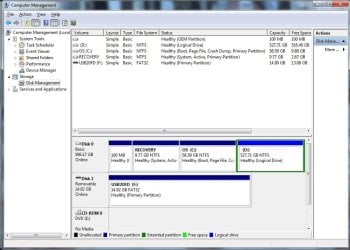
Lets see if I did it correctly.........
This any help???
 

Attachments

  • disk mgr.jpg
    disk mgr.jpg
    82.6 KB · Views: 6

My Computer My Computer

At a glance

Windows 7 Home Premium 64bitIntel R Core (TM) i5M 450 @ 2.40GH 6GB (5.80 available
Computer type
PC/Desktop
Computer Manufacturer/Model Number
Dell
OS
Windows 7 Home Premium 64bit
CPU
Intel R Core (TM) i5
Memory
M 450 @ 2.40GH 6GB (5.80 available
Antivirus
Norton 360
Browser
Google Chrome
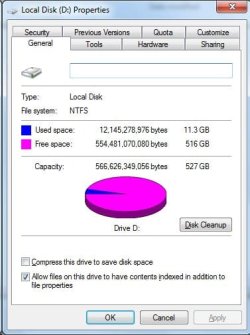
Is that possible 516GB left on D?????
 

Attachments

  • Ddrive.jpg
    Ddrive.jpg
    29 KB · Views: 72

My Computer My Computer

At a glance

Windows 7 Home Premium 64bitIntel R Core (TM) i5M 450 @ 2.40GH 6GB (5.80 available
Computer type
PC/Desktop
Computer Manufacturer/Model Number
Dell
OS
Windows 7 Home Premium 64bit
CPU
Intel R Core (TM) i5
Memory
M 450 @ 2.40GH 6GB (5.80 available
Antivirus
Norton 360
Browser
Google Chrome
Well I will be back tomorrow. It's almost 1:30a.m.

Thanks so much for the help.....
 

My Computer My Computer

At a glance

Windows 7 Home Premium 64bitIntel R Core (TM) i5M 450 @ 2.40GH 6GB (5.80 available
Computer type
PC/Desktop
Computer Manufacturer/Model Number
Dell
OS
Windows 7 Home Premium 64bit
CPU
Intel R Core (TM) i5
Memory
M 450 @ 2.40GH 6GB (5.80 available
Antivirus
Norton 360
Browser
Google Chrome
Is that possible 516GB left on D?????

Yea,
Sounds like you are storing User data on your drive and that's why it needs more space, and there is so much free space on [D], because you're not using it for User data. Do as suggested in Post #2 to resize - I don't think you need a bigger HD ...
 

My Computer My Computer

At a glance

Multi-Boot W7_Pro_x64 W8.1_Pro_x64 W10_Pro_x6...AMD Athlon II x4 6206GB GSkill DDR2 800AMD 4670 GPU + AMD 4200 IGP
Computer type
PC/Desktop
Computer Manufacturer/Model Number
home built
OS
Multi-Boot W7_Pro_x64 W8.1_Pro_x64 W10_Pro_x64 +Linux_VMs +Chromium_VM
CPU
AMD Athlon II x4 620
Motherboard
Gigabyte GA-MA785G-UD3H
Memory
6GB GSkill DDR2 800
Graphics Card(s)
AMD 4670 GPU + AMD 4200 IGP
Sound Card
on board Realtek ALC889A
Monitor(s) Displays
RCA 40" LCD TV, Insignia 32" LCD TV, HP 15" LCD monitor
Screen Resolution
1680 x 1050
Hard Drives
OCZ Vertex 3 120GB,
Samsung F3 1TB (3),
Several others - WD, Seagate, Hitachi, ...
PSU
Corsair 500 W
Case
Rosewill mid tower
Cooling
CM 90mm rifle
Keyboard
Gyration wireless, Logitech wireless, Dell USB wired
Mouse
Gyration wireless, Logitech wireless, V7 USB wired
Internet Speed
Spectrum - 100Mbps D / 10Mbps U
Antivirus
Avast, MBAM3, EMET, WinPatrol
Browser
Pale Moon, Firefox, IE
Other Info
2 multi-boot PC's
Mainly HTPC/Office/Gen purpose (no gaming).
Trendnet USB KVM.
LG DVD burner/Blue Ray Player.
Tray system for removable SATA backup drives.

Not currently OCd, under-volted.
I use Hybrid sleep, rarely re-boot or shutdown.

Hauppauge HD-PVR, Avermedia PCIe TV Tuner, Hauppauge PCI TV Tuner.
Hard drives are configured this way so we keep Win7 smaller for imaging purposes. But to accomplish this it also needs to have the User folders moved or copied to D and then linked back to the OS. There are two ways to do this: User Folders - Change Default Location to move them, or copy them yourself and then rightclick each to include in Library - Include a Folder - Windows 7 Forums followed by Library - Set Save Folder - Windows 7 Help Forums.

The point of this is to keep the backup image of C small enough with just the OS and Programs so that if it ever becomes irreparable you can reimage C in 20 minutes and your data is waiting and current in D.

If you don't want to mess with that then simply extend C into D by as much space as you wish to borrow: How to extend partition easily with Partition Wizard - video help.
Use the PW disk to be safest, and back up your files first.
http://partitionwizard.com/video-help/extend_partition/extend_partition.html
 
This a.m. I backed up the c & D drives..saved everything on my desktop too. Hubby was goiong to use disk management. I went out. Just got back and it won't even open. He was not able to reduce the D drive and add to c. He gets this message: BOOT MGR is missing. Press Control Alt To Restart
He does that
Then it spins for awhile and comes back with option to click on F2 or F10
What happened.......

unhappy camper......please tell me it can be besaved.....
 

My Computer My Computer

At a glance

Windows 7 Home Premium 64bitIntel R Core (TM) i5M 450 @ 2.40GH 6GB (5.80 available
Computer type
PC/Desktop
Computer Manufacturer/Model Number
Dell
OS
Windows 7 Home Premium 64bit
CPU
Intel R Core (TM) i5
Memory
M 450 @ 2.40GH 6GB (5.80 available
Antivirus
Norton 360
Browser
Google Chrome
What exact changes were made besides backing up the data?

Boot into System Recovery Options to try running Startup Repair a few times. If it fails confirm that the System (preferred) or C partition is Partition Marked Active which can also be done from Partition Wizard disk if you've made that yet. If no Active flag is set then after doing so run the REpairs again.

If this fails everything is here (including the Win7 disk) that can be done to start unbootable Win7 Troubleshooting Windows 7 Failure to Start leading up to if necessary rescuiing any other files, then running Dell Windows 7 PC Restore or doing the vastly superior Clean Reinstall - Factory OEM Windows 7 - Be sure to read the Note to Dell Owners at end.
 
Ztruker
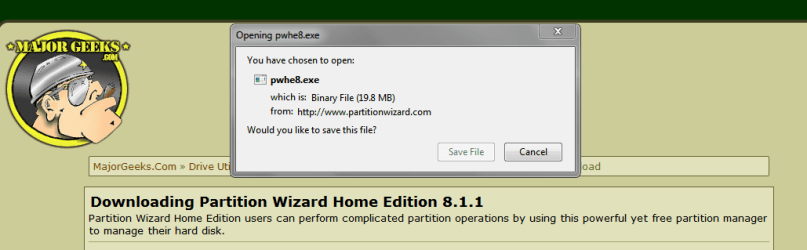
Is there any chance of downlkoading the Download Partition Wizard Home Edition - MajorGeeks now?
But how would I do that????
I am on my desktop now. Hubby tried to downlaod itthis a.m. but it wanted to load another scan program. No way to get around it so he got out of it. Why do you always have to downlod one program to get another????

So bummed out.... :(
 

My Computer My Computer

At a glance

Windows 7 Home Premium 64bitIntel R Core (TM) i5M 450 @ 2.40GH 6GB (5.80 available
Computer type
PC/Desktop
Computer Manufacturer/Model Number
Dell
OS
Windows 7 Home Premium 64bit
CPU
Intel R Core (TM) i5
Memory
M 450 @ 2.40GH 6GB (5.80 available
Antivirus
Norton 360
Browser
Google Chrome
I don't have that issue with the MajorGeeks/Partition Wizard link you posted.

Not sure what other scan program you see ...

Here's what I get

PWDSP01.PNG
 

My Computer My Computer

At a glance

Multi-Boot W7_Pro_x64 W8.1_Pro_x64 W10_Pro_x6...AMD Athlon II x4 6206GB GSkill DDR2 800AMD 4670 GPU + AMD 4200 IGP
Computer type
PC/Desktop
Computer Manufacturer/Model Number
home built
OS
Multi-Boot W7_Pro_x64 W8.1_Pro_x64 W10_Pro_x64 +Linux_VMs +Chromium_VM
CPU
AMD Athlon II x4 620
Motherboard
Gigabyte GA-MA785G-UD3H
Memory
6GB GSkill DDR2 800
Graphics Card(s)
AMD 4670 GPU + AMD 4200 IGP
Sound Card
on board Realtek ALC889A
Monitor(s) Displays
RCA 40" LCD TV, Insignia 32" LCD TV, HP 15" LCD monitor
Screen Resolution
1680 x 1050
Hard Drives
OCZ Vertex 3 120GB,
Samsung F3 1TB (3),
Several others - WD, Seagate, Hitachi, ...
PSU
Corsair 500 W
Case
Rosewill mid tower
Cooling
CM 90mm rifle
Keyboard
Gyration wireless, Logitech wireless, Dell USB wired
Mouse
Gyration wireless, Logitech wireless, V7 USB wired
Internet Speed
Spectrum - 100Mbps D / 10Mbps U
Antivirus
Avast, MBAM3, EMET, WinPatrol
Browser
Pale Moon, Firefox, IE
Other Info
2 multi-boot PC's
Mainly HTPC/Office/Gen purpose (no gaming).
Trendnet USB KVM.
LG DVD burner/Blue Ray Player.
Tray system for removable SATA backup drives.

Not currently OCd, under-volted.
I use Hybrid sleep, rarely re-boot or shutdown.

Hauppauge HD-PVR, Avermedia PCIe TV Tuner, Hauppauge PCI TV Tuner.

My Computer My Computer

At a glance

Windows 7 Home Premium 64bitIntel R Core (TM) i5M 450 @ 2.40GH 6GB (5.80 available
Computer type
PC/Desktop
Computer Manufacturer/Model Number
Dell
OS
Windows 7 Home Premium 64bit
CPU
Intel R Core (TM) i5
Memory
M 450 @ 2.40GH 6GB (5.80 available
Antivirus
Norton 360
Browser
Google Chrome
the blue screen sat there for 5 minutes than ERROR came up 04001100200001012

click o.k. and we are right back to
Boot Mgr is missing.

Hubby is now on the Dell site finding out how to reboot.....
Stay tuned and Thanks for everyine being willing to help me....
 

My Computer My Computer

At a glance

Windows 7 Home Premium 64bitIntel R Core (TM) i5M 450 @ 2.40GH 6GB (5.80 available
Computer type
PC/Desktop
Computer Manufacturer/Model Number
Dell
OS
Windows 7 Home Premium 64bit
CPU
Intel R Core (TM) i5
Memory
M 450 @ 2.40GH 6GB (5.80 available
Antivirus
Norton 360
Browser
Google Chrome
he can't Boot into System Recovery Options to try running Startup Repair a few times. The boot MGR is missing....

He put the restore disk in and so far we have a blue screen.....

Did you click the blue link to see how to boot into System Recovery Options ? This is not in Windows 7 but in the Advanced Boot Options, triggered by tapping the F8 key when the PC restarts, or booting the Win7 installation DVD or Repair CD - not the Dell Recovery disks if that's what you have.

Does it say Reinstallation Dsk on the Dell disk you have? That will work for the repair, but you must boot it by tapping the Dell F12 key at boot to choose DVD drive to boot.

If it will not enter Boot Options then you'll need to create a System Repair Disk on another Win7 PC, or download and burn to DVD or flash stick the Win7 installation media for your licensed version from Step 6 of Troubleshooting Windows 7 Failure to Start.

Then proceed with the steps I gave you earlier to run Startup Repair. If this fails continue with the Troubleshooting steps, or at any point you can bail out to rescue any more files and do the superior Clean Reinstall - Factory OEM Windows 7.
 
O.K. The only thing he did was to try and use the Disk MGr. He did not get to move the D space to the C space. somewhere along the line (do not know what he did) he got the Boot MGR missing error.

We do not have a Windows repair disk or reinstallation disk. He was trying to use the backup disk he made for,the laptop. No wonder it did not work.

He did try clciking the F10m and it put us back to the Boot Mgr thing....

Can someone tell me HOW to Boot into System Recovery Options
 

My Computer My Computer

At a glance

Windows 7 Home Premium 64bitIntel R Core (TM) i5M 450 @ 2.40GH 6GB (5.80 available
Computer type
PC/Desktop
Computer Manufacturer/Model Number
Dell
OS
Windows 7 Home Premium 64bit
CPU
Intel R Core (TM) i5
Memory
M 450 @ 2.40GH 6GB (5.80 available
Antivirus
Norton 360
Browser
Google Chrome
If you click on the blue underlined link it shows you the different ways to boot into Recovery Options.

Easiest is to reboot and tap the F8 key vigorously until the menu shows up, select Repair My Computer, accept any offered repair or click through to Options list to run Startup Repair.

Sometimes it takes good timing to get it to accept the F8 key so I'd try several times to see if that's the problem. If not then burn the Win7 disk from Step 6 of Troubleshooting Windows 7 Failure to Start to boot it using the F12 key, selecting DVD drive. I would also run the Diagnostics on that same F12 key menu, listed as both Diagnostics and a fuller suite on Utility partition that tests everything.

If you'll report back the results of every step I've given you thusfar, we'll know better what to do next if required.
 
Back
Top