Any way to automate this when updated webpage trick?

bratboy1

New member
Local time
11:02 PM
Messages
39
Okay, the other day I came across this trick for checking a web page for when it was last updated. All you do is either by copy/pasting or typing the following entire line, including the ( )'s, over the pages web address in the address bar when your on the page:

javascript:alert(document.lastModified)

then you hit enter and you get a pop-up that shows the date and time of last update. Very handy when doing research papers for school. Anyways is there some way to automate this so its an option I can just click when I'm on a page in IE8 or does IE8 already have a way to do this I just am unaware of? :geek:
Thx
 

My Computer My Computer

At a glance

Vista
OS
Vista
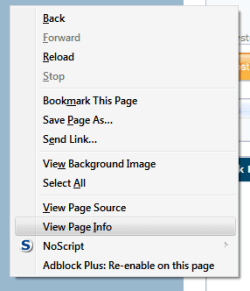
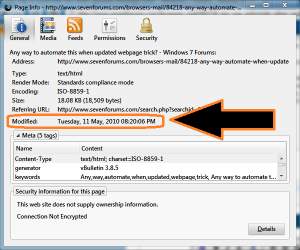
I'm not sure if it's in the same place in IE8, but if you right click anywhere in blank space on a webpage you should get the standard context menu. This should have an item called Page Info or View Page Info. This should show you a list of the current page's properties including the last modification. An IE8 user should be able to tell you where it's located, most likely either in the view menu, right click context menu or tools menu.

Here's an example in Firefox:
 

Attachments

  • pageinfo1.png
    pageinfo1.png
    5 KB · Views: 4
  • pageinfo2.png
    pageinfo2.png
    24.8 KB · Views: 9

My Computer My Computer

At a glance

W7 Ult. x64 | OS XIntel Mobile Core 2 Duo 2.93Ghz [T9800 Penryn]4096MB Samsung DDR3 Dual Channel [PC3-8500F 1...NVIDIA GeForce 9600M GT 512MB [G96M Rev. C1]
Computer Manufacturer/Model Number
Apple Macbook Pro (April 2009)
OS
W7 Ult. x64 | OS X
CPU
Intel Mobile Core 2 Duo 2.93Ghz [T9800 Penryn]
Motherboard
NVIDIA nForce 730i Rev. B1 [Mac-F2268EC8 (U2E1)]
Memory
4096MB Samsung DDR3 Dual Channel [PC3-8500F 1066Mhz]
Graphics Card(s)
NVIDIA GeForce 9600M GT 512MB [G96M Rev. C1]
Sound Card
SB X-Fi Surround 5.1 USB | Onboard Realtek (Disabled)
Monitor(s) Displays
Acer x223wbd 22" | Apple Anti-Glare 17" (Disabled)
Screen Resolution
{Current} 1440x900 {Acer} 1680x1050 {Apple} 1920x1200
Hard Drives
{Internal}
Seagate Momentus 320GB 2.5" 7200RPM [ST9320421AS]

{Externals}
LaCie 320GB USB 2.0 HDD [301284UR]
LaCie 750GB USB 2.0 FW400 eSATA HDD [301314U]
LaCie 1TB USB 2.0 HDD [301304UR]
PSU
Magsafe
Case
Aluminum/Unibody (MBP52)
Cooling
2 x 6000 RPM Fans
Keyboard
Logitech G-15v2 [PN 920-000379]
Mouse
Logitech G-9 [PN 910-000338]
Internet Speed
12Mbps/2.5Mbps w/ 24Mbps Speed Boost [Comcast]
Other Info
Logitech X-540 Speakers [PN 970223-0122]
Sennheiser PC-151 Headset
Hum, checked all 3 places and not sure. Closest thing I could find was "properties" in the context menu. I looked under both view and tools but didn't see a page info type option. I can view a pages source but thats not quite the same :(
 

My Computer My Computer

At a glance

Vista
OS
Vista

My Computer My Computer

At a glance

Windows 7 Home Premium 64-bitPentium(R) Dual-Core T4300 @ 2.10GHz3 GB DDR2 PC2-6400 (400 MHz) Samsung M4 70T28...Mobile Intel GMA4500M 32bit OS (64bit OS) dyn...
Computer Manufacturer/Model Number
Toshiba Satellite
OS
Windows 7 Home Premium 64-bit
CPU
Pentium(R) Dual-Core T4300 @ 2.10GHz
Motherboard
Toshiba Model KSWAA - Chipset Intel GL40 Rev 07
Memory
3 GB DDR2 PC2-6400 (400 MHz) Samsung M4 70T2864Q23-CF7
Graphics Card(s)
Mobile Intel GMA4500M 32bit OS (64bit OS) dynamically
Sound Card
Realtek ALC272-GR Software Sound
Monitor(s) Displays
16.0" HD TFT with TrueBrite Matrix colour LCD display
Screen Resolution
1366 x 768
Hard Drives
FUJITSU MJA2320BH G2-(S2) 320GB (5400RPM) Serial-ATA
Keyboard
Canadian Bilingual Keyboard 105 keys with 13 Function keys
Mouse
Touchpad Point device & Lexma USB Mouse
Internet Speed
Walking is Faster
Other Info
Wireless LAN Realtek RTL89191SE 802.11n PCI-E NIC + a
LAN Realek PCIe FE Family Controller and
TOSHIBA Software Modem
Well, thats why I asked specifically about sure an ability in IE, hehe. I am used to IE8, use it at work as well so no learn curve in general, so just haven't tried firefox. Basically its a choice and IE is what I'm used to. This was just something I'd found out how to do manually using javascript and figured would ask if it was tucked into IE somewhere.
 

My Computer My Computer

At a glance

Vista
OS
Vista
javascript:alert(document.lastModified) as a bookmarklet works fine in Firefox.
For some reason in SRWare Iron it pops up a dialog box with no info.


Just make a bookmark on your bookmarks toolbar or whatever the IE equivalent is.
I named mine Mod, and put this for URL
javascript:alert(document.lastModified)

Works fine in Opera too. I don't know what's up with Iron!

Hmmmmmmm, don't know how dependable it is though. I went to a Windows freeware site and it shows the mod date of Jan 1, 1970. I don't think so!!

It is annoying though when you do a search and read a page only to find out it's 2 years old. They should make a standard way to know the date of the page.

edit: Iron will show the info but I have to allow sites to show Popups to get it. :(

edit2: even at that it's hit and miss. Not good for Iron.
 

My Computer My Computer

At a glance

Windows 7 32 bitAMD 5200+ dual core2 GBNVidia GeForce 6150SE 128 MB
Computer Manufacturer/Model Number
HP Media Center
OS
Windows 7 32 bit
CPU
AMD 5200+ dual core
Memory
2 GB
Graphics Card(s)
NVidia GeForce 6150SE 128 MB
Monitor(s) Displays
CRT
Screen Resolution
1280x1024
Hard Drives
500 GB Sata internal :

SIIG USB 3.0 docking stations w/WD Caviar Black 6 Gb/s drives
Keyboard
PS/2
Mouse
PS/2 Wheel Mouse
Other Info
SIIG USB 3.0 PCIexpress card.
Stupid IE. It won't let me turn it into a bookmark. It keeps insisting on putting the Http:// on it.
 

My Computer My Computer

At a glance

Vista
OS
Vista
Oh well, since the Firefox Page Info works most of the time I can just use my Selector program to open the current page in Firefox, then look at the mod date.. since I'm almost always using Iron now.

Esp. blog/review type pages it drives me nuts. You start reading some review of some computer hardware or something and half way into it you realize they are talking about some USB 2.0 thing instead of a USB 3.0 thing. The article is like written in 2008 or some crap!!

I hate it when that happens!!
 

My Computer My Computer

At a glance

Windows 7 32 bitAMD 5200+ dual core2 GBNVidia GeForce 6150SE 128 MB
Computer Manufacturer/Model Number
HP Media Center
OS
Windows 7 32 bit
CPU
AMD 5200+ dual core
Memory
2 GB
Graphics Card(s)
NVidia GeForce 6150SE 128 MB
Monitor(s) Displays
CRT
Screen Resolution
1280x1024
Hard Drives
500 GB Sata internal :

SIIG USB 3.0 docking stations w/WD Caviar Black 6 Gb/s drives
Keyboard
PS/2
Mouse
PS/2 Wheel Mouse
Other Info
SIIG USB 3.0 PCIexpress card.
btw the home made bookmarklet using your javascript works fine in Google Chrome 5 Beta!!! Yay!!!

edit: guess it won't work on every site because some sites block it. But with SRWare Iron it worked on zero sites. Better'n nuthin' as the sayin' goes. :)


3dapplaudir.gif
 

My Computer My Computer

At a glance

Windows 7 32 bitAMD 5200+ dual core2 GBNVidia GeForce 6150SE 128 MB
Computer Manufacturer/Model Number
HP Media Center
OS
Windows 7 32 bit
CPU
AMD 5200+ dual core
Memory
2 GB
Graphics Card(s)
NVidia GeForce 6150SE 128 MB
Monitor(s) Displays
CRT
Screen Resolution
1280x1024
Hard Drives
500 GB Sata internal :

SIIG USB 3.0 docking stations w/WD Caviar Black 6 Gb/s drives
Keyboard
PS/2
Mouse
PS/2 Wheel Mouse
Other Info
SIIG USB 3.0 PCIexpress card.
Okay, so does anyone know how to create a favorite in ie to do it? Like I said If I try to just creat a favorite and then edit it so it has the text its constantly readding http:// to it
 

My Computer My Computer

At a glance

Vista
OS
Vista
I would search on the terms "bookmarklet" and "IE" there must be some way to get it to work in IE.

edit: this looks like it has good info. I don't use IE so I'm not going to read the whole enchilada:

http://www.mvps.org/dmcritchie/ie/bookmarklets.htm
 

My Computer My Computer

At a glance

Windows 7 32 bitAMD 5200+ dual core2 GBNVidia GeForce 6150SE 128 MB
Computer Manufacturer/Model Number
HP Media Center
OS
Windows 7 32 bit
CPU
AMD 5200+ dual core
Memory
2 GB
Graphics Card(s)
NVidia GeForce 6150SE 128 MB
Monitor(s) Displays
CRT
Screen Resolution
1280x1024
Hard Drives
500 GB Sata internal :

SIIG USB 3.0 docking stations w/WD Caviar Black 6 Gb/s drives
Keyboard
PS/2
Mouse
PS/2 Wheel Mouse
Other Info
SIIG USB 3.0 PCIexpress card.
Back
Top