Solved Any way to mod a Windows 10 iso so it'll install on an MBR partition?

teckneeculler

Member
Power User
VIP
Local time
8:06 AM
Messages
512
I'm experimenting with a temporary dual-boot W10 install on my W7 system.
My system drive is a 500GB SSD which has been running with just two partitions - System Reserved and C:\ .
Using Disk Management I shrunk the C partition and created a new 125GB partition for W10.
Only problem, when I began the install it told me I couldn't install W10 there because it was an MBR partition. I must have arranged this when I first installed W7 on the SSD. I confirmed the drive's state via cmd. It's definitely not GPT

Is there any way of making that new partition GPT? Or, if not, is it possible to reformat the entire 3x partition 500GB SSD from MBR to GPT without losing data?
 
Last edited:

My Computer My Computer

At a glance

Win7 Ultimate SP1Intel Core i5 9400 Coffee Lake 14nm16G DDR4NVidia GeForce GTX 960
Computer type
PC/Desktop
Computer Manufacturer/Model Number
My build
OS
Win7 Ultimate SP1
CPU
Intel Core i5 9400 Coffee Lake 14nm
Motherboard
Asus Prime H310M-E R2.0 (LGA1151)
Memory
16G DDR4
Graphics Card(s)
NVidia GeForce GTX 960
Sound Card
Realtek High Definition Audio (mobo)
Monitor(s) Displays
Asus PA248 24" 16:10 format
Screen Resolution
1920x1200@59Hz
Hard Drives
1863GB Seagate ST2000DM
3726GB Seagate ST4000DM
1863GB Seagate ST2000DM
6TB Seagate
465GB NVMe Samsung SSD 970
PSU
750G2
Case
Tower
Cooling
Standard
Keyboard
USB
Mouse
USB
Internet Speed
920Mbs/480Mbs
Antivirus
Malwarebytes
Browser
Firefox
...Only problem, when I began the install it told me I couldn't install W10 there because it was an MBR partition.
Windows 10 is quite capable of being installed on an MBR partition. A W10 install usb can boot in both Legacy mode or UEFI. Whichever mode you boot, than that is the one it will try to install. Boot in Legacy mode and it will install to MBR, boot in UEFI and it will be GPT.
 

My Computers My Computers

  • At a glance

    Windows 7 Home Premium x64AMD V1204GB
    Computer type
    Laptop
    Computer Manufacturer/Model Number
    Toshiba satellite C650D
    OS
    Windows 7 Home Premium x64
    CPU
    AMD V120
    Memory
    4GB
    Internet Speed
    150 Mbps
    Antivirus
    MSE
    Browser
    IE11, Edge, Firefox
    Other Info
    I also have W7 Pro on my System Two, and several W7 Hyper-V VMs. My other machines run Windows 10/11. Their specs are in my Ten Forums & Eleven Forum profiles.
  • At a glance

    Windows 7 Pro x64Intel i5-3320M8 GB
    Computer type
    Laptop
    System Manufacturer/Model Number
    Lenovo Thinkpad T430
    OS
    Windows 7 Pro x64
    CPU
    Intel i5-3320M
    Memory
    8 GB
    Hard Drives
    250GB Samsung SSD 860 EVO
    Antivirus
    MSE
Thanks Bree.
Thanks, Samuria. 4DDiG doesn't appear to get good press. One comment suggests that the free version is very limited, and buying it only works for a month.
The problem is that my W7 is on a 500GB M.2 SSD that's been formatted MBR. I want to install W10 on a new partition on that drive, so I'll need to back up the OS and System Reserved partitions somewhere else, format the drive GPT, then copy those partitions back, then create a third partition for W10. It might be a little more complicated but I'd be more confident of making it work.
 

My Computer My Computer

At a glance

Win7 Ultimate SP1Intel Core i5 9400 Coffee Lake 14nm16G DDR4NVidia GeForce GTX 960
Computer type
PC/Desktop
Computer Manufacturer/Model Number
My build
OS
Win7 Ultimate SP1
CPU
Intel Core i5 9400 Coffee Lake 14nm
Motherboard
Asus Prime H310M-E R2.0 (LGA1151)
Memory
16G DDR4
Graphics Card(s)
NVidia GeForce GTX 960
Sound Card
Realtek High Definition Audio (mobo)
Monitor(s) Displays
Asus PA248 24" 16:10 format
Screen Resolution
1920x1200@59Hz
Hard Drives
1863GB Seagate ST2000DM
3726GB Seagate ST4000DM
1863GB Seagate ST2000DM
6TB Seagate
465GB NVMe Samsung SSD 970
PSU
750G2
Case
Tower
Cooling
Standard
Keyboard
USB
Mouse
USB
Internet Speed
920Mbs/480Mbs
Antivirus
Malwarebytes
Browser
Firefox
No, no, no. It's a matter of booting the Setup the right way. There is an EFI and a non-EFI way of doing it, and so far you chose the EFI one. Choose the non-EFI aka MBR one.
 

My Computer My Computer

At a glance

Windows 7 Home Premium
Computer type
PC/Desktop
OS
Windows 7 Home Premium
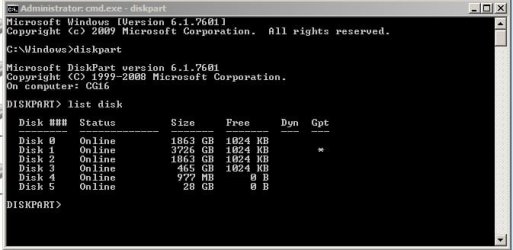
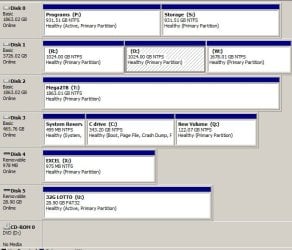
Thanks VZ: Thing is, I don't want to risk any problems with the other drives - spinners and USBs - by changing the BIOS to MBR. Even though (I assume) the change is only temporary. Spinners are 0,1,2. USBs are 4 and 5. Disk 3 is the 500GB M.2 SSD. New Volume Q is where I intended to put W10.dpart.jpgdpart2.jpg
 

My Computer My Computer

At a glance

Win7 Ultimate SP1Intel Core i5 9400 Coffee Lake 14nm16G DDR4NVidia GeForce GTX 960
Computer type
PC/Desktop
Computer Manufacturer/Model Number
My build
OS
Win7 Ultimate SP1
CPU
Intel Core i5 9400 Coffee Lake 14nm
Motherboard
Asus Prime H310M-E R2.0 (LGA1151)
Memory
16G DDR4
Graphics Card(s)
NVidia GeForce GTX 960
Sound Card
Realtek High Definition Audio (mobo)
Monitor(s) Displays
Asus PA248 24" 16:10 format
Screen Resolution
1920x1200@59Hz
Hard Drives
1863GB Seagate ST2000DM
3726GB Seagate ST4000DM
1863GB Seagate ST2000DM
6TB Seagate
465GB NVMe Samsung SSD 970
PSU
750G2
Case
Tower
Cooling
Standard
Keyboard
USB
Mouse
USB
Internet Speed
920Mbs/480Mbs
Antivirus
Malwarebytes
Browser
Firefox
I don't know what this means. The BIOS is booting MBR right now. Only your Windows 10 Setup is booting GPT by your choice. If you can boot it GPT, you can boot it MBR. Could be called Legacy in the UEFI menu.
 

My Computer My Computer

At a glance

Windows 7 Home Premium
Computer type
PC/Desktop
OS
Windows 7 Home Premium
Thanks, I'll check. The mobo is an Asus PRIME H310M-E R2. But right now I have to grab my chainsaw and go get some firewood. BRB.
 

My Computer My Computer

At a glance

Win7 Ultimate SP1Intel Core i5 9400 Coffee Lake 14nm16G DDR4NVidia GeForce GTX 960
Computer type
PC/Desktop
Computer Manufacturer/Model Number
My build
OS
Win7 Ultimate SP1
CPU
Intel Core i5 9400 Coffee Lake 14nm
Motherboard
Asus Prime H310M-E R2.0 (LGA1151)
Memory
16G DDR4
Graphics Card(s)
NVidia GeForce GTX 960
Sound Card
Realtek High Definition Audio (mobo)
Monitor(s) Displays
Asus PA248 24" 16:10 format
Screen Resolution
1920x1200@59Hz
Hard Drives
1863GB Seagate ST2000DM
3726GB Seagate ST4000DM
1863GB Seagate ST2000DM
6TB Seagate
465GB NVMe Samsung SSD 970
PSU
750G2
Case
Tower
Cooling
Standard
Keyboard
USB
Mouse
USB
Internet Speed
920Mbs/480Mbs
Antivirus
Malwarebytes
Browser
Firefox
MBR or GPT is a characteristic of a drive, not a partition.

From your Disk Manager image, your Win 7 is installed on drive 3 that is a MBR drive.
So you must install Win 10 on the drive as Legacy - MBR and not UEFI - GPT.

Windows can be installed in two ways: Legacy-MBR or UEFI-GPT
To install as Legacy-MBR you must boot the installation drive as Legacy
To install as UEFI-GPT you must boot the installation drive as UEFI.


Detach any other drives (SATA or Power cable) from the MB.

During POST, press F8 to launch the boot menu. You will see two options for the USB drive. USB UEFI (Name) and USB (Name). Select USB (name) to install as Legacy-MBR.
Go to install and select the last partition to install on and then proceed.
If you don't want to use MS account, don't enable updates or connect to the internet during installation.
 

My Computers My Computers

  • At a glance

    Windows 7 HP 64i5 6600K - 800MHz to 4200MHz4+4G GSkill DDR4 3000IG - Intel 530
    Computer type
    PC/Desktop
    Computer Manufacturer/Model Number
    custom build
    OS
    Windows 7 HP 64
    CPU
    i5 6600K - 800MHz to 4200MHz
    Motherboard
    GA-Z170-HD3P
    Memory
    4+4G GSkill DDR4 3000
    Graphics Card(s)
    IG - Intel 530
    Monitor(s) Displays
    Samsung 226BW
    Screen Resolution
    1680x1050
    Hard Drives
    (1) -1 SM951 – 128GB M.2 AHCI PCIe SSD drive for Windows 7 and Lubuntu
    (2) -1 WD SATA 3 - 1T for Data
    (3) -1 WD SATA 3 - 1T for backup
    PSU
    Thermaltake 450W TR2 gold
    Keyboard
    Old and good Chicony mechanical keyboard
    Mouse
    Logitech mX performance - 9 buttons (had to disable some)
    Internet Speed
    500Mb/s
    Browser
    Firefox 64
    Other Info
    TinyWall firewall
  • At a glance

    Windows 7 Proi7-4500U 800MHz to 3.0GHz(4+4)G DDR3 1600IG intel 4400 + NVIDIA GeForce GT 745M
    Computer type
    Laptop
    System Manufacturer/Model Number
    Asus Q550LF
    OS
    Windows 7 Pro
    CPU
    i7-4500U 800MHz to 3.0GHz
    Motherboard
    Asus Q550LF
    Memory
    (4+4)G DDR3 1600
    Graphics Card(s)
    IG intel 4400 + NVIDIA GeForce GT 745M
    Sound Card
    Realtek
    Monitor(s) Displays
    LG Display LP156WF4-SPH1
    Screen Resolution
    1920 x 1080
    Hard Drives
    BX500 120G SSD for Windows and programs +
    1T HDD for data
    Internet Speed
    500 Mb/s
    Browser
    Firefox
    Other Info
    TinyWall firewall
Some motherboards allow the user to select "both" in bios.

I think the asus 310 motherboard does not have that setting. I had a couple of those briefly, till I realised a higher 300 series has advantages. In that case, should be able to select by using the one time boot menu key. No need to keep going into bios to change the setting there.

From memory, I think tap F8 at post beep on asus to get the one time boot menu.

- - - Updated - - -

Or you could convert your 465GB NVMe Samsung SSD 970 disk to gpt partition style. It is quite easy.

- - - Updated - - -

To install as Legacy-MBR you must boot the installation drive as Legacy

Not necessarily. Could use the apply method, either from winpe or from within the existing win7 installation.
 

My Computers My Computers

  • At a glance

    7 X64i5 84002x8gb 3200mhz
    Computer type
    PC/Desktop
    OS
    7 X64
    CPU
    i5 8400
    Motherboard
    gigabyte b365m ds3h
    Memory
    2x8gb 3200mhz
    Hard Drives
    various
    PSU
    pure power 11 400w cm
    Case
    Coolermaster
    Cooling
    cryorig m9i
  • At a glance

    7x64g54008gb ddr4 2400
    Computer type
    PC/Desktop
    OS
    7x64
    CPU
    g5400
    Motherboard
    ga b365m ds3h
    Memory
    8gb ddr4 2400
    PSU
    xfx pro 450w
Megahertz: Thanks, but if I understand you correctly, I'm not intending to install W10 on the USB drives. They're just unimportant data caches.
SIW2: 'Or you could convert your 465GB NVMe Samsung SSD 970 disk to gpt partition style. It is quite easy.' This would definitely be my preferred option but how to achieve this? Seems to me I'd need to backup the entire drive contents (possibly first removing the Q partition to simplify the operation), convert the SSD to GPT, using Diskpart or whatever, then copy back the original contents. I guess I could do that with Macrium.
 

My Computer My Computer

At a glance

Win7 Ultimate SP1Intel Core i5 9400 Coffee Lake 14nm16G DDR4NVidia GeForce GTX 960
Computer type
PC/Desktop
Computer Manufacturer/Model Number
My build
OS
Win7 Ultimate SP1
CPU
Intel Core i5 9400 Coffee Lake 14nm
Motherboard
Asus Prime H310M-E R2.0 (LGA1151)
Memory
16G DDR4
Graphics Card(s)
NVidia GeForce GTX 960
Sound Card
Realtek High Definition Audio (mobo)
Monitor(s) Displays
Asus PA248 24" 16:10 format
Screen Resolution
1920x1200@59Hz
Hard Drives
1863GB Seagate ST2000DM
3726GB Seagate ST4000DM
1863GB Seagate ST2000DM
6TB Seagate
465GB NVMe Samsung SSD 970
PSU
750G2
Case
Tower
Cooling
Standard
Keyboard
USB
Mouse
USB
Internet Speed
920Mbs/480Mbs
Antivirus
Malwarebytes
Browser
Firefox
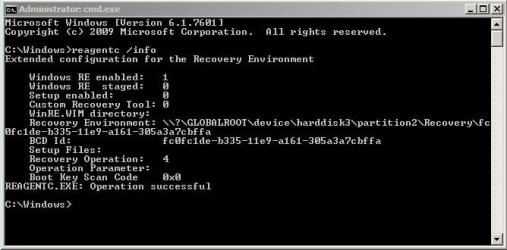
If you have winre enabled, disable it first at admin cmd propmt

reagentc /disable

Then I would use the free version of diskgenius. Create the boot media, boot it up and run it from there.

1. convert the evo 970 disk to gpt

2. convert the 499mb partition to esp partition

3. use bcdboot command to create the boot entry

takes only a few seconds to do each of the above.

I have done it many times, without any data loss


you can borrow my boot media . I think I included diskgenius
23v7.iso

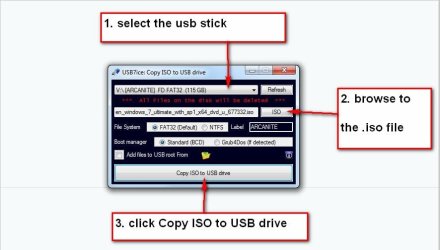
extract the 23v7.iso to usb stick using something like usb7ice :ar: View attachment Usb7ice.zip

usb7ice.JPG

- - - Updated - - -

***********************************************************************************************************************************

1. convert disk to gpt

Right-click the MBR disk you want to change partition table type and choose "Convert To GUID Partition Table".

then Click "Save All" button from toolbar and click "Yes" to save changes to the disk

Convert Partition Type Between MBR and GPT Without Data Loss


2. convert 499mb partition to esp partition

the easiest way is delete the 499mb partition. Rt click the 499mb partition and select delete current partition ( then click save all )

rt click the 499 unallocated space and select "create esp/msr" accept the sizes and offsets it offers . Then click save all ( it will ask if you want to format esp partition immediately, say yes ).

3. then it is just populate the esp partition with the boot critical files using bcdboot command

at cmd prompt

bcdboot whatever is the windows partition letter as seen from winpe:\windows /s device path /f all

for example

bcdboot d:\windows /s \Device\HarddiskVolume6 /f all


you can find the device path of the esp partition in diskgenius main window on the right and copy and paste it into the command

dg-devicepath6.jpg
 
Last edited:

My Computers My Computers

  • At a glance

    7 X64i5 84002x8gb 3200mhz
    Computer type
    PC/Desktop
    OS
    7 X64
    CPU
    i5 8400
    Motherboard
    gigabyte b365m ds3h
    Memory
    2x8gb 3200mhz
    Hard Drives
    various
    PSU
    pure power 11 400w cm
    Case
    Coolermaster
    Cooling
    cryorig m9i
  • At a glance

    7x64g54008gb ddr4 2400
    Computer type
    PC/Desktop
    OS
    7x64
    CPU
    g5400
    Motherboard
    ga b365m ds3h
    Memory
    8gb ddr4 2400
    PSU
    xfx pro 450w
SIW2: Wow, that's excellent. If I can manage to get my head around the method, it'll solve my problem. Thanks so much.

Edit: Looks like WinRe is enabled. I had no idea. Duh.
winre.jpg
Neither did I really know that an 'esp' is...
The EFI (Extensible Firmware Interface) system partition contains the boot loaders, boot managers, or kernel images of installed operating systems (which are typically contained in other partitions), device driver files for hardware devices present in a computer and used by the firmware at boot time, system utility programs that are intended to be run before an before an operating system is booted, and data files such as error logs.
Thanks mate, got the iso. I'm on a voyage of discovery:-)
 
Last edited:

My Computer My Computer

At a glance

Win7 Ultimate SP1Intel Core i5 9400 Coffee Lake 14nm16G DDR4NVidia GeForce GTX 960
Computer type
PC/Desktop
Computer Manufacturer/Model Number
My build
OS
Win7 Ultimate SP1
CPU
Intel Core i5 9400 Coffee Lake 14nm
Motherboard
Asus Prime H310M-E R2.0 (LGA1151)
Memory
16G DDR4
Graphics Card(s)
NVidia GeForce GTX 960
Sound Card
Realtek High Definition Audio (mobo)
Monitor(s) Displays
Asus PA248 24" 16:10 format
Screen Resolution
1920x1200@59Hz
Hard Drives
1863GB Seagate ST2000DM
3726GB Seagate ST4000DM
1863GB Seagate ST2000DM
6TB Seagate
465GB NVMe Samsung SSD 970
PSU
750G2
Case
Tower
Cooling
Standard
Keyboard
USB
Mouse
USB
Internet Speed
920Mbs/480Mbs
Antivirus
Malwarebytes
Browser
Firefox
It's so much easier. Of course you are not intending to install Windows 10 on the USB drives. It's not us who are getting you wrong. It's you who is getting us wrong. Your USB drive (drive U) is marked as active, so it is BIOS (MBR) bootable. There is a non-EFI entry for the device existing in your UEFI, and all you need to do is find it. There are no permanent changes to make as this is a one time choice.

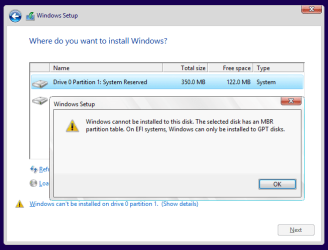
I can easily reproduce the error you are seeing by booting a Setup the wrong way:

Cannot be installed.PNG
 

My Computer My Computer

At a glance

Windows 7 Home Premium
Computer type
PC/Desktop
OS
Windows 7 Home Premium
Megahertz: Thanks, but if I understand you correctly, I'm not intending to install W10 on the USB drives. They're just unimportant data caches.

No, you undestood all WRONG. Read it again.
 

My Computers My Computers

  • At a glance

    Windows 7 HP 64i5 6600K - 800MHz to 4200MHz4+4G GSkill DDR4 3000IG - Intel 530
    Computer type
    PC/Desktop
    Computer Manufacturer/Model Number
    custom build
    OS
    Windows 7 HP 64
    CPU
    i5 6600K - 800MHz to 4200MHz
    Motherboard
    GA-Z170-HD3P
    Memory
    4+4G GSkill DDR4 3000
    Graphics Card(s)
    IG - Intel 530
    Monitor(s) Displays
    Samsung 226BW
    Screen Resolution
    1680x1050
    Hard Drives
    (1) -1 SM951 – 128GB M.2 AHCI PCIe SSD drive for Windows 7 and Lubuntu
    (2) -1 WD SATA 3 - 1T for Data
    (3) -1 WD SATA 3 - 1T for backup
    PSU
    Thermaltake 450W TR2 gold
    Keyboard
    Old and good Chicony mechanical keyboard
    Mouse
    Logitech mX performance - 9 buttons (had to disable some)
    Internet Speed
    500Mb/s
    Browser
    Firefox 64
    Other Info
    TinyWall firewall
  • At a glance

    Windows 7 Proi7-4500U 800MHz to 3.0GHz(4+4)G DDR3 1600IG intel 4400 + NVIDIA GeForce GT 745M
    Computer type
    Laptop
    System Manufacturer/Model Number
    Asus Q550LF
    OS
    Windows 7 Pro
    CPU
    i7-4500U 800MHz to 3.0GHz
    Motherboard
    Asus Q550LF
    Memory
    (4+4)G DDR3 1600
    Graphics Card(s)
    IG intel 4400 + NVIDIA GeForce GT 745M
    Sound Card
    Realtek
    Monitor(s) Displays
    LG Display LP156WF4-SPH1
    Screen Resolution
    1920 x 1080
    Hard Drives
    BX500 120G SSD for Windows and programs +
    1T HDD for data
    Internet Speed
    500 Mb/s
    Browser
    Firefox
    Other Info
    TinyWall firewall
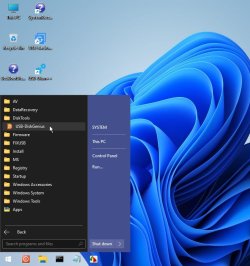
diskgenius is under the startmenu in the disktools folder

23h2-diskgenius.jpg
 

My Computers My Computers

  • At a glance

    7 X64i5 84002x8gb 3200mhz
    Computer type
    PC/Desktop
    OS
    7 X64
    CPU
    i5 8400
    Motherboard
    gigabyte b365m ds3h
    Memory
    2x8gb 3200mhz
    Hard Drives
    various
    PSU
    pure power 11 400w cm
    Case
    Coolermaster
    Cooling
    cryorig m9i
  • At a glance

    7x64g54008gb ddr4 2400
    Computer type
    PC/Desktop
    OS
    7x64
    CPU
    g5400
    Motherboard
    ga b365m ds3h
    Memory
    8gb ddr4 2400
    PSU
    xfx pro 450w
Thanks SIW2. I'll take my time and work slowly through this.
 

My Computer My Computer

At a glance

Win7 Ultimate SP1Intel Core i5 9400 Coffee Lake 14nm16G DDR4NVidia GeForce GTX 960
Computer type
PC/Desktop
Computer Manufacturer/Model Number
My build
OS
Win7 Ultimate SP1
CPU
Intel Core i5 9400 Coffee Lake 14nm
Motherboard
Asus Prime H310M-E R2.0 (LGA1151)
Memory
16G DDR4
Graphics Card(s)
NVidia GeForce GTX 960
Sound Card
Realtek High Definition Audio (mobo)
Monitor(s) Displays
Asus PA248 24" 16:10 format
Screen Resolution
1920x1200@59Hz
Hard Drives
1863GB Seagate ST2000DM
3726GB Seagate ST4000DM
1863GB Seagate ST2000DM
6TB Seagate
465GB NVMe Samsung SSD 970
PSU
750G2
Case
Tower
Cooling
Standard
Keyboard
USB
Mouse
USB
Internet Speed
920Mbs/480Mbs
Antivirus
Malwarebytes
Browser
Firefox
SIW2: Sorry about delay, I've been trying to work out a backup method for my main system disk in case anything went wrong. I think I now have that covered and I'll explain later.
I did a trial run of your ISO and managed to find the relevant areas of Disk Genius. Apart from a few minor queries I think I understand it. When you say 'at command prompt' I assume you meant 'run cmd from the taskbar shortcut' in your booted app. Also, you mentioned winpe here 'as seen from winpe:windows /s device path /f all'. I assume you didn't mean to use winpe but simply find the device path in Disk Genius. Which would make the path, in my case, bcdboot j:\windows \Device\HarddiskVolume9 /f all.
Last, I noticed when Disk Genius opens a message appears at top: 'Disk Genius v.5.5.1.1508x64. New version found: v.5.6.01565. Release notes....' Is that relevant?
 

My Computer My Computer

At a glance

Win7 Ultimate SP1Intel Core i5 9400 Coffee Lake 14nm16G DDR4NVidia GeForce GTX 960
Computer type
PC/Desktop
Computer Manufacturer/Model Number
My build
OS
Win7 Ultimate SP1
CPU
Intel Core i5 9400 Coffee Lake 14nm
Motherboard
Asus Prime H310M-E R2.0 (LGA1151)
Memory
16G DDR4
Graphics Card(s)
NVidia GeForce GTX 960
Sound Card
Realtek High Definition Audio (mobo)
Monitor(s) Displays
Asus PA248 24" 16:10 format
Screen Resolution
1920x1200@59Hz
Hard Drives
1863GB Seagate ST2000DM
3726GB Seagate ST4000DM
1863GB Seagate ST2000DM
6TB Seagate
465GB NVMe Samsung SSD 970
PSU
750G2
Case
Tower
Cooling
Standard
Keyboard
USB
Mouse
USB
Internet Speed
920Mbs/480Mbs
Antivirus
Malwarebytes
Browser
Firefox
Well, it worked - eventually. Had a few frantic moments when my keyboard refused to make a \ backslash, but found that Right\Alt + backslash fixed it. So my main SSD (or, fortunately, a copy thereof) is now GPT. But, durn, a large problem now with my W7 Ultimate.
So back to my original MBR and I'll run W10 on a separate SATA HDD. Much thanks to SIW2 and to everyone else who commented.
 
Last edited:

My Computer My Computer

At a glance

Win7 Ultimate SP1Intel Core i5 9400 Coffee Lake 14nm16G DDR4NVidia GeForce GTX 960
Computer type
PC/Desktop
Computer Manufacturer/Model Number
My build
OS
Win7 Ultimate SP1
CPU
Intel Core i5 9400 Coffee Lake 14nm
Motherboard
Asus Prime H310M-E R2.0 (LGA1151)
Memory
16G DDR4
Graphics Card(s)
NVidia GeForce GTX 960
Sound Card
Realtek High Definition Audio (mobo)
Monitor(s) Displays
Asus PA248 24" 16:10 format
Screen Resolution
1920x1200@59Hz
Hard Drives
1863GB Seagate ST2000DM
3726GB Seagate ST4000DM
1863GB Seagate ST2000DM
6TB Seagate
465GB NVMe Samsung SSD 970
PSU
750G2
Case
Tower
Cooling
Standard
Keyboard
USB
Mouse
USB
Internet Speed
920Mbs/480Mbs
Antivirus
Malwarebytes
Browser
Firefox
Is there any way of making that new partition GPT? Or, if not, is it possible to reformat the entire 3x partition 500GB SSD from MBR to GPT without losing data?

Rufus℠ (windows to go) is a faster way if you have the files on desktop + [caddy]..
MBR @1Byte does run a lot better than GPT @16Bytes and is lossless (excellent with dual cores)..

-DiskGenius did not make an identical copy (1x restore point might be best)..
 

My Computers My Computers

  • At a glance

    Windows 64bit
    Computer type
    PC/Desktop
    OS
    Windows 64bit
  • Computer type
    PC/Desktop
Back
Top