Anyone familiar with modifying visual styles?

Cov

Banned
Local time
1:58 PM
Messages
140
Location
Europe
Hello,

I'm looking for someone who is able (and willing) to modify a visual style.

Please let me know and I'll come up with more details.

Thanks
:)
 

My Computer My Computer

OS
Windos 7 x64
CPU
i5 3570K
Motherboard
Intel DH77DF
Memory
2 x 8GB G.Skill
Graphics Card(s)
HD4000
Sound Card
on board
Monitor(s) Displays
LG IPS236 x 2
Screen Resolution
1920 x 1200
Hard Drives
Samsung 840 Pro 256GB
PSU
BeQuiet 480 E9 CM Modular
Case
Lian Li PC-Q25 Silver
Cooling
Titan
Keyboard
Dell
Mouse
Microsoft Basic Optical Mouse
Internet Speed
6 MB
Other Info
Don't talk if you can't improve the silence.
What is it you want modified, that way we have an idea what needs to be done.

Jerry
 

My Computer My Computer

Computer type
Laptop
Computer Manufacturer/Model Number
Sager NP9170
OS
Win 7 Pro x64 / Win 10 Pro
CPU
Intel(R) Core(TM) i7-3630QM CPU @ 2.40GHz
Motherboard
CLEVO P170EM
Memory
12 GB
Graphics Card(s)
(1) Intel(R) HD Graphics 4000 (2) NVIDIA GeForce GTX 675M
Sound Card
(1) Realtek High Definition Audio (2) Intel(R) Display Aud
Monitor(s) Displays
17.3
Screen Resolution
1920x1080
Hard Drives
(1) Samsung 860 EVO 500GB(OS) (1) Samsung 860 EVO 500GB(Data)
Keyboard
Backlite
Antivirus
MSE, Malwarebytes Pro
Browser
Firefox
Other Info
DESKTOP: Custom-built.
OS: Win 10 Pro x64.
CASE: Rosewill R5.
CPU: Intel I5 4670K CPU @ 3.40GHz.
CPU COOLER: Cool Master Hyper 212 EVO.
MOTHERBOARD: Asus Z87-A.
MEMORY: Kingston HyperX 2x4 GB.
GPU: Nvidia Geforce 650 TI.
PSU: Corsair TX750.
DRIVES: (1) Samsung 840 120 GB SSD (2) Western Digital blue 500 GB 7200 RPM.
Hi Bongo,

I'm using the Visual Style called Clearscreen Sharp for about three years now.

I would like the following three things to be modified:

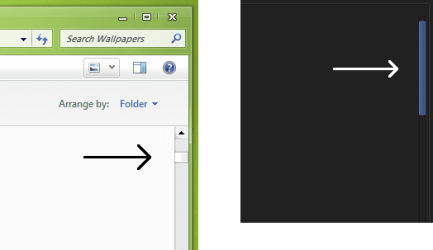
1 - The vertical and horizontal scrollbars in Windows Explorer are hard for me to spot.
Would prefer the bars to be more visible, like the light blue one on the right hand side of the picture.

2 - I prefer the square navigation buttons in glass (right) over the round, blue ones (left).
Also the very light rounded corners of the frame of the buttons as well as of the address bar look better than the default sharp corners, I think. Just the corners of the windows themselves should stay sharp as they are.

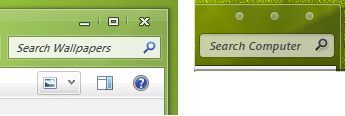
3 - The three symbols on the top right hand side of each window (don't know how you call them), for collapsing, full screen and closing - I'd prefer them all equal, like the bullet points on the right hand side of the picture.

Are these modifications possible?

Thanks
:)
 

Attachments

  • 1.png
    1.png
    6.7 KB · Views: 6
  • 2.png
    2.png
    9.3 KB · Views: 6
  • 3.png
    3.png
    7.4 KB · Views: 6

My Computer My Computer

OS
Windos 7 x64
CPU
i5 3570K
Motherboard
Intel DH77DF
Memory
2 x 8GB G.Skill
Graphics Card(s)
HD4000
Sound Card
on board
Monitor(s) Displays
LG IPS236 x 2
Screen Resolution
1920 x 1200
Hard Drives
Samsung 840 Pro 256GB
PSU
BeQuiet 480 E9 CM Modular
Case
Lian Li PC-Q25 Silver
Cooling
Titan
Keyboard
Dell
Mouse
Microsoft Basic Optical Mouse
Internet Speed
6 MB
Other Info
Don't talk if you can't improve the silence.
All of that is possible but it is not cool to change someone else's work without permission and then post it on a public forum for distribution.
If you can get permission from the theme maker I can make a couple of them changes for you (scrollbars and the close minimum maximize buttons) or you could purchase Ave's Windows7 Style Builder and do it yourself without asking permission (I can show you how)
The navigation buttons are in the explorerframe.dll Where did you get that picture from maybe that theme already has the explorerframe.dll made up.

Jerry
 

My Computer My Computer

Computer type
Laptop
Computer Manufacturer/Model Number
Sager NP9170
OS
Win 7 Pro x64 / Win 10 Pro
CPU
Intel(R) Core(TM) i7-3630QM CPU @ 2.40GHz
Motherboard
CLEVO P170EM
Memory
12 GB
Graphics Card(s)
(1) Intel(R) HD Graphics 4000 (2) NVIDIA GeForce GTX 675M
Sound Card
(1) Realtek High Definition Audio (2) Intel(R) Display Aud
Monitor(s) Displays
17.3
Screen Resolution
1920x1080
Hard Drives
(1) Samsung 860 EVO 500GB(OS) (1) Samsung 860 EVO 500GB(Data)
Keyboard
Backlite
Antivirus
MSE, Malwarebytes Pro
Browser
Firefox
Other Info
DESKTOP: Custom-built.
OS: Win 10 Pro x64.
CASE: Rosewill R5.
CPU: Intel I5 4670K CPU @ 3.40GHz.
CPU COOLER: Cool Master Hyper 212 EVO.
MOTHERBOARD: Asus Z87-A.
MEMORY: Kingston HyperX 2x4 GB.
GPU: Nvidia Geforce 650 TI.
PSU: Corsair TX750.
DRIVES: (1) Samsung 840 120 GB SSD (2) Western Digital blue 500 GB 7200 RPM.
Hi Jerry,

I wouldn't want to distribute the modified version to anyone else - it'd be for myself only.
Thanks for the link - do you use this software by yourself? Is it user friendly and intuitive, that a noob like me can handle it?
The link to the Visual Style of the square navigation buttons is embedded into the term: "square navigation buttons" from above.
 

My Computer My Computer

OS
Windos 7 x64
CPU
i5 3570K
Motherboard
Intel DH77DF
Memory
2 x 8GB G.Skill
Graphics Card(s)
HD4000
Sound Card
on board
Monitor(s) Displays
LG IPS236 x 2
Screen Resolution
1920 x 1200
Hard Drives
Samsung 840 Pro 256GB
PSU
BeQuiet 480 E9 CM Modular
Case
Lian Li PC-Q25 Silver
Cooling
Titan
Keyboard
Dell
Mouse
Microsoft Basic Optical Mouse
Internet Speed
6 MB
Other Info
Don't talk if you can't improve the silence.
It's a little bit of a learning curve but not too bad they haven't excellent forum you can join after you purchase it with maps showing the location of the different items. You would also need a image editor since such as Gimp, Photoshop, paint.net etc. (I could give you guidance on how to get started)

Using the images from the theme with the square navigation buttons I could make you the explorerframe.dll pretty easily then you would have to change a system file, you need to take ownership give yourself permission and rename the old file and then copy in the new one look at Post #6 of this thread will tell you how to do it http://www.sevenforums.com/customization/179502-basic-networking-information.html#post1525656

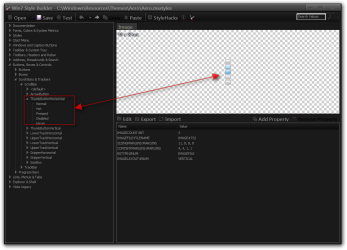
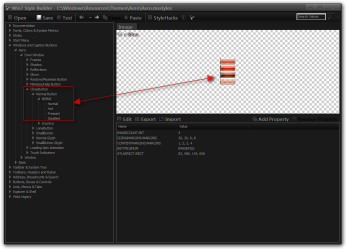
Here's a couple examples of Windows Style Builder
Here is where some of the scrollbar images are
1.png

Here is the close button
2.png

Jerry
 

My Computer My Computer

Computer type
Laptop
Computer Manufacturer/Model Number
Sager NP9170
OS
Win 7 Pro x64 / Win 10 Pro
CPU
Intel(R) Core(TM) i7-3630QM CPU @ 2.40GHz
Motherboard
CLEVO P170EM
Memory
12 GB
Graphics Card(s)
(1) Intel(R) HD Graphics 4000 (2) NVIDIA GeForce GTX 675M
Sound Card
(1) Realtek High Definition Audio (2) Intel(R) Display Aud
Monitor(s) Displays
17.3
Screen Resolution
1920x1080
Hard Drives
(1) Samsung 860 EVO 500GB(OS) (1) Samsung 860 EVO 500GB(Data)
Keyboard
Backlite
Antivirus
MSE, Malwarebytes Pro
Browser
Firefox
Other Info
DESKTOP: Custom-built.
OS: Win 10 Pro x64.
CASE: Rosewill R5.
CPU: Intel I5 4670K CPU @ 3.40GHz.
CPU COOLER: Cool Master Hyper 212 EVO.
MOTHERBOARD: Asus Z87-A.
MEMORY: Kingston HyperX 2x4 GB.
GPU: Nvidia Geforce 650 TI.
PSU: Corsair TX750.
DRIVES: (1) Samsung 840 120 GB SSD (2) Western Digital blue 500 GB 7200 RPM.
  • Like
Reactions: Cov
Hi Bongo, thanks for that.
I will look at this later, when I have more time.
Looks exciting though.
 

My Computer My Computer

OS
Windos 7 x64
CPU
i5 3570K
Motherboard
Intel DH77DF
Memory
2 x 8GB G.Skill
Graphics Card(s)
HD4000
Sound Card
on board
Monitor(s) Displays
LG IPS236 x 2
Screen Resolution
1920 x 1200
Hard Drives
Samsung 840 Pro 256GB
PSU
BeQuiet 480 E9 CM Modular
Case
Lian Li PC-Q25 Silver
Cooling
Titan
Keyboard
Dell
Mouse
Microsoft Basic Optical Mouse
Internet Speed
6 MB
Other Info
Don't talk if you can't improve the silence.
Back
Top