

Hey everyone,
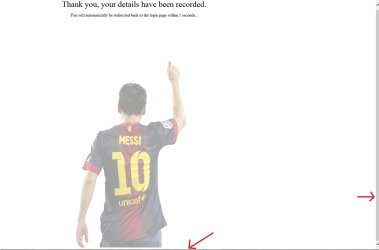
I'm having a bit of trouble with a webpage that I'm working on. When viewed in either Chrome or Firefox it loads correctly but when viewed in IE it adds a thin white line at the bottom of the page and therefore adds a scroll bar. I'm fairly new to all this and so far have just been salvaging bits of code from online and modifying it for my site.
I have attached the two images showing how it should look and how IE displays it.
The CSS for the image is -
#messi {
height:75%;
width: 30%;
position: absolute;
left: 50%;
margin-left: -14%;
bottom: 0;
opacity:0.4;
filter:alpha(opacity=40);
}
Does anyone know why it is doing this and how I can remove it. Any help would be appreciated.
Thanks.
I'm having a bit of trouble with a webpage that I'm working on. When viewed in either Chrome or Firefox it loads correctly but when viewed in IE it adds a thin white line at the bottom of the page and therefore adds a scroll bar. I'm fairly new to all this and so far have just been salvaging bits of code from online and modifying it for my site.
I have attached the two images showing how it should look and how IE displays it.
The CSS for the image is -
#messi {
height:75%;
width: 30%;
position: absolute;
left: 50%;
margin-left: -14%;
bottom: 0;
opacity:0.4;
filter:alpha(opacity=40);
}
Does anyone know why it is doing this and how I can remove it. Any help would be appreciated.
Thanks.
Attachments

My Computer
- OS
- Windows 7: Home Premium
- CPU
- AMD Quad Core Phenom II X4 965
- Motherboard
- AMD 770 and SB710 Chipset Motherboard
- Memory
- 2 x 2Gb PC-10666 Memory
- Graphics Card(s)
- Sapphire Radeon HD 5850 1GB
- Monitor(s) Displays
- Dell
- Screen Resolution
- 1280 x 1024
- Hard Drives
- Western Digital Caviar Blue 500GB
- PSU
- Corsair 750Watt
- Case
- ATX Black Gaming Tower Case
- Keyboard
- Dell
- Mouse
- Logitech
- Internet Speed
- 10 Meg
