Anyone know how to make maxed title bar solid black?

imacken

New member
Power User
VIP
Local time
2:52 AM
Messages
288
I know some people like it and some don't, but having the title bars in aero when certain apps are maxed looks messy - Lightroom and Photoshop are 2 examples.
I know MS changed it from the beta as a lot of people asked, but is there any way of hacking this so that it is back to a solid colour when maxed?
It should be made an option by MS.
 

My Computer My Computer

OS
Windows 7 64-bit
CPU
Intel i7 920 @ 4GHz
Motherboard
Asus P6T Deluxe V2
Memory
6Gb
Graphics Card(s)
nVidia GTX 285
Sound Card
X-Fi Extreme Audio PCIe
Screen Resolution
1900x1200
I know some people like it and some don't, but having the title bars in aero when certain apps are maxed looks messy - Lightroom and Photoshop are 2 examples.
I know MS changed it from the beta as a lot of people asked, but is there any way of hacking this so that it is back to a solid colour when maxed?
It should be made an option by MS.
right-click desktop, select personalisation, select Window Color: Either deselect enable transparancy or move slider to right for max depth, but keeping some tranparancy...
 
Last edited by a moderator:

My Computer My Computer

OS
Win7 x64 7127
Other Info
Office 2010 ctp
Thanks but that affects all windows, not just maxed ones.
In the beta, maximised windows were solid black, which works much better in apps like Photoshop or Lightroom.
There must be a way of doing this.
 

My Computer My Computer

OS
Windows 7 64-bit
CPU
Intel i7 920 @ 4GHz
Motherboard
Asus P6T Deluxe V2
Memory
6Gb
Graphics Card(s)
nVidia GTX 285
Sound Card
X-Fi Extreme Audio PCIe
Screen Resolution
1900x1200
Thanks, looks pretty useful. Sorry to ask such a dumb question, but how do I get it to work?
I've clicked on it and it takes me to 'Color and Appearance' but I can't see how to go any further!!!
 

My Computer My Computer

OS
Windows 7 64-bit
CPU
Intel i7 920 @ 4GHz
Motherboard
Asus P6T Deluxe V2
Memory
6Gb
Graphics Card(s)
nVidia GTX 285
Sound Card
X-Fi Extreme Audio PCIe
Screen Resolution
1900x1200
i think its a custom msstyles... maybe you have to patch your uxtheme files for that one
 

My Computer My Computer

OS
Windows 7 Home Premium SP1 64-bit
CPU
Intel™ Core™ i7 920 2.66 ghz
Motherboard
Asus P6T Deluxe V2
Memory
OCZ 6gb (triple 2gb) ddr3-1333 (Gold Edition)
Graphics Card(s)
Nvidia 9800 GT 1GB - x2 SLI
Sound Card
On board
Monitor(s) Displays
19" LCD Wide Screen / Built-in TV Tuner
Screen Resolution
1440x900
Hard Drives
250 GB Maxtor
+
1 TB Seagate
PSU
Corsair GX 800 (800watts)
Case
Thermaltake Level 10 GT
Cooling
Antec Kuhler 920
Mouse
CM Storm Sentinel Advanced
Internet Speed
1MBps
I'm afraid that means nothing to me!! Sorry for the ignorance on this. Never had to deal with themes before.
 

My Computer My Computer

OS
Windows 7 64-bit
CPU
Intel i7 920 @ 4GHz
Motherboard
Asus P6T Deluxe V2
Memory
6Gb
Graphics Card(s)
nVidia GTX 285
Sound Card
X-Fi Extreme Audio PCIe
Screen Resolution
1900x1200
How to Patch Uxtheme.dll in Windows 7

1. Download Uxtheme patch Files
2. Login to Your Windows 7 with User having administrator privileges
3. Open you’re my Computer and Navigate to Following Directory
C:\Windows\system32\ (change driver letter as per your windows 7 installation)
4. Locate following three files
uxtheme.dll
themeui.dll
shsvcs.dll
5. Take Ownership of each of these files
6. Grant Full Permission to yourself on each of these files
7. Rename uxtheme.dll to uxtheme.old , themeui.dll to themeui.old & shsvcs.dll to shsvcs.old
8. Copy downloaded patch files and past in C:\Windows\system32\ directory
(change driver letter as per your windows 7 installation)
9. Reboot Your Windows 7


NOTE:


Be careful though.. since you're dealing with system files and a mistake might cause a faulty system... so make sure to backup your files.. and only do this at your own risk
 

My Computer My Computer

OS
Windows 7 Home Premium SP1 64-bit
CPU
Intel™ Core™ i7 920 2.66 ghz
Motherboard
Asus P6T Deluxe V2
Memory
OCZ 6gb (triple 2gb) ddr3-1333 (Gold Edition)
Graphics Card(s)
Nvidia 9800 GT 1GB - x2 SLI
Sound Card
On board
Monitor(s) Displays
19" LCD Wide Screen / Built-in TV Tuner
Screen Resolution
1440x900
Hard Drives
250 GB Maxtor
+
1 TB Seagate
PSU
Corsair GX 800 (800watts)
Case
Thermaltake Level 10 GT
Cooling
Antec Kuhler 920
Mouse
CM Storm Sentinel Advanced
Internet Speed
1MBps
I'm on 7201 x64, which patch should I download?
 

My Computer My Computer

OS
Windows 7 64-bit
CPU
Intel i7 920 @ 4GHz
Motherboard
Asus P6T Deluxe V2
Memory
6Gb
Graphics Card(s)
nVidia GTX 285
Sound Card
X-Fi Extreme Audio PCIe
Screen Resolution
1900x1200
i dont think the site has a patched uxtheme for that build yet.. im sorry :(
 

My Computer My Computer

OS
Windows 7 Home Premium SP1 64-bit
CPU
Intel™ Core™ i7 920 2.66 ghz
Motherboard
Asus P6T Deluxe V2
Memory
OCZ 6gb (triple 2gb) ddr3-1333 (Gold Edition)
Graphics Card(s)
Nvidia 9800 GT 1GB - x2 SLI
Sound Card
On board
Monitor(s) Displays
19" LCD Wide Screen / Built-in TV Tuner
Screen Resolution
1440x900
Hard Drives
250 GB Maxtor
+
1 TB Seagate
PSU
Corsair GX 800 (800watts)
Case
Thermaltake Level 10 GT
Cooling
Antec Kuhler 920
Mouse
CM Storm Sentinel Advanced
Internet Speed
1MBps
Why does it need all this patching to run a 'Windows Visual Style File'? Do all the thousands of these require this treatment?
 

My Computer My Computer

OS
Windows 7 64-bit
CPU
Intel i7 920 @ 4GHz
Motherboard
Asus P6T Deluxe V2
Memory
6Gb
Graphics Card(s)
nVidia GTX 285
Sound Card
X-Fi Extreme Audio PCIe
Screen Resolution
1900x1200
because it's a custom file :)
that's why it needs to be patched
 

My Computer My Computer

OS
Windows 7 Home Premium SP1 64-bit
CPU
Intel™ Core™ i7 920 2.66 ghz
Motherboard
Asus P6T Deluxe V2
Memory
OCZ 6gb (triple 2gb) ddr3-1333 (Gold Edition)
Graphics Card(s)
Nvidia 9800 GT 1GB - x2 SLI
Sound Card
On board
Monitor(s) Displays
19" LCD Wide Screen / Built-in TV Tuner
Screen Resolution
1440x900
Hard Drives
250 GB Maxtor
+
1 TB Seagate
PSU
Corsair GX 800 (800watts)
Case
Thermaltake Level 10 GT
Cooling
Antec Kuhler 920
Mouse
CM Storm Sentinel Advanced
Internet Speed
1MBps
what does that software do ?
could you please provide a description :)
a screenshot would be nice too :D
 

My Computer My Computer

OS
Windows 7 Home Premium SP1 64-bit
CPU
Intel™ Core™ i7 920 2.66 ghz
Motherboard
Asus P6T Deluxe V2
Memory
OCZ 6gb (triple 2gb) ddr3-1333 (Gold Edition)
Graphics Card(s)
Nvidia 9800 GT 1GB - x2 SLI
Sound Card
On board
Monitor(s) Displays
19" LCD Wide Screen / Built-in TV Tuner
Screen Resolution
1440x900
Hard Drives
250 GB Maxtor
+
1 TB Seagate
PSU
Corsair GX 800 (800watts)
Case
Thermaltake Level 10 GT
Cooling
Antec Kuhler 920
Mouse
CM Storm Sentinel Advanced
Internet Speed
1MBps

i took a chance with this, and it successfully patched the theme files in 7229 x86. not many good styles out there yet, still looking for one that just gets rid of aero stripes in the taskbar and window borders, but it's good to know this tool is there.

thanks :)
 

My Computer My Computer

OS
7600 x86
CPU
Core 2 Duo e7200, 2.53 ghz
Motherboard
Micro-Star MS-7529
Memory
2x DDR2 PC5300 1gb, 667 mhz
Graphics Card(s)
GeForce 9500gt, 512mb
Monitor(s) Displays
22" LG Flatron w2234s
Screen Resolution
1680x1050
Hard Drives
Excelstor SATA-II 250gb 7200rpm, 8mb cache
PSU
CoolerMaster M520
Internet Speed
30/20 mbits
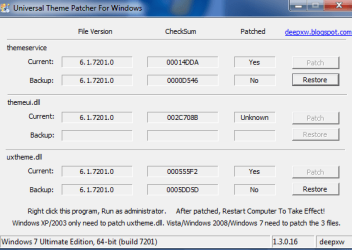
Doesn't want to work for me on the Uxtheme patching. See screenshot here
 

Attachments

  • patch.png
    patch.png
    13.3 KB · Views: 32

My Computer My Computer

OS
Windows 7 64-bit
CPU
Intel i7 920 @ 4GHz
Motherboard
Asus P6T Deluxe V2
Memory
6Gb
Graphics Card(s)
nVidia GTX 285
Sound Card
X-Fi Extreme Audio PCIe
Screen Resolution
1900x1200
what does that software do ?
could you please provide a description :)
a screenshot would be nice too :D

It can remove watermarks, enable dreamscene, Uxtheme patcher for x86 and x64, and a few other things. Does not need installing runs from exe. Is safe, have scanned with Avast, malwarebytes and spybot search and destroy.

win7.png
 

My Computer My Computer

OS
Win7 7600 x64
Memory
8gig
Graphics Card(s)
Nvidia
Monitor(s) Displays
dual wide screen 22inch each
Hard Drives
2x 500gig
Any ideas on why it won't do the Uxtheme patching for me? (see above)
 

My Computer My Computer

OS
Windows 7 64-bit
CPU
Intel i7 920 @ 4GHz
Motherboard
Asus P6T Deluxe V2
Memory
6Gb
Graphics Card(s)
nVidia GTX 285
Sound Card
X-Fi Extreme Audio PCIe
Screen Resolution
1900x1200
tried it and it works ok for me.. im using 32-bit though...
:confused:
 

My Computer My Computer

OS
Windows 7 Home Premium SP1 64-bit
CPU
Intel™ Core™ i7 920 2.66 ghz
Motherboard
Asus P6T Deluxe V2
Memory
OCZ 6gb (triple 2gb) ddr3-1333 (Gold Edition)
Graphics Card(s)
Nvidia 9800 GT 1GB - x2 SLI
Sound Card
On board
Monitor(s) Displays
19" LCD Wide Screen / Built-in TV Tuner
Screen Resolution
1440x900
Hard Drives
250 GB Maxtor
+
1 TB Seagate
PSU
Corsair GX 800 (800watts)
Case
Thermaltake Level 10 GT
Cooling
Antec Kuhler 920
Mouse
CM Storm Sentinel Advanced
Internet Speed
1MBps
I think I've modified it in some way with your original suggested method.
Can anyone send me the original themeui.dll for 7201 64bit?
Thanks.
 
Last edited:

My Computer My Computer

OS
Windows 7 64-bit
CPU
Intel i7 920 @ 4GHz
Motherboard
Asus P6T Deluxe V2
Memory
6Gb
Graphics Card(s)
nVidia GTX 285
Sound Card
X-Fi Extreme Audio PCIe
Screen Resolution
1900x1200
Back
Top