Anyone knows:process mctadmin?

drazenn

New member
Hi
I am running windows 7 for a while now,and yesterday I have noticed a startup process mctadmin,and I have it 2 times??
I've google it,looked in SS&D,but didn't found answer.Does anybody know what is it for?
 

My Computer

Computer type
PC/Desktop
Computer Manufacturer/Model Number
intel x58 selfmade
OS
Windows 7 Ultimate x64
CPU
[email protected] (non overclocked)
Motherboard
x58
Memory
8gb DDR3
Graphics Card(s)
Asus 6850
Monitor(s) Displays
lg 22"
Hard Drives
1TB
PSU
Corsair 650w
Case
Gigabyte
Cooling
Scytech
Keyboard
noname
Mouse
Logitech wireless xy
Internet Speed
70GB
Antivirus
Windows Defender
Browser
Chrome (default)
I haven't got it on mine.
 

My Computer

Computer Manufacturer/Model Number
Home Brew
OS
Windows 7 Ultimate Vista Ultimate x64
CPU
Core 2 Duo E8500 3.16Ghz @ 3.8Ghz
Motherboard
eVGA 750i FTW
Memory
2x2Gigs Patriot PC2-6400 LL
Graphics Card(s)
Inno3D GeForce GTX260 216 SP
Monitor(s) Displays
ASUS VW222U 22" 2ms Response time
Screen Resolution
1680x1050
Hard Drives
SATA 150GB
SATA II 250GB
USB IDE 750GB Ext.
PSU
HYTEC 600W & Thermaltake 650W Toughpower Power Exp
Case
Thermaltake Armor LCS (Liquid Cooling System)
Cooling
Liquid Cooling System
Keyboard
Logitech G15 Gaming Keyboard
Mouse
Logitech G9 Gaming Mouse
No, never seen that one in any of my startups. Can't really find any info on it either.
 

My Computer

Computer type
PC/Desktop
Computer Manufacturer/Model Number
Airbot 2.0
OS
Windows 7 Ultimate x64 SP1
CPU
Core i7 920 (D0) @ 4Ghz, *26c idle *65c full load on air
Motherboard
Asus P6X58D Premium - Sata 6Gb/s - USB 3.0
Memory
12GB DDR3 Corsair Dominator -CMD12GX3M6A1600C8 at 1600MHz
Graphics Card(s)
Zotac Geforce GTX 770
Sound Card
ASUS Xonar D2X
Monitor(s) Displays
1 LG 24" Flatron W2453V-PF 1 Samsung 24" P2450H both 2ms RT
Screen Resolution
1920x1080@60hz
Hard Drives
1 Samsung 250GB 840 Evo SSD
1 OCZ Vertex2 180GB SSD
1 TB Samsung Spinpoint F1 7200RPM 32MB cache
2 500GB WD Caviar Blacks 7200RPM 32MB cache (WD5001AALS)

Pioneer DVD Burner DVR-S18M
PSU
Corsair HX1000W
Case
Cooler Master HAF 932
Cooling
Case Fans *3 230mm, *1 140mm/CPU - *Tuniq Tower 120 Extreme
Keyboard
Logitech Wireless MK700
Mouse
Logitech Wireless MK700
Internet Speed
DL 15 Mbps UL 0.98 Mbps
Antivirus
None
Browser
Firefox Nightly
Other Info
Processor-7.7 *RAM- 7.9 *Graphics-7.9 *Gaming Graphics- 7.9 *SSD- 7.8 W.E.I final score= 7.7
*Phone- LG Nexus 5
Apparently to do with Network Service.

C:\Windows\System32\mctadmin.exe (User 'NETWORK SERVICE')

What exactly, I haven't a clue :)
 

My Computer

OS
XP
Apparently to do with Network Service.

C:\Windows\System32\mctadmin.exe (User 'NETWORK SERVICE')

What exactly, I haven't a clue :)

Yes,exactly in 'NETWORK SERVICE',but thing that bothering me is that I haven't seen it for a month,and then it suddenly appeared,and appeared first just one,and now I have it two times already.
So I was a little affraid that it isn't some kind of troyan,or something which redirects me through somebody's IP when I am connecting to internet,because I see several unknown adresses in netstat,and strange things are happening to me like a changing of original iGoogle,mouse cursor shaking(what we all know that it is a sign that someone is connected to my PC),and I don't have any firewall besides included one.
And a reason for that is I can't find any simple but good one that is compatible,something like ZoneAlarm,and with Kaspersky IS I have to many problems(BSOD,every .exe reported like a malware so I had to uninstalled it),so for me,Avast Professional(which is really really good,effective and doesn't waste too much resources) is the best option for antivirus, and don't know which firewall should I install beside it,doesn't matter,paid or free.
 

My Computer

Computer type
PC/Desktop
Computer Manufacturer/Model Number
intel x58 selfmade
OS
Windows 7 Ultimate x64
CPU
[email protected] (non overclocked)
Motherboard
x58
Memory
8gb DDR3
Graphics Card(s)
Asus 6850
Monitor(s) Displays
lg 22"
Hard Drives
1TB
PSU
Corsair 650w
Case
Gigabyte
Cooling
Scytech
Keyboard
noname
Mouse
Logitech wireless xy
Internet Speed
70GB
Antivirus
Windows Defender
Browser
Chrome (default)
I don't have it neither.And by the way i also use Avast Pro and I think it's a great antivirus.I had a few problems thou with some K**gen(they were detected as trojans),but it's fine. Maybe you should log on as an admin and see if the process still exists.Or stop the process in the Control Panel/Administrative Tools/Component Services and see if anything happens
 

My Computer

OS
Windows 7 build 7000
CPU
Intel Dual Core E 6300
Motherboard
Gigabyte GA-P35-DS3 v1.0
Memory
Kingston 1Gb DDRII 800MHz
Graphics Card(s)
Gigabyte GeForce 8600GT
Hard Drives
Seagate ST 250Gb
Well, Avast has a network shield provider already that works pretty good at blocking network attacks. Has saved me a few times. If you're worried, you can do a boot time scan with Avast, scan with something like Malwarebytes and Spybot SD. Both free. And Spybot has real time protection. Works pretty good with Avast. I believe you'd need to run it in Vista compatibility mode and as an administrator though.
 

My Computer

Computer type
PC/Desktop
Computer Manufacturer/Model Number
Airbot 2.0
OS
Windows 7 Ultimate x64 SP1
CPU
Core i7 920 (D0) @ 4Ghz, *26c idle *65c full load on air
Motherboard
Asus P6X58D Premium - Sata 6Gb/s - USB 3.0
Memory
12GB DDR3 Corsair Dominator -CMD12GX3M6A1600C8 at 1600MHz
Graphics Card(s)
Zotac Geforce GTX 770
Sound Card
ASUS Xonar D2X
Monitor(s) Displays
1 LG 24" Flatron W2453V-PF 1 Samsung 24" P2450H both 2ms RT
Screen Resolution
1920x1080@60hz
Hard Drives
1 Samsung 250GB 840 Evo SSD
1 OCZ Vertex2 180GB SSD
1 TB Samsung Spinpoint F1 7200RPM 32MB cache
2 500GB WD Caviar Blacks 7200RPM 32MB cache (WD5001AALS)

Pioneer DVD Burner DVR-S18M
PSU
Corsair HX1000W
Case
Cooler Master HAF 932
Cooling
Case Fans *3 230mm, *1 140mm/CPU - *Tuniq Tower 120 Extreme
Keyboard
Logitech Wireless MK700
Mouse
Logitech Wireless MK700
Internet Speed
DL 15 Mbps UL 0.98 Mbps
Antivirus
None
Browser
Firefox Nightly
Other Info
Processor-7.7 *RAM- 7.9 *Graphics-7.9 *Gaming Graphics- 7.9 *SSD- 7.8 W.E.I final score= 7.7
*Phone- LG Nexus 5
Mctadimgg

Hi:

I did have two copies of mctadmin but didn't notice it until I tried to install VMware WS. The VMware didn't mention it and all seemed able to install Build 7000 as guest and host. However, when I rebooted the system froze after login in (the welcome screen). I was able to restore the systlem to before the VMware WS (Windows 7 definitely has enchaced recovery options over Vista).
Then installed Spybot and noticed the two startup items for mctadmin which I disabled. BTW there were 2 entries for Sidebar which I also disabled. Then VMware installed perfectly. I doubt that mctadmin is malware as I aslo use Avast and I'm pretty certain it wou;ld have found it. I'm using Build 7057 and it does have some bugs (the desktop.ini issue) so it's possbile MS was using mctadmin to debug some network problems.

marty
 

My Computer

OS
Windows 7
OK, I did some searching, and here is what I found:

http://www.prevx.com/filenames/X22684716160985460-0/MCTADMIN2EEXE.html said:
MCTADMIN.EXECurrently being reviewed

The filename MCTADMIN.EXE is used by objects that are classified as safe. It has not yet been seen to be associated with malicious software.
MCTADMIN.EXE, Prevx

The PrevX page also shows three versions having been submitted for analysis -
# Microsoft Corporation; MCTAdmin; 6.1.7048.0 (winmain.090219-1845)
# Microsoft Corporation; MCTAdmin; 6.1.6956.0 (winmain.081122-1150)
# Microsoft Corporation; MCTAdmin; 6.1.7000.0 (winmain_win7beta.081212-1400)

All of them Windows 7.

Several HiJack This logs have this listed, most notably MSNMSGR.EXE - No Disk error : Windows 7 Miscellaneous : Windows 7 Beta : Microsoft TechNet Forums - notice how there are two instances, one for Local service and one for Network service. I did see a third one in one log, which listed Postgre service as well.

I searched my HD and found 7 references to it, 2 executable files, 2 .mui files, 2 Manifests, and 1 folder - located in Winsxs folder.

I suppose that ti has something to do with databases, and I know it is not Windows Live Messenger, as I have that running, nor a few more items. However, I don't currently have Office installed, and IIRC every one with this entry in their HiJack this *does* have Office installed.
 

My Computers

System One System Two

  • Computer type
    PC/Desktop
    Computer Manufacturer/Model Number
    The Beast Model A (homebrew)
    OS
    Windows 11 21H2 Current build
    CPU
    AMD Ryzen 9 3950X
    Motherboard
    MSI MEG X570 GODLIKE
    Memory
    4 * 32 GB - Corsair Vengeance 3600 MHz
    Graphics Card(s)
    EVGA GeForce RTX 3080 Ti XC3 ULTRA GAMING (12G-P5-3955-KR)
    Sound Card
    Realtek® ALC1220 Codec
    Monitor(s) Displays
    2x Eve Spectrum ES07D03 4K Gaming Monitor (Matte) | Eve Spec
    Screen Resolution
    3x 3840 x 2160
    Hard Drives
    3x Samsung 980 Pro NVMe PCIe 4 M.2 2 TB SSD (MZ-V8P2T0B/AM) } 3x Sabrent Rocket NVMe 4.0 1 TB SSD
    PSU
    PC Power & Cooling’s Silencer Series 1050 Watt, 80 Plus Plat
    Case
    Fractal Design Define 7 XL Dark ATX Full Tower Case
    Cooling
    SteelSeries Apex Pro Wired Gaming Keyboard
    Keyboard
    SteelSeries Apex Pro
    Mouse
    Logitech MX Master 3S | MX Master 3 for business
    Internet Speed
    AT&T LightSpeed Gigabit Duplex Ftth
    Antivirus
    Windows Defender + MB 3
    Browser
    Nightly (default) + Firefox (stable),Chrome, Edge
  • Computer type
    PC/Desktop
    System Manufacturer/Model Number
    Dell Latitude E5470
    OS
    ChromeOS Flex Dev Channel (current)
    CPU
    Intel(R) Core(TM) i5-6300U CPU @ 2.40GHz, 2501 Mhz, 2 Core(s), 4 Logical Processor(s)
    Motherboard
    Dell
    Memory
    16 GB
    Graphics Card(s)
    Intel(R) HD Graphics 520
    Sound Card
    Intel(R) HD Graphics 520 + RealTek Audio
    Monitor(s) Displays
    Dell laptop display 15"
    Screen Resolution
    1920 * 1080
    Hard Drives
    Toshiba 128GB M.2 22300 drive
    INTEL Cherryville 520 Series SSDSC2CW180A 180 GB SATA III SSD
    PSU
    Dell
    Case
    Dell
    Cooling
    Dell
    Keyboard
    Dell
    Mouse
    Logitech MX Master 3S (shared w. Sys 1) | Dell TouchPad
    Internet Speed
    AT&T LightSpeed Gigabit Duplex Ftth
I'm showing this in hijackthis as well:

O4 - HKUS\S-1-5-19\..\Run: [Sidebar] %ProgramFiles%\Windows Sidebar\Sidebar.exe /autoRun (User 'LOCAL SERVICE')
O4 - HKUS\S-1-5-19\..\RunOnce: [mctadmin] C:\Windows\System32\mctadmin.exe (User 'LOCAL SERVICE')
O4 - HKUS\S-1-5-20\..\Run: [Sidebar] %ProgramFiles%\Windows Sidebar\Sidebar.exe /autoRun (User 'NETWORK SERVICE')
O4 - HKUS\S-1-5-20\..\RunOnce: [mctadmin] C:\Windows\System32\mctadmin.exe (User 'NETWORK SERVICE')


Also strange is the little window that opens-then-closes-almost instantly upon desktop login after a reboot. It happens so quickly I almost don't see it!

I'm running build 7077 - is it possible that my system's been compromised?? :(

Logfile of Trend Micro HijackThis v2.0.2
Scan saved at 9:46:48 PM, on 5/3/2009
Platform: Unknown Windows (WinNT 6.01.2981)
MSIE: Internet Explorer v8.00 (8.00.7077.0000)
Boot mode: Normal

Running processes:
C:\Windows\system32\taskhost.exe
C:\Windows\system32\Dwm.exe
C:\Windows\Explorer.EXE
C:\Program Files\Lavasoft\Ad-Aware\AAWTray.exe
C:\Program Files\Alwil Software\Avast4\ashDisp.exe
C:\Program Files\Seagate\SeagateManager\FreeAgent Status\stxmenumgr.exe
C:\Program Files\Java\jre6\bin\jusched.exe
C:\Users\W\AppData\Local\Google\Update\GoogleUpdate.exe
C:\Users\W\AppData\Roaming\Google\Google Talk\googletalk.exe
C:\Program Files\Dropbox\Dropbox.exe
C:\Windows\system32\taskmgr.exe
C:\Program Files\Mozilla Firefox\firefox.exe
C:\Windows\system32\NOTEPAD.EXE
C:\Windows\system32\SearchFilterHost.exe
C:\Program Files\Trend Micro\HijackThis\HijackThis.exe

R1 - HKLM\Software\Microsoft\Internet Explorer\Main,Default_Page_URL = MSN.com
R1 - HKLM\Software\Microsoft\Internet Explorer\Main,Default_Search_URL = Live Search
R1 - HKLM\Software\Microsoft\Internet Explorer\Main,Search Page = Live Search
R0 - HKLM\Software\Microsoft\Internet Explorer\Main,Start Page = MSN.com
R0 - HKLM\Software\Microsoft\Internet Explorer\Search,SearchAssistant =
R0 - HKLM\Software\Microsoft\Internet Explorer\Search,CustomizeSearch =
R1 - HKCU\Software\Microsoft\Windows\CurrentVersion\Internet Settings,ProxyOverride = *.local
R0 - HKCU\Software\Microsoft\Internet Explorer\Toolbar,LinksFolderName =
O2 - BHO: AcroIEHelperStub - {18DF081C-E8AD-4283-A596-FA578C2EBDC3} - C:\Program Files\Common Files\Adobe\Acrobat\ActiveX\AcroIEHelperShim.dll
O2 - BHO: Skype add-on (mastermind) - {22BF413B-C6D2-4d91-82A9-A0F997BA588C} - C:\Program Files\Skype\Toolbars\Internet Explorer\SkypeIEPlugin.dll
O2 - BHO: Adobe PDF Conversion Toolbar Helper - {AE7CD045-E861-484f-8273-0445EE161910} - C:\Program Files\Common Files\Adobe\Acrobat\ActiveX\AcroIEFavClient.dll
O2 - BHO: Java(tm) Plug-In 2 SSV Helper - {DBC80044-A445-435b-BC74-9C25C1C588A9} - C:\Program Files\Java\jre6\bin\jp2ssv.dll
O2 - BHO: Google Gears Helper - {E0FEFE40-FBF9-42AE-BA58-794CA7E3FB53} - C:\Program Files\Google\Google Gears\Internet Explorer\0.5.16.0\gears.dll
O2 - BHO: SmartSelect - {F4971EE7-DAA0-4053-9964-665D8EE6A077} - C:\Program Files\Common Files\Adobe\Acrobat\ActiveX\AcroIEFavClient.dll
O3 - Toolbar: Adobe PDF - {47833539-D0C5-4125-9FA8-0819E2EAAC93} - C:\Program Files\Common Files\Adobe\Acrobat\ActiveX\AcroIEFavClient.dll
O4 - HKLM\..\Run: [avast!] "C:\Program Files\Alwil Software\Avast4\ashDisp.exe"
O4 - HKLM\..\Run: [Google Desktop Search] "C:\Program Files\Google\Google Desktop Search\GoogleDesktop.exe" /startup
O4 - HKLM\..\Run: [Ad-Watch] C:\Program Files\Lavasoft\Ad-Aware\AAWTray.exe
O4 - HKLM\..\Run: [Adobe Acrobat Speed Launcher] "C:\Program Files\Adobe\Acrobat 9.0\Acrobat\Acrobat_sl.exe"
O4 - HKLM\..\Run: [Adobe_ID0ENQBO] C:\PROGRA~1\COMMON~1\Adobe\ADOBEV~1\Server\bin\VERSIO~2.EXE
O4 - HKLM\..\Run: [MaxMenuMgr] "C:\Program Files\Seagate\SeagateManager\FreeAgent Status\StxMenuMgr.exe"
O4 - HKLM\..\Run: [SunJavaUpdateSched] "C:\Program Files\Java\jre6\bin\jusched.exe"
O4 - HKCU\..\Run: [Google Update] "C:\Users\W\AppData\Local\Google\Update\GoogleUpdate.exe" /c
O4 - HKCU\..\Run: [googletalk] C:\Users\W\AppData\Roaming\Google\Google Talk\googletalk.exe /autostart
O4 - HKUS\S-1-5-19\..\Run: [Sidebar] %ProgramFiles%\Windows Sidebar\Sidebar.exe /autoRun (User 'LOCAL SERVICE')
O4 - HKUS\S-1-5-19\..\RunOnce: [mctadmin] C:\Windows\System32\mctadmin.exe (User 'LOCAL SERVICE')
O4 - HKUS\S-1-5-20\..\Run: [Sidebar] %ProgramFiles%\Windows Sidebar\Sidebar.exe /autoRun (User 'NETWORK SERVICE')
O4 - HKUS\S-1-5-20\..\RunOnce: [mctadmin] C:\Windows\System32\mctadmin.exe (User 'NETWORK SERVICE')
O4 - Startup: Dropbox.lnk = C:\Program Files\Dropbox\Dropbox.exe
O8 - Extra context menu item: Add to Google Photos Screensa&ver - res://C:\Windows\system32\GPhotos.scr/200
O8 - Extra context menu item: Append Link Target to Existing PDF - res://C:\Program Files\Common Files\Adobe\Acrobat\ActiveX\AcroIEFavClient.dll/AcroIEAppendSelLinks.html
O8 - Extra context menu item: Append to Existing PDF - res://C:\Program Files\Common Files\Adobe\Acrobat\ActiveX\AcroIEFavClient.dll/AcroIEAppend.html
O8 - Extra context menu item: Convert Link Target to Adobe PDF - res://C:\Program Files\Common Files\Adobe\Acrobat\ActiveX\AcroIEFavClient.dll/AcroIECaptureSelLinks.html
O8 - Extra context menu item: Convert to Adobe PDF - res://C:\Program Files\Common Files\Adobe\Acrobat\ActiveX\AcroIEFavClient.dll/AcroIECapture.html
O8 - Extra context menu item: E&xport to Microsoft Excel - res://C:\PROGRA~1\MICROS~2\Office12\EXCEL.EXE/3000
O9 - Extra button: (no name) - {09C04DA7-5B76-4EBC-BBEE-B25EAC5965F5} - C:\Program Files\Google\Google Gears\Internet Explorer\0.5.16.0\gears.dll
O9 - Extra 'Tools' menuitem: &Gears Settings - {09C04DA7-5B76-4EBC-BBEE-B25EAC5965F5} - C:\Program Files\Google\Google Gears\Internet Explorer\0.5.16.0\gears.dll
O9 - Extra button: Skype - {77BF5300-1474-4EC7-9980-D32B190E9B07} - C:\Program Files\Skype\Toolbars\Internet Explorer\SkypeIEPlugin.dll
O9 - Extra button: Research - {92780B25-18CC-41C8-B9BE-3C9C571A8263} - C:\PROGRA~1\MICROS~2\Office12\REFIEBAR.DLL
O13 - Gopher Prefix:
O16 - DPF: {D27CDB6E-AE6D-11CF-96B8-444553540000} (Shockwave Flash Object) - http://fpdownload2.macromedia.com/get/shockwave/cabs/flash/swflash.cab
O18 - Protocol: skype4com - {FFC8B962-9B40-4DFF-9458-1830C7DD7F5D} - C:\PROGRA~1\COMMON~1\Skype\SKYPE4~1.DLL
O20 - AppInit_DLLs: C:\PROGRA~1\Google\GOOGLE~1\GO36F4~1.DLL
O23 - Service: Adobe Version Cue CS4 - Adobe Systems Incorporated - C:\Program Files\Common Files\Adobe\Adobe Version Cue CS4\Server\bin\VersionCueCS4.exe
O23 - Service: Apple Mobile Device - Apple Inc. - C:\Program Files\Common Files\Apple\Mobile Device Support\bin\AppleMobileDeviceService.exe
O23 - Service: avast! iAVS4 Control Service (aswUpdSv) - ALWIL Software - C:\Program Files\Alwil Software\Avast4\aswUpdSv.exe
O23 - Service: avast! Antivirus - ALWIL Software - C:\Program Files\Alwil Software\Avast4\ashServ.exe
O23 - Service: avast! Mail Scanner - ALWIL Software - C:\Program Files\Alwil Software\Avast4\ashMaiSv.exe
O23 - Service: avast! Web Scanner - ALWIL Software - C:\Program Files\Alwil Software\Avast4\ashWebSv.exe
O23 - Service: Bonjour Service - Apple Inc. - C:\Program Files\Bonjour\mDNSResponder.exe
O23 - Service: FLEXnet Licensing Service - Acresso Software Inc. - C:\Program Files\Common Files\Macrovision Shared\FLEXnet Publisher\FNPLicensingService.exe
O23 - Service: Seagate Service (FreeAgentGoNext Service) - Seagate Technology LLC - C:\Program Files\Seagate\SeagateManager\Sync\FreeAgentService.exe
O23 - Service: Google Desktop Manager 5.8.809.23506 (GoogleDesktopManager-092308-165331) - Google - C:\Program Files\Google\Google Desktop Search\GoogleDesktop.exe
O23 - Service: Google Update Service (gupdate1c9c181a2b00fc0) (gupdate1c9c181a2b00fc0) - Google Inc. - C:\Program Files\Google\Update\GoogleUpdate.exe
O23 - Service: Google Updater Service (gusvc) - Google - C:\Program Files\Google\Common\Google Updater\GoogleUpdaterService.exe
O23 - Service: iPod Service - Apple Inc. - C:\Program Files\iPod\bin\iPodService.exe
O23 - Service: Lavasoft Ad-Aware Service - Lavasoft - C:\Program Files\Lavasoft\Ad-Aware\AAWService.exe
O23 - Service: NVIDIA Display Driver Service (nvsvc) - NVIDIA Corporation - C:\Windows\system32\nvvsvc.exe

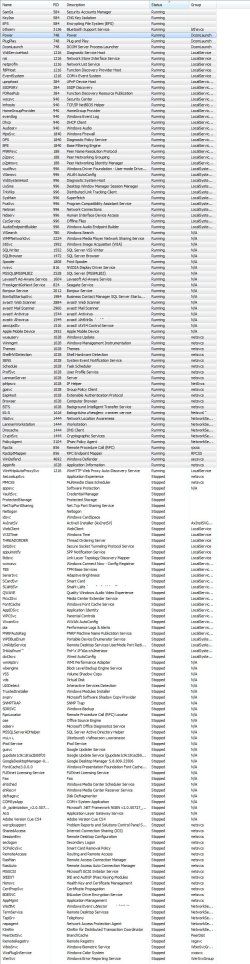
Major thanks for any and all help with this strange, unidentified pop-up window. (attached a screenshot of the task-manager 'services' tab also in case that helps). Thanks!
 

Attachments

  • system-services-running.jpg
    system-services-running.jpg
    680.8 KB · Views: 2,544

My Computer

OS
7077
CPU
intel core2 Duo T8300 @ 2.40 GHz, 2401 Mhz
Motherboard
Dell Inc. A12 11/19/2008
Memory
4.00 GH
Graphics Card(s)
NVIDIA GeForce 8600M GT
Sound Card
SigmaTel High Definition Audio CODEC
Screen Resolution
1440 x 900 x 60 hertz
Hard Drives
TOSHIBA MK3252GSX

Partition Disk #0, Partition #0
Partition Size 86.26 MB (90,445,824 bytes)
Partition Starting Offset 32,256 bytes
Partition Disk #0, Partition #1
Partition Size 10.00 GB (10,737,418,240 bytes)
Partition Starting Offset 91,22
Other Info
0x00000000-0x00000CF7 PCI bus OK
0x00000000-0x00000CF7 Direct memory access controller OK
0x00000010-0x0000001F Direct memory access controller OK
0x00000020-0x00000021 System board OK
0x00000024-0x00000025 Programmable interrupt controller OK
0x00000028-0x00000029 Programmable interrupt controller OK
0x0000002C-0x0000002D Programmable interrupt controller OK
0x00000030-0x00000031 Programma
And a reason for that is I can't find any simple but good one that is compatible,something like ZoneAlarm,and with Kaspersky IS I have to many problems(BSOD,every .exe reported like a malware so I had to uninstalled it),so for me,Avast Professional(which is really really good,effective and doesn't waste too much resources) is the best option for antivirus, and don't know which firewall should I install beside it,doesn't matter,paid or free.

Comodo runs smoothly for me.
 

My Computer

OS
Build 7100
Answer

mctadmin.exe is a microsoft tool in Win7 and Windows server 2008 R2 to allow Local Pack installation for a customized Windows 7 installation for a specific region.

IE Favorites, RSS feeds, and other items are updated when the Local Pack is activated to include resources specific to the region.

The actual local packs are hidden and Local Pack content is exposed when user Location setting matches the target location for an available Local Pack.

mctadmin.exe is a command line tool. Presumably it is activated during the setup sequence to see if the users location choice matches one of the packs. Thereafter a sysadmin may run it manually.

I wouldn't worry about it. It should only "runonce" but will probably resolve itself.

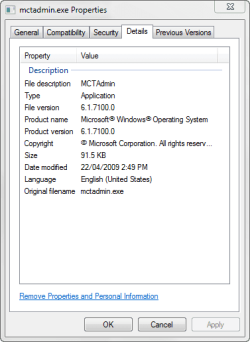
Here are my file details
mctadmin.png

If I've helped - hit the little scales
 

My Computer

Computer Manufacturer/Model Number
AMD Athlon 64 3200+, Lenovo G560 i3
OS
Windows 7 Ultimate, Ubuntu
Motherboard
Gigabyte K8T8000
Memory
DDR 2Gb (!)
Graphics Card(s)
6600GT
Monitor(s) Displays
MultiMonitor (2) LCD
Hard Drives
Old Seagate 75
Big Western Digital
Samsung 500Gb pulled out of an external drive and installed
Ext: Maxtor (Firewire), 1Gb Lacie (Samsung)
Mouse
Logitech MX620 Cordless
I was also curious as to mctadmin file, found it during a HJT run and have had trouble identifying, posted below is my log, will someone let me know if anything is of concern.


Code:
Running processes:
C:\Windows\system32\taskhost.exe
C:\Windows\system32\Dwm.exe
C:\Windows\Explorer.EXE
C:\Program Files\AVG\AVG8\avgtray.exe
C:\Program Files\Microsoft Office\Office12\GrooveMonitor.exe
C:\Program Files\Common Files\LogiShrd\LComMgr\Communications_Helper.exe
C:\Program Files\Common Files\LogiShrd\LComMgr\LVComSX.exe
C:\Program Files\Logitech\Logitech WebCam Software\LWS.exe
C:\Program Files\Windows Sidebar\sidebar.exe
C:\Program Files\Logitech\Logitech Vid\Vid.exe
C:\Program Files\Logitech\SetPoint\SetPoint.exe
C:\Program Files\Common Files\Logitech\KhalShared\KHALMNPR.EXE
C:\Program Files\Common Files\Logishrd\LQCVFX\COCIManager.exe
C:\Program Files\Windows Mail\WinMail.exe
C:\Program Files\Mozilla Firefox\firefox.exe
C:\Program Files\AIM\aim.exe
C:\Program Files\Skype\Phone\Skype.exe
C:\Program Files\Skype\Plugin Manager\skypePM.exe
C:\Program Files\Trend Micro\HijackThis\HijackThis.exe
F:\Google\Google Earth\googleearth.exe
C:\Windows\system32\taskhost.exe
C:\Windows\system32\DllHost.exe
 
R1 - HKCU\Software\Microsoft\Internet Explorer\Main,Search Page = [URL="http://go.microsoft.com/fwlink/?LinkId=54896"]Bing[/URL]
R0 - HKCU\Software\Microsoft\Internet Explorer\Main,Start Page = [URL="http://go.microsoft.com/fwlink/?LinkId=69157"]MSN.com[/URL]
R1 - HKLM\Software\Microsoft\Internet Explorer\Main,Default_Page_URL = [URL="http://go.microsoft.com/fwlink/?LinkId=69157"]MSN.com[/URL]
R1 - HKLM\Software\Microsoft\Internet Explorer\Main,Default_Search_URL = [URL="http://go.microsoft.com/fwlink/?LinkId=54896"]Bing[/URL]
R1 - HKLM\Software\Microsoft\Internet Explorer\Main,Search Page = [URL="http://go.microsoft.com/fwlink/?LinkId=54896"]Bing[/URL]
R0 - HKLM\Software\Microsoft\Internet Explorer\Main,Start Page = [URL="http://go.microsoft.com/fwlink/?LinkId=69157"]MSN.com[/URL]
R0 - HKLM\Software\Microsoft\Internet Explorer\Search,SearchAssistant = 
R0 - HKLM\Software\Microsoft\Internet Explorer\Search,CustomizeSearch = 
R0 - HKCU\Software\Microsoft\Internet Explorer\Toolbar,LinksFolderName = 
R3 - URLSearchHook: AVG Security Toolbar BHO - {A3BC75A2-1F87-4686-AA43-5347D756017C} - C:\Program Files\AVG\AVG8\Toolbar\IEToolbar.dll
O2 - BHO: WormRadar.com IESiteBlocker.NavFilter - {3CA2F312-6F6E-4B53-A66E-4E65E497C8C0} - C:\Program Files\AVG\AVG8\avgssie.dll
O2 - BHO: Search Helper - {6EBF7485-159F-4bff-A14F-B9E3AAC4465B} - C:\Program Files\Microsoft\Search Enhancement Pack\Search Helper\SEPsearchhelperie.dll
O2 - BHO: Groove GFS Browser Helper - {72853161-30C5-4D22-B7F9-0BBC1D38A37E} - C:\Program Files\Microsoft Office\Office12\GrooveShellExtensions.dll
O2 - BHO: Windows Live ID Sign-in Helper - {9030D464-4C02-4ABF-8ECC-5164760863C6} - C:\Program Files\Common Files\Microsoft Shared\Windows Live\WindowsLiveLogin.dll
O2 - BHO: AVG Security Toolbar BHO - {A3BC75A2-1F87-4686-AA43-5347D756017C} - C:\Program Files\AVG\AVG8\Toolbar\IEToolbar.dll
O2 - BHO: Windows Live Toolbar Helper - {E15A8DC0-8516-42A1-81EA-DC94EC1ACF10} - C:\Program Files\Windows Live\Toolbar\wltcore.dll
O3 - Toolbar: AVG Security Toolbar - {CCC7A320-B3CA-4199-B1A6-9F516DD69829} - C:\Program Files\AVG\AVG8\Toolbar\IEToolbar.dll
O3 - Toolbar: &Windows Live Toolbar - {21FA44EF-376D-4D53-9B0F-8A89D3229068} - C:\Program Files\Windows Live\Toolbar\wltcore.dll
O4 - HKLM\..\Run: [AVG8_TRAY] C:\PROGRA~1\AVG\AVG8\avgtray.exe
O4 - HKLM\..\Run: [GrooveMonitor] "C:\Program Files\Microsoft Office\Office12\GrooveMonitor.exe"
O4 - HKLM\..\Run: [Kernel and Hardware Abstraction Layer] KHALMNPR.EXE
O4 - HKLM\..\Run: [LogitechCommunicationsManager] "C:\Program Files\Common Files\LogiShrd\LComMgr\Communications_Helper.exe"
O4 - HKLM\..\Run: [LVCOMSX] "C:\Program Files\Common Files\LogiShrd\LComMgr\LVComSX.exe"
O4 - HKLM\..\Run: [LogitechQuickCamRibbon] "C:\Program Files\Logitech\Logitech WebCam Software\LWS.exe" /hide
O4 - HKCU\..\Run: [Sidebar] C:\Program Files\Windows Sidebar\sidebar.exe /autoRun
O4 - HKCU\..\Run: [Logitech Vid] "C:\Program Files\Logitech\Logitech Vid\vid.exe" -bootmode
O4 - HKCU\..\Run: [Google Update] "C:\Users\Ace Admin\AppData\Local\Google\Update\GoogleUpdate.exe" /c
O4 - HKUS\S-1-5-19\..\Run: [Sidebar] %ProgramFiles%\Windows Sidebar\Sidebar.exe /autoRun (User 'LOCAL SERVICE')
O4 - HKUS\S-1-5-19\..\RunOnce: [mctadmin] C:\Windows\System32\mctadmin.exe (User 'LOCAL SERVICE')
O4 - HKUS\S-1-5-20\..\Run: [Sidebar] %ProgramFiles%\Windows Sidebar\Sidebar.exe /autoRun (User 'NETWORK SERVICE')
O4 - HKUS\S-1-5-20\..\RunOnce: [mctadmin] C:\Windows\System32\mctadmin.exe (User 'NETWORK SERVICE')
O4 - Global Startup: Logitech SetPoint.lnk = C:\Program Files\Logitech\SetPoint\SetPoint.exe
O8 - Extra context menu item: E&xport to Microsoft Excel - res://C:\PROGRA~1\MICROS~2\Office12\EXCEL.EXE/3000
O9 - Extra button: Blog This - {219C3416-8CB2-491a-A3C7-D9FCDDC9D600} - C:\Program Files\Windows Live\Writer\WriterBrowserExtension.dll
O9 - Extra 'Tools' menuitem: &Blog This in Windows Live Writer - {219C3416-8CB2-491a-A3C7-D9FCDDC9D600} - C:\Program Files\Windows Live\Writer\WriterBrowserExtension.dll
O9 - Extra button: Send to OneNote - {2670000A-7350-4f3c-8081-5663EE0C6C49} - C:\PROGRA~1\MICROS~2\Office12\ONBttnIE.dll
O9 - Extra 'Tools' menuitem: S&end to OneNote - {2670000A-7350-4f3c-8081-5663EE0C6C49} - C:\PROGRA~1\MICROS~2\Office12\ONBttnIE.dll
O9 - Extra button: Research - {92780B25-18CC-41C8-B9BE-3C9C571A8263} - C:\PROGRA~1\MICROS~2\Office12\REFIEBAR.DLL
O10 - Unknown file in Winsock LSP: c:\program files\common files\microsoft shared\windows live\wlidnsp.dll
O13 - Gopher Prefix: 
O16 - DPF: {D27CDB6E-AE6D-11CF-96B8-444553540000} (Shockwave Flash Object) - [URL]http://fpdownload2.macromedia.com/get/shockwave/cabs/flash/swflash.cab[/URL]
O18 - Protocol: grooveLocalGWS - {88FED34C-F0CA-4636-A375-3CB6248B04CD} - C:\Program Files\Microsoft Office\Office12\GrooveSystemServices.dll
O18 - Protocol: linkscanner - {F274614C-63F8-47D5-A4D1-FBDDE494F8D1} - C:\Program Files\AVG\AVG8\avgpp.dll
O18 - Protocol: skype4com - {FFC8B962-9B40-4DFF-9458-1830C7DD7F5D} - C:\PROGRA~1\COMMON~1\Skype\SKYPE4~1.DLL
O20 - AppInit_DLLs: avgrsstx.dll
O23 - Service: AVG Free8 E-mail Scanner (avg8emc) - AVG Technologies CZ, s.r.o. - C:\PROGRA~1\AVG\AVG8\avgemc.exe
O23 - Service: AVG Free8 WatchDog (avg8wd) - AVG Technologies CZ, s.r.o. - C:\PROGRA~1\AVG\AVG8\avgwdsvc.exe
O23 - Service: Process Monitor (LVPrcSrv) - Logitech Inc. - C:\Program Files\Common Files\LogiShrd\LVMVFM\LVPrcSrv.exe
O23 - Service: LVSrvLauncher - Logitech Inc. - C:\Program Files\Common Files\LogiShrd\SrvLnch\SrvLnch.exe
O23 - Service: NVIDIA Display Driver Service (nvsvc) - NVIDIA Corporation - C:\Windows\system32\nvvsvc.exe
 
Last edited by a moderator:

My Computer

OS
Windows 7 Ultimate
CPU
Intel Core 2 6600 @ 2.40GHz
Motherboard
NVIDA NFORCE 680i SLI
Memory
Kingston Hyper X DDR2 2x2GB 1066 Mhz
Graphics Card(s)
GeForce GTX 285 OCFU
Sound Card
Integrated with motherboard
Monitor(s) Displays
2 Dell Ultrasharp 20' monitors
Hard Drives
Seagate 1 TB hard drive
Case
Raidmax Sirius

My Computer

Computer Manufacturer/Model Number
Systemax N2000 Gaming PC
OS
Windows 7 Ultimate x64
CPU
Q6600 @2.4ghz (G0 stepping)
Motherboard
XFX nforce 680i LT
Memory
8 gb OCZ vista essential sli PC-6400
Graphics Card(s)
Dual 9800gt in SLI mode
Sound Card
Integrated 8.1 High Definition Audio
Monitor(s) Displays
Dual Sceptre x246w 24 inch monitors
Screen Resolution
1920 x 1200 each monitor
Hard Drives
500 GB SATA II / 7500 rpm
PSU
Cooler Master Real Power Pro 1250W
Case
N2000 server tower
Cooling
Thermaltake Bigwater 760 is
Keyboard
MS Intelitype 6000 v2.0
Mouse
MS Intelipoint 6000
Internet Speed
Wi-power 1.5GB up / 512k down
Other Info
Windows 7 Ultimate x64, Windows 7 Pro x64, Windows Home Premium X86, Windows XP pro, Windows Home Server x86, Ubuntu 10.4 x86 and x64, Ubuntu server 10.4, SQL Server 2005, MySQL 5.0
mctadmin function.

For what its worth!

Seems that the "mctadmin.exe" is used to run desktop themes. You can download country motif themes from MS. The command line will be like mctadmin.exe/XX <where xx is a two letter country code>. For example "mctadmin.exe/au" will load Australian theme images.

This may be true since I downloaded, installed and ran the China and Spain themes, hence the "mctadmin.exe/sp" entry reported by SpyBot.

To play it safe; I prevent both entries from running via SpyBot 1.62, without any consequences to the overall performance of the system.

For more info do a search in Microsoft's knowledge base. This may provide more info on this misterious executable.
 

My Computer

Computer type
PC/Desktop
Computer Manufacturer/Model Number
DIY Re-built.
OS
Windows 7 Home Premium 64Bits SP1
CPU
Intel i7-920
Motherboard
ASUS P6TD Deluxe
Memory
12 Gb (6x2GB Corsair XMS TR3X3G1600C9 G) Tri Channels
Graphics Card(s)
ASUS GTX-970 Turbo
Sound Card
ASUS On Board SoundMax
Monitor(s) Displays
Samsung UN46D6500 46" TV
Screen Resolution
1920x1080
Hard Drives
1 OCZ SSD Agility Sata III 120Gb
1 Samsung 1Tb
1 Samsung 750Gb
1 Western Digital 500Gb(Mounted in ext eSata case)
PSU
Enermax CUG-950W
Case
Full ATX (Generic)
Cooling
Fans (6) 80mm
Keyboard
Saitek Eclipse II
Mouse
Cyborg R.A.T-5
Internet Speed
Comcast 105.0 MBPS
Antivirus
AVG
Browser
Waterfox v40.02(x64)
Other Info
- Logitech X-530 5.1 Sound speakers.
- APC ES-1300.
- Arris TG862G/CT Modem/Router.
- Samsung BD-083A Blue Ray Player
- Lite On iHBS212 Blue Ray Burner
- Nippon Labs All-In-One Card Reader/Writer W/USB & eSata

My Computer

Computer type
PC/Desktop
Computer Manufacturer/Model Number
Bruce ... somewhere in his 40's
OS
Windows 7 Ultimate 32bit SP1
CPU
Intel(R) Core(TM)2 Quad CPU @ 2.40GHz, 2400 MHz
Motherboard
INTEL/D975XBX2
Memory
4 GB
Graphics Card(s)
ATI Radeon HD 2600 Pro
Monitor(s) Displays
Samsung SyncMaster 914v
Screen Resolution
1280 x 1024
Hard Drives
2/500GB each ... ST3500630AS ATA Device.
One is not connected
PSU
Rocketfish 700 W
Case
G.Skill Gigabyte Chassis
Keyboard
Standard PS/2 Keyboard
Mouse
Microsoft PS/2 Mouse
Internet Speed
DSL
Antivirus
Avira Internet Security
Browser
IE 11
Other Info
ATI HDMI Audio
SOLVED: Anyone know what mctadmin.exe is?

You can use the Content Management Engine (Mctadmin) tool to configure a Local Pack. Mctadmin is a command-line tool that is available with all installations of Windows 7. This tool manages available Local Pack content on a per-user basis and exposes it within an end user's profile. The Mctadmin tool runs during Windows Welcome for every end user to determine if a Local Pack matching the end user's current location setting is available on the system. If a Local Pack is installed that matches the end user's current location, the Mctadmin tool will copy the Local Pack content to the end user's profile. End users will have the market-customized theme and associated subelements exposed to them within the Personalization control panel. They will also have any available links to local Web sites added to their Internet Explorer Favorites directory and local RSS feeds added to their RSS store.


My opinion is that it would be safe to remove the entries if you really want to...:geek:
 

My Computer

Computer Manufacturer/Model Number
Dell Inspiron 600m
OS
Windows 7 Home Premium 32-bit
CPU
Pentium M 1.7 GHz
Motherboard
Unkown
Memory
2GB
Graphics Card(s)
ATI Mobility Radeon 9000
Sound Card
Unknown
Monitor(s) Displays
Laptop LCD, non-glossy, factory
Hard Drives
80 GB
PSU
Unkown
Case
Stock, factory
Cooling
Factory
Back
Top