Solved Anyone seen a tray app that pops up a list of program shortcuts?

So, given this, I cannot reason why the need for the 'Favorites' registry mod from a few posts back. No matter, I happy now and all's well.

-thx

Well I posted that 'Favorites' registry mod without understanding that it would also affect IE Favorites.

The Libraries method would seem to be more suitable!
 

My Computer My Computer

At a glance

Microsoft Windows 7 Home Premium 64-bit 7601 ...AMD C-60 APU with Radeon(tm) HD Graphics4.00 GBAMD Radeon HD 6290 Graphics
Computer type
Laptop
Computer Manufacturer/Model Number
ASUS
OS
Microsoft Windows 7 Home Premium 64-bit 7601 Multiprocessor Free Service Pack 1
CPU
AMD C-60 APU with Radeon(tm) HD Graphics
Motherboard
ASUSTeK COMPUTER INC. X501U
Memory
4.00 GB
Graphics Card(s)
AMD Radeon HD 6290 Graphics
Sound Card
(1) AMD High Definition Audio Device (2) Realtek High Defi
Screen Resolution
1366 x 768 x 32 bits (4294967296 colors) @ 60 Hz
Hard Drives
Hitachi HTS545050A7E380 SATA Disk Device
Antivirus
Comodo CIS & FW, SecureAplus App Whitelisting, Threatfire
Browser
Cyberfox 64bit, Opera 64bit, Airfox
Other Info
Spy-The-Spy, HitmanPro.Alert, Norton Connect Safe, MJRegWatcher, BitDefender TrafficLight, Voodoo Shield, Zemana AntiMalware
So, given this, I cannot reason why the need for the 'Favorites' registry mod from a few posts back. No matter, I happy now and all's well.

-thx

Well I posted that 'Favorites' registry mod without understanding that it would also affect IE Favorites.
Hey, it's cool - and was actually educational for me. I learned where the taskbar items were located (as well as where the Start Menu's programs shortcuts were). So, still a 'win' in my eyes - thx!

The Libraries method would seem to be more suitable!
I agree. Any clue as to how I managed to put that on the right-side of the Start Menu (or was it 'automatic' as a result of doing that tutorial, I'm stumped)?
 

My Computer My Computer

At a glance

Microsoft Windows 7 Home Premium 64-bit 7601 ...Pentium(R) Dual-Core CPU E5300 @ 2.60GHz6.00 GBIntel(R) G33/G31 Express Chipset Family
Computer type
PC/Desktop
Computer Manufacturer/Model Number
HP (HP-P6212F)
OS
Microsoft Windows 7 Home Premium 64-bit 7601 Multiprocessor Free Service Pack 1
CPU
Pentium(R) Dual-Core CPU E5300 @ 2.60GHz
Motherboard
PEGATRON CORPORATION Benicia
Memory
6.00 GB
Graphics Card(s)
Intel(R) G33/G31 Express Chipset Family
Sound Card
Realtek High Definition Audio
Monitor(s) Displays
24'' HP WS LCD
Screen Resolution
1920 x 1080 x 32 bits (4294967296 colors) @ 60 Hz
Hard Drives
(1) ATA Hitachi HDT72106 SCSI Disk Device (2) Generic- Compact Flash USB Device (3) Generic- MS/MS-Pro USB Device (4) Generic- SD/MMC USB Device (5) Generic- SM/xD-Picture USB Device (6) Verbatim STORE N GO USB Device

Keyboard
Logitech G510s
Mouse
Logitech Trackball M570
Antivirus
Microsoft Security Essentials / Malwarebytes
Browser
IE / Firefox / Chrome
Any clue as to how I managed to put that on the right-side of the Start Menu (or was it 'automatic' as a result of doing that tutorial, I'm stumped)?

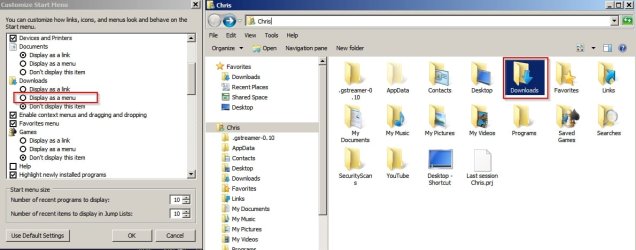
Well did you choose an unused user folder - your default downloads folder or one of the others shown below?

20337d1379267671t-user-folders-restore-default-location-example1.jpg

Then display it in your start menu?

Downloads.jpg

You can change the location of where to save downloaded files in most browsers.

I'm just guessing here but that's one way it could happen.
 

My Computer My Computer

At a glance

Microsoft Windows 7 Home Premium 64-bit 7601 ...AMD C-60 APU with Radeon(tm) HD Graphics4.00 GBAMD Radeon HD 6290 Graphics
Computer type
Laptop
Computer Manufacturer/Model Number
ASUS
OS
Microsoft Windows 7 Home Premium 64-bit 7601 Multiprocessor Free Service Pack 1
CPU
AMD C-60 APU with Radeon(tm) HD Graphics
Motherboard
ASUSTeK COMPUTER INC. X501U
Memory
4.00 GB
Graphics Card(s)
AMD Radeon HD 6290 Graphics
Sound Card
(1) AMD High Definition Audio Device (2) Realtek High Defi
Screen Resolution
1366 x 768 x 32 bits (4294967296 colors) @ 60 Hz
Hard Drives
Hitachi HTS545050A7E380 SATA Disk Device
Antivirus
Comodo CIS & FW, SecureAplus App Whitelisting, Threatfire
Browser
Cyberfox 64bit, Opera 64bit, Airfox
Other Info
Spy-The-Spy, HitmanPro.Alert, Norton Connect Safe, MJRegWatcher, BitDefender TrafficLight, Voodoo Shield, Zemana AntiMalware
... Well did you choose an unused user folder - your default downloads folder or one of the others shown below? ...
uh, unused user folder I suppose,
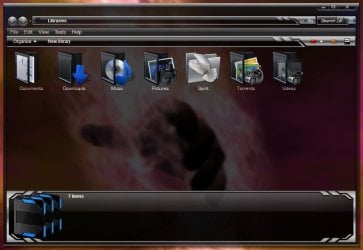
I believe I cliked on 'New Library' to create the 'Spirit' & 'Torrents' Library folder icons.
 

Attachments

  • EXPwin.JPG
    EXPwin.JPG
    62 KB · Views: 1

My Computer My Computer

At a glance

Microsoft Windows 7 Home Premium 64-bit 7601 ...Pentium(R) Dual-Core CPU E5300 @ 2.60GHz6.00 GBIntel(R) G33/G31 Express Chipset Family
Computer type
PC/Desktop
Computer Manufacturer/Model Number
HP (HP-P6212F)
OS
Microsoft Windows 7 Home Premium 64-bit 7601 Multiprocessor Free Service Pack 1
CPU
Pentium(R) Dual-Core CPU E5300 @ 2.60GHz
Motherboard
PEGATRON CORPORATION Benicia
Memory
6.00 GB
Graphics Card(s)
Intel(R) G33/G31 Express Chipset Family
Sound Card
Realtek High Definition Audio
Monitor(s) Displays
24'' HP WS LCD
Screen Resolution
1920 x 1080 x 32 bits (4294967296 colors) @ 60 Hz
Hard Drives
(1) ATA Hitachi HDT72106 SCSI Disk Device (2) Generic- Compact Flash USB Device (3) Generic- MS/MS-Pro USB Device (4) Generic- SD/MMC USB Device (5) Generic- SM/xD-Picture USB Device (6) Verbatim STORE N GO USB Device
Keyboard
Logitech G510s
Mouse
Logitech Trackball M570
Antivirus
Microsoft Security Essentials / Malwarebytes
Browser
IE / Firefox / Chrome
Back
Top