Anyone tried Vboot from VMLite?

eldinv

New member
Guru
Local time
10:09 AM
Messages
560
Location
New Hampshire
It sounds like it will let you boot into a Windows XP VHD. So first you downloaded and install XM mode, which will give you the XP Pro in a VHD. Then install VBoot?

Sounds interesting?
 

My Computers My Computers

System One System Two

  • Computer type
    PC/Desktop
    Computer Manufacturer/Model Number
    PowerSpec G164
    OS
    WIN10
    CPU
    AMD Ryzen 5 3600 6-Core Processor 3.59 GHz
    Memory
    16.0 GB
    Internet Speed
    VERY FAST>>>!!!
  • Antivirus
    ESET Security Premium
   Note
This post represents my personal, subjective opinion based on my own experience. As such, this should not be taken as a software review or as a recommendation not to use this software.

My opinion may be biased due to previous negative experiences with VMlite's software in general.

I have tried.

1. Trying to boot from existing vhd

Following the instructions carefully, I am able to prepare all Windows vhd's to be used with VBoot and add them to VBoot start menu. All Windows vhd's boot OK, until Windows boot screen, and then (without an exception) a BSOD causes PC to reboot back to square 1.

Tested Windows vhd's: XP Pro SP2, XP Pro SP3, Vista Ultimate x86, Vista Ultimate x64, Seven Ultimate x86, Seven Enterprise x86

All mentioned vhd's tested on one laptop (see my specs) and two desktops, one running Seven Ultimate x64 and the other Seven Enterprise x64.

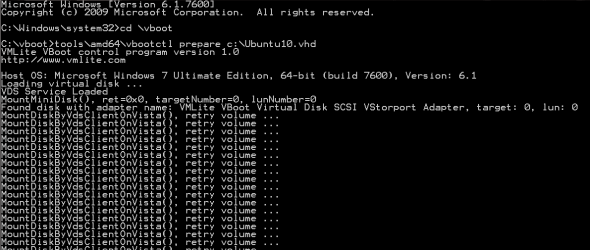
Trying to mount other than Windows vhd's have not worked at all. Here trying to mount Ubuntu 10.04 vhd. VBoot tries to mount the vhd:

VBoot_1.png

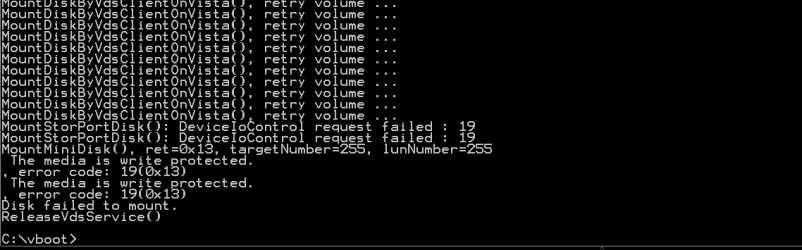
Until it finally fails, telling that the vhd is write protected (which it is not):

VBoot_2.png

This happens with all tested Linux and Solaris Unix vhd's.

2. Trying to create a vhd and install OS using VBoot

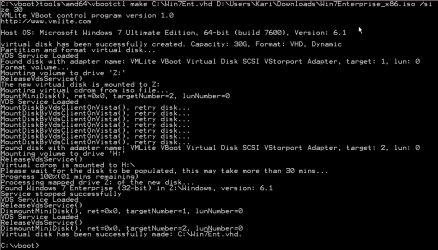
Every installation seems to work, this is what I normally got:

VBoot_3.png

But after testing, only Windows 7 Enterprise guest vhd was able to boot, which it did completely problem free. Installation of Seven using VBoot command line options took about 15 minutes, plus an additional 7 minutes after first boot to vhd.

All other tries failed, Linux and Windows. The most common reason to fail:

VBoot_4.png

So, after an 8 hour test session, I would like to say this is a pretty useless piece of software.

Kari

 

My Computer My Computer

Computer type
Laptop
Computer Manufacturer/Model Number
HP ENVY 17-1150eg
OS
Windows 10 Pro x64 EN-GB
CPU
1.6 GHz Intel Core i7-720QM Processor
Memory
6 GB
Graphics Card(s)
ATI Mobility Radeon HD 5850 Graphics
Sound Card
Beats sound system with integrated subwoofer
Monitor(s) Displays
17" laptop display, 22" LED and 32" Full HD TV through HDMI
Screen Resolution
1600*900 (1), 1920*1080 (2&3)
Hard Drives
Internal: 2 x 500 GB SATA Hard Disk Drive 7200 rpm
External: 2TB for backups, 3TB USB3 network drive for media
Cooling
As Envy runs a bit warm, I have it on a Cooler Master pad
Keyboard
Logitech diNovo Media Desktop Laser (bluetooth)
Mouse
Logitech Performance Mouse MX
Internet Speed
50/10 Mbps VDSL
Antivirus
Windows Defender 4.3.9431.0
Browser
Maxthon 3.5.2., IE11
Over 3 weeks after release, more than 10,000 people have used it and are happy.

If you want to boot existing vhds, you need to do v2p conversion. In addition to run "vbootctl prepare", you need to inject mass storage drivers. If you want to boot windows from a virtual disk stored on USB, you need to insert more USB drivers. Our forum has many discussions.

VBoot main purpose is to boot fresh virtual disks installed from iso files, i.e., you need to follow our instructions to install a fresh windows xp/2003/7/2008 from original os cd, then it will surely boot on the physical machine.

For ubuntu Linux, you need to change initrd.

If you mount Linux Vhd on windows, it won't work since there is no Linux file systems, such as ext3.

In short, vboot works extremely well, no one comes even close, and it boots all windows from a virtual disk file, in vhd/vmdk/vdi, and it supports snapshots and differencing files.

Don't take my words, go to read others feedbacks in vmlite forums.
 
Last edited:

My Computer My Computer

OS
windows 7
Can I ask what the purpose of this is? Is it simply to take a virtual hard drive file and boot the machine from this file just like a dual boot? That's what I am thinking. While I have needs for running VM's, I don't really have a need for a dual boot style setup.
 

My Computer My Computer

Computer Manufacturer/Model Number
Self-Built in July 2009
OS
Windows 7 Ultimate x64
CPU
Intel Q9550 2.83Ghz OC'd to 3.40Ghz
Motherboard
Gigabyte GA-EP45-UD3R rev. 1.1, F12 BIOS
Memory
8GB G.Skill PI DDR2-800, 4-4-4-12 timings
Graphics Card(s)
EVGA 1280MB Nvidia GeForce GTX570
Sound Card
Realtek ALC899A 8 channel onboard audio
Monitor(s) Displays
23" Acer x233H
Screen Resolution
1920x1080
Hard Drives
Intel X25-M 80GB Gen 2 SSD
Western Digital 1TB Caviar Black, 32MB cache. WD1001FALS
PSU
Corsair 620HX modular
Case
Antec P182
Cooling
stock
Keyboard
ABS M1 Mechanical
Mouse
Logitech G9 Laser Mouse
Internet Speed
15/2 cable modem
Other Info
Windows and Linux enthusiast. Logitech G35 Headset.
multi boot is one use.

VBoot will give you the same control to your host machine as you do on virtual machines. For example, you can take snapshots and keep your machine clean.

Many situations, vms are slow, and people may want to run them as real machine. VBoot provides you the capability to run the same disk file as virtual and as real interchangeably.

Also, this will simply IT management by distributing a file to real machines. VBoot also provides a feature called "immutable boot", where all system changes will be discarded after reboot. This is ideal in public computers, e.g., universities. A few universities are already in talk with us to deploy vboot.

There are many other use cases, e.g., to distribute a readonly Linux vhds, to boot a readonly Windows PE for admin use, etc.

Can I ask what the purpose of this is? Is it simply to take a virtual hard drive file and boot the machine from this file just like a dual boot? That's what I am thinking. While I have needs for running VM's, I don't really have a need for a dual boot style setup.
 

My Computer My Computer

OS
windows 7
another use, VBoot will allow you for the first time to install Windows from iso files, instead of using a physical cdrom.

for example, you do these two steps to install Windows XP to a real hard disk from iso file:

menuentry "XP Install Step 1" {
vboot floppy=(hd0,1)/vboot/vboot.img cdrom=(hd0,1)/winxp-sp3.iso boot=cdrom
}

menuentry "XP Install Step 2" {
vboot cdrom=(hd0,1)/winxp-sp2.iso boot=harddisk
}

More instructions:

VBoot Instructions
 

My Computer My Computer

OS
windows 7
You are the VLite Developer? I had a friend try and since he has VBox installed it wouldn't even install. Is this program just a copy of VBox?
 

My Computers My Computers

System One System Two

  • Computer type
    PC/Desktop
    Computer Manufacturer/Model Number
    PowerSpec G164
    OS
    WIN10
    CPU
    AMD Ryzen 5 3600 6-Core Processor 3.59 GHz
    Memory
    16.0 GB
    Internet Speed
    VERY FAST>>>!!!
  • Antivirus
    ESET Security Premium
As mentioned in our site, vmlite workstation is based on vbox ose, you need to remove vbox before installing vmlite workstation, or install vmlite plugin for vbox.

Vboot is very different from vbox or vmlite workstation, as it is not a virtual machine, only thing same is the disk format.
 

My Computer My Computer

OS
windows 7
Does VBox know this?
 

My Computers My Computers

System One System Two

  • Computer type
    PC/Desktop
    Computer Manufacturer/Model Number
    PowerSpec G164
    OS
    WIN10
    CPU
    AMD Ryzen 5 3600 6-Core Processor 3.59 GHz
    Memory
    16.0 GB
    Internet Speed
    VERY FAST>>>!!!
  • Antivirus
    ESET Security Premium
Why not? I work with vbox founder closely, and commit our code changes back.
 

My Computer My Computer

OS
windows 7
For example, we are implementing drag and drop feature for vbox, will submit code when finished.
 

My Computer My Computer

OS
windows 7
Holy crap, finally, thank you, this was one of those things that is long over due for VirtualBox.
 

My Computer My Computer

OS
windows 7 x64
   Note
This post represents my personal, subjective opinion based on my own experience. As such, this should not be taken as a software review or as a recommendation not to use this software.

My opinion may be biased due to previous negative experiences with VMlite's software in general.

I have tried.

1. Trying to boot from existing vhd

Following the instructions carefully, I am able to prepare all Windows vhd's to be used with VBoot and add them to VBoot start menu. All Windows vhd's boot OK, until Windows boot screen, and then (without an exception) a BSOD causes PC to reboot back to square 1.

Tested Windows vhd's: XP Pro SP2, XP Pro SP3, Vista Ultimate x86, Vista Ultimate x64, Seven Ultimate x86, Seven Enterprise x86

All mentioned vhd's tested on one laptop (see my specs) and two desktops, one running Seven Ultimate x64 and the other Seven Enterprise x64.

Trying to mount other than Windows vhd's have not worked at all. Here trying to mount Ubuntu 10.04 vhd. VBoot tries to mount the vhd:

View attachment 129626

Until it finally fails, telling that the vhd is write protected (which it is not):

View attachment 129627

This happens with all tested Linux and Solaris Unix vhd's.

2. Trying to create a vhd and install OS using VBoot

Every installation seems to work, this is what I normally got:

View attachment 129628

But after testing, only Windows 7 Enterprise guest vhd was able to boot, which it did completely problem free. Installation of Seven using VBoot command line options took about 15 minutes, plus an additional 7 minutes after first boot to vhd.

All other tries failed, Linux and Windows. The most common reason to fail:

View attachment 129629

So, after an 8 hour test session, I would like to say this is a pretty useless piece of software.

Kari

Hi there
I think apart from the various "dubious legal copyright issues" I posted much the same as this WAY WAY back --at least 18 months ago.

There really isn't any point in using "Cludged" VM software --vbox and vmware work pretty well

Further if you are a REAL glutton for punishment the old QEMU works fine as well. Now who remembers THAT piece of software for creating VM'S.

Before you could use vmware PLAYER to CREATE virtual machines (only possible now with the latest releases) QEMU was used to CREATE a new VM for use with vmware player. Not needed however any more.

VMWARE will allow you also to use "RAW DISKS" too --vbox might as well but I haven't got so much experience with vbox although it seems to be pretty good these days.

I think both VBOX and VMWARE allow various conversions between different vhd formats so booting a VHD should not be too much of a problem whatever software you used in creating the initial VM.

There ARE a few posts around on how to boot an XP MODE VM using vmware but as this involves some tampering with the product ID you are on your own on this one.

XP mode needs at least W7 Pro to run -- using your own XP systems as VM's will run on ANY version of W7 -- even Starter edition but you will need to have a valid RETAIL copy of XP for validation.

Cheers
jimbo
 

My Computer My Computer

Computer type
PC/Desktop
Computer Manufacturer/Model Number
Custom built, several laptops HP/ASUS
OS
Linux CENTOS 7 / various Windows OS'es and servers
CPU
Intel i7 Intel i5
Memory
8GB, 16GB
Graphics Card(s)
On Motherboard
Sound Card
Realtek HD audio
Monitor(s) Displays
Apple Cinema display, Samsung LCD
Screen Resolution
1920 X 1080
Hard Drives
4 X 1TB SATA
Mouse
Toshiba wireless laser
Internet Speed
> 20MB up
Since some of you totally missed the point of VBoot, I'd like to clarify.

VBoot != VMLite

VBoot is an independent piece of software, and it is NOT virtual machine software. It contains a boot loader and system drivers for Windows and Linux (coming in the future Mac OS X too), so these operating systems can boot on a real physical machine from a virtual disk file. After booting, the os inside the virtual disk file is your host operating system, it's not running as a virtual machine. It's the real and primary os.

This way, it manages your whole OS as a file, you can take snapshot, you can copy and paste this file to another pc, and boot it. For the first time, you can control your host OS as if it's a virtual machine.

Since VBoot uses same disk formats as popular virtual machine software, the same image can also run as a vm. This way, you can operate on the same image, sometimes boot your pc, sometimes run it inside a vm software.

Here are steps to install and boot an XP from a vmdk file:

menuentry "XP VMDK" {
vboot harddisk="(hd0,1)/winxp.vmdk"
}

menuentry "XP Install Step 2" {
vboot harddisk="(hd0,1)/winxp.vmdk" cdrom=(hd0,1)/winxp-sp3.iso boot=harddisk
}

menuentry "XP Install Step 1" {
vboot harddisk="(hd0,1)/winxp.vmdk" floppy=(hd0,1)/vboot/vboot.img cdrom=(hd0,1)/winxp-sp3.iso boot=cdrom
}

You can also boot your pc using Microsoft Windows XP Mode vhd file (needs some efforts to inject necessary mass storage drivers):

menuentry "XP Mode VHD" {
vboot harddisk="(hd0,1)/VMLite XP Mode base.vhd"
}


Simply put, VBoot is unique and no other software can do this in terms of booting physical machines from Linux/Windows from virtual disk files.
 
Last edited:

My Computer My Computer

OS
windows 7
Back
Top