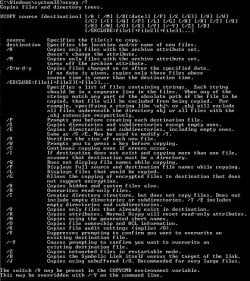
Anyone use windows xcopy to backup and move files?

craney5

New member
Power User
Local time
3:46 AM
Messages
212
Just curious to know if anyone here uses the windows xcopy utility. I never knew it was built into windows until yesterday and its a fab tool for backing up and moving files quickly. The key switches are straight forward to use found it far more user friendly than any other backup method
 

My Computer My Computer

At a glance

Windows 7 64bitPhenom IIx4 955 Black Edition4GB Kingston 1066mhz DDR2Gigabyte 260GTX
OS
Windows 7 64bit
CPU
Phenom IIx4 955 Black Edition
Memory
4GB Kingston 1066mhz DDR2
Graphics Card(s)
Gigabyte 260GTX
Monitor(s) Displays
Samsung syncmaster 2033
Hard Drives
500GB Samsung ATA
500GB Segate ATA
PSU
Antec True blue 750W Modular
Case
Antec 1200
Cooling
Prolimatech Megahalems Performance CPU Cooler/2x Apache Fan
I used to use it back in the DOS days. Now I just use Windows Explorer as I have my views selected to show all hidden and system files.

Should one not care to do so, xcopy is a great tool for batch files and unattended file moving and saving. Ahhh, reminds me of the good old days. :)

Screenshot_2.jpg
 

My Computer My Computer

At a glance

Windows 7 Ultimate x64 SP1Core2 Duo4 GBGM965 on-board
Computer Manufacturer/Model Number
Toshiba L355D
OS
Windows 7 Ultimate x64 SP1
CPU
Core2 Duo
Motherboard
Intel
Memory
4 GB
Graphics Card(s)
GM965 on-board
Sound Card
RealTek on-board
Monitor(s) Displays
19"+17"(laptop)
Screen Resolution
1440x900 (x 2)
Hard Drives
500GB Ext. 200GB Internal
PSU
N/A
Case
N/A
Cooling
N/A
Yep, I have used xcopy with the /D /Y and /s swithces for years in a batch file to back up My Documents and a few other folders. It just copies any changed files to my external backup file. I run it at least every day.
 

My Computer My Computer

At a glance

Windows 7 Home Premium (Retail) Full version ...3.10 Gig Intel Core i5-3350P8192 Megabytes Usable Installed Memory
Computer type
PC/Desktop
Computer Manufacturer/Model Number
Dell XPS-8500
OS
Windows 7 Home Premium (Retail) Full version - With SP1
CPU
3.10 Gig Intel Core i5-3350P
Motherboard
Dell 0NW73C A00
Memory
8192 Megabytes Usable Installed Memory
Monitor(s) Displays
Samsung SyncMaster [Monitor] (19.1"vis, s/n HVELA10194, Octo
Screen Resolution
1024 X 768
Hard Drives
INTEL SSDSA2CW120G3 ATA Device [Hard drive] (120.03 GB)
INTEL SSDSA2CW080G3 ATA Device [Hard drive] (80.02 GB)
Keyboard
HID Keyboard Device (HP)
Mouse
Dell (came with computer)
Internet Speed
cox high speed
Other Info
The above taken with Bel Arc Advisor
While I don't use xcopy, I do use robocopy which is a built-in command line tool from Microsoft that copies from one location to another and can optionally keep them in sync. Meaning that if files are deleted from the source, they get deleted from the destination too.

The syntax that I use looks like this
robocopy C:\users\profilename\music H:\Backups\PCName\music /mir /dst
robocopy C:\users\profilename\pictures H:\Backups\PCName\pictures /mir /dst

I keep these in a batch file and run them regularly and my subsequent backups usually complete in less then 30 seconds.
 

My Computer My Computer

At a glance

Windows 7 Ultimate x64Intel Q9550 2.83Ghz OC'd to 3.40Ghz8GB G.Skill PI DDR2-800, 4-4-4-12 timingsEVGA 1280MB Nvidia GeForce GTX570
Computer Manufacturer/Model Number
Self-Built in July 2009
OS
Windows 7 Ultimate x64
CPU
Intel Q9550 2.83Ghz OC'd to 3.40Ghz
Motherboard
Gigabyte GA-EP45-UD3R rev. 1.1, F12 BIOS
Memory
8GB G.Skill PI DDR2-800, 4-4-4-12 timings
Graphics Card(s)
EVGA 1280MB Nvidia GeForce GTX570
Sound Card
Realtek ALC899A 8 channel onboard audio
Monitor(s) Displays
23" Acer x233H
Screen Resolution
1920x1080
Hard Drives
Intel X25-M 80GB Gen 2 SSD
Western Digital 1TB Caviar Black, 32MB cache. WD1001FALS
PSU
Corsair 620HX modular
Case
Antec P182
Cooling
stock
Keyboard
ABS M1 Mechanical
Mouse
Logitech G9 Laser Mouse
Internet Speed
15/2 cable modem
Other Info
Windows and Linux enthusiast. Logitech G35 Headset.
Back
Top