Anytime Upgrade feature

wsplawn

New member
Local time
5:02 PM
Messages
74
A week or two ago there was a considerable amount of confusion concerning the Anytime upgrade. The people on the phone at MS insist they must send you a DVD in the mail. Windows 7 imples all you need to do is pay and get a key. The book Windows 7 inside and out says the same thing, but when you try to do that, at least this is what happened last week, the web site fails.

I attribute this to the product being brand new and just one of the glitches that go along with a new roll out. Does anyone know if these issuses have been clarified?
 

My Computer

OS
Windows XP
For what it's worth, I performed an upgrade from Windows 7 Home Premium to Ultimate addition using the "Windows Anytime Upgrade" link under the All Programs menu.

I clicked the "Enter an Upgrade key" option and entered my Ultimate key. After the system downloaded the upgrade (I guess that's what it was doing!), 10 minutes and a couple of reboots later I had a perfectly stable and working Windows 7 Ultimate edition.
 

My Computer

Computer Manufacturer/Model Number
Self Build
OS
Windows 7 Home Premium x64
CPU
Intel Core 2 Quad Q6600 @ 2.40GHz
Motherboard
Asus P5B-E
Memory
4Gb (2x Corsair CM2X2048-6400C5)
Graphics Card(s)
NVIDIA GeForce 9600 GT 512Mb
Sound Card
Realtek High Definition Audio Device
Monitor(s) Displays
Mirai 22" Widescreen and LG 19" Standard
Screen Resolution
1680 x 1050 and 1280 x 1024
Hard Drives
Western Digital 500Gb SATA x 2
Samsung 1Tb SATA
PSU
Hiper Modular 530W
Case
Akasa Ecplise 62 Midi
Cooling
Artic Cooling Freezer Pro 7
Keyboard
Advent Standard with Hotkeys
Mouse
PC Line PCL-FL1 Wired Laser
Internet Speed
ISP: Fast.co.uk up to 8Mb
Other Info
Netgear Router plus 5 Way LAN Switch, Samsung Ethernet Laser Printer, Epson PX650 Colour PSC, plus 2 more Desktop PCs, 3 Laptops and 2 Netbooks in same Home Network.
Any license key will work with Anytime. Provided, of course, that the upgrade key is a higher version than the existing installation.
 

My Computer

Computer Manufacturer/Model Number
Custom
OS
Windows 7 Professional x64
CPU
Intel i7 2600K OC'd @ 4620 MHz
Motherboard
Asus P8Z68-V Pro
Memory
16GB GSkill Sniper 2133 Mhz (4x4GB)
Graphics Card(s)
EVGA GeForce GTX 480 SuperClocked+
Sound Card
Realtek High Definition Audio
Monitor(s) Displays
2x Acer S273HLbmii 27"
Screen Resolution
2 x 1920x1080
Hard Drives
64GB Crucial M4 SSD

Storage: Hitachi 1TB 5400RPM, Samsung 1.5TB 5400RPM
PSU
Corsair HW Series 750w (modular)
Case
Cooler Master HAF 932 Advanced Blue Edition
Cooling
CM Hyper 212+ CPU cooler, 3x 230mm + 1x 140mm case fans
Keyboard
Logitech MK320 (wireless)
Mouse
Logitech MK320 (wireless)
Internet Speed
30 Mb/s : 2 Mb/s
I do appreciate your input Jonathan, thank you. Do you know if the issue I spoke about with the web site has been resolved? Do you know if it does indeed require a DVD to be mailed to you, or is the site setup now so that it will take your order and give you a key via email?
 

My Computer

OS
Windows XP
It does not require a DVD at all. Put it this way: I obtained a Pro license from Microsoft from their student offer. They emailed the key to my sister (the student) and she emailed it to me. I opened up Anytime, pasted the key, and 10 minutes later I was good to go.
 

My Computer

Computer Manufacturer/Model Number
Custom
OS
Windows 7 Professional x64
CPU
Intel i7 2600K OC'd @ 4620 MHz
Motherboard
Asus P8Z68-V Pro
Memory
16GB GSkill Sniper 2133 Mhz (4x4GB)
Graphics Card(s)
EVGA GeForce GTX 480 SuperClocked+
Sound Card
Realtek High Definition Audio
Monitor(s) Displays
2x Acer S273HLbmii 27"
Screen Resolution
2 x 1920x1080
Hard Drives
64GB Crucial M4 SSD

Storage: Hitachi 1TB 5400RPM, Samsung 1.5TB 5400RPM
PSU
Corsair HW Series 750w (modular)
Case
Cooler Master HAF 932 Advanced Blue Edition
Cooling
CM Hyper 212+ CPU cooler, 3x 230mm + 1x 140mm case fans
Keyboard
Logitech MK320 (wireless)
Mouse
Logitech MK320 (wireless)
Internet Speed
30 Mb/s : 2 Mb/s
I agree with Jonathan on this. My upgrade just used the key I had been suppllied with. After entering it Windows said it would need to download aboubt 3 updates, which it did and again, about 10 minutes later I had a working Ultimate edition. No need for any DVD.
 

My Computer

Computer Manufacturer/Model Number
Self Build
OS
Windows 7 Home Premium x64
CPU
Intel Core 2 Quad Q6600 @ 2.40GHz
Motherboard
Asus P5B-E
Memory
4Gb (2x Corsair CM2X2048-6400C5)
Graphics Card(s)
NVIDIA GeForce 9600 GT 512Mb
Sound Card
Realtek High Definition Audio Device
Monitor(s) Displays
Mirai 22" Widescreen and LG 19" Standard
Screen Resolution
1680 x 1050 and 1280 x 1024
Hard Drives
Western Digital 500Gb SATA x 2
Samsung 1Tb SATA
PSU
Hiper Modular 530W
Case
Akasa Ecplise 62 Midi
Cooling
Artic Cooling Freezer Pro 7
Keyboard
Advent Standard with Hotkeys
Mouse
PC Line PCL-FL1 Wired Laser
Internet Speed
ISP: Fast.co.uk up to 8Mb
Other Info
Netgear Router plus 5 Way LAN Switch, Samsung Ethernet Laser Printer, Epson PX650 Colour PSC, plus 2 more Desktop PCs, 3 Laptops and 2 Netbooks in same Home Network.
Thank you both.

>I obtained a Pro license from Microsoft from their student offer.

How did you obtain the license? That is. I have Windows Home Premium. There is an option from within Windows 7 to upgrade. However, when I followed the links and tried to submit (this was a week and a half ago), the site crashed and would not take my information. This is when I called Microsoft and was told that, the site notwithstanding, the only way to do it was to order the DVD through them.

I felt at the time the operator was misinformed, but then again, the web site where you're supposed to be able to order the upgraded wasn't working. So again the question, How did you obtain the license?
 

My Computer

OS
Windows XP
Thank you both.

>I obtained a Pro license from Microsoft from their student offer.

How did you obtain the license? That is. I have Windows Home Premium. There is an option from within Windows 7 to upgrade. However, when I followed the links and tried to submit (this was a week and a half ago), the site crashed and would not take my information. This is when I called Microsoft and was told that, the site notwithstanding, the only way to do it was to order the DVD through them.

I felt at the time the operator was misinformed, but then again, the web site where you're supposed to be able to order the upgraded wasn't working. So again the question, How did you obtain the license?
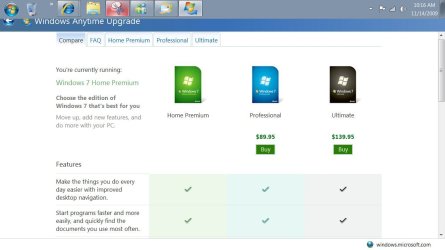
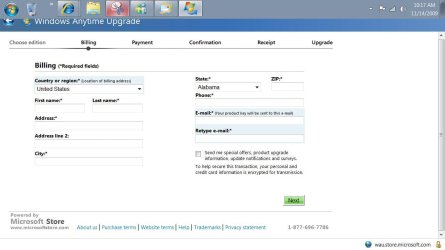
Start search anytime upgrade. I did this on my home win 7 and came up with it going to ms store. Is this what you are doing and its failing for you? Phone # at bottom of pic 2
anytime upgrade.JPG

anytime upgrade2.JPG
 

My Computer

Computer Manufacturer/Model Number
Gateway GT5692
OS
Windows 7 Ulti. x64
CPU
AMD Phenom 8450 triple-core 2.10 ghz
Memory
4GB
Graphics Card(s)
ATI Radion HD 3200
Monitor(s) Displays
Gateway FPD1775W
Screen Resolution
1280x720
Hard Drives
465.6613 Gibibytes
Yes, that is the method I used, and those are the screens I was presented with, and the one following asked for my Credit card Number. I supplied it and pressed Next, but this is where things hung. At that point I called MS by phone and spoke to someone at great length. I was informed that doing it by phone and getting an actual DVD in the mail was the only way you could upgrade, and the operator was adament that I would have to eventually go through her.

It seemed to me at the time that there was some confusion between the Marketing department and the web site and I decided I would wait a couple of weeks and try again.

If the above worked for you, sounds like my assertion was correct and the problem has been resolved.
 

My Computer

OS
Windows XP
Back
Top