Anyway to increase the windows login icons?

Shockwave

New member
Member
Local time
10:38 PM
Messages
39
Location
NH
The icons for the user accounts in windows 7. Is there anyway to increase the icon size?

thanks
 

My Computer My Computer

At a glance

Windows 7 ProffesionalQ6600 @ 3.6ghz8GB Kingston HyperX T1MSI 8800GTS 512
Computer Manufacturer/Model Number
My Own Build
OS
Windows 7 Proffesional
CPU
Q6600 @ 3.6ghz
Motherboard
Gigabyte P45-UD3P
Memory
8GB Kingston HyperX T1
Graphics Card(s)
MSI 8800GTS 512
Sound Card
Realtek ALC889A
Monitor(s) Displays
HP w2207
Screen Resolution
1650 x 1050
Hard Drives
OCZ Agility 60GB SSD
WD 6400AAKS
WD 1TB My Book
PSU
Corsair 650 watt
Case
Antec 900
Cooling
Thermaltake
Keyboard
Logitech Illuminated
Mouse
MX Revolution
Internet Speed
20/8
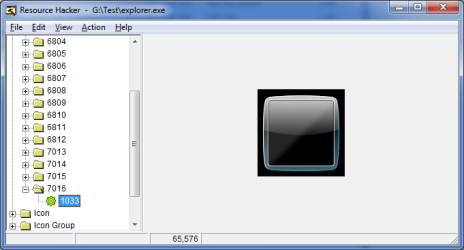
I don't know exactly answer on your question neverless look on this attached image.I opened explorer.exe in Resource Hacker - from 7013-7016 there are with different size icon account.I think 7016 is responsible for windows login icon
 

Attachments

  • LIS.png
    LIS.png
    12.4 KB · Views: 1,908

My Computer My Computer

At a glance

Windows 7 Professional x64 PLAMD Athlon 4450eGoodRam DDR2 2x2048MB (FSB 800MHz)nVidia GeForce 9600GT (G94-300) 1024 MB
Computer Manufacturer/Model Number
Custom made
OS
Windows 7 Professional x64 PL
CPU
AMD Athlon 4450e
Motherboard
Giga-Byte GA-MA69G-S3H
Memory
GoodRam DDR2 2x2048MB (FSB 800MHz)
Graphics Card(s)
nVidia GeForce 9600GT (G94-300) 1024 MB
Monitor(s) Displays
SAMSUNG SyncMaster HS2P301688
Hard Drives
Seagate ST3750330AS 750GB
PSU
Corsair 550W
Cooling
AeroCool ExtremeEngine 3T
Login to the default hidden Adminstrator account. Change screen resolution to a lower res. Boot. I think this will set the Admin screen resolution for the login screen. Not a bigger icon, but the same effect. Screen res will change to user settings after login.
 
Back
Top