Anyways to convert WIM to ISO

n9uf

New member
Local time
8:04 PM
Messages
8
Hi all. Having problems restoring my Dell 1640 image.
They're using WIM files.
I've already extract all files using 7-zip.
Unfortunately. Theres no setup.exe file in it.
So i wonder.
Is there any posibilities converting *.wim to *.iso.
... Been trying to restore since Feb ... thanks ...
 

My Computer My Computer

At a glance

Win Vista and Win 7
OS
Win Vista and Win 7

My Computer My Computer

At a glance

Microsoft Windows 10 Pro Insider Preview 64-bitIntel(R) Core(TM) i3-4130 CPU @ 3.40GHzCorsair Vengence 4GB x2 (8.00GB Dual-Channel ...2047MB GeForce GTS 450 (ZOTAC International)
Computer type
PC/Desktop
Computer Manufacturer/Model Number
Self Assembled
OS
Microsoft Windows 10 Pro Insider Preview 64-bit
CPU
Intel(R) Core(TM) i3-4130 CPU @ 3.40GHz
Motherboard
Gigabyte Technology Co., Ltd. B85M-D3H
Memory
Corsair Vengence 4GB x2 (8.00GB Dual-Channel DDR3 @ 798MHz)
Graphics Card(s)
2047MB GeForce GTS 450 (ZOTAC International)
Sound Card
Onboard (Realtek High Definition Audio)
Monitor(s) Displays
LG Flatron E2040T
Screen Resolution
1600x900
Hard Drives
Western Digital 1 TB
Seagate 500 GB
PSU
Corsair VS550
Case
Cooler Master K380
Cooling
Cooler Master Seidon 120V Plus
Keyboard
Logitech MK260r
Mouse
Logitech MK260r
Internet Speed
PMPL Broadband
Antivirus
Windows Defender + MBAM
Browser
Firefox
Other Info
Dell Studio 15" Laptop
You may read this ....
WIM to ISO or what

Thanks Arc ...

I've already D/L and installed WAIK.
I've the image file (DELLrestore.wim) which is in E'drive
Do I still need to follow precedure from no.2 to no.7 ?

Sorry. computer noob here ... :o
 

My Computer My Computer

At a glance

Win Vista and Win 7
OS
Win Vista and Win 7
Speaking frankly, I have never faced a situation like you, so in this regard I am also a noob. I think it is better to follow the instructions, but it is not to repeat a step that we have already taken :) .
 

My Computer My Computer

At a glance

Microsoft Windows 10 Pro Insider Preview 64-bitIntel(R) Core(TM) i3-4130 CPU @ 3.40GHzCorsair Vengence 4GB x2 (8.00GB Dual-Channel ...2047MB GeForce GTS 450 (ZOTAC International)
Computer type
PC/Desktop
Computer Manufacturer/Model Number
Self Assembled
OS
Microsoft Windows 10 Pro Insider Preview 64-bit
CPU
Intel(R) Core(TM) i3-4130 CPU @ 3.40GHz
Motherboard
Gigabyte Technology Co., Ltd. B85M-D3H
Memory
Corsair Vengence 4GB x2 (8.00GB Dual-Channel DDR3 @ 798MHz)
Graphics Card(s)
2047MB GeForce GTS 450 (ZOTAC International)
Sound Card
Onboard (Realtek High Definition Audio)
Monitor(s) Displays
LG Flatron E2040T
Screen Resolution
1600x900
Hard Drives
Western Digital 1 TB
Seagate 500 GB
PSU
Corsair VS550
Case
Cooler Master K380
Cooling
Cooler Master Seidon 120V Plus
Keyboard
Logitech MK260r
Mouse
Logitech MK260r
Internet Speed
PMPL Broadband
Antivirus
Windows Defender + MBAM
Browser
Firefox
Other Info
Dell Studio 15" Laptop
Done everything.
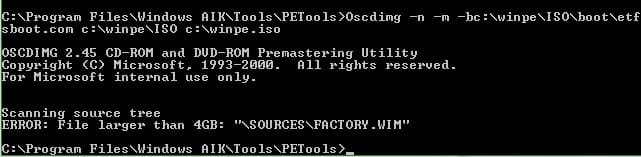
But when it comes to create ISO, it give me an error ...

Is there a -m options in Oscdimg ?
 

Attachments

  • WAIK.jpg
    WAIK.jpg
    17.6 KB · Views: 1,677

My Computer My Computer

At a glance

Win Vista and Win 7
OS
Win Vista and Win 7
Mounting WIM Images from Windows Explorer - Robert McLaws: Windows Vista Edition

Is this from an intact Recovery Partition? Have you tried marking it Active and running it? How about triggering it from boot using key combo to start recovery?

Back up your files first.

Hi Rocker. 1) Yes. ITs from intact Recovery partition.
2) I've already extract all files from *.WIM but no setup.exe
3) You mean using usb. No
Tried pressing F8 went in Vista Advance Boot Option.
But theres' no Repair your computer option.

Mine a Dell studio XPS laptop ... thanks
 

My Computer My Computer

At a glance

Win Vista and Win 7
OS
Win Vista and Win 7
There should be a combination of keys to press at bootup to Start Recovery from boot. Look on the first boot screen or in you manual.

See if you can run it that way.
 
There should be a combination of keys to press at bootup to Start Recovery from boot. Look on the first boot screen or in you manual.

See if you can run it that way.


Yes theres F10 and another one CTRL+F11.
Both doesent work.

Am still working on that -m option.
But so far nothings works ... :mad:
 

My Computer My Computer

At a glance

Win Vista and Win 7
OS
Win Vista and Win 7
The thing is I formated my C drive and install Win7.
Few months time I did not like it and install back to Vista instead ... :sick:
By that time I realised Vista Advance Boot Option went missing.
The stupidest thing was I DID NOT MAKE AN IMAGE.
So I did a setup using DVD that was given to me from DELL.
Not an image file but fresh installation.
Thats the reason why I need to create ISO file from my Factory.WIM file.

Just today managed to put back Vista Advance Boot Option
using How to install The Windows Recovery Environment on your Vista PC
tuts. And still giving me errors.

If only I know how to use that -m option while making an ISO file
Im one step behind ... :cry:
 

My Computer My Computer

At a glance

Win Vista and Win 7
OS
Win Vista and Win 7
Hi,

It's a joliet file limitation.

Create iso's over 4gb using udf. Use the u2 switch instead.

Oscdimg.exe –u2 –b"C:\ whatever\path\to\etfsboot.com" –h "C:\path\to\the files" C:\7.iso

Hope it helps.
 

My Computers My Computers

  • At a glance

    7 X64i5 84002x8gb 3200mhz
    Computer type
    PC/Desktop
    OS
    7 X64
    CPU
    i5 8400
    Motherboard
    gigabyte b365m ds3h
    Memory
    2x8gb 3200mhz
    Hard Drives
    various
    PSU
    pure power 11 400w cm
    Case
    Coolermaster
    Cooling
    cryorig m9i
  • At a glance

    7x64g54008gb ddr4 2400
    Computer type
    PC/Desktop
    OS
    7x64
    CPU
    g5400
    Motherboard
    ga b365m ds3h
    Memory
    8gb ddr4 2400
    PSU
    xfx pro 450w
Hi,

It's a joliet file limitation.

Create iso's over 4gb using udf. Use the u2 switch instead.

Oscdimg.exe –u2 –b"C:\ whatever\path\to\etfsboot.com" –h "C:\path\to\the files" C:\7.iso

Hope it helps.

Hi SIW2 ... still giving me error
File is like 6.3G ... thanks


Scanning source tree
ERROR: File larger than 4GB: "\sources\Factory.wim"
 
Last edited:

My Computer My Computer

At a glance

Win Vista and Win 7
OS
Win Vista and Win 7
Managed to do it ... Thanks for them peeps who helped ... :)
 

My Computer My Computer

At a glance

Win Vista and Win 7
OS
Win Vista and Win 7
Managed to do it ... Thanks for them peeps who helped ... :)

Dear friend. I have same problem. Formatted HDD without creating recovery dvd. But I have recovery partition at the D driver named factory.wim I installed WAIK program too. Can you help me How I can create ISO from this factory.wim
 

My Computer My Computer

At a glance

Vista7 x64Dual Core T4300 2.10GHz, 2100 MHz3964MBMobile Intel(R) 4 Series Express Chipset Family
Computer Manufacturer/Model Number
ZX4800
OS
Vista7 x64
CPU
Dual Core T4300 2.10GHz, 2100 MHz
Motherboard
Unknown
Memory
3964MB
Graphics Card(s)
Mobile Intel(R) 4 Series Express Chipset Family
Sound Card
Realtek High Defination Audio
Monitor(s) Displays
Generic PNP Monitor
Hard Drives
ST3750528AS ATA Device 750GB

My Computer My Computer

At a glance

ME/XP/Vista/Win7
OS
ME/XP/Vista/Win7
Indeed you can order them.

But where's the fun in that?


Would be interesting to make your own.

Please post a screenshot of the entire contents of the recovery partition - so we can see what files/folders are in there.


Managed to do it ... Thanks for them peeps who helped ... :)

Dear friend. I have same problem. Formatted HDD without creating recovery dvd. But I have recovery partition at the D driver named factory.wim I installed WAIK program too. Can you help me How I can create ISO from this factory.wim

You can Order Gateway Recovery Disks from here:
https://secure.tx.acer.com/RCDB/Main.aspx?brand=gateway
 

My Computers My Computers

  • At a glance

    7 X64i5 84002x8gb 3200mhz
    Computer type
    PC/Desktop
    OS
    7 X64
    CPU
    i5 8400
    Motherboard
    gigabyte b365m ds3h
    Memory
    2x8gb 3200mhz
    Hard Drives
    various
    PSU
    pure power 11 400w cm
    Case
    Coolermaster
    Cooling
    cryorig m9i
  • At a glance

    7x64g54008gb ddr4 2400
    Computer type
    PC/Desktop
    OS
    7x64
    CPU
    g5400
    Motherboard
    ga b365m ds3h
    Memory
    8gb ddr4 2400
    PSU
    xfx pro 450w
Indeed you can order them.

But where's the fun in that?


Would be interesting to make your own.

Please post a screenshot of the entire contents of the recovery partition - so we can see what files/folders are in there.


Dear friend. I have same problem. Formatted HDD without creating recovery dvd. But I have recovery partition at the D driver named factory.wim I installed WAIK program too. Can you help me How I can create ISO from this factory.wim

You can Order Gateway Recovery Disks from here:
https://secure.tx.acer.com/RCDB/Main.aspx?brand=gateway

Hi SIW2
True. would be fun.

Would be nice to see the contents of partition.

Gateway ZX4800, Spec's & drivers.
http://support.gateway.com/product/default.aspx?tab=1&modelId=2321
 
Last edited:

My Computer My Computer

At a glance

ME/XP/Vista/Win7
OS
ME/XP/Vista/Win7
You may need to unhide Hidden files in Control Panel>Folder Options>View to explore the Recovery Partition.

If it doesn't show up in Explorer, you may need to temporarily give it a drive letter in Disk management by rightclicking on it to Edit Drive letter.

Make a screenshot of the maximized, fully scrolled contents using Snipping Tool in Start Menu.
 
If you want to work with your recovery partition in a totally safe fashion I would suggest simply imaging the partition with free Macrium Reflect. You can then simply mount the image and work on the contents with total safety. I have done this many times.
Even if you want to work directly on the recovery partition an image of it is good insurance.
 

My Computer My Computer

At a glance

Windows 7x64 Home Premium SP1Intel i7 2600kG.Skill Ripjaws (DDR3-1600) 2x4GBNvidia GeForce GTS 450; Intel HD Graphics 300...
Computer type
PC/Desktop
Computer Manufacturer/Model Number
Own build
OS
Windows 7x64 Home Premium SP1
CPU
Intel i7 2600k
Motherboard
ASUS P8Z68 Deluxe
Memory
G.Skill Ripjaws (DDR3-1600) 2x4GB
Graphics Card(s)
Nvidia GeForce GTS 450; Intel HD Graphics 3000(GT2+)
Monitor(s) Displays
Dell Ultrasharp IPS panel U2311H, Samsung SyncMaster P2350
Screen Resolution
1920x1080
Hard Drives
Samsung 850 Pro SSD 256GB, Samsung SSD 840 120GB, Seagates 1TB Barracuda ST31000528AS x2
PSU
Seasonic M12II 520W
Case
Lian Li Lancool PC-K60
Cooling
Case: 1x120mm, 3x140mm CPU: Hyper 212+
Keyboard
Logitech MK520 (wireless)
Mouse
Logitech MK520
Internet Speed
6-7 Mbps
Antivirus
Norton Security Premium, Malwarebytes on 2 (MSE on 3rd PC)
Browser
FireFox
Other Info
Audio: Logitech Z523 2.1
Back
Top