AOMEI Disk Copy freeze at 99 percent and no option to exit

loninappleton

New member
Member
VIP
Local time
1:08 PM
Messages
892
A bad experience with AOMEI after a long run of a disk backup


The system says Updating at 99 percent. Apparently AOMEI knows about the probem and there is
an onscreen message to terminate in Task manager. I never got there because everything froze up
and I had to go to a hard reset.


At least my source disk is still ok, just some lost time on it.


Any solutions for this? I guess I'll be going back to my old copy of Ghost 11.5
 

My Computer My Computer

At a glance

Windows 7 x64 UltimateAMD Athlon II x3 4502 GB
Computer type
PC/Desktop
Computer Manufacturer/Model Number
custom
OS
Windows 7 x64 Ultimate
CPU
AMD Athlon II x3 450
Motherboard
MSI 880GM
Memory
2 GB
Hard Drives
various
Browser
Firefox, Opera
Hi loninappleton,

Try an older version. I use AOMEI and have for a few years. AOMEI V 3.0. Which version are you experiencing problems with?
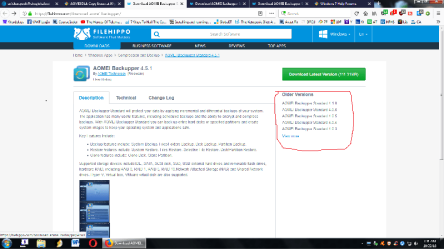
Quite a few older versions to choose from here: FileHippo AOMEI Backupper
 

My Computer My Computer

At a glance

Win 10 x64, Linux Lite, Win 7 x64, BlackArch,...
Computer type
PC/Desktop
Computer Manufacturer/Model Number
HP Desktop & Compaq Laptop
OS
Win 10 x64, Linux Lite, Win 7 x64, BlackArch, & Kali
Hard Drives
Samsung 850 Pro 256Gb,
Hitachi HDD 1Tb,
Crucial MX SSD 250Gb
Segate 3Tb USB 3.0 Ext. Backup HDD
Internet Speed
150Mbps dn, 20Mbps up
Antivirus
Avast Free, Malwarebytes Anti-Exploit & Anti-Ransomware
Browser
Firefox, Chrome, Opera, & VPN
Snick, is your link supposed to lead somewhere?
 

My Computers My Computers

  • At a glance

    7 X64i5 84002x8gb 3200mhz
    Computer type
    PC/Desktop
    OS
    7 X64
    CPU
    i5 8400
    Motherboard
    gigabyte b365m ds3h
    Memory
    2x8gb 3200mhz
    Hard Drives
    various
    PSU
    pure power 11 400w cm
    Case
    Coolermaster
    Cooling
    cryorig m9i
  • At a glance

    7x64g54008gb ddr4 2400
    Computer type
    PC/Desktop
    OS
    7x64
    CPU
    g5400
    Motherboard
    ga b365m ds3h
    Memory
    8gb ddr4 2400
    PSU
    xfx pro 450w

My Computer My Computer

At a glance

Windows 7 Pro SP1 64 bit8 GB
Computer type
Laptop
Computer Manufacturer/Model Number
Dell M6500 Precision Work Station
OS
Windows 7 Pro SP1 64 bit
Memory
8 GB
Screen Resolution
1920x
Internet Speed
30 Mbps
Antivirus
Norton Security
Browser
IE 11
Thanks for answering.


Thanks for answering. I think this needs some sorting out.


Will happily use an older version. Just now I have not tested the completed clone.

I don't know if just doing the usual MBR routines would find anything. It's always a 4 hour job
of an HD with media files.


Also just confirming that this AOMEI was used on Win7. Earlier in the Day it seemed to go through on a shorter
Disk Copy routine on Windows 10. So it might indeed be a version problem.
 

My Computer My Computer

At a glance

Windows 7 x64 UltimateAMD Athlon II x3 4502 GB
Computer type
PC/Desktop
Computer Manufacturer/Model Number
custom
OS
Windows 7 x64 Ultimate
CPU
AMD Athlon II x3 450
Motherboard
MSI 880GM
Memory
2 GB
Hard Drives
various
Browser
Firefox, Opera
Are you sure your source HDD is okay? Have you run chkdsk on it?
 

My Computer My Computer

At a glance

Windows 7 Ultimate x64
Computer type
PC/Desktop
OS
Windows 7 Ultimate x64
Snick, is your link supposed to lead somewhere?

Yes, I clicked the link several times & it's working. It is to FileHippo AOMEI Backupper page, with choices of versions in the right-hand column!

Untitled.png
 

My Computer My Computer

At a glance

Win 10 x64, Linux Lite, Win 7 x64, BlackArch,...
Computer type
PC/Desktop
Computer Manufacturer/Model Number
HP Desktop & Compaq Laptop
OS
Win 10 x64, Linux Lite, Win 7 x64, BlackArch, & Kali
Hard Drives
Samsung 850 Pro 256Gb,
Hitachi HDD 1Tb,
Crucial MX SSD 250Gb
Segate 3Tb USB 3.0 Ext. Backup HDD
Internet Speed
150Mbps dn, 20Mbps up
Antivirus
Avast Free, Malwarebytes Anti-Exploit & Anti-Ransomware
Browser
Firefox, Chrome, Opera, & VPN
OP here. I'm confident the source disk is ok-- a Seagate Baracuda 2Tb a couple months old.
But Yes I could run chkdsk.


If there is a choice in old versions of AOMEI should I have more confidence in one in particular?
 

My Computer My Computer

At a glance

Windows 7 x64 UltimateAMD Athlon II x3 4502 GB
Computer type
PC/Desktop
Computer Manufacturer/Model Number
custom
OS
Windows 7 x64 Ultimate
CPU
AMD Athlon II x3 450
Motherboard
MSI 880GM
Memory
2 GB
Hard Drives
various
Browser
Firefox, Opera
I don't believe so, I've tried most iterations except for the last few. I am using AOMEI 3.0 which only failed once because my father used the computer while the backup was running and put it to sleep.

As with Microsoft, AOMEI updates to newer versions sometimes contain bugs unfortunately.

Did you try AOMEI from USB or CD/DVD?
Did you to run it again after it didn't complete?

Sometimes software fails to work correctly for various reasons, i.e. Windows has an issue and a function doesn't work or a freeze takes place, then you reboot and the problem goes away or Word has an issue, you close the program, open it and it now works, etc.
 

My Computer My Computer

At a glance

Win 10 x64, Linux Lite, Win 7 x64, BlackArch,...
Computer type
PC/Desktop
Computer Manufacturer/Model Number
HP Desktop & Compaq Laptop
OS
Win 10 x64, Linux Lite, Win 7 x64, BlackArch, & Kali
Hard Drives
Samsung 850 Pro 256Gb,
Hitachi HDD 1Tb,
Crucial MX SSD 250Gb
Segate 3Tb USB 3.0 Ext. Backup HDD
Internet Speed
150Mbps dn, 20Mbps up
Antivirus
Avast Free, Malwarebytes Anti-Exploit & Anti-Ransomware
Browser
Firefox, Chrome, Opera, & VPN
I could try the AOMEI 3.0 you suggest. From File Hippo was it not?
And will try a run from a USB stick. This will happen after I make a secure backup the old way.
 

My Computer My Computer

At a glance

Windows 7 x64 UltimateAMD Athlon II x3 4502 GB
Computer type
PC/Desktop
Computer Manufacturer/Model Number
custom
OS
Windows 7 x64 Ultimate
CPU
AMD Athlon II x3 450
Motherboard
MSI 880GM
Memory
2 GB
Hard Drives
various
Browser
Firefox, Opera
Something else that may be of concern is if the Shadow Copy service is working correctly. AOMEI may not need it, but I believe it speeds up cloning.
 

My Computer My Computer

At a glance

Windows 7 Ultimate x64
Computer type
PC/Desktop
OS
Windows 7 Ultimate x64
Yes, file hippo has AOMEI v 3.0 and may others!

You could also try Macrium Reflect free, it is recommended my many here on SevenForums!
 

My Computer My Computer

At a glance

Win 10 x64, Linux Lite, Win 7 x64, BlackArch,...
Computer type
PC/Desktop
Computer Manufacturer/Model Number
HP Desktop & Compaq Laptop
OS
Win 10 x64, Linux Lite, Win 7 x64, BlackArch, & Kali
Hard Drives
Samsung 850 Pro 256Gb,
Hitachi HDD 1Tb,
Crucial MX SSD 250Gb
Segate 3Tb USB 3.0 Ext. Backup HDD
Internet Speed
150Mbps dn, 20Mbps up
Antivirus
Avast Free, Malwarebytes Anti-Exploit & Anti-Ransomware
Browser
Firefox, Chrome, Opera, & VPN
Saved by half on the backup. The half I need-- a large meda cache is intact. But booting to that
target disk started up and then went to a BSOD in doing a routine to 'set up the desktop' which of course
I would normally not see.


It's worth another try in the future and from a USB.


I checked both disks, the Seagate is in the blue for health and has few about 4k hours. It runs all the time.The target is a used Hitachi 2Tb and is in the blue yet but has about 35k hours on it.


For the startup problem, is there any way to drag and drop the core folder of Win7 to the backup? It wants to complete but that 99% may have left an end of file off or something. The Hitachi is showing all good in Crystal Disk. I don't know if another prog would show something different for this glitched part of the transfer.
 

My Computer My Computer

At a glance

Windows 7 x64 UltimateAMD Athlon II x3 4502 GB
Computer type
PC/Desktop
Computer Manufacturer/Model Number
custom
OS
Windows 7 x64 Ultimate
CPU
AMD Athlon II x3 450
Motherboard
MSI 880GM
Memory
2 GB
Hard Drives
various
Browser
Firefox, Opera
I've gone to the file hippo and went back and found the 3.0. I out that on the thumb drive and it seemed
to install correctly.


Just now I'm waiting for a good time for a four run at it.
 

My Computer My Computer

At a glance

Windows 7 x64 UltimateAMD Athlon II x3 4502 GB
Computer type
PC/Desktop
Computer Manufacturer/Model Number
custom
OS
Windows 7 x64 Ultimate
CPU
AMD Athlon II x3 450
Motherboard
MSI 880GM
Memory
2 GB
Hard Drives
various
Browser
Firefox, Opera
I got he AOMIE 3.0.


Some unusual events happened. Just to test on some scratch drives in this case Windows 10 not 7
I noticed an uninvited Update happening.


I looked up what causes this:


Difference between the Manual and Manual (trigger start) services


What it talks about is the indication in services.msc where I turned off Windows Update but
apparetnly not enough other things. There's another oine called Update Remediation at least in Win10
where I'm seeing this.


Is there no end to it?


What the link describes is a trigger event (which you can see noted in services) at the presemce of
adding a USB device.


Also relevant to this AOMEIE discussion is the fact that AOMEI program adds it's own service to the
group.


I do not wish to have any of this happening. Microsoft stoppiing the current update in Win10 due to data errors is just one example of why I don't want the interference.


Can anyone give some samples on how to turn off trigger events and also avoid fresh
services being added? I think it is applicable to all but possibly just Win10. In my Windows Update service I also had 'retries' turned off but maybe didn't do it effectively.


Of note, I caught the Update running at about 30% completion since I was doing the AOMEI backup and not watching every minute.


On which screen is the update "Date Completed" given?
 

My Computer My Computer

At a glance

Windows 7 x64 UltimateAMD Athlon II x3 4502 GB
Computer type
PC/Desktop
Computer Manufacturer/Model Number
custom
OS
Windows 7 x64 Ultimate
CPU
AMD Athlon II x3 450
Motherboard
MSI 880GM
Memory
2 GB
Hard Drives
various
Browser
Firefox, Opera
If I read an earlier question correctly, I do not believe dropping the Windows folder into a full image will give you the results you are wanting.
 

My Computer My Computer

At a glance

Windows 7 Professional 64-bitDesktop i5; Acers i5 & i7desktop 16GB; 1 Acer 8GB & 1 Acer 16GB
Computer type
PC/Desktop
Computer Manufacturer/Model Number
Antec desktop; Acer Aspire laptops
OS
Windows 7 Professional 64-bit
CPU
Desktop i5; Acers i5 & i7
Memory
desktop 16GB; 1 Acer 8GB & 1 Acer 16GB
Hard Drives
1TB split into 2 equal partitions [OS and data] usable by RJS
Internet Speed
AT&T DSL
Browser
FF, GChrome, msIE
Other Info
Windows 7 Firewall, Emsisoft AM/AV, MSE [scan-only], SpywareBlaster, Ruiware/BillP combine
Just a few notes on this. I wound up reverting to my old backup program run from cd. Old equipment, old program.


On the Updater problem, there is a way to go in and delete the updates you don't want. I don't
know for certain how effective that is. Also along with turning off Windows Update in services.msc
there is another thing to do in group policies editor which I print here for anyone interested rather than making more links:


Option 3: Group Policy Editor

Open the Run command (Win + R), in it type: gpedit.msc and press enter.
Navigate to: Computer Configuration -> Administrative Templates -> Windows Components -> Windows Update.
Open this and change the Configure Automatic Updates setting to '2 - Notify for download and notify for install'

How to Turn off Windows Updates in Windows 10

You can do this using the Windows Update service. Via Control Panel > Administrative Tools, you can access Services. In the Services window, scroll down to Windows Update and turn off the process.
To turn it off, right-click on the process, click on Properties and select Disabled."


[My note: There is another screen in services where you turn off a number of 'retries' if the system tries
once then twice etc to do what it wants. Select "No action taken" at each. Many good reasons to not move beyond Windows 7. I advanced to Win7 to use one audio editor program available only for 64 bit operation.]


We got off track but for completion's sake on AOMIE I give these details for any Windows 10 viewers.
I'm pursuing all this on TenForums.
 

My Computer My Computer

At a glance

Windows 7 x64 UltimateAMD Athlon II x3 4502 GB
Computer type
PC/Desktop
Computer Manufacturer/Model Number
custom
OS
Windows 7 x64 Ultimate
CPU
AMD Athlon II x3 450
Motherboard
MSI 880GM
Memory
2 GB
Hard Drives
various
Browser
Firefox, Opera
Back
Top