Apache Web Server Installation Problems

ibby1992

New member
Local time
7:51 PM
Messages
5
Location
London
SOLVED

Hey,

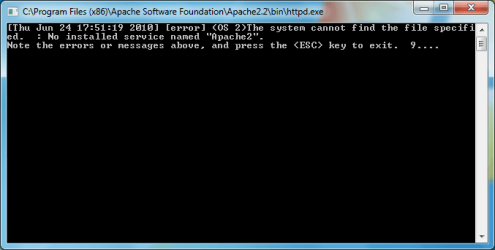
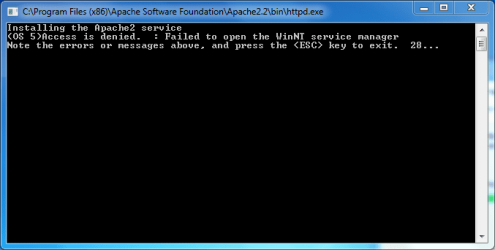
I am trying to install Apache 2.2.4 (apache_2.2.4-win32-x86-no_ssl.msi) on my Windows 7 Home Premium computer. During the installation, two command prompt windows show up with some errors. The first one shows a long list of 'Access Denied' errors, while the second one says something similar to 'NT [...] Not Found'. I noticed, that the httpd.conf file was missing after the installation, and that the service did not get installed at all. After following this guide (Installing Apache 2.2 on Windows 7 (beta) | Developer Oracles), I got the service installed, but it doesn't start.

What can I do to get Apache installed properly? I installed it on Windows Vista (before upgrading) and it worked fine. If required, I can upload screenshots of the error command prompts.

Thanks a lot for helping out :)

UPDATE 1

Thanks for the welcome :)

As requested by Dwarf, here the pictures of the error command prompt windows. Note that another window opened during the installation, even before the ones I uploaded. However, it disappeared so quickly that it was impossible to get a screenshot of it. It basically showed a long list of 'Access Denied' messages.


Attachments
  • Capture 1.PNG
    Capture 1.PNG
    50.6 KB · Views: 388
  • Capture 2.PNG
    Capture 2.PNG
    61 KB · Views: 276
Last edited:

My Computer

Computer Manufacturer/Model Number
HP Pavilion p6122f
OS
Windows 7 Home Premium
CPU
AMD Phenom™ X3 8450 Triple-Core Processor
Memory
6 GB (2x2048 MB and 2x1024 MB)
Graphics Card(s)
NVIDIA GeForce 9100
Monitor(s) Displays
HP 2009m
Screen Resolution
1600x900
Hard Drives
640 GB
Internet Speed
Supposed to be 4.8 Mbps - usually less though :@
Hi ibby1992 and welcome to Windows 7 Forums :party:

Please do upload the screenshots, as the more information that is provided the easier it is for us to help you. I don't have experience of Apache myself, but others might.
 

My Computer

Computer type
PC/Desktop
Computer Manufacturer/Model Number
Dwarf Dwf/11/2012 r09/2013
OS
Windows 8.1 Pro RTM x64
CPU
Intel Core-i5-3570K 4-core @ 3.4GHz (Ivy Bridge) (OC 4.4GHz)
Motherboard
ASRock Z77 Extreme4-M
Memory
4 x 4GB DDR3-1600 Corsair Vengeance CMZ8GX3M2A1600C9B (16GB)
Graphics Card(s)
MSI GeForce GTX770 Gaming OC 2GB
Sound Card
Realtek High Definition on board solution (ALC 898)
Monitor(s) Displays
ViewSonic VA1912w Widescreen (VGA)
Screen Resolution
1440x900
Hard Drives
OCZ Agility 3 SSD 120GB SATA III x2 (RAID 0)
Samsung HD501LJ 500GB SATA II x2
Hitachi HDS721010CLA332 1TB SATA II
Iomega 1.5TB Ext USB 2.0
WD 2.0TB Ext USB 3.0
PSU
XFX Pro Series 850W Semi-Modular
Case
Gigabyte IF233
Cooling
1 x 120mm Front Inlet 1 x 120mm Rear Exhaust
Keyboard
Microsoft Comfort Curve Keyboard 3000 (USB)
Mouse
Microsoft Comfort Mouse 3000 for Business (USB)
Internet Speed
NetGear DG834Gv3 ADSL Modem/Router (Ethernet) ~4.0 Mb/s (O2)
Antivirus
Avast! 8.0.1497
Browser
IE 11
Other Info
Optical Drive: HL-DT-ST BD-RE BH10LS30 SATA Bluray
Lexmark S305 Printer/Scanner/Copier (USB)
WEI Score: 8.1/8.1/8.5/8.5/8.25
Asus Eee PC 1011PX Netbook (Windows 7 x86 Starter)
No one here to help me out... :(
 

My Computer

Computer Manufacturer/Model Number
HP Pavilion p6122f
OS
Windows 7 Home Premium
CPU
AMD Phenom™ X3 8450 Triple-Core Processor
Memory
6 GB (2x2048 MB and 2x1024 MB)
Graphics Card(s)
NVIDIA GeForce 9100
Monitor(s) Displays
HP 2009m
Screen Resolution
1600x900
Hard Drives
640 GB
Internet Speed
Supposed to be 4.8 Mbps - usually less though :@

My Computer

Computer Manufacturer/Model Number
Dell XPS 15 L502x
OS
Windows 7 Ultimate x64 SP1
CPU
Core i7-2670QM
Memory
8GB DDR3 PC3-10600
Graphics Card(s)
Intel HD Graphics 3000 + GeForce GT 540M
Screen Resolution
1920x1080
Hard Drives
1TB 5400RPM Seagate
Hey Kegobeer,

Yes I have read that guide. But it assumes that everything will run smoothly during the installation. I think that the problem I have is not a common or usual Windows 7 problem, but rather just happens on my computer. Why would I get 'Access Denied' errors? I am using an Admin account for the installation. I tried to run the installation as an admin via Right Click > Run as Admin, but there is no such option for this particular file.
 

My Computer

Computer Manufacturer/Model Number
HP Pavilion p6122f
OS
Windows 7 Home Premium
CPU
AMD Phenom™ X3 8450 Triple-Core Processor
Memory
6 GB (2x2048 MB and 2x1024 MB)
Graphics Card(s)
NVIDIA GeForce 9100
Monitor(s) Displays
HP 2009m
Screen Resolution
1600x900
Hard Drives
640 GB
Internet Speed
Supposed to be 4.8 Mbps - usually less though :@

My Computer

Computer Manufacturer/Model Number
HP Pavilion p6122f
OS
Windows 7 Home Premium
CPU
AMD Phenom™ X3 8450 Triple-Core Processor
Memory
6 GB (2x2048 MB and 2x1024 MB)
Graphics Card(s)
NVIDIA GeForce 9100
Monitor(s) Displays
HP 2009m
Screen Resolution
1600x900
Hard Drives
640 GB
Internet Speed
Supposed to be 4.8 Mbps - usually less though :@
Problem SOLVED

... It works! :D

I did two things to make the service work (I don't know which one actually did the magic):

First, I installed Apache actually from the Administrator account. In other words, not just an account with administrators privileges.
Second, I shortened the installation path to C:\Apache - I read that spaces are not allowed in the installation path of Apache. That is why C:\Program Files\... doesn't work.

Use this guide to activate/deactivate the Administrator account in Windows 7:

http://www.sevenforums.com/tutorials/507-built-administrator-account-enable-disable.html

I hope this thread is of use for someone else with this problem :)
 

My Computer

Computer Manufacturer/Model Number
HP Pavilion p6122f
OS
Windows 7 Home Premium
CPU
AMD Phenom™ X3 8450 Triple-Core Processor
Memory
6 GB (2x2048 MB and 2x1024 MB)
Graphics Card(s)
NVIDIA GeForce 9100
Monitor(s) Displays
HP 2009m
Screen Resolution
1600x900
Hard Drives
640 GB
Internet Speed
Supposed to be 4.8 Mbps - usually less though :@
Back
Top