APC Back-UPS Pro 1000 vs. 'regular' APC UPS vs. Cost?

markg2

New member
Member
VIP
Local time
3:20 AM
Messages
477
Assuming comparable VA, both lines offer the same downloadable Powerchute software for automatic system shutdown, I'm having trouble understanding why the Back-UPS is so much more expensive than APC's regular UPS.

I think I'm reading that the Back-UPS 1000 offers far more battery powered up time than the regular APC UPS 1000 due to 'more sophisticated' electronics I do not understand?

Also, it seems (un-intuitively, and if I read it correctly) the Back-UPS doesn't have a useful lifespan anywhere near APC's regular UPS.

Can someone provide a little clarity here?

Mark
 

My Computer My Computer

At a glance

Windows 7 & Windows 10
Computer type
PC/Desktop
OS
Windows 7 & Windows 10
If I read the specs correctly the Back-UPS 1000 offers voltage regulation that the other does not. More of a "pro" model. Whether the extra features are worth the extra $$ is up to you.
 

My Computer My Computer

At a glance

Windows 10 64 bitIntel i7 6700K16GB Corsair DominatorIntel CPU Graphics
Computer type
PC/Desktop
Computer Manufacturer/Model Number
My Own Build
OS
Windows 10 64 bit
CPU
Intel i7 6700K
Motherboard
ASUS ROG Maximus VIII Hero
Memory
16GB Corsair Dominator
Graphics Card(s)
Intel CPU Graphics
Sound Card
RealTek
Monitor(s) Displays
27" Dell S2719dgf
Screen Resolution
2560X1440
Hard Drives
1 TB Samsung 850 EVO SSD for Win 10 Pro
500GB Samsung 850 EVO SSD for Win 10 Insider
2 TB drive for backup
PSU
EVGA Supernova 750G2
Case
BeQuiet Silent Base 600
Cooling
Deepcool Captain 120EX
Keyboard
Microsoft Wireless 2000
Mouse
Microsoft wireless
Internet Speed
100 MB/sec (Cable)
Antivirus
Microsoft Defender and Malwarebytes
Browser
Edge/Firefox
Other Info
Cakewalk (Sonar) by BandLab and Studio One 4.1 Pro recording studio software. MOTU 896Mk3 Hybrid recording interface, Frontier Tranzport wireless control unit, Behringer X-Touch Control Surface.
Five USB connected optical drives for CD Audio production using Nero BurningROM
I don't think APC is doing a decent job describing the product. I saw the voltage regulation but 'assumed' that any good UPS will be keeping spikes/surges within acceptable limits. So the broad brush 'v regulation', as far as I'm concerned, isn't anything to write home about. If you check their Smart UPS line, those beauties do some serious v regulation. I know little about electricity but when the spec talks about a pure sine wave I gotta think that those critters are the serious ones.

I keep seeing snippets of text relating to maximizing the usable battery life by (I think) the user being able to prioritize attached equipment and the device not sending power to equipment that isn't calling for it? I thought equipment was either on or off 120v power (hence, heat sinks on heavy duty light dimmers).

What really got me confused (and enough to give up and buy the thing) occurred when I let APC tell me which unit I needed. (for home/small business) I gave the site: 1 desktop, 1 router, 1 hour and the only choice that was 1000 va Back UPS. There were only 2 other choices and they 700 va and below. Interestingly, the price variance wasn't as huge as I had remembered from the last time I purchased a UPS.
 

My Computer My Computer

At a glance

Windows 7 & Windows 10
Computer type
PC/Desktop
OS
Windows 7 & Windows 10
It looked to me that the voltage "regulation" was above the usual surge protection. Voltage "regulation" if it works the way "regulators" do means it will maintain a constant output voltage within the + and - parameters of the input AC line voltage.

I used to use Back UPS in my recording studio but I've switched to Cyberpower UPS. At the time I switched the only Back UPS models that supported PFC power supplies (what all PC power supplies in the last 6 or 7 years are) with a "pure sine wave" output when in backup battery mode were very high priced "commercial use" models.
 

My Computer My Computer

At a glance

Windows 10 64 bitIntel i7 6700K16GB Corsair DominatorIntel CPU Graphics
Computer type
PC/Desktop
Computer Manufacturer/Model Number
My Own Build
OS
Windows 10 64 bit
CPU
Intel i7 6700K
Motherboard
ASUS ROG Maximus VIII Hero
Memory
16GB Corsair Dominator
Graphics Card(s)
Intel CPU Graphics
Sound Card
RealTek
Monitor(s) Displays
27" Dell S2719dgf
Screen Resolution
2560X1440
Hard Drives
1 TB Samsung 850 EVO SSD for Win 10 Pro
500GB Samsung 850 EVO SSD for Win 10 Insider
2 TB drive for backup
PSU
EVGA Supernova 750G2
Case
BeQuiet Silent Base 600
Cooling
Deepcool Captain 120EX
Keyboard
Microsoft Wireless 2000
Mouse
Microsoft wireless
Internet Speed
100 MB/sec (Cable)
Antivirus
Microsoft Defender and Malwarebytes
Browser
Edge/Firefox
Other Info
Cakewalk (Sonar) by BandLab and Studio One 4.1 Pro recording studio software. MOTU 896Mk3 Hybrid recording interface, Frontier Tranzport wireless control unit, Behringer X-Touch Control Surface.
Five USB connected optical drives for CD Audio production using Nero BurningROM
There is a lot of talk about pure sine wave output UPSs that I think are probably mostly sales talk. While the mains supply is very rigorously frequency controlled, the voltage can & often does vary greatly with surges & spikes occurring that electrical people call "dirty power".

Because I get frequent power outages here I have very standard UPS to cope with an outage while I shut down the computer. I then start my back up AC generator which certainly does not have pure sine wave output. In fact the voltage varies depending on the load at any given time, which of course influences the speed of the engine & hence if the speed drops the frequency also drops. I use this with a good surge protector & the same UPS without any problems at all.

Computers operate on DC current & generally somewhere around 3-12 volts, so reasonably large fluctuations of the mains input to the PSU only cause small changes in the DC output. Lightning strikes hitting the power line nearby & huge spikes in the mains supply can & do cause major damage, which will not be controlled by sine wave output UPSs or even a good surge protector.
 

My Computer My Computer

At a glance

Windows 7 Home Premium 64 bit sp1Intel i5 3570 3.4Ghz Ivy Bridge SKT 1155 quad...G-Skill Rip Jaws 16Gb (8x2) DDR3 -1600 PC3 12...Gigabyte NVIDIA GT610 1Gb DDR3 810/1200 PCI-E...
Computer type
PC/Desktop
Computer Manufacturer/Model Number
Self built using existing case
OS
Windows 7 Home Premium 64 bit sp1
CPU
Intel i5 3570 3.4Ghz Ivy Bridge SKT 1155 quad core
Motherboard
Gigabyte Z77-HD3 SKT 1155 2xSata 3, 4x USB 3.0
Memory
G-Skill Rip Jaws 16Gb (8x2) DDR3 -1600 PC3 12800 CL 10 red
Graphics Card(s)
Gigabyte NVIDIA GT610 1Gb DDR3 810/1200 PCI-E 2.0 Silent
Sound Card
NVIDIA High Definition & Realtech High Definition Audio
Monitor(s) Displays
2 x Philips 226V4L 16:9 aspect ratio
Screen Resolution
1920 x 1080 HD
Hard Drives
Samsung 840 Pro 256gb SSD, SATA 3.
Hitachi Touro Portable 1tb, USB 3.0 HDD used for image b/ups.
PSU
Corsair VS450
Case
Codeng
Cooling
PSU fan & CPU fan
Keyboard
Logitech
Mouse
Logitech Wireless trackball M570
Internet Speed
Wireless 3G. 3mg down & 550kb up.
Antivirus
Bitdefender Internet Security 2020
Browser
Opera (Current Version) & Firefox
Other Info
MS Office 2013 Pro. Davis weather station software. MGE Nova 600 avr UPS.
There are "sine wave" UPS systems and there are "modified sine wave" types. Early PFC power supplies will not work on a modified sine wave. Newer PFC supplies seem to be more tolerant and many will work on a modified sine wave.

High power commercial UPS systems are even more complex. I'm a Retired LAN/WAN Network manager and in my computer room with mainframes, servers, routers, etc the UPS system I had always converted DC to a "pure" sine wave. It operated by first converting the AC power to DC voltage. The DC voltage charged a bank of 60 2VDC batteries and was also converted to a pure sine wave AC to power my equipment. This method also isolated the incoming AC power line from the equipment and any noise, glitches voltage variations were never "seen" by the equipment since it was converted to a DC voltage.
 

My Computer My Computer

At a glance

Windows 10 64 bitIntel i7 6700K16GB Corsair DominatorIntel CPU Graphics
Computer type
PC/Desktop
Computer Manufacturer/Model Number
My Own Build
OS
Windows 10 64 bit
CPU
Intel i7 6700K
Motherboard
ASUS ROG Maximus VIII Hero
Memory
16GB Corsair Dominator
Graphics Card(s)
Intel CPU Graphics
Sound Card
RealTek
Monitor(s) Displays
27" Dell S2719dgf
Screen Resolution
2560X1440
Hard Drives
1 TB Samsung 850 EVO SSD for Win 10 Pro
500GB Samsung 850 EVO SSD for Win 10 Insider
2 TB drive for backup
PSU
EVGA Supernova 750G2
Case
BeQuiet Silent Base 600
Cooling
Deepcool Captain 120EX
Keyboard
Microsoft Wireless 2000
Mouse
Microsoft wireless
Internet Speed
100 MB/sec (Cable)
Antivirus
Microsoft Defender and Malwarebytes
Browser
Edge/Firefox
Other Info
Cakewalk (Sonar) by BandLab and Studio One 4.1 Pro recording studio software. MOTU 896Mk3 Hybrid recording interface, Frontier Tranzport wireless control unit, Behringer X-Touch Control Surface.
Five USB connected optical drives for CD Audio production using Nero BurningROM
Computers PS converts the AC input to DC and filters with a L-C low pass filter. So it doesn't matter if the input is square wave or sine wave or even DC or AC. This is also the case of any device that has a PS that has 100-240V input.

The only big difference is if you have a device with an input transformer as frequency is very important and square waves has high frequency harmonics that generates heat.

A UPS converts AC to DC and charge the battery.
- On a square wave inverter, the DC voltage is switched directly onto a transformer and the output is a square wave, fixed frequency with voltage variation due to battery voltage.
- On a sine wave inverter, the DC voltage is switched using a high frequency PWM (Pulse Wide Modulation) onto a ferrite transformer, the output is filtered on a tuned L-C filter, and the output is a sine wave, fixed frequency with no voltage variation due to battery voltage.

I see no technical reasons to use a square wave inverter as the PWM circuits are very common and the high frequency ferrite transformer doesn't cost much more than the traditional transformer.
 

My Computers My Computers

  • At a glance

    Windows 7 HP 64i5 6600K - 800MHz to 4200MHz4+4G GSkill DDR4 3000IG - Intel 530
    Computer type
    PC/Desktop
    Computer Manufacturer/Model Number
    custom build
    OS
    Windows 7 HP 64
    CPU
    i5 6600K - 800MHz to 4200MHz
    Motherboard
    GA-Z170-HD3P
    Memory
    4+4G GSkill DDR4 3000
    Graphics Card(s)
    IG - Intel 530
    Monitor(s) Displays
    Samsung 226BW
    Screen Resolution
    1680x1050
    Hard Drives
    (1) -1 SM951 – 128GB M.2 AHCI PCIe SSD drive for Windows 7 and Lubuntu
    (2) -1 WD SATA 3 - 1T for Data
    (3) -1 WD SATA 3 - 1T for backup
    PSU
    Thermaltake 450W TR2 gold
    Keyboard
    Old and good Chicony mechanical keyboard
    Mouse
    Logitech mX performance - 9 buttons (had to disable some)
    Internet Speed
    500Mb/s
    Browser
    Firefox 64
    Other Info
    TinyWall firewall
  • At a glance

    Windows 7 Proi7-4500U 800MHz to 3.0GHz(4+4)G DDR3 1600IG intel 4400 + NVIDIA GeForce GT 745M
    Computer type
    Laptop
    System Manufacturer/Model Number
    Asus Q550LF
    OS
    Windows 7 Pro
    CPU
    i7-4500U 800MHz to 3.0GHz
    Motherboard
    Asus Q550LF
    Memory
    (4+4)G DDR3 1600
    Graphics Card(s)
    IG intel 4400 + NVIDIA GeForce GT 745M
    Sound Card
    Realtek
    Monitor(s) Displays
    LG Display LP156WF4-SPH1
    Screen Resolution
    1920 x 1080
    Hard Drives
    BX500 120G SSD for Windows and programs +
    1T HDD for data
    Internet Speed
    500 Mb/s
    Browser
    Firefox
    Other Info
    TinyWall firewall
A non "pure sine wave" UPS will power an Active PFC type power supply, however the problem comes in when the UPS switches from the AC power line to battery backup. Most Active PFC power supplies will not tolerate the switch and shut down instead of remaining on. This was a major issue on the Dell forum about 6 years ago when the Active PFC power supply was a requirement for new PC's sold in Europe and there were only a few expensive UPS systems with "true sine wave".
 

My Computer My Computer

At a glance

Windows 10 64 bitIntel i7 6700K16GB Corsair DominatorIntel CPU Graphics
Computer type
PC/Desktop
Computer Manufacturer/Model Number
My Own Build
OS
Windows 10 64 bit
CPU
Intel i7 6700K
Motherboard
ASUS ROG Maximus VIII Hero
Memory
16GB Corsair Dominator
Graphics Card(s)
Intel CPU Graphics
Sound Card
RealTek
Monitor(s) Displays
27" Dell S2719dgf
Screen Resolution
2560X1440
Hard Drives
1 TB Samsung 850 EVO SSD for Win 10 Pro
500GB Samsung 850 EVO SSD for Win 10 Insider
2 TB drive for backup
PSU
EVGA Supernova 750G2
Case
BeQuiet Silent Base 600
Cooling
Deepcool Captain 120EX
Keyboard
Microsoft Wireless 2000
Mouse
Microsoft wireless
Internet Speed
100 MB/sec (Cable)
Antivirus
Microsoft Defender and Malwarebytes
Browser
Edge/Firefox
Other Info
Cakewalk (Sonar) by BandLab and Studio One 4.1 Pro recording studio software. MOTU 896Mk3 Hybrid recording interface, Frontier Tranzport wireless control unit, Behringer X-Touch Control Surface.
Five USB connected optical drives for CD Audio production using Nero BurningROM
PFC (Power Factor Correction) uses a tuned (60 or 50Hz) input capacitor. This capacitor will fry with the harmonics of a square wave.
 

My Computers My Computers

  • At a glance

    Windows 7 HP 64i5 6600K - 800MHz to 4200MHz4+4G GSkill DDR4 3000IG - Intel 530
    Computer type
    PC/Desktop
    Computer Manufacturer/Model Number
    custom build
    OS
    Windows 7 HP 64
    CPU
    i5 6600K - 800MHz to 4200MHz
    Motherboard
    GA-Z170-HD3P
    Memory
    4+4G GSkill DDR4 3000
    Graphics Card(s)
    IG - Intel 530
    Monitor(s) Displays
    Samsung 226BW
    Screen Resolution
    1680x1050
    Hard Drives
    (1) -1 SM951 – 128GB M.2 AHCI PCIe SSD drive for Windows 7 and Lubuntu
    (2) -1 WD SATA 3 - 1T for Data
    (3) -1 WD SATA 3 - 1T for backup
    PSU
    Thermaltake 450W TR2 gold
    Keyboard
    Old and good Chicony mechanical keyboard
    Mouse
    Logitech mX performance - 9 buttons (had to disable some)
    Internet Speed
    500Mb/s
    Browser
    Firefox 64
    Other Info
    TinyWall firewall
  • At a glance

    Windows 7 Proi7-4500U 800MHz to 3.0GHz(4+4)G DDR3 1600IG intel 4400 + NVIDIA GeForce GT 745M
    Computer type
    Laptop
    System Manufacturer/Model Number
    Asus Q550LF
    OS
    Windows 7 Pro
    CPU
    i7-4500U 800MHz to 3.0GHz
    Motherboard
    Asus Q550LF
    Memory
    (4+4)G DDR3 1600
    Graphics Card(s)
    IG intel 4400 + NVIDIA GeForce GT 745M
    Sound Card
    Realtek
    Monitor(s) Displays
    LG Display LP156WF4-SPH1
    Screen Resolution
    1920 x 1080
    Hard Drives
    BX500 120G SSD for Windows and programs +
    1T HDD for data
    Internet Speed
    500 Mb/s
    Browser
    Firefox
    Other Info
    TinyWall firewall
Btw, one of our machines is not connected to the UPS with the (time of purchase) supplied data cord for Parachute to operate. Anyone know where to get one or two w/o paying a king's ransom?
 

My Computer My Computer

At a glance

Windows 7 & Windows 10
Computer type
PC/Desktop
OS
Windows 7 & Windows 10
Btw, one of our machines is not connected to the UPS with the (time of purchase) supplied data cord for Parachute to operate. Anyone know where to get one or two w/o paying a king's ransom?

Didn't understand what you want.
Does the UPS has a data exit (USB or LAN)?
What is Parachute?
 

My Computers My Computers

  • At a glance

    Windows 7 HP 64i5 6600K - 800MHz to 4200MHz4+4G GSkill DDR4 3000IG - Intel 530
    Computer type
    PC/Desktop
    Computer Manufacturer/Model Number
    custom build
    OS
    Windows 7 HP 64
    CPU
    i5 6600K - 800MHz to 4200MHz
    Motherboard
    GA-Z170-HD3P
    Memory
    4+4G GSkill DDR4 3000
    Graphics Card(s)
    IG - Intel 530
    Monitor(s) Displays
    Samsung 226BW
    Screen Resolution
    1680x1050
    Hard Drives
    (1) -1 SM951 – 128GB M.2 AHCI PCIe SSD drive for Windows 7 and Lubuntu
    (2) -1 WD SATA 3 - 1T for Data
    (3) -1 WD SATA 3 - 1T for backup
    PSU
    Thermaltake 450W TR2 gold
    Keyboard
    Old and good Chicony mechanical keyboard
    Mouse
    Logitech mX performance - 9 buttons (had to disable some)
    Internet Speed
    500Mb/s
    Browser
    Firefox 64
    Other Info
    TinyWall firewall
  • At a glance

    Windows 7 Proi7-4500U 800MHz to 3.0GHz(4+4)G DDR3 1600IG intel 4400 + NVIDIA GeForce GT 745M
    Computer type
    Laptop
    System Manufacturer/Model Number
    Asus Q550LF
    OS
    Windows 7 Pro
    CPU
    i7-4500U 800MHz to 3.0GHz
    Motherboard
    Asus Q550LF
    Memory
    (4+4)G DDR3 1600
    Graphics Card(s)
    IG intel 4400 + NVIDIA GeForce GT 745M
    Sound Card
    Realtek
    Monitor(s) Displays
    LG Display LP156WF4-SPH1
    Screen Resolution
    1920 x 1080
    Hard Drives
    BX500 120G SSD for Windows and programs +
    1T HDD for data
    Internet Speed
    500 Mb/s
    Browser
    Firefox
    Other Info
    TinyWall firewall
Any APC UPS comes with a USB data cable: computer to UPS. You download APC's software Parachute. The primary function of the software is to setup your parameters for an automatic, orderly shutdown of the machine if you're not home and the battery is soon to expire.
 

My Computer My Computer

At a glance

Windows 7 & Windows 10
Computer type
PC/Desktop
OS
Windows 7 & Windows 10
So Parachute is the shut down software.
Still didn't understand what you want. A USB data cable and software to use the existing UPS or you want to replace them?
 

My Computers My Computers

  • At a glance

    Windows 7 HP 64i5 6600K - 800MHz to 4200MHz4+4G GSkill DDR4 3000IG - Intel 530
    Computer type
    PC/Desktop
    Computer Manufacturer/Model Number
    custom build
    OS
    Windows 7 HP 64
    CPU
    i5 6600K - 800MHz to 4200MHz
    Motherboard
    GA-Z170-HD3P
    Memory
    4+4G GSkill DDR4 3000
    Graphics Card(s)
    IG - Intel 530
    Monitor(s) Displays
    Samsung 226BW
    Screen Resolution
    1680x1050
    Hard Drives
    (1) -1 SM951 – 128GB M.2 AHCI PCIe SSD drive for Windows 7 and Lubuntu
    (2) -1 WD SATA 3 - 1T for Data
    (3) -1 WD SATA 3 - 1T for backup
    PSU
    Thermaltake 450W TR2 gold
    Keyboard
    Old and good Chicony mechanical keyboard
    Mouse
    Logitech mX performance - 9 buttons (had to disable some)
    Internet Speed
    500Mb/s
    Browser
    Firefox 64
    Other Info
    TinyWall firewall
  • At a glance

    Windows 7 Proi7-4500U 800MHz to 3.0GHz(4+4)G DDR3 1600IG intel 4400 + NVIDIA GeForce GT 745M
    Computer type
    Laptop
    System Manufacturer/Model Number
    Asus Q550LF
    OS
    Windows 7 Pro
    CPU
    i7-4500U 800MHz to 3.0GHz
    Motherboard
    Asus Q550LF
    Memory
    (4+4)G DDR3 1600
    Graphics Card(s)
    IG intel 4400 + NVIDIA GeForce GT 745M
    Sound Card
    Realtek
    Monitor(s) Displays
    LG Display LP156WF4-SPH1
    Screen Resolution
    1920 x 1080
    Hard Drives
    BX500 120G SSD for Windows and programs +
    1T HDD for data
    Internet Speed
    500 Mb/s
    Browser
    Firefox
    Other Info
    TinyWall firewall
Only 1 of our UPS' is data connected to its APC UPS. I hadn't bothered to connect the other 2 and lost the computer to APC proprietary USB data cable that connects the computer to the UPS that allows Parachute to talk to the UPS and me to see the status of the UPS. I could contact APC and buy 2 cables from them except that route is usually way > $ than 'other' routes.
 

My Computer My Computer

At a glance

Windows 7 & Windows 10
Computer type
PC/Desktop
OS
Windows 7 & Windows 10

My Computers My Computers

  • At a glance

    Windows 7 HP 64i5 6600K - 800MHz to 4200MHz4+4G GSkill DDR4 3000IG - Intel 530
    Computer type
    PC/Desktop
    Computer Manufacturer/Model Number
    custom build
    OS
    Windows 7 HP 64
    CPU
    i5 6600K - 800MHz to 4200MHz
    Motherboard
    GA-Z170-HD3P
    Memory
    4+4G GSkill DDR4 3000
    Graphics Card(s)
    IG - Intel 530
    Monitor(s) Displays
    Samsung 226BW
    Screen Resolution
    1680x1050
    Hard Drives
    (1) -1 SM951 – 128GB M.2 AHCI PCIe SSD drive for Windows 7 and Lubuntu
    (2) -1 WD SATA 3 - 1T for Data
    (3) -1 WD SATA 3 - 1T for backup
    PSU
    Thermaltake 450W TR2 gold
    Keyboard
    Old and good Chicony mechanical keyboard
    Mouse
    Logitech mX performance - 9 buttons (had to disable some)
    Internet Speed
    500Mb/s
    Browser
    Firefox 64
    Other Info
    TinyWall firewall
  • At a glance

    Windows 7 Proi7-4500U 800MHz to 3.0GHz(4+4)G DDR3 1600IG intel 4400 + NVIDIA GeForce GT 745M
    Computer type
    Laptop
    System Manufacturer/Model Number
    Asus Q550LF
    OS
    Windows 7 Pro
    CPU
    i7-4500U 800MHz to 3.0GHz
    Motherboard
    Asus Q550LF
    Memory
    (4+4)G DDR3 1600
    Graphics Card(s)
    IG intel 4400 + NVIDIA GeForce GT 745M
    Sound Card
    Realtek
    Monitor(s) Displays
    LG Display LP156WF4-SPH1
    Screen Resolution
    1920 x 1080
    Hard Drives
    BX500 120G SSD for Windows and programs +
    1T HDD for data
    Internet Speed
    500 Mb/s
    Browser
    Firefox
    Other Info
    TinyWall firewall
Some clarification:

The UPS's sold and operated here in the USA are not the same ones sold in foreign countries, so the answers given here by members from outside the US, can be very confusing.

I am an old APC Service Tech, since I worked on the APC UPS's here in a local Computer repair shop.
But that was some years ago and much improvement in the UPS's has been done since then. They have been greatly improved, in performance and have also come down in price. My first UPS, back in the early 90's, was only rated at 120va and cost me $149.95. And it would only run a desktop PC and CRT monitor for a few minutes, barely time enough to do a proper shutdown.

There are two distinct classes of UPS's, being the ones we buy at a local store for home use and those commercial UPS's that are usually sold directly by APC at a greatly increased cost.

So for the sake of this forum, and mostly HOME users, let us only discuss the US Models and generally under 1000 VA. It's just the nature of consumer electronics, that one day they will fail, because they are for the most part built out of 'Hobby Grade' components.

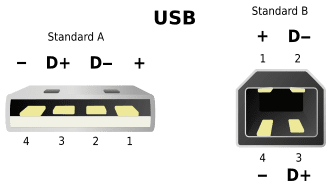
Within the Consumer Grade UPS's there are two distinct types, those with a software shutdown feature which requires the software to run on the PC, and those without that feature. The cable that joins the UPS to the PC is usually a standard USB Printer Cable, available in many stores. The software can usually be downloaded from the manufacturer's website.

All consumer Grade UPS's are of the Square Wave output type, or NON Sinusoidal wave. That type of power is readily accepted by any electronic equipment that uses a modern Non-Analog power supply.
Some of the devices that I power with my own UPS's (all APC Brand) include my PC, monitor, printer, speakers, Digital LED TV, Cable Box, Modem, Router, and my Magic Jack VOIP device.

I also have a 2000 Watt Inverter that puts out a 120vac square wave, from a 12 volt battery. It will run all of my kitchen appliances, but it does make my toaster HUMMMMM! :D
It will NOT,however, run my refrigerator, because it has a Capacitor Start motor and that doesn't like a square wave. But it does run just fine with the output of my home Generator.

I once tried a Cyber Power UPS, but it gave false battery status reports and would not accept an exterior battery, like an APC will. So today it only backs up my telephone answering machine and one digital clock. When it finally dies, it will go out in the trash, like any other POC. Buying a Cyber Power UPS was a mistake that I will not repeat.

Buying more UPS than you need is just throwing money down a rat hole. My Main PC (desktop system) is connected to an APC Back UPS that I got at Walmart for $39.95. I think it was rated at 350va. The little Jell-Cell battery that comes with the UPS will only keep the UPS running for a few minutes, so, I removed the little OEM battery and replaced it with a 12vdc tractor battery w/250 CCA. I've only tested it once since doing the battery transplant, but during that live test, everything ran for three hours before the UPS ever even started to BEEP. After restoring line power, the UPS had the battery charged up to full power in about 12 hours.
I stopped the test before the UPS ever had the chance to shut down.
Here's that setup: Sometimes, this forum will not show my pictures.

29kywyp.jpg


In this pic, you can also see the Panamax Surge Protector that's plugged into the wall outlet.

I have two other APC UPS's, a 500va and a 600va. The bigest one provides back up power to my Cable box, LED 32" TV and a set of speakers, and even a LED Table Lamp. It uses two car batteries for its power source and can back up my TV for up to 8 hours.

So during a power failure, I have my PC, Cable TV and even Light, while my neighbors are in the dark.

If it appears that a power failure is going to be prolonged, like it was during Hurricane Irma (five days) I'll separate my home from the power line and fire up my Predator Generator, which can power up most of my home and well.

I was joking once, with an APC Engineer, and I commented, "I'd like an APC UPS that could run my whole house", and he responded "We have those!". I know they do, but I sure can't afford one!
I could probably buy a nice car for the price of a Whole House UPS, with both 120vac and 220vac outputs in full Sine Wave output.

My home generator might not put out a really CLEAN sine-wave, but it IS 60 cycle, 120vac/220vac, and will run my well pump and my refrigerator, that both have Capacitor-Start motors.

There is just NO good replacement for good backup power. :geek:

I hope you all have a very great 2018,

Cheers Mates!
TechnoMage :cool:
 
Last edited:

My Computer My Computer

At a glance

Win 7 Pro, SP1, x86, Win-11/Pro/64AMD8GB CrucialVarious
Computer type
PC/Desktop
Computer Manufacturer/Model Number
Various
OS
Win 7 Pro, SP1, x86, Win-11/Pro/64
CPU
AMD
Motherboard
Various
Memory
8GB Crucial
Graphics Card(s)
Various
Sound Card
OnBoard
Monitor(s) Displays
Acer 21.5"
Hard Drives
Crucial SSD, 500 GB
PSU
OEM
Case
SFF Slim Line Case
Cooling
OEM
Keyboard
eMachines
Mouse
Logitech Wireless
Internet Speed
varies
Antivirus
Windows Defender/Super Anti-Spyware
Browser
Firefox
I hesitated even attempting to consider buying a cable that 'looked' like the one I have (I'm talking about the device attachment end not the computer's USB port end). When I've done that previously with other electronics I've gotten burned--small variations.

If you're saying that USB cables that have squarish ends (older HP cables) are all the same size then no problem?

Mark
 

My Computer My Computer

At a glance

Windows 7 & Windows 10
Computer type
PC/Desktop
OS
Windows 7 & Windows 10

My Computer My Computer

At a glance

Win 7 Pro, SP1, x86, Win-11/Pro/64AMD8GB CrucialVarious
Computer type
PC/Desktop
Computer Manufacturer/Model Number
Various
OS
Win 7 Pro, SP1, x86, Win-11/Pro/64
CPU
AMD
Motherboard
Various
Memory
8GB Crucial
Graphics Card(s)
Various
Sound Card
OnBoard
Monitor(s) Displays
Acer 21.5"
Hard Drives
Crucial SSD, 500 GB
PSU
OEM
Case
SFF Slim Line Case
Cooling
OEM
Keyboard
eMachines
Mouse
Logitech Wireless
Internet Speed
varies
Antivirus
Windows Defender/Super Anti-Spyware
Browser
Firefox
Almost.

Yes, for the required loose cable, and that's good information for later.

The UPS' are downstairs in the office, I've been staying upstairs tending a repaired shoulder so I hadn't crawled under the desk to verify what I had remembered.

I just did that. I didn't remember correctly. The data cable for the Back UPS 550 (the model 1000 is for another use) under my desk is hard wired from the device with a USB connector at the machine end. The cable is ~1/4 the diameter of a 'normal' Windows peripheral device USB data line.

And now I remember why I never installed Parachute. (remarkably) The APC data cable doesn't reach from the APC on the floor to the laptop on the desk. And given the thinness of the cable, if there is a way to add an extension, the extension cable would never match this super slim gauge.

I've had it. No Parachute--no problem.

Thanks for bearing with this--

Mark
 

My Computer My Computer

At a glance

Windows 7 & Windows 10
Computer type
PC/Desktop
OS
Windows 7 & Windows 10
Boy, they really went cheap on that one, Eh?
Replace that mickey mouse cable with a good quality USB Printer Cable of the required length.

Or, do just what you're doing.....get along nicely without the Parachute at all. That's what I do.
Actually, the little Back UPS 350 that I'm using does not even have the Parachute cable socket on it.
Only the more Top End UPS's have that option. In years past, I've tried the Parachute but didn't really like it.

I replaced the little wimpy Gell Cell in the UPS with an outboarded Tractor Battery, which will keep the little UPS running for several hours, so I really don't need a Parachute. ;)

29kywyp.jpg


Sometimes, when I post a picture to this forum, is shows up, and sometimes it doesn't.

I just pull the battery wires out of the UPS and extend them to a Lead/Acid battery with about 250CCA capacity. I ran a test on the above setup as soon as I had it wired (battery was NOT at full charge) and the test ran for three hours, before the UPS started beeping to signal that the battery was running down.
When at full charge, that battery should keep the UPS running for at least four hours. Not bad for a $39 UPS and a $29 battery (at Walmart).

Cheers Mates!
TechnoMage :cool:
 

My Computer My Computer

At a glance

Win 7 Pro, SP1, x86, Win-11/Pro/64AMD8GB CrucialVarious
Computer type
PC/Desktop
Computer Manufacturer/Model Number
Various
OS
Win 7 Pro, SP1, x86, Win-11/Pro/64
CPU
AMD
Motherboard
Various
Memory
8GB Crucial
Graphics Card(s)
Various
Sound Card
OnBoard
Monitor(s) Displays
Acer 21.5"
Hard Drives
Crucial SSD, 500 GB
PSU
OEM
Case
SFF Slim Line Case
Cooling
OEM
Keyboard
eMachines
Mouse
Logitech Wireless
Internet Speed
varies
Antivirus
Windows Defender/Super Anti-Spyware
Browser
Firefox
Back
Top