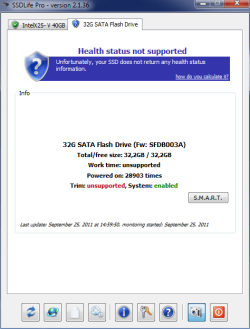
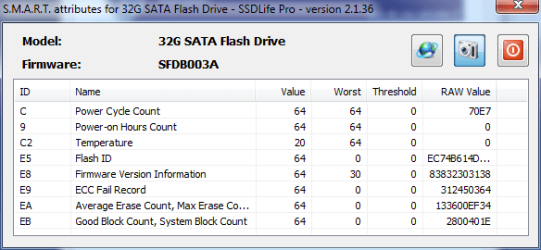
Apcer SSD 32GB Dead?

makisxxx

New member
Local time
3:37 AM
Messages
10
Location
Greece-Crete
Hello all

Since yesterday my SSD Drive (:D) dont work.It shows as RAW Drive even if i try to change it to NTFS or try to format it an error pop up like semaphore timeout.
Also when i try to clean instal on the selected drive it comes with error 0x80070057.
I tryed to instal the drive in all variation : AHCI IDE .same problem
Could my drive be dead?:cry:

Windows 7 64bit
Intel i7 3.20
Corsair 12 GB Ram
ATI 6990
2 SSD Drives Intel 40 gb +Apacer 32gb (Dead one?)
Motherboard:Gigabyte Technology X58A-UD3R
Sorry for bad English :o
Ty for Help
 

My Computer

OS
Windows 7 Ultimate 64 Bit Greek
give us more info like when did you install it and operating conditions.....
Remember SSD's are like time bombs.
btw did you dry error checking with windows drive tools?
Go to drive properties find disk tools and check the drive for errors and come back
 

My Computer

Computer Manufacturer/Model Number
HCL
OS
Windows 7 Ultimate 32bit
CPU
Intel Quadcore E5500 @2.8 GHz
Motherboard
IPM41
Memory
4 Gigs
Sound Card
Logitech 5.1
Monitor(s) Displays
22" LCD
Hard Drives
Seagate 500 GB
PSU
400 W
Go into an elevated Command Prompt and run these commands:

Diskpart
List disk

Select disk n (where n is the number that was given for your SSD in List disk)
Create partition primary align=1024
Active (assuming you want to install an OS)
Exit
 

My Computer

Computer Manufacturer/Model Number
HP, Dell, Gateway, Toshiba - 4 laptops and 2 desktops
OS
Vista, Windows7, Mint Mate, Zorin, Windows 8
CPU
from 1.6GHz Duo to i7
Monitor(s) Displays
2x HP w2207
Hard Drives
5x HDD, 7x SSD, 12x Externals
Keyboard
with trackball - no mices
Mouse
Trackball mice
Internet Speed
DSL 6000
SSDs do not guarantee more stability. They do remove the possibility of moving parts failing, but at least in the case of your most recent failure, bad LBAs (sectors/blocks) are just as likely to happen on SSDs (I have one which already has 1 reallocated LBA; big deal). Though SSD failures commonly do not appear as "blocks going bad"; usually the drive just stops working entirely for reasons which are completely different than that of their mechanical counterparts. So with SSDs, continue to follow the above "its-bound-to-fail" advice while remembering that the mechanical failure aspect has been removed from the picture. Electrical failure, however, is just as likely as it always was.

I hope what I've written suffices as both an educational and sympathetic note as someone who deals with storage on a regular basis.
 

My Computer

Computer Manufacturer/Model Number
HCL
OS
Windows 7 Ultimate 32bit
CPU
Intel Quadcore E5500 @2.8 GHz
Motherboard
IPM41
Memory
4 Gigs
Sound Card
Logitech 5.1
Monitor(s) Displays
22" LCD
Hard Drives
Seagate 500 GB
PSU
400 W
Go into an elevated Command Prompt and run these commands:

Diskpart
List disk

Select disk n (where n is the number that was given for your SSD in List disk)
Create partition primary align=1024
Active (assuming you want to install an OS)
Exit

This dont work. It says that i dont thave enough space to do this :confused:
Also when i try to format or make active partition from Computer Managment it says Semaphore Time out . btw Green light in the back of my SSD is blinking green.
 

My Computer

OS
Windows 7 Ultimate 64 Bit Greek
give us more info like when did you install it and operating conditions.....
Remember SSD's are like time bombs.
btw did you dry error checking with windows drive tools?
Go to drive properties find disk tools and check the drive for errors and come back

It was my main OS Partition.after i buy a secont ssd drive i format it.it was working fine till 2 days ago.The drive is about 8 months old maybe less dont remember.
 

My Computer

OS
Windows 7 Ultimate 64 Bit Greek

My Computer

Computer Manufacturer/Model Number
HP, Dell, Gateway, Toshiba - 4 laptops and 2 desktops
OS
Vista, Windows7, Mint Mate, Zorin, Windows 8
CPU
from 1.6GHz Duo to i7
Monitor(s) Displays
2x HP w2207
Hard Drives
5x HDD, 7x SSD, 12x Externals
Keyboard
with trackball - no mices
Mouse
Trackball mice
Internet Speed
DSL 6000
Last attempt. Run a chkdsk /f /r in Command Prompt.
 

My Computer

Computer Manufacturer/Model Number
HP, Dell, Gateway, Toshiba - 4 laptops and 2 desktops
OS
Vista, Windows7, Mint Mate, Zorin, Windows 8
CPU
from 1.6GHz Duo to i7
Monitor(s) Displays
2x HP w2207
Hard Drives
5x HDD, 7x SSD, 12x Externals
Keyboard
with trackball - no mices
Mouse
Trackball mice
Internet Speed
DSL 6000
Last attempt. Run a chkdsk /f /r in Command Prompt.

Hello
well now the drive wont show in Explorer but its listet under Hardware in Computer managment.when i plug in the drive and i restart it takes sometimes more then 15 min to boot.as soon i plug it off the system responts in seconts and restarts in normal time.
Well seems for me that the drive is damaged.dont know :( i did all the ways are listet above nothink helped
I connected the drive in various way IDE AHCI etc.
 

My Computer

OS
Windows 7 Ultimate 64 Bit Greek

My Computer

Computer type
PC/Desktop
Computer Manufacturer/Model Number
Custom
OS
windows 10 pro 64 bit
CPU
i5 4690K@4500 COOLER MASTER Seidon 120M water cooler
Motherboard
ASUS SABERTOOTH Z87 LGA 1150 Intel
Memory
16gb Kingston HyperX DDR3 1600
Graphics Card(s)
EVGA GTX 1070 sc
Monitor(s) Displays
BenQ GL2760H Black 27" 2ms HDMI Widescreen LED 1920X1080
Screen Resolution
DSR 2103X1183
Hard Drives
ADATA 256 gig SSD + 4 junk
PSU
EVGA supernova 750
Case
coolermaster
Cooling
many...
Keyboard
z merc
Mouse
Logitech wireless G602
Internet Speed
2.5mbs cable
Can you return the drive and get another one.
 

My Computer

Computer Manufacturer/Model Number
HP, Dell, Gateway, Toshiba - 4 laptops and 2 desktops
OS
Vista, Windows7, Mint Mate, Zorin, Windows 8
CPU
from 1.6GHz Duo to i7
Monitor(s) Displays
2x HP w2207
Hard Drives
5x HDD, 7x SSD, 12x Externals
Keyboard
with trackball - no mices
Mouse
Trackball mice
Internet Speed
DSL 6000

Attachments

  • SSDLife.png
    SSDLife.png
    17.1 KB · Views: 11
  • SSDLife_SMART.png
    SSDLife_SMART.png
    13.1 KB · Views: 12

My Computer

OS
Windows 7 Ultimate 64 Bit Greek
Back
Top