

- Local time
- 5:06 AM
- Messages
- 51
Hello
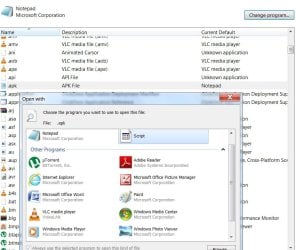
I wanted to take a quick look at a APK file so I just right click on it and selected open with the wrong one.
Now I cant get them back to the way they were so I can open them in APKtool.
I found this on the net and before I try this can someone let me know its safe.
...............................
regedit (Registry Editor) opens, on the left pane (side), click on (Click on HKEY_CURRENT_USER first, then the list expands. You keep clicking until you get to where you need to go) HKEY_CURRENT_USER\Software\Microsoft\Windows\CurrentVersion?\Explorer\FileExts?\. Then, after expanding 'FileExts?' in the previously mentioned location, find the '.apk' extension, right click it and click delete. Restart your computer, then it should work. All I had to do was delete that from the registry and the icons switched right back to the apk icons.
.................................
Thanks for any info. you can give.
I wanted to take a quick look at a APK file so I just right click on it and selected open with the wrong one.
Now I cant get them back to the way they were so I can open them in APKtool.
I found this on the net and before I try this can someone let me know its safe.
...............................
regedit (Registry Editor) opens, on the left pane (side), click on (Click on HKEY_CURRENT_USER first, then the list expands. You keep clicking until you get to where you need to go) HKEY_CURRENT_USER\Software\Microsoft\Windows\CurrentVersion?\Explorer\FileExts?\. Then, after expanding 'FileExts?' in the previously mentioned location, find the '.apk' extension, right click it and click delete. Restart your computer, then it should work. All I had to do was delete that from the registry and the icons switched right back to the apk icons.
.................................
Thanks for any info. you can give.
Attachments

My Computer
- Computer Manufacturer/Model Number
- Samurai Jack Special
- OS
- Windows 7 Ultimate x64
- CPU
- i7 2600k
- Motherboard
- Asus-P67-Sabertooth
- Memory
- 8G Corsair-DDR3
- Graphics Card(s)
- GTX 260 Evga
- Monitor(s) Displays
- HP 2711x
- Hard Drives
- 3 Samsung.. 500G/250/250/
- PSU
- Corsair
- Case
- Antec
- Cooling
- 5 Fans
- Other Info
- Laptop Asus G75VW. A little heavy but its a Beast...


