App crash

ca10c3sar

New member
Local time
5:29 PM
Messages
11
I got a app crash often, so i start look at task manager and realized that every time it crashes in "reserva nao paginada" "reserve not paginated" (i think its virtual memory), that value keep increasing with time, and when it goes higher than 91-92 (the highest value its stable) happens the crash.

zyCDR
395079d1483475063t-app-crash-1.png


395081d1483474231-app-crash-3.png


In first photo, those two red lines are the clients who crashed. I also realized that it happens often when im using a lot of RAM or using many of those applications, but i always got free RAM disponible:

395082d1483474231-app-crash-4.png


Those crash already happened when i was using low amount of RAm like 40%, but crashes more when using high values of RAM

I already updated all my drivers, incluse gpu drivers, did all windows update, nothing resolve my problem.

In the client folder, the log error says:

29: C:\Windows\syswow64\kernel32.dll(BaseThreadInitThunk+0x12) [0x756633CA]
30: C:\Windows\SysWOW64\ntdll.dll(RtlInitializeExceptionChain+0x63) [0x77219ED2]
31: C:\Windows\SysWOW64\ntdll.dll(RtlInitializeExceptionChain+0x36) [0x77219EA5]


So i searched about that ntdll.ll followed some tutorials who said to add those applications who are crashing in "DEP":

395083d1483474231-app-crash-5.png


I did that reinitialized my pc, but when i tried open the client and login, it just crash instantly :(
So i set it back to default.

Actually my virtual memory are in "automatic", but i already tried change it to high values, not solved my problem, continued crashing.


395080d1483474231-app-crash-2.png


Im using WIN 7 X64


There something i can do to stop that value from increasing? "reserve not paginated", because 100% of times it crashed, those value was high like 120~~


I also using one software called memory improve master, and marked it to do "free memory" every 2 min, but the app continues crashing
 
Last edited:

My Computer

Computer type
PC/Desktop
OS
Windows 7 Ultimate x64
CPU
i5 2310
Memory
16gb
Graphics Card(s)
nvidia
Antivirus
none
Browser
firefox
Welcome to our forumca10c3sar.

Just a suggestion.

From you post.

I also using one software called memory improve master
I suggestion removing this program. Windows 7 can manage the ram perfectly you you allow it to do so.

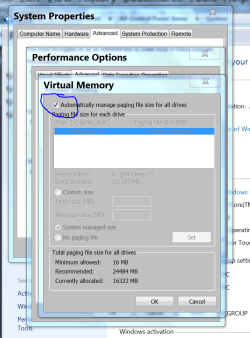
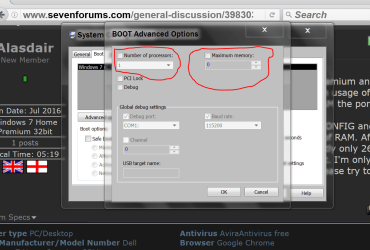
These are the setting I use and recommend. Some pictures to help.

Virtual Memory Performance.PNG

msconfig Boot advanced options.PNG

I have had for 4 gigs to 32 gig of ram on Windows 7 and Windows 7 has never had a problem managing the ram.


Jack
 

My Computer

Computer type
PC/Desktop
Computer Manufacturer/Model Number
Home made Desktop
OS
Windows 10 Pro. 64/ version 1709 Windows 7 Pro/64
CPU
Intel i7-6800K @ 4.3
Motherboard
ASUS X-99 Deluxe II
Memory
Corsair Platinum 16 gig @2400
Graphics Card(s)
EVGA GTX 1070 OC
Monitor(s) Displays
Asus 27" LED LCD/VE278Q
Screen Resolution
1920-1080 or 1280-720 HDMI
Hard Drives
INTEL SSD 730-240 Gb Sata 3.0/
PSU
EVGA Platium 1200W
Case
Phanteks Luxe Tempered Glass 8 fans/ one radiator
Cooling
XSPC/ Water Cooled CPU
Keyboard
Das 4 Professional
Mouse
Logitech M705/MX Anywhere 2-S
Internet Speed
100 mbits
Antivirus
Microsoft Security Essentials/ Malwarebytes Premium 3.0/ SAS
Browser
I.E. 11 default/Firefox/ ISP Time Warner Cable/Spectrum
Other Info
LG BluRay Burner/
Sound system-KLipsch-THX/
Icy Dock ssd Hot Swap bays.
The problem is not the RAM, is the app crash :(
 

My Computer

Computer type
PC/Desktop
OS
Windows 7 Ultimate x64
CPU
i5 2310
Memory
16gb
Graphics Card(s)
nvidia
Antivirus
none
Browser
firefox
The app can't crash if it's removed.

That is why I recommend removing (memory improve master).

one software called memory improve master
It is not needed in Windows 7.
If the memory is set like the pictures I posted your ram usage should be proper.

The system is yours to fix, so you can do as you please.

I just posted recommendation of things I would do if I had to fix this problem.

Jack
 

My Computer

Computer type
PC/Desktop
Computer Manufacturer/Model Number
Home made Desktop
OS
Windows 10 Pro. 64/ version 1709 Windows 7 Pro/64
CPU
Intel i7-6800K @ 4.3
Motherboard
ASUS X-99 Deluxe II
Memory
Corsair Platinum 16 gig @2400
Graphics Card(s)
EVGA GTX 1070 OC
Monitor(s) Displays
Asus 27" LED LCD/VE278Q
Screen Resolution
1920-1080 or 1280-720 HDMI
Hard Drives
INTEL SSD 730-240 Gb Sata 3.0/
PSU
EVGA Platium 1200W
Case
Phanteks Luxe Tempered Glass 8 fans/ one radiator
Cooling
XSPC/ Water Cooled CPU
Keyboard
Das 4 Professional
Mouse
Logitech M705/MX Anywhere 2-S
Internet Speed
100 mbits
Antivirus
Microsoft Security Essentials/ Malwarebytes Premium 3.0/ SAS
Browser
I.E. 11 default/Firefox/ ISP Time Warner Cable/Spectrum
Other Info
LG BluRay Burner/
Sound system-KLipsch-THX/
Icy Dock ssd Hot Swap bays.
Omg :rolleyes:
Why i would remove the app if i need use it, please forget memory improve master, thats not the point here...
 

My Computer

Computer type
PC/Desktop
OS
Windows 7 Ultimate x64
CPU
i5 2310
Memory
16gb
Graphics Card(s)
nvidia
Antivirus
none
Browser
firefox
Please explain what is the point other than memory management.
Your entire first post is about memory.


Jack
 

My Computer

Computer type
PC/Desktop
Computer Manufacturer/Model Number
Home made Desktop
OS
Windows 10 Pro. 64/ version 1709 Windows 7 Pro/64
CPU
Intel i7-6800K @ 4.3
Motherboard
ASUS X-99 Deluxe II
Memory
Corsair Platinum 16 gig @2400
Graphics Card(s)
EVGA GTX 1070 OC
Monitor(s) Displays
Asus 27" LED LCD/VE278Q
Screen Resolution
1920-1080 or 1280-720 HDMI
Hard Drives
INTEL SSD 730-240 Gb Sata 3.0/
PSU
EVGA Platium 1200W
Case
Phanteks Luxe Tempered Glass 8 fans/ one radiator
Cooling
XSPC/ Water Cooled CPU
Keyboard
Das 4 Professional
Mouse
Logitech M705/MX Anywhere 2-S
Internet Speed
100 mbits
Antivirus
Microsoft Security Essentials/ Malwarebytes Premium 3.0/ SAS
Browser
I.E. 11 default/Firefox/ ISP Time Warner Cable/Spectrum
Other Info
LG BluRay Burner/
Sound system-KLipsch-THX/
Icy Dock ssd Hot Swap bays.
I wanna know if theres something i can do to stop that value "reserve not paginated" from increasing, because when it goes higher than 91-92 the cliente crash, about memory, is bc that value goes higher fast when im using high amounts of ram
 

My Computer

Computer type
PC/Desktop
OS
Windows 7 Ultimate x64
CPU
i5 2310
Memory
16gb
Graphics Card(s)
nvidia
Antivirus
none
Browser
firefox
Well I'm some how I'm not getting through.
If you want to use that 3rd party memory program I have no other ideas.

Jack
 

My Computer

Computer type
PC/Desktop
Computer Manufacturer/Model Number
Home made Desktop
OS
Windows 10 Pro. 64/ version 1709 Windows 7 Pro/64
CPU
Intel i7-6800K @ 4.3
Motherboard
ASUS X-99 Deluxe II
Memory
Corsair Platinum 16 gig @2400
Graphics Card(s)
EVGA GTX 1070 OC
Monitor(s) Displays
Asus 27" LED LCD/VE278Q
Screen Resolution
1920-1080 or 1280-720 HDMI
Hard Drives
INTEL SSD 730-240 Gb Sata 3.0/
PSU
EVGA Platium 1200W
Case
Phanteks Luxe Tempered Glass 8 fans/ one radiator
Cooling
XSPC/ Water Cooled CPU
Keyboard
Das 4 Professional
Mouse
Logitech M705/MX Anywhere 2-S
Internet Speed
100 mbits
Antivirus
Microsoft Security Essentials/ Malwarebytes Premium 3.0/ SAS
Browser
I.E. 11 default/Firefox/ ISP Time Warner Cable/Spectrum
Other Info
LG BluRay Burner/
Sound system-KLipsch-THX/
Icy Dock ssd Hot Swap bays.
Back
Top