Apple Bluetooth Keyboard won't connect

d6kwan

New member
Local time
7:32 AM
Messages
2
Let me just say that I'm a newb when it comes to this stuff. I just figured out why W7 wouldn't let me go into dual monitor mode because I was lacking the nvidia driver.

But my problem now is that I have the thin Apple Bluetooth keyboard and it simply won't connect. When I add devices, the keyboard is detected and it says "connecting to device" and stalls. Sometimes it says there was a timeout. Can anyone help me?
 

My Computer My Computer

OS
W7 Ultimate
Can you plugin the keyboard and post a screenshot of Device Manager? To get to Device Manager, Hit Start->Type Device Manager->Hit Enter->Take the screenie
 

My Computer My Computer

Computer Manufacturer/Model Number
Compal JFT02 (Custom Build Laptop)
OS
Windows 7 Home Premium x64 - Mac OS X 10.6.4 x64
CPU
Intel Core 2 Duo T9300 2.5 GHz
Motherboard
JFT02
Memory
4GB Kingston DDR2-800
Graphics Card(s)
NVIDIA Geforce 8600M GT (512MB Model)
Sound Card
Realtek HD Audio
Monitor(s) Displays
WUXGA Standard Laptop Display
Screen Resolution
1680*1050
Hard Drives
Toshiba 320GB 5400RPM Laptop HD
PSU
Standard Laptop Power Supply
Case
Standard Laptop Case
Cooling
Standard Laptop Cooling
Keyboard
Standard Laptop 105 Key-Keyboard
Mouse
Synaptics Touchpad
Internet Speed
Verizion Online DSL 3360/864 kbs (dl/up)
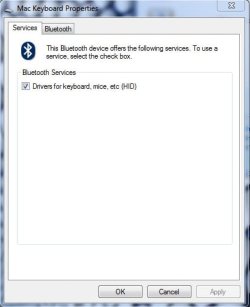
I was able to fix it last night. When it detected the bluetooth keyboard, I had to right click and goto properties and under services I had to check the box to download the bluetooth HID driver. Apparently it wouldn't download the driver automatically. I also had to do a restart to get it working. Annoying, but after half a day of trying I got most of the kinks ironed out.
 

Attachments

  • SS.jpg
    SS.jpg
    19.4 KB · Views: 367
Last edited:

My Computer My Computer

OS
W7 Ultimate
ok a weird one

Hi guys,

So here's a weird related problem:

Running windows 7 on a Mac Pro 2.8 quad.

Upgraded from vista, which ran fine, onto a new partition.

Now when I first installed 7, my apple bluetooth keyboard worked fine. Didn't have to pair it, but the function keys, sound keys didn't work, and the eject button didn't work. But the keyboard worked fine generally.

But I had the regular problems associated with Windows *no sound etc, so I installed bootcamp from the snow leopard disc.

Okay so you know where this is headed.

So the keyboard stopped working. A couple of things:

1) the keyboard works when I have to choose between Windows partitions when the computer boots up. Stops working when it's time to type in my password.

2) I've followed the above advice, but nothing shows up in the services window, and under the Bluetooth tab, there's no indication the computer can see this is an Apple device. Odd.

In fact, under the Add a device window, it just comes up as a generic bluetooth keyboard.

thoughts?
 

My Computer My Computer

Computer Manufacturer/Model Number
Apple Mac Pro
OS
Windows 7
CPU
Quad 2.8
Monitor(s) Displays
Dell
Hi guys,

So here's a weird related problem:

Running windows 7 on a Mac Pro 2.8 quad.

Upgraded from vista, which ran fine, onto a new partition.

Now when I first installed 7, my apple bluetooth keyboard worked fine. Didn't have to pair it, but the function keys, sound keys didn't work, and the eject button didn't work. But the keyboard worked fine generally.

But I had the regular problems associated with Windows *no sound etc, so I installed bootcamp from the snow leopard disc.

Okay so you know where this is headed.

So the keyboard stopped working. A couple of things:

1) the keyboard works when I have to choose between Windows partitions when the computer boots up. Stops working when it's time to type in my password.

2) I've followed the above advice, but nothing shows up in the services window, and under the Bluetooth tab, there's no indication the computer can see this is an Apple device. Odd.

In fact, under the Add a device window, it just comes up as a generic bluetooth keyboard.

thoughts?
Try to update the drivers of the device...point the location for the updated driver to the bootcamp CD


It is worth a shot
 

My Computer My Computer

Computer Manufacturer/Model Number
Compal JFT02 (Custom Build Laptop)
OS
Windows 7 Home Premium x64 - Mac OS X 10.6.4 x64
CPU
Intel Core 2 Duo T9300 2.5 GHz
Motherboard
JFT02
Memory
4GB Kingston DDR2-800
Graphics Card(s)
NVIDIA Geforce 8600M GT (512MB Model)
Sound Card
Realtek HD Audio
Monitor(s) Displays
WUXGA Standard Laptop Display
Screen Resolution
1680*1050
Hard Drives
Toshiba 320GB 5400RPM Laptop HD
PSU
Standard Laptop Power Supply
Case
Standard Laptop Case
Cooling
Standard Laptop Cooling
Keyboard
Standard Laptop 105 Key-Keyboard
Mouse
Synaptics Touchpad
Internet Speed
Verizion Online DSL 3360/864 kbs (dl/up)
Yeah tried that. Even tried to look for a driver on the windows 7 disc. No go
 

My Computer My Computer

Computer Manufacturer/Model Number
Apple Mac Pro
OS
Windows 7
CPU
Quad 2.8
Monitor(s) Displays
Dell
Back
Top