Application menu item left hanging on desktop

Ziggi

Banned
Local time
7:06 PM
Messages
10
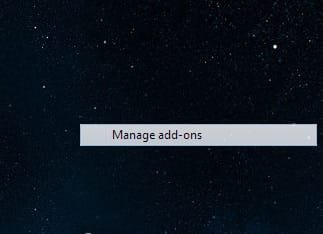
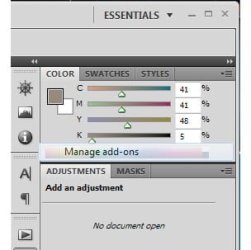
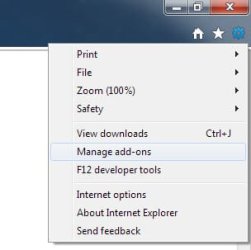
I have an issue with some applications (especially IE9 beta) frequently leaving nasty garbage (elements of their interface) on the desktop. These are particulary menu-items being left from roll-outs. In the attachment to this message you may find three screenshots what will explain you what I do actually mean. Such screen garbage is misfortunately displayed on top of other screen elements what is totally annoying. It is pretty hard to get rid of this shit - I usually need to log-off/log-on to reinitialize the screen buffer.

Any idea how to overcome this nastiness???

WINDOWS 7 x64 ULTIMATE
 

Attachments
  • original_IE9_menu.jpg
    original_IE9_menu.jpg
    13.9 KB · Views: 306
  • garbage_left_on_desktop.jpg
    garbage_left_on_desktop.jpg
    10 KB · Views: 307
  • garbage_is_displayed_on_top.jpg
    garbage_is_displayed_on_top.jpg
    16.2 KB · Views: 308

My Computer My Computer

Computer Manufacturer/Model Number
Custom assembly
OS
Windows 7 x64
CPU
INTEL CORE 2 QUAD Q6600 @ 2.40 GHz
Motherboard
ASUS P5B DELUXE
Memory
8 GB DDR2 @ 800 MHz
Graphics Card(s)
NVIDIA GFORCE GTX 285
Sound Card
SOUND BLASTER AUDIGY 2 NX
Monitor(s) Displays
2 x LG FLATRON W2253TQ
Hard Drives
SEAGATE ST3160815AS (ESATA)
SEAGATE ST3500320NS (ESATA)
SEAGATE FreeAgent Xtreme (ESATA)
PSU
TAGAN 650 W
Case
?
Cooling
AIR
Its beta and will have these problems. IE9 has not been released. Those that use it will find these problems and hopefully they will be fixed when IE9 is released.
 

My Computer My Computer

Computer type
PC/Desktop
Computer Manufacturer/Model Number
Dell XPS 420
OS
Windows 10, Home Clean Install
CPU
Intel Core2 processsor Q8200(2.33Ghz 1333FSB) Quad Core Tech
Motherboard
Dell
Memory
6 gb
Graphics Card(s)
ATI Radeon 256MB HD3650
Sound Card
Intergrated 7.1 Channel Audio
Monitor(s) Displays
Dell SP2009W 20"
Hard Drives
640 GB Serial ATA Hard drive
Cooling
Fan
Keyboard
Dell USB Keyboard
Mouse
Dell Premium Optical USB
Internet Speed
DSL 2.85
Well I was hoping to come across a solution to the original issue too. I have menu items staying on the desktop after a menu rolls up as well.
Unfortunately the reponse was fixated on IE9, which the poster clearly said was a major culprit...but not the only culprit.
I find many Adobe apps have been doing it this past week....and so has the recycle bin.

Win7 pro 64 bit.
Guess I'll keep looking.
 

My Computer My Computer

OS
Windows 7 Pro 64 bit
Back
Top