Application not sizing correctly when maximizing

obaidrock1

New member
Local time
10:29 PM
Messages
10
Greetings,

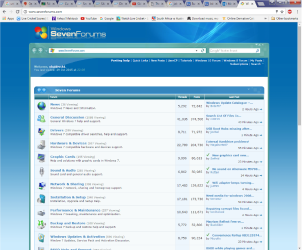
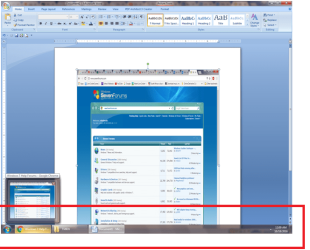
Recently my computer has started acting strange and whenever i open any Application like word or any other, after maximizing, the size goes more than the taskbar as can be seen in the pic with the red box. While using google chrome, you cannot see the taskbar when ever you maximize the application. Please help to resolve this problem,

Thanks
 

Attachments
  • PROBLEM.png
    PROBLEM.png
    59.5 KB · Views: 11
  • PROBLEM 2.png
    PROBLEM 2.png
    252.8 KB · Views: 0

My Computer

Computer type
Laptop
Computer Manufacturer/Model Number
Dell
OS
Windows 7 Home Premium 64bit
CPU
Intel Core i5-2410M
Memory
16 GB
Graphics Card(s)
Nvidia 525M
Hard Drives
500 GB
Antivirus
Microsoft Security Essentials
Browser
Chrome
If AutoHide The Taskbar is enabled, then the "work area" of the desktop reported by the OS to the application will be the same as the desktop size. In other words, if you want the work area to not cover the Taskbar AutoHide has to be disabled. You can check it by right clicking the taskbar, selecting Properties. If Auto Hide the Taskbar is not checked I would try checking it, then unchecking and reboot to see if this makes the setting "stick."

It could be something else entirely but I know from writing work area sizing utilities that the work area will not take the Taskbar into account unless AutoHide is disabled. I think in XP they called the equivalent setting "always on top" for Taskbar. Same deal. If Always On Top is not enabled, the work area takes no account of it.

If this only happens in a few programs then it is probably not a work area issue. But if it happens with everything then it could be that Windows somehow is confused about the actual size of the Taskbar. This could be a corrupted registry issue. But I would try the stuff I suggested first before any Registry tweaking.

Please post back if you find anything out about the Taskbar settings.
 

My Computer

Computer Manufacturer/Model Number
HP Media Center
OS
Windows 7 32 bit
CPU
AMD 5200+ dual core
Memory
2 GB
Graphics Card(s)
NVidia GeForce 6150SE 128 MB
Monitor(s) Displays
CRT
Screen Resolution
1280x1024
Hard Drives
500 GB Sata internal :

SIIG USB 3.0 docking stations w/WD Caviar Black 6 Gb/s drives
Keyboard
PS/2
Mouse
PS/2 Wheel Mouse
Other Info
SIIG USB 3.0 PCIexpress card.
Back
Top