Application Software Install Failures

Ryan Knowles

New member
Local time
4:59 AM
Messages
6
Location
San Diego
Hello All -
Until recently, the Win 7 Home Premium OS has always behaved great; been using the computer as is for 3+ years.

The computer cannot install program software at this time, doesn't matter if the software is Microsoft, OEM or other licensed software. The error messages all relate to the software installer not being able to write to the registry. By now I've read every error message or error number that can be returned upon rollback. Since it appears to be a generalized glitch affecting any and all program software installs, what would you do to solve the problem?

Big concern is the AVG anti-virus doesn't install when trying to re-install the software. Without an antivirus installed, I have the usual concerns.

I have tried to install the software under full admin privileges by re-booting and signing on with that profile; no effect so far.

Anyhow, I could go on and on but think it best to post as-is and look for some feedback.

Thank You Everyone
Ryan Knowles

Win 7 Home Premium 64 bit, Intel Dual Quad Processor @240GHz, 8GB ram, running MS Office 2013, PhotoShop C6, Corel 6 Pro, Steinberg WaveLab 8, iTunes, WinAmp, and a couple utilities run frequently to keep it maintained.
 

My Computer

Computer type
PC/Desktop
Computer Manufacturer/Model Number
HP-Pavilion AW016AV-ABA s5280t
OS
Windows 7 Home Premium (x64) Service Pack 1 (build 7601)
CPU
2.50 gigahertz Intel Core2 Quad 64-bit ready Multi-core
Motherboard
PEGATRON CORPORATION Eureka3 1.02
Memory
8192 Megabytes Usable Installed Memory
Graphics Card(s)
NVIDIA GeForce GT 220 [Display adapter]
Hard Drives
ST3500418AS [Hard drive] (500.11 GB)
Antivirus
AVG Internet Security 2013
Browser
Google - Chrome Version 28.0.1500.95
My Computer

Computer type
PC/Desktop
Computer Manufacturer/Model Number
Home made Desktop
OS
Windows 10 Pro. 64/ version 1709 Windows 7 Pro/64
CPU
Intel i7-6800K @ 4.3
Motherboard
ASUS X-99 Deluxe II
Memory
Corsair Platinum 16 gig @2400
Graphics Card(s)
EVGA GTX 1070 OC
Monitor(s) Displays
Asus 27" LED LCD/VE278Q
Screen Resolution
1920-1080 or 1280-720 HDMI
Hard Drives
INTEL SSD 730-240 Gb Sata 3.0/
PSU
EVGA Platium 1200W
Case
Phanteks Luxe Tempered Glass 8 fans/ one radiator
Cooling
XSPC/ Water Cooled CPU
Keyboard
Das 4 Professional
Mouse
Logitech M705/MX Anywhere 2-S
Internet Speed
100 mbits
Antivirus
Microsoft Security Essentials/ Malwarebytes Premium 3.0/ SAS
Browser
I.E. 11 default/Firefox/ ISP Time Warner Cable/Spectrum
Other Info
LG BluRay Burner/
Sound system-KLipsch-THX/
Icy Dock ssd Hot Swap bays.
Layback Bear - Thanks for that info and the speedi reply! (Y'all have great signatures, by the way.)

I did run a free malware app after AVG failed and you're right about the virus infections. With Admin privileges, I deleted (9) registry subkeys plus 6 folders in my AppData files. With those deleted, the installs failed as before.

After applying the suggestions in the tutorials, I'll follow up at Win 7 Forum with the outcome.

Thanks Again -
R
 

My Computer

Computer type
PC/Desktop
Computer Manufacturer/Model Number
HP-Pavilion AW016AV-ABA s5280t
OS
Windows 7 Home Premium (x64) Service Pack 1 (build 7601)
CPU
2.50 gigahertz Intel Core2 Quad 64-bit ready Multi-core
Motherboard
PEGATRON CORPORATION Eureka3 1.02
Memory
8192 Megabytes Usable Installed Memory
Graphics Card(s)
NVIDIA GeForce GT 220 [Display adapter]
Hard Drives
ST3500418AS [Hard drive] (500.11 GB)
Antivirus
AVG Internet Security 2013
Browser
Google - Chrome Version 28.0.1500.95
Let us know what sfc /scannow does.
Sometimes after removing infections the damage they do is not repaired.
 

My Computer

Computer type
PC/Desktop
Computer Manufacturer/Model Number
Home made Desktop
OS
Windows 10 Pro. 64/ version 1709 Windows 7 Pro/64
CPU
Intel i7-6800K @ 4.3
Motherboard
ASUS X-99 Deluxe II
Memory
Corsair Platinum 16 gig @2400
Graphics Card(s)
EVGA GTX 1070 OC
Monitor(s) Displays
Asus 27" LED LCD/VE278Q
Screen Resolution
1920-1080 or 1280-720 HDMI
Hard Drives
INTEL SSD 730-240 Gb Sata 3.0/
PSU
EVGA Platium 1200W
Case
Phanteks Luxe Tempered Glass 8 fans/ one radiator
Cooling
XSPC/ Water Cooled CPU
Keyboard
Das 4 Professional
Mouse
Logitech M705/MX Anywhere 2-S
Internet Speed
100 mbits
Antivirus
Microsoft Security Essentials/ Malwarebytes Premium 3.0/ SAS
Browser
I.E. 11 default/Firefox/ ISP Time Warner Cable/Spectrum
Other Info
LG BluRay Burner/
Sound system-KLipsch-THX/
Icy Dock ssd Hot Swap bays.
Hi Layback -

That's an interesting question re scannow; here's why - I did run it as a fix effort a couple days ago and nothing occurred worth noting. I was surprised, frankly.

I wanted to reply back as soon as possible with the results of the various fixes; however, I'll be off the grid until mid-part of next week (my 30 y.o. son is getting married).

Having said that, I would appreciate any suggestions for a solution from the Win 7 Forum contributors.

Thanks Again, talk soon -
R
 

My Computer

Computer type
PC/Desktop
Computer Manufacturer/Model Number
HP-Pavilion AW016AV-ABA s5280t
OS
Windows 7 Home Premium (x64) Service Pack 1 (build 7601)
CPU
2.50 gigahertz Intel Core2 Quad 64-bit ready Multi-core
Motherboard
PEGATRON CORPORATION Eureka3 1.02
Memory
8192 Megabytes Usable Installed Memory
Graphics Card(s)
NVIDIA GeForce GT 220 [Display adapter]
Hard Drives
ST3500418AS [Hard drive] (500.11 GB)
Antivirus
AVG Internet Security 2013
Browser
Google - Chrome Version 28.0.1500.95
Have fun with the wedding
 

My Computer

Computer type
PC/Desktop
Computer Manufacturer/Model Number
Home made Desktop
OS
Windows 10 Pro. 64/ version 1709 Windows 7 Pro/64
CPU
Intel i7-6800K @ 4.3
Motherboard
ASUS X-99 Deluxe II
Memory
Corsair Platinum 16 gig @2400
Graphics Card(s)
EVGA GTX 1070 OC
Monitor(s) Displays
Asus 27" LED LCD/VE278Q
Screen Resolution
1920-1080 or 1280-720 HDMI
Hard Drives
INTEL SSD 730-240 Gb Sata 3.0/
PSU
EVGA Platium 1200W
Case
Phanteks Luxe Tempered Glass 8 fans/ one radiator
Cooling
XSPC/ Water Cooled CPU
Keyboard
Das 4 Professional
Mouse
Logitech M705/MX Anywhere 2-S
Internet Speed
100 mbits
Antivirus
Microsoft Security Essentials/ Malwarebytes Premium 3.0/ SAS
Browser
I.E. 11 default/Firefox/ ISP Time Warner Cable/Spectrum
Other Info
LG BluRay Burner/
Sound system-KLipsch-THX/
Icy Dock ssd Hot Swap bays.

My Computer

Computer type
PC/Desktop
OS
Windows 10 Home x64
CPU
INTEL Core i5-750 Quad-Core 3.37GHz
Motherboard
ASUS P7P55D
Memory
HyperX Fury Black Series 8GB (2 x 4GB) 1866Mhz
Graphics Card(s)
EVGA GeForce GTX 750 Superclocked 1GB 128-Bit GDDR5
Monitor(s) Displays
LG 32MA68HY 32" IPS
Screen Resolution
1920 x 1080
Hard Drives
Samsung 840 Evo 120GB, SEAGATE 500GB Barracuda® 7200.12, SATA 3 Gb/s, 7200 RPM, 16MB cache
PSU
ANTEC TruePower New TP-550, 80 PLUS, 550W
Case
ANTEC Three Hundred Illusion
Cooling
COOLER MASTER Hyper 212 Plus, 4 x 120mm 1 x 140mm Noctua's
Internet Speed
85 + Mbps
Antivirus
Avast
Browser
Vivaldi
Link to Folder with Info re Fix Attempts, Error Info, etc.

To: A Guy and Layback Bear

Hello Gents -
Thanks for responding and being patient, it was a looong week and holiday with my kid's wedding, etc.

Back on 8/27 I had a couple suggestions from Layback incl links to the tutorials. And on 8/31 A Guy suggested I provide screen shots of the errors.

Here's a link to a GDrive folder with the information plus more info:
https://drive.google.com/folderview?id=0B7SIVq3qZvj0Ulp4WDZYTHRQdDQ&usp=sharing

In it you'll find a Notebook file with each solution process I used originating from the Win7 Forum Tutorials for System File Check and problems related to Windows 7 system files. Also included is a folder with the registry fixes that did install without requiring Windows Installer.
And there's a folder of software downloaded fr Microsoft specifically for Windows Installer, none of which installed. These programs - in effect, were a 'negative control' since I tried to install each of them after a Fix Process was attempted. There's also a non-MS program I attempted to install each time, too.
You'll see there's a folder with all the Error Panels and another one with all the MS Logs; plus there's a files of my Computer's Profile and one of Autoruns.

Hopefully this compiled information will be helpful enough to zero-in on what the hell is so screwed up with the OS on my Desktop PC. I should mention that I did remove antivirus software as explained in the Notebook text document. So I'm not using the PC on-line for obvious reasons. In fact, as soon as I uninstalled AVG, some ambitious malware showed up; I removed those files via Malwarebytes scan results and that MBAM Log is included with everything else.

In closing this post, THANK YOU BOTH for taking on the OS problems belonging to the Unclean, of which I am a part of. Also, I like the fact your replies hit my Gmail, another bonus point to my experience thus far as a Junior Member of Win 7 Forum.

Thanks Again Y'all and GOOD LUCK!
Ryan
 

My Computer

Computer type
PC/Desktop
Computer Manufacturer/Model Number
HP-Pavilion AW016AV-ABA s5280t
OS
Windows 7 Home Premium (x64) Service Pack 1 (build 7601)
CPU
2.50 gigahertz Intel Core2 Quad 64-bit ready Multi-core
Motherboard
PEGATRON CORPORATION Eureka3 1.02
Memory
8192 Megabytes Usable Installed Memory
Graphics Card(s)
NVIDIA GeForce GT 220 [Display adapter]
Hard Drives
ST3500418AS [Hard drive] (500.11 GB)
Antivirus
AVG Internet Security 2013
Browser
Google - Chrome Version 28.0.1500.95
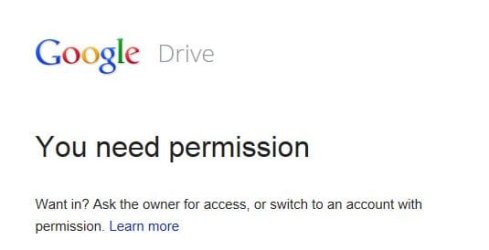
Sorry but I don't do this google folder view.
 

My Computer

Computer type
PC/Desktop
Computer Manufacturer/Model Number
Home made Desktop
OS
Windows 10 Pro. 64/ version 1709 Windows 7 Pro/64
CPU
Intel i7-6800K @ 4.3
Motherboard
ASUS X-99 Deluxe II
Memory
Corsair Platinum 16 gig @2400
Graphics Card(s)
EVGA GTX 1070 OC
Monitor(s) Displays
Asus 27" LED LCD/VE278Q
Screen Resolution
1920-1080 or 1280-720 HDMI
Hard Drives
INTEL SSD 730-240 Gb Sata 3.0/
PSU
EVGA Platium 1200W
Case
Phanteks Luxe Tempered Glass 8 fans/ one radiator
Cooling
XSPC/ Water Cooled CPU
Keyboard
Das 4 Professional
Mouse
Logitech M705/MX Anywhere 2-S
Internet Speed
100 mbits
Antivirus
Microsoft Security Essentials/ Malwarebytes Premium 3.0/ SAS
Browser
I.E. 11 default/Firefox/ ISP Time Warner Cable/Spectrum
Other Info
LG BluRay Burner/
Sound system-KLipsch-THX/
Icy Dock ssd Hot Swap bays.

My Computer

Computer type
PC/Desktop
Computer Manufacturer/Model Number
Self Built
OS
Win 10 Pro x64
CPU
Intel I5-2500K @3.3GHz
Motherboard
Asrock P67 Extreme4
Memory
16GB G.Skill Ripjaws X (4x4GB)
Graphics Card(s)
EVGA GeForce 750 Ti SC 2GB
Sound Card
ASUS Xonar DG 5.1 Channels 24-bit 96KHz PCI Interface Sound
Monitor(s) Displays
auria eq2367
Screen Resolution
1920 x 1080
Hard Drives
250GB Samsung 850 EVO SSD
1TB WD Blue
1TB Hitachi
PSU
SeaSonic X 650W 80 Plus Gold
Case
Corsair Obsidian 750D
Cooling
Corsair H60, Three 140mm case fans
Keyboard
Logitech Wireless Keyboard K520
Mouse
Logitech Wireless Mouse M310
Internet Speed
Wave Broadband ~ 100 dn 5 up
Antivirus
Windows Defender, Malwarebytes Premium
Browser
Edge, IE11, Chrome
Other Info
Laptop specs: HP g7-1365dx /
CPU: AMD A6-3420M APU with Radeon(tm) HD Graphics /
RAM: Crucial 8Gb (2x4Gb) /
SSD: Crucial M4-CT128M4SSD2 ATA Device/ FW 000F /
GFX: AMD Radeon HD 6520G /
OS: Windows 10 Pro x64
To Layback Bear and Derekimo -

Thanks for the nudging to get my protocol together.

I get it and I'm on it... THANKS!
 

My Computer

Computer type
PC/Desktop
Computer Manufacturer/Model Number
HP-Pavilion AW016AV-ABA s5280t
OS
Windows 7 Home Premium (x64) Service Pack 1 (build 7601)
CPU
2.50 gigahertz Intel Core2 Quad 64-bit ready Multi-core
Motherboard
PEGATRON CORPORATION Eureka3 1.02
Memory
8192 Megabytes Usable Installed Memory
Graphics Card(s)
NVIDIA GeForce GT 220 [Display adapter]
Hard Drives
ST3500418AS [Hard drive] (500.11 GB)
Antivirus
AVG Internet Security 2013
Browser
Google - Chrome Version 28.0.1500.95
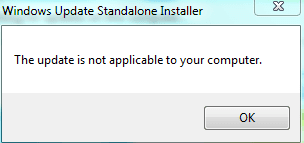
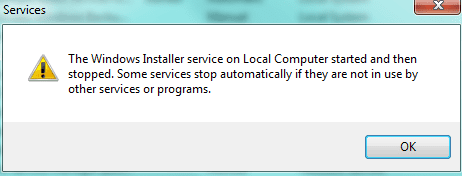
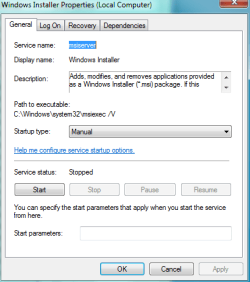
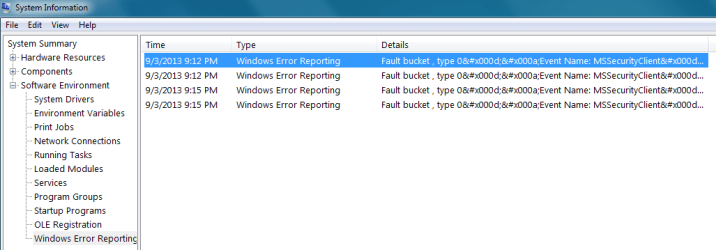
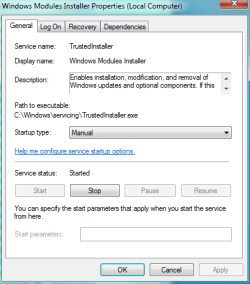
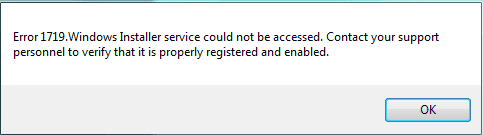
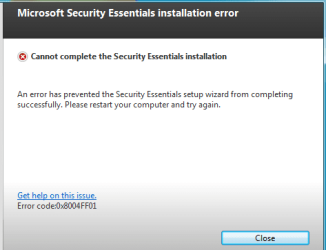
Windows Install Failure - Error Panels

Hi All -

Here's the Error Panels - THANKS MUCH for any suggestions - RKnowles

Error panel 1719.PNG

Error panel MSE.PNG

Error panel NotAccess.PNG

Error panel NotApplic.PNG

Error panel PropValueConflict.PNG

Error StartManual_Services.PNG

WindowsInstallerProperties.PNG

WinErrorReporting.PNG

WinInstallerPropertiesLogOn.PNG

WinInstallProperties.PNG
 

My Computer

Computer type
PC/Desktop
Computer Manufacturer/Model Number
HP-Pavilion AW016AV-ABA s5280t
OS
Windows 7 Home Premium (x64) Service Pack 1 (build 7601)
CPU
2.50 gigahertz Intel Core2 Quad 64-bit ready Multi-core
Motherboard
PEGATRON CORPORATION Eureka3 1.02
Memory
8192 Megabytes Usable Installed Memory
Graphics Card(s)
NVIDIA GeForce GT 220 [Display adapter]
Hard Drives
ST3500418AS [Hard drive] (500.11 GB)
Antivirus
AVG Internet Security 2013
Browser
Google - Chrome Version 28.0.1500.95
Hello Ryan, forgive me I am usually pretty busy during the week. Hopefully others will also jump in as my replies may be slow in coming. That said, lets try these commands

Start> In search box type cmd> Right click on cmd.exe in results above and choose Run as administrator> When the command prompt opens, type

%windir%\system32\msiexec.exe /unregister

Enter

%windir%\syswow64\msiexec.exe /unregister

Enter

%windir%\system32\msiexec.exe /regserver

Enter

%windir%\syswow64\msiexec.exe /regserver

Enter


Restart your PC and test again

If no help, try to re-register the MSI service

Windows key + R> In the run box type net start MSIServer> Enter

If no success, try the above again, but in Safe Mode

Also, is there any history that you haven't shared with us yet? No infections? Hardware failures? Most of the error seem to be related to the installer service, but the Performance Monitor issue points towards a deeper issue. Confirm again that the SFC found no errors?

A Guy
 

My Computer

Computer type
PC/Desktop
OS
Windows 10 Home x64
CPU
INTEL Core i5-750 Quad-Core 3.37GHz
Motherboard
ASUS P7P55D
Memory
HyperX Fury Black Series 8GB (2 x 4GB) 1866Mhz
Graphics Card(s)
EVGA GeForce GTX 750 Superclocked 1GB 128-Bit GDDR5
Monitor(s) Displays
LG 32MA68HY 32" IPS
Screen Resolution
1920 x 1080
Hard Drives
Samsung 840 Evo 120GB, SEAGATE 500GB Barracuda® 7200.12, SATA 3 Gb/s, 7200 RPM, 16MB cache
PSU
ANTEC TruePower New TP-550, 80 PLUS, 550W
Case
ANTEC Three Hundred Illusion
Cooling
COOLER MASTER Hyper 212 Plus, 4 x 120mm 1 x 140mm Noctua's
Internet Speed
85 + Mbps
Antivirus
Avast
Browser
Vivaldi

My Computer

Computer type
PC/Desktop
Computer Manufacturer/Model Number
Home made Desktop
OS
Windows 10 Pro. 64/ version 1709 Windows 7 Pro/64
CPU
Intel i7-6800K @ 4.3
Motherboard
ASUS X-99 Deluxe II
Memory
Corsair Platinum 16 gig @2400
Graphics Card(s)
EVGA GTX 1070 OC
Monitor(s) Displays
Asus 27" LED LCD/VE278Q
Screen Resolution
1920-1080 or 1280-720 HDMI
Hard Drives
INTEL SSD 730-240 Gb Sata 3.0/
PSU
EVGA Platium 1200W
Case
Phanteks Luxe Tempered Glass 8 fans/ one radiator
Cooling
XSPC/ Water Cooled CPU
Keyboard
Das 4 Professional
Mouse
Logitech M705/MX Anywhere 2-S
Internet Speed
100 mbits
Antivirus
Microsoft Security Essentials/ Malwarebytes Premium 3.0/ SAS
Browser
I.E. 11 default/Firefox/ ISP Time Warner Cable/Spectrum
Other Info
LG BluRay Burner/
Sound system-KLipsch-THX/
Icy Dock ssd Hot Swap bays.
Back
Top