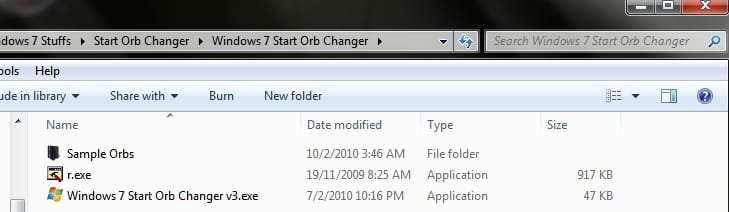
Application to change your start orb

Yes, that was unchecked, but it didn't restart explorer because it had changed the executable into a file.
Ok now i'm confused. The files needed to run the application, are they all in the same folder? If not, that's the problem.
 

Attachments

  • Untitled.jpg
    Untitled.jpg
    44.8 KB · Views: 20

My Computer

Computer Manufacturer/Model Number
D3f's Customs
OS
Win 7 Ultimate SP1 x64
CPU
Intel Pentium Dual Core E5300 OC'd @ 3GHz
Motherboard
Asus P5G41-M LE
Memory
Kingston 2x2GB DDR2-800 Dual Channel SDRAM
Graphics Card(s)
Integrated Intel GMA X4500
Sound Card
Realtek 5.1 HD Audio (ALC887)
Monitor(s) Displays
LG Flatron W1943S @ 60Hz
Screen Resolution
1360 x 768
Hard Drives
Internal - WD Caviar Blue 500GB, External - WD My Passport Essential 500GB
PSU
Headway 450w PSU
Case
Pixxo Slim Black mATX Case
Cooling
Stock Cpu Fan, 1 x Top Case Fan
Keyboard
Logitech K120
Mouse
Logitech LS1 Laser Mouse
Internet Speed
17.66Mb/s Down, 0.82Mb/s Up
Other Info
Creative SBS A300 2.1 Speaker System, LG GH22NS50 22x Internal Super-Multi DVD-RW, 2Wire 5012NV Wireless Modem Router
Yes, all in the same folder.

(Man, a power user helping a guru :thumbsup: :p)
 

My Computer

Computer type
PC/Desktop
Computer Manufacturer/Model Number
The Dominator?
OS
Windows Seven Ultimate
CPU
AMD Piledriver FX 8320 @ 3.5GHz
Motherboard
ASUS M5A97 EVO R2.0
Memory
Crucial Ballistix 8GB 1600 MHz DDR3
Graphics Card(s)
ASUS GeForce GTX 970 Strix Edition @ 1.114 GHz
Sound Card
Integrated
Monitor(s) Displays
LG 23EA63V 23" IPS 1080p Monitor
Screen Resolution
1920x1080
Hard Drives
Samsung SSD 840 EVO 120 GB
1x WD GreenPower 500GB 7200RPM
1 External HDD 1TB
PSU
Corsair CX500
Case
Zalman Z9 Plus
Cooling
CPU - Corsair Hydro H80i, Case - 3x Aerocool Shark Edition
Keyboard
Xenta Backlit Keyboard (Not very good!)
Mouse
Logitech G400
Internet Speed
Download: 7 mb/s Upload: 0.76 mb/s
Antivirus
Microsoft Security Essentials
Browser
Google Chrome
Other Info
Overclockers UK Desk Pad 89 x 45 cm
1200x730x600mm Desk
Using Virtual Audio Cable to split stereo sound into Audio Technica ATH-M50 headphones and Logitech X-530 speakers.

My Computer

Computer Manufacturer/Model Number
D3f's Customs
OS
Win 7 Ultimate SP1 x64
CPU
Intel Pentium Dual Core E5300 OC'd @ 3GHz
Motherboard
Asus P5G41-M LE
Memory
Kingston 2x2GB DDR2-800 Dual Channel SDRAM
Graphics Card(s)
Integrated Intel GMA X4500
Sound Card
Realtek 5.1 HD Audio (ALC887)
Monitor(s) Displays
LG Flatron W1943S @ 60Hz
Screen Resolution
1360 x 768
Hard Drives
Internal - WD Caviar Blue 500GB, External - WD My Passport Essential 500GB
PSU
Headway 450w PSU
Case
Pixxo Slim Black mATX Case
Cooling
Stock Cpu Fan, 1 x Top Case Fan
Keyboard
Logitech K120
Mouse
Logitech LS1 Laser Mouse
Internet Speed
17.66Mb/s Down, 0.82Mb/s Up
Other Info
Creative SBS A300 2.1 Speaker System, LG GH22NS50 22x Internal Super-Multi DVD-RW, 2Wire 5012NV Wireless Modem Router
Nope, just gonna stick with the old fashioned way.
BTW, the change orb button just brings up the browse for orb window up again ;)
 

My Computer

Computer type
PC/Desktop
Computer Manufacturer/Model Number
The Dominator?
OS
Windows Seven Ultimate
CPU
AMD Piledriver FX 8320 @ 3.5GHz
Motherboard
ASUS M5A97 EVO R2.0
Memory
Crucial Ballistix 8GB 1600 MHz DDR3
Graphics Card(s)
ASUS GeForce GTX 970 Strix Edition @ 1.114 GHz
Sound Card
Integrated
Monitor(s) Displays
LG 23EA63V 23" IPS 1080p Monitor
Screen Resolution
1920x1080
Hard Drives
Samsung SSD 840 EVO 120 GB
1x WD GreenPower 500GB 7200RPM
1 External HDD 1TB
PSU
Corsair CX500
Case
Zalman Z9 Plus
Cooling
CPU - Corsair Hydro H80i, Case - 3x Aerocool Shark Edition
Keyboard
Xenta Backlit Keyboard (Not very good!)
Mouse
Logitech G400
Internet Speed
Download: 7 mb/s Upload: 0.76 mb/s
Antivirus
Microsoft Security Essentials
Browser
Google Chrome
Other Info
Overclockers UK Desk Pad 89 x 45 cm
1200x730x600mm Desk
Using Virtual Audio Cable to split stereo sound into Audio Technica ATH-M50 headphones and Logitech X-530 speakers.
Nope, just gonna stick with the old fashioned way.
BTW, the change orb button just brings up the browse for orb window up again ;)
When you click the change orb button, it's supposed to launch a windows prompt for you to browse and select an orb from a folder. Once you've selected an orb, windows explorer will automatically restart and your new start orb will be applied. :geek:
 

My Computer

Computer Manufacturer/Model Number
D3f's Customs
OS
Win 7 Ultimate SP1 x64
CPU
Intel Pentium Dual Core E5300 OC'd @ 3GHz
Motherboard
Asus P5G41-M LE
Memory
Kingston 2x2GB DDR2-800 Dual Channel SDRAM
Graphics Card(s)
Integrated Intel GMA X4500
Sound Card
Realtek 5.1 HD Audio (ALC887)
Monitor(s) Displays
LG Flatron W1943S @ 60Hz
Screen Resolution
1360 x 768
Hard Drives
Internal - WD Caviar Blue 500GB, External - WD My Passport Essential 500GB
PSU
Headway 450w PSU
Case
Pixxo Slim Black mATX Case
Cooling
Stock Cpu Fan, 1 x Top Case Fan
Keyboard
Logitech K120
Mouse
Logitech LS1 Laser Mouse
Internet Speed
17.66Mb/s Down, 0.82Mb/s Up
Other Info
Creative SBS A300 2.1 Speaker System, LG GH22NS50 22x Internal Super-Multi DVD-RW, 2Wire 5012NV Wireless Modem Router
Nope, just gonna stick with the old fashioned way.
BTW, the change orb button just brings up the browse for orb window up again ;)
When you click the change orb button, it's supposed to launch a windows prompt for you to browse and select an orb from a folder. Once you've selected an orb, windows explorer will automatically restart and your new start orb will be applied. :geek:

Lol! Thanks for the clarification. :p
 

My Computer

Computer type
PC/Desktop
Computer Manufacturer/Model Number
The Dominator?
OS
Windows Seven Ultimate
CPU
AMD Piledriver FX 8320 @ 3.5GHz
Motherboard
ASUS M5A97 EVO R2.0
Memory
Crucial Ballistix 8GB 1600 MHz DDR3
Graphics Card(s)
ASUS GeForce GTX 970 Strix Edition @ 1.114 GHz
Sound Card
Integrated
Monitor(s) Displays
LG 23EA63V 23" IPS 1080p Monitor
Screen Resolution
1920x1080
Hard Drives
Samsung SSD 840 EVO 120 GB
1x WD GreenPower 500GB 7200RPM
1 External HDD 1TB
PSU
Corsair CX500
Case
Zalman Z9 Plus
Cooling
CPU - Corsair Hydro H80i, Case - 3x Aerocool Shark Edition
Keyboard
Xenta Backlit Keyboard (Not very good!)
Mouse
Logitech G400
Internet Speed
Download: 7 mb/s Upload: 0.76 mb/s
Antivirus
Microsoft Security Essentials
Browser
Google Chrome
Other Info
Overclockers UK Desk Pad 89 x 45 cm
1200x730x600mm Desk
Using Virtual Audio Cable to split stereo sound into Audio Technica ATH-M50 headphones and Logitech X-530 speakers.
Oh, and its working now!
How did I do that :confused:
Someone give D3ftOn3Z some rep, thanks for helping mate :thumbsup:
I need to spread around before giving some more to him :(
 

My Computer

Computer type
PC/Desktop
Computer Manufacturer/Model Number
The Dominator?
OS
Windows Seven Ultimate
CPU
AMD Piledriver FX 8320 @ 3.5GHz
Motherboard
ASUS M5A97 EVO R2.0
Memory
Crucial Ballistix 8GB 1600 MHz DDR3
Graphics Card(s)
ASUS GeForce GTX 970 Strix Edition @ 1.114 GHz
Sound Card
Integrated
Monitor(s) Displays
LG 23EA63V 23" IPS 1080p Monitor
Screen Resolution
1920x1080
Hard Drives
Samsung SSD 840 EVO 120 GB
1x WD GreenPower 500GB 7200RPM
1 External HDD 1TB
PSU
Corsair CX500
Case
Zalman Z9 Plus
Cooling
CPU - Corsair Hydro H80i, Case - 3x Aerocool Shark Edition
Keyboard
Xenta Backlit Keyboard (Not very good!)
Mouse
Logitech G400
Internet Speed
Download: 7 mb/s Upload: 0.76 mb/s
Antivirus
Microsoft Security Essentials
Browser
Google Chrome
Other Info
Overclockers UK Desk Pad 89 x 45 cm
1200x730x600mm Desk
Using Virtual Audio Cable to split stereo sound into Audio Technica ATH-M50 headphones and Logitech X-530 speakers.
Oh, and its working now!
How did I do that :confused:
Someone give D3ftOn3Z some rep, thanks for helping mate :thumbsup:
I need to spread around before giving some more to him :(
NP domii. Am glad to help you. ;)
 

My Computer

Computer Manufacturer/Model Number
D3f's Customs
OS
Win 7 Ultimate SP1 x64
CPU
Intel Pentium Dual Core E5300 OC'd @ 3GHz
Motherboard
Asus P5G41-M LE
Memory
Kingston 2x2GB DDR2-800 Dual Channel SDRAM
Graphics Card(s)
Integrated Intel GMA X4500
Sound Card
Realtek 5.1 HD Audio (ALC887)
Monitor(s) Displays
LG Flatron W1943S @ 60Hz
Screen Resolution
1360 x 768
Hard Drives
Internal - WD Caviar Blue 500GB, External - WD My Passport Essential 500GB
PSU
Headway 450w PSU
Case
Pixxo Slim Black mATX Case
Cooling
Stock Cpu Fan, 1 x Top Case Fan
Keyboard
Logitech K120
Mouse
Logitech LS1 Laser Mouse
Internet Speed
17.66Mb/s Down, 0.82Mb/s Up
Other Info
Creative SBS A300 2.1 Speaker System, LG GH22NS50 22x Internal Super-Multi DVD-RW, 2Wire 5012NV Wireless Modem Router
The problem is with admin rights (UAC). If you dont "run as admin" then the program isnt allowed to take ownership of the files therefore its doesnt have the rights to rename, delete, or change anything.


Right click on the .exe and click on security and then click run as administrator. Save the changes and try again.

Hope it helps.
 

My Computer

OS
Windows 7 Ultimate x86
CPU
amd64
  • Like
Reactions: Dom
I tried 'Run as admin' before, and that way it deleted explorer so i had to manually change the file extension back from the explorer.old to get it back. But when tried it again it just worked!
Thanks for your time guys :)
 

My Computer

Computer type
PC/Desktop
Computer Manufacturer/Model Number
The Dominator?
OS
Windows Seven Ultimate
CPU
AMD Piledriver FX 8320 @ 3.5GHz
Motherboard
ASUS M5A97 EVO R2.0
Memory
Crucial Ballistix 8GB 1600 MHz DDR3
Graphics Card(s)
ASUS GeForce GTX 970 Strix Edition @ 1.114 GHz
Sound Card
Integrated
Monitor(s) Displays
LG 23EA63V 23" IPS 1080p Monitor
Screen Resolution
1920x1080
Hard Drives
Samsung SSD 840 EVO 120 GB
1x WD GreenPower 500GB 7200RPM
1 External HDD 1TB
PSU
Corsair CX500
Case
Zalman Z9 Plus
Cooling
CPU - Corsair Hydro H80i, Case - 3x Aerocool Shark Edition
Keyboard
Xenta Backlit Keyboard (Not very good!)
Mouse
Logitech G400
Internet Speed
Download: 7 mb/s Upload: 0.76 mb/s
Antivirus
Microsoft Security Essentials
Browser
Google Chrome
Other Info
Overclockers UK Desk Pad 89 x 45 cm
1200x730x600mm Desk
Using Virtual Audio Cable to split stereo sound into Audio Technica ATH-M50 headphones and Logitech X-530 speakers.
I get an error when trying to import some orbs:

View attachment 52358

This just doesn't work! I get that error, i press continue , but the browse window just stays up, and the 'close explorer' button just stays greyed out :confused:
Any help guys?
I was having this error aswell so incase anyone else has it you need to goto Windows 7 Start Orb Changer's properties and unblock the program and run as admin. also there should only be 3 things in the folder, the sample orb's folder. r. and the orb changer program. i did the above and it worked for me
 

My Computer

Computer Manufacturer/Model Number
Self Build
OS
Windows 7 X64
CPU
Intel E6750 @ 3.2GHz
Motherboard
Foxconn ELA 01
Memory
6GiB
Graphics Card(s)
EVGA 9800GTX/9800GTX+
Sound Card
Onboard
Monitor(s) Displays
22 Inch AOC
Hard Drives
500GiB 7200rpm
PSU
1050W
Cooling
Corsair H50 Hydro Cooler
If I change the ORB to something another, how can I get the original one back ?
 

My Computer

Computer type
PC/Desktop
Computer Manufacturer/Model Number
Self Assembled
OS
Microsoft Windows 10 Pro Insider Preview 64-bit
CPU
Intel(R) Core(TM) i3-4130 CPU @ 3.40GHz
Motherboard
Gigabyte Technology Co., Ltd. B85M-D3H
Memory
Corsair Vengence 4GB x2 (8.00GB Dual-Channel DDR3 @ 798MHz)
Graphics Card(s)
2047MB GeForce GTS 450 (ZOTAC International)
Sound Card
Onboard (Realtek High Definition Audio)
Monitor(s) Displays
LG Flatron E2040T
Screen Resolution
1600x900
Hard Drives
Western Digital 1 TB
Seagate 500 GB
PSU
Corsair VS550
Case
Cooler Master K380
Cooling
Cooler Master Seidon 120V Plus
Keyboard
Logitech MK260r
Mouse
Logitech MK260r
Internet Speed
PMPL Broadband
Antivirus
Windows Defender + MBAM
Browser
Firefox
Other Info
Dell Studio 15" Laptop
If you made a backup (there is an option in the program) you can navigate to C:\Windows\ and underneath all the folders you should find an application with the explorer icon named "explorer_backup". Just rename this to "explorer.exe". Close the explorer.exe process in task manager, and start a new task named "explorer.exe". That will bring up the original explorer settings.
 

My Computer

Computer type
PC/Desktop
Computer Manufacturer/Model Number
The Dominator?
OS
Windows Seven Ultimate
CPU
AMD Piledriver FX 8320 @ 3.5GHz
Motherboard
ASUS M5A97 EVO R2.0
Memory
Crucial Ballistix 8GB 1600 MHz DDR3
Graphics Card(s)
ASUS GeForce GTX 970 Strix Edition @ 1.114 GHz
Sound Card
Integrated
Monitor(s) Displays
LG 23EA63V 23" IPS 1080p Monitor
Screen Resolution
1920x1080
Hard Drives
Samsung SSD 840 EVO 120 GB
1x WD GreenPower 500GB 7200RPM
1 External HDD 1TB
PSU
Corsair CX500
Case
Zalman Z9 Plus
Cooling
CPU - Corsair Hydro H80i, Case - 3x Aerocool Shark Edition
Keyboard
Xenta Backlit Keyboard (Not very good!)
Mouse
Logitech G400
Internet Speed
Download: 7 mb/s Upload: 0.76 mb/s
Antivirus
Microsoft Security Essentials
Browser
Google Chrome
Other Info
Overclockers UK Desk Pad 89 x 45 cm
1200x730x600mm Desk
Using Virtual Audio Cable to split stereo sound into Audio Technica ATH-M50 headphones and Logitech X-530 speakers.
If I change the ORB to something another, how can I get the original one back ?
Just in case you didn't make a backup of the original start orb. Here it is. ;)
 

Attachments

My Computer

Computer Manufacturer/Model Number
D3f's Customs
OS
Win 7 Ultimate SP1 x64
CPU
Intel Pentium Dual Core E5300 OC'd @ 3GHz
Motherboard
Asus P5G41-M LE
Memory
Kingston 2x2GB DDR2-800 Dual Channel SDRAM
Graphics Card(s)
Integrated Intel GMA X4500
Sound Card
Realtek 5.1 HD Audio (ALC887)
Monitor(s) Displays
LG Flatron W1943S @ 60Hz
Screen Resolution
1360 x 768
Hard Drives
Internal - WD Caviar Blue 500GB, External - WD My Passport Essential 500GB
PSU
Headway 450w PSU
Case
Pixxo Slim Black mATX Case
Cooling
Stock Cpu Fan, 1 x Top Case Fan
Keyboard
Logitech K120
Mouse
Logitech LS1 Laser Mouse
Internet Speed
17.66Mb/s Down, 0.82Mb/s Up
Other Info
Creative SBS A300 2.1 Speaker System, LG GH22NS50 22x Internal Super-Multi DVD-RW, 2Wire 5012NV Wireless Modem Router
You, guys, with all your cool little things, would finally make me abandon my so-loved Windowblinds!!!
Well, i get this so, for the day i'll change my mind...
Maybe i should start another user account, just for fun, and then decide the best way for me...
Anyway, Thx SG9 & Mr Grim for this and all the rest!!!
Greetings to you all...
 

My Computer

Computer Manufacturer/Model Number
Home Made 00x
OS
7Home64
CPU
AMD Phenom II x4 965 - 3,4GHz
Motherboard
Gigabyte GA-880GMA-UD2H
Memory
DDR3 1333Mhz, 8Gb (Corsair xms3 : 9, 9, 9, 24)
Graphics Card(s)
GeForce GTX550Ti 1024mb GDDR5 (Gainward)
Sound Card
Creative X-Fi ExtremeGamer
Monitor(s) Displays
Acer 27", led, full hd
Screen Resolution
1920x1080
Hard Drives
G-Skill SSD 80Gb + Kingston SSD 64Gb + WD sata 500Mb + Hitachi sata 1Tb
PSU
CombatPower 750W, 12cm fan
Case
Antec "Three Hundred", 12 + 14 cm fans
Cooling
Noctua NH-U12P (CPU) + 2xNF-B9 (HDD's) + NF-P12 (case side)
Keyboard
Logitech + Saitek "Cyborg Command Unit"
Mouse
Logitech LS1 laser
Internet Speed
4Mb/s
Other Info
6-fan-&-temp controller Scythe Kase Master Pro 5.25
I have this working on 64 bit but it will not work on my 32 bit desktop I tried both old & new program I have tried running as administrator It's shows the change in the preview window & it restarts explorer I think the screen blinks & the taskbar go's away & comes back. Any ideas
 

My Computer

Computer type
Laptop
Computer Manufacturer/Model Number
Sager NP9170
OS
Win 7 Pro x64 / Win 10 Pro
CPU
Intel(R) Core(TM) i7-3630QM CPU @ 2.40GHz
Motherboard
CLEVO P170EM
Memory
12 GB
Graphics Card(s)
(1) Intel(R) HD Graphics 4000 (2) NVIDIA GeForce GTX 675M
Sound Card
(1) Realtek High Definition Audio (2) Intel(R) Display Aud
Monitor(s) Displays
17.3
Screen Resolution
1920x1080
Hard Drives
(1) Samsung 860 EVO 500GB(OS) (1) Samsung 860 EVO 500GB(Data)
Keyboard
Backlite
Antivirus
MSE, Malwarebytes Pro
Browser
Firefox
Other Info
DESKTOP: Custom-built.
OS: Win 10 Pro x64.
CASE: Rosewill R5.
CPU: Intel I5 4670K CPU @ 3.40GHz.
CPU COOLER: Cool Master Hyper 212 EVO.
MOTHERBOARD: Asus Z87-A.
MEMORY: Kingston HyperX 2x4 GB.
GPU: Nvidia Geforce 650 TI.
PSU: Corsair TX750.
DRIVES: (1) Samsung 840 120 GB SSD (2) Western Digital blue 500 GB 7200 RPM.
I have this working on 64 bit but it will not work on my 32 bit desktop I tried both old & new program I have tried running as administrator It's shows the change in the preview window & it restarts explorer I think the screen blinks & the taskbar go's away & comes back. Any ideas

Check the permissions for the Explorer.exe and also the attributes
anyway, how is the peace start orb i made for you ?
 

My Computer

Computer type
Laptop
Computer Manufacturer/Model Number
HP EliteBook 8530w Mobile Workstation
OS
Windows 7 Ultimate x64 (XP, 98SE, 95, 3.11, DOS 7.10 on VM) + Ubuntu 10.04 LTS Lucid Lynx
CPU
Intel Core 2 Duo Processor P8600 (2.40 GHz, 3 MB L2 cache)
Motherboard
Mobile Intel PM45 Express Chipset ICH9M-Enhanced
Memory
4GB 800 MHz DDR2 SDRAM
Graphics Card(s)
ATI Mobility FireGL V5700 with 256 MB
Sound Card
SoundMAX Integrated Digital HD Audio
Monitor(s) Displays
15.4-inch WXGA anti-glare (1280 x 800 resolution)
Screen Resolution
1280 x 800
Hard Drives
500GB + 1TB
Mouse
Synaptics PS/2 Port Touchpad, USB Mouse
Internet Speed
4 Mbps
Antivirus
MSE
Browser
Firefox, Chrome, IE
Other Info
Authentec AES2810 Fingerprint Reader
I have this working on 64 bit but it will not work on my 32 bit desktop I tried both old & new program I have tried running as administrator It's shows the change in the preview window & it restarts explorer I think the screen blinks & the taskbar go's away & comes back. Any ideas

Check the permissions for the Explorer.exe and also the attributes
anyway, how is the peace start orb i made for you ?
Thanks for the orb now I am using StartOrbz by ~Blizo on deviantART so I made a new one.
 

My Computer

Computer type
Laptop
Computer Manufacturer/Model Number
Sager NP9170
OS
Win 7 Pro x64 / Win 10 Pro
CPU
Intel(R) Core(TM) i7-3630QM CPU @ 2.40GHz
Motherboard
CLEVO P170EM
Memory
12 GB
Graphics Card(s)
(1) Intel(R) HD Graphics 4000 (2) NVIDIA GeForce GTX 675M
Sound Card
(1) Realtek High Definition Audio (2) Intel(R) Display Aud
Monitor(s) Displays
17.3
Screen Resolution
1920x1080
Hard Drives
(1) Samsung 860 EVO 500GB(OS) (1) Samsung 860 EVO 500GB(Data)
Keyboard
Backlite
Antivirus
MSE, Malwarebytes Pro
Browser
Firefox
Other Info
DESKTOP: Custom-built.
OS: Win 10 Pro x64.
CASE: Rosewill R5.
CPU: Intel I5 4670K CPU @ 3.40GHz.
CPU COOLER: Cool Master Hyper 212 EVO.
MOTHERBOARD: Asus Z87-A.
MEMORY: Kingston HyperX 2x4 GB.
GPU: Nvidia Geforce 650 TI.
PSU: Corsair TX750.
DRIVES: (1) Samsung 840 120 GB SSD (2) Western Digital blue 500 GB 7200 RPM.
curious if this replaces the start orb how is it that mine reverted to the default randomly?
also i thought of a cool orb a planet that starts to explode when you drag the mouse over it and explodes when you click it. just a ramble from me
 

My Computer

Computer Manufacturer/Model Number
Self Build
OS
Windows 7 X64
CPU
Intel E6750 @ 3.2GHz
Motherboard
Foxconn ELA 01
Memory
6GiB
Graphics Card(s)
EVGA 9800GTX/9800GTX+
Sound Card
Onboard
Monitor(s) Displays
22 Inch AOC
Hard Drives
500GiB 7200rpm
PSU
1050W
Cooling
Corsair H50 Hydro Cooler
Back
Top