Are background processes causing my application to lock?

j9lemmon

New member
Local time
9:23 PM
Messages
9
I am running Adobe Flash Professional CC on a Toshiba AMD laptop running Win 7 Home Premium 64-bit.

None of the dialog windows in Flash CC function properly; the window opens but the buttons don't work. Some dialog windows cause the application to lock and I have to close it via Task Manager.
I wonder if another process is conflicting with Flash Pro CC.

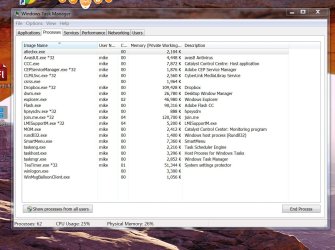
I've attached a screenshot of all the processes that are running. I've checked each process on the excellent site:
Windows startup programs - Database search and I don't see an obvious culprit.

Does anyone see a process that I should get rid of? Or do you have any other suggestions?
The computer has recently been scanned by CC Cleaner, MalwareBytes, Avast Free Anti-virus and SpyBot.
 

Attachments

  • Capture3_FlashCCopen.jpg
    Capture3_FlashCCopen.jpg
    183.9 KB · Views: 0

My Computer

Computer type
Laptop
Computer Manufacturer/Model Number
Toshiba
OS
Windows 7 Home Premium 64 bit
CPU
AMD
Your screen print shows you have 62 processes running but there are not 62 processes in the list.
You need to click Show processes from all users to see all the processes running.
 

My Computer

Computer type
PC/Desktop
Computer Manufacturer/Model Number
home built
OS
Multi-Boot W7_Pro_x64 W8.1_Pro_x64 W10_Pro_x64 +Linux_VMs +Chromium_VM
CPU
AMD Athlon II x4 620
Motherboard
Gigabyte GA-MA785G-UD3H
Memory
6GB GSkill DDR2 800
Graphics Card(s)
AMD 4670 GPU + AMD 4200 IGP
Sound Card
on board Realtek ALC889A
Monitor(s) Displays
RCA 40" LCD TV, Insignia 32" LCD TV, HP 15" LCD monitor
Screen Resolution
1680 x 1050
Hard Drives
OCZ Vertex 3 120GB,
Samsung F3 1TB (3),
Several others - WD, Seagate, Hitachi, ...
PSU
Corsair 500 W
Case
Rosewill mid tower
Cooling
CM 90mm rifle
Keyboard
Gyration wireless, Logitech wireless, Dell USB wired
Mouse
Gyration wireless, Logitech wireless, V7 USB wired
Internet Speed
Spectrum - 100Mbps D / 10Mbps U
Antivirus
Avast, MBAM3, EMET, WinPatrol
Browser
Pale Moon, Firefox, IE
Other Info
2 multi-boot PC's
Mainly HTPC/Office/Gen purpose (no gaming).
Trendnet USB KVM.
LG DVD burner/Blue Ray Player.
Tray system for removable SATA backup drives.

Not currently OCd, under-volted.
I use Hybrid sleep, rarely re-boot or shutdown.

Hauppauge HD-PVR, Avermedia PCIe TV Tuner, Hauppauge PCI TV Tuner.
Thanks for that advice, DavidW7ncus.
As far as I know, there is only one user on the computer, so I didn't click that button.
I'll do it.
 

My Computer

Computer type
Laptop
Computer Manufacturer/Model Number
Toshiba
OS
Windows 7 Home Premium 64 bit
CPU
AMD
It shows how to troubleshoot processes in Troubleshooting Steps for Windows 7
as well as go over your install closely to find problems.

We have gradually stopped co-recommending Avast here as problems with its bloating have mounted. I would uninstall it and use Microsoft Security Essentials which will at least tell you if it is involved.

Similarly no one has advised Spybot since before the Win7 era when it similarly bloated up and became permanently buggy. We now use SUPERAntiSpyware - Downloads and AdwCleaner. I prefer the former.

Are you running the Toshiba factory preinstalled Win7 which is similarly bloated with duplicate utilties that conflict with better versions built into Win7? To begin enjoying Win7 native performance for the first time you may want to consider what most tech enthusiasts do and Clean Reinstall - Factory OEM Windows 7. At the minimum I'd Clean Up Factory Bloatware.
 
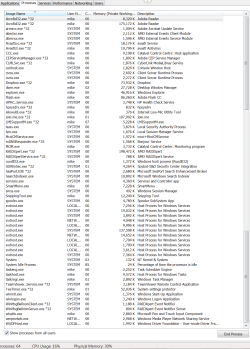
I've attached a new screenshot of Task Manager - Processes, this time showing All Users.
The computer involved is my business partner's. His system HP Win 7 Home Premium. Detailed specs below.

As described in my original post, Flash Professional CC is not functioning properly, and this is the top priority. Adobe has suggested we delete the Flash CC Configuration folder to fix that.

Also the machine is slower in general than it should be.

I suspect some of the slowness issue is due partly to Processes and partly to HP bloatware. Gregrocker. I appreciate your advice about bloatware on my Toshiba laptop, and any similar advice about this HP is appreciated.

Thanks

Here are the HP specs:

HP Pavilion Elite Desktop / AMD Phenom™ II Processor / 8GB Memory / 1TB Hard Drive
HP USB keyboard, HP optical mouse
Software: HP MediaSmart Suite; Microsoft Works 9.0 and more

Product Features
VISION Ultimate Technology by AMD
For cutting-edge, high-definition performance while creating and editing HD videos, manipulating detailed photos, playing graphics-rich games, editing and mixing music, recording live TV or creating podcasts.
AMD Phenom™ II quad-core processor 945*
True multicore processing for extreme multitasking performance. Cool'n'Quiet™ 3.0 and CoolCore™ technologies and Dual Dynamic Power Management™ for efficient energy usage.
Direct Connect Architecture
Delivers overall system performance. HyperTransport™ technology, AMD Balanced Smart Cache and AMD Wide Floating Point Accelerator for quick access times and improved performance.
AMD Memory Optimizer Technology
For multithreaded software performance, and AMD Virtualization with Rapid Virtualization Indexing to help virtualization software run securely and efficiently.
8GB PC3-8500 DDR3 SDRAM
For multitasking power, expandable to 16GB.
Blu-ray Disc-enabled DVD±RW/CD-RW drive
Features read support for next-generation Blu-ray Disc (BD-ROM). Double-layer support using compatible media. Supports LightScribe direct-disc labels using compatible media.
2MB L2 + 6MB shared L3 cache memory
For efficient system processing.
1TB Serial ATA hard drive
Offers plenty of storage capacity.
ATI Radeon HD 5450 Series graphics
For lush images with stunning detail. HDMI output for connection to and HDTV. High-definition audio with up to 7.1 surround sound capability.
15-in-1 media reader
Supports CompactFlash Type I/II, SmartMedia, Memory Stick, Memory Stick PRO, Memory Stick Duo, Memory Stick PRO Duo, Secure Digital and miniSD.
Also supports MultiMediaCard, MultiMediaCard Plus MultiMediaCard mobile, Reduced-Size MultiMediaCard and xD-Picture Card.
IEEE 1394 (FireWire) interface and 7 USB 2.0 ports
For fast digital data transfer and easy peripheral connectivity.
Built-in high-speed wireless LAN (802.11b/g/n)
Connect to the Internet without wires.
Built-in 10/100/1000Base-T Ethernet networking interface
For flexible wired Web connectivity options.
Microsoft Windows 7 Home Premium Edition 64-bit operating system preinstalled
Provides a stable computing platform.
Software package included
With HP MediaSmart Suite, Microsoft Works 9.0 and more. 60-day trial version of Microsoft Office also included.

 

Attachments

  • TaskMgrProcesses_Capture-allUsers_4&5.png
    TaskMgrProcesses_Capture-allUsers_4&5.png
    68.6 KB · Views: 0

My Computer

Computer type
Laptop
Computer Manufacturer/Model Number
Toshiba
OS
Windows 7 Home Premium 64 bit
CPU
AMD
Why do you need that flash program? Have you uninstalled it to see if the problem abates?

If not have you at the least established a clean boot and other steps in Clean Up Factory Bloatware
to try to get a handle on the HP factory bloatware. HP's have the worst load of bloatware in the industry, making their preinstalled Win7 the worst possible install one can have. There's little point in troubleshooting something that crippled. I'd just do the Clean Reinstall - Factory OEM Windows 7 and have the best install anyone can possibly have. Not a hard choice.
 
Thanks for your answer gregrocker.

The clean reinstall using HP's built in recovery partition looks like the best route for me.
"On newer models HP Recovery may offer a Minimized OS Recovery option when booting from F11, which retains only the OS, Recovery Manager, HP Support Asst, and HP Wireless LAN. This is as close to a clean reinstall as you can get without doing one yourself."

Our HP computer was purchased in July 2010. Is there a way I can look at the HP factory image from inside Windows Explorer to determine if it is one of those 'newer models HP Recovery may offer a Minimized OS Recovery option'?
Thanks.
 

My Computer

Computer type
Laptop
Computer Manufacturer/Model Number
Toshiba
OS
Windows 7 Home Premium 64 bit
CPU
AMD
Just reboot into HP System Recovery to check if its offered on the Recovery menu. If so you can cancel out of it and prepare for it, but I'd back up my files first just in case you get an itchy trigger finger.

The preparatory steps in Clean Reinstall - Factory OEM Windows 7 may be of help to get ready, help you remember everything.

After reinstall I would uninstall any HP software in Control Panel>Programs and Features including the HP Connection manager to reconnect via the icon in System Tray to avoid the buggy HP intermediary and enjoy Win7's superior connection and utilities. HP has nothing to offer of value except maybe a Power Manager's battery tender to extend battery life only.
 
Thanks I visited the HP System Recovery link you sent and it says this about Minimized Image Recovery:
"Available on many of HP's notebook computers, the Minimized Image Recovery removes all partitions, reformats the entire hard drive, reinstalls the original operating system and hardware drivers, and reinstalls HP essential software (such as HP Support Assistant and HP Recovery Manager). Minimized Image Recovery does not reinstall the trial applications and games."

Our computer is a desktop, so we don't have that option.

These other 2 options sound like they re-install all the original HP bloatware:
System Recovery: This option reformats the system drive (usually C), reinstalls the original operating system, and reinstalls all the original hardware drivers and software. System Recovery does not impact user created partitions. If there are two hard drives, System Recovery modifies only the drive with the operating system.

Factory Reset: Factory Reset removes all partitions, reformats the entire hard drive, reinstalls the original operating system, and reinstalls all the original hardware drivers and software. This option also recreates the required Recovery partition (usually D) and UEFI partition (usually E) and reinstalls the required software.
The Factory Reset option returns all of the notebook's software to the condition it was in at the time of purchase. All user changes or additions are removed.
 

My Computer

Computer type
Laptop
Computer Manufacturer/Model Number
Toshiba
OS
Windows 7 Home Premium 64 bit
CPU
AMD
I'm considering another option.

Since this HP computer is old for the Flash animation work we do, I may buy a new Windows 7 computer from CyberPower. We have a colleague who does animation using a CyberPower Win 7 machine. If it works for him it will work for us.
I don't think CyberPower adds bloatware.

Any thoughts or alternative suggestions?
 

My Computer

Computer type
Laptop
Computer Manufacturer/Model Number
Toshiba
OS
Windows 7 Home Premium 64 bit
CPU
AMD
You could try a Clean Reinstall - Factory OEM Windows 7 to see if it works before buying a new one. It's a shame you've never been able to experience native Win7 on that PC yet.

At least shut off everything at boot except your AV, and use the lightweight free MSE to see if that helps.
 
Process List

I don't know what's causing lockups but I see the following in your process list: mom.exe and ccc.exe

You don't really need ATI Catalyst Control Centre and if you remove it along with the Radeon Graphics Card drivers then reinstall just the drivers - you won't see those processes.

On the other hand if you wish to leave Catalyst Control Centre installed you could read this:

What's the problem and why it happens: Guru3D.com Forums - View Single Post - ccc.exe memory increases every opening ( all Users ) fixed from kevsamiga1974

The fix: Guru3D.com Forums - View Single Post - ccc.exe memory increases every opening ( all Users ) fixed from kevsamiga1974

If you want to remove Catalyst Control Centre post a reply and someone will help!
 

My Computer

Computer type
Laptop
Computer Manufacturer/Model Number
ASUS
OS
Microsoft Windows 7 Home Premium 64-bit 7601 Multiprocessor Free Service Pack 1
CPU
AMD C-60 APU with Radeon(tm) HD Graphics
Motherboard
ASUSTeK COMPUTER INC. X501U
Memory
4.00 GB
Graphics Card(s)
AMD Radeon HD 6290 Graphics
Sound Card
(1) AMD High Definition Audio Device (2) Realtek High Defi
Screen Resolution
1366 x 768 x 32 bits (4294967296 colors) @ 60 Hz
Hard Drives
Hitachi HTS545050A7E380 SATA Disk Device
Antivirus
Comodo CIS & FW, SecureAplus App Whitelisting, Threatfire
Browser
Cyberfox 64bit, Opera 64bit, Airfox
Other Info
Spy-The-Spy, HitmanPro.Alert, Norton Connect Safe, MJRegWatcher, BitDefender TrafficLight, Voodoo Shield, Zemana AntiMalware
You can uninstall CCC in Control Panel as suggested. But turning it off in Startups as I advised by establishing a Clean Boot will keep it from starting on Win7's back. Follow step 7 in Troubleshooting Steps for Windows 7.

If you uninstall it and it takes the display driver with it, then first enable Automatically deliver drivers via Windows Update (Step 3) to Check for Updates, install all Important and Optional Drivers which may include the display driver Win7 wants. If not import it from the Support Downlaods webpage for your model.
 
Back
Top