Are firewalls really needed?

antares

New member
Member
VIP
Local time
9:57 AM
Messages
207
I was going crazy about Shields Up reporting that two ports were open until I found that Skype was the culprit as this happened only when Skype was running, otherwise all my ports were stealth. I found out that having an open port is not really a security concern as I read here:
Skype makes port 80 & 443 wide open to the public?! - Skype Community

In that same thread a member says:
"If your using NAT then your box is fine anyway, unless you have DMZ or port forwarding turned on.

When someone is trying to find out what your box is running they'll use a port scanner like nmap or something, they'll see what ports are open (like port 80 say) and then what O/S your running (they'll get this from the TCP fingerprint) and know what exploits are available for the O/S or more accurately the services running on the machine i.e. Apache on *nix variants IIS on Windows.

Anyways a firewall is a total waste of time for people that know whats running on their box, Firewalls are there for people who don't know how to admin their box properly i.e. Close off all your services and open the ones your only need and know that are secure.

My box only has 5190 (apache) and ssh running on a different port (latest patches. A firewall is useless for me anyway because i don't have anything running on any other ports.

Besides even if your are on a firewall anyone could still knock you offline with enough bandwidth (like zombie machines running trojans) or if they were on a 100meg atm link or something."

Do you agree with that statement?
 

My Computer My Computer

At a glance

Windows XP Professional SP3/Windows 7 Ultimat...Intel Pentium 4 3.06GHz Northwood/Intel Core ...2 Gb RDRAM Dual Channel/GSkill 32GB DDR3 1866ATI ALL-IN-WONDER X800 XT AGP/MSI GTX 660 Ti PE
Computer type
PC/Desktop
Computer Manufacturer/Model Number
Dell Dimension 8200/Personal Build
OS
Windows XP Professional SP3/Windows 7 Ultimate x64
CPU
Intel Pentium 4 3.06GHz Northwood/Intel Core i7 3770K
Motherboard
North Bridge:Intel Tehama i850(E)/Asus P8Z77-V Deluxe
Memory
2 Gb RDRAM Dual Channel/GSkill 32GB DDR3 1866
Graphics Card(s)
ATI ALL-IN-WONDER X800 XT AGP/MSI GTX 660 Ti PE
Sound Card
Voyetra Turtle Beach Santa Cruz PCI/Onboard Realtek HD
Monitor(s) Displays
Viewsonic VP230mb ViewPanel
Screen Resolution
1600x1200 32bit
Hard Drives
Western Digital 500Gb IDE drive (main drive) (XP PC)/Samsung 512GB 840 Pro Series SSD main+Western Digital Caviar Black 2 TB SATA III 7200 RPM 64 MB Cache as 2nd internal (Win 7 PC)
PSU
Dell OEM/Thermaltake Toughpower Grand 850W TPG-850M
Case
Dell OEM/Corsair Obsidian 650DW-1 Midtower
Cooling
Dell OEM/Noctua NH-D14
Keyboard
Dell Multimedia keyboard
Mouse
Logitech Cordless MouseMan® Optical M-RM63
NO....
 

My Computer My Computer

At a glance

W7-Enterprise + WS-2008 (Converted to Worksta...P4 2,4GHz (at 1,8GHz, "slow" RDRAM, only 400M...2GBNVIDIA QUADRO2 PRO 64MB
Computer Manufacturer/Model Number
Dell
OS
W7-Enterprise + WS-2008 (Converted to Workstation)
CPU
P4 2,4GHz (at 1,8GHz, "slow" RDRAM, only 400MHz FSB...)
Motherboard
Intel 850E
Memory
2GB
Graphics Card(s)
NVIDIA QUADRO2 PRO 64MB
Sound Card
Yes
Monitor(s) Displays
Dell 1702FP
Screen Resolution
1280x1024
Hard Drives
Yes
PSU
Yes
Case
Yes
Cooling
Yes
Keyboard
Yes
Mouse
Yes, and i also have Cats...
Internet Speed
University: 100 MBit/s, Home: UMTS 7,2 MBit/s
Other Info
W7 on a DINOSAUR: P2 with 266MHz CPU & 160MB RAM
Software firewalls are designed to protect "you" from "yourself". With a NAT hardware firewall, you only protect the bad guys from coming in. However, they don't do jack to stop you from going to a malicious website and clicking on something and accepting the payload. This is where the software firewalls come into play.
 

My Computer My Computer

At a glance

Windows 7 Ultimate x64Intel Q9550 2.83Ghz OC'd to 3.40Ghz8GB G.Skill PI DDR2-800, 4-4-4-12 timingsEVGA 1280MB Nvidia GeForce GTX570
Computer Manufacturer/Model Number
Self-Built in July 2009
OS
Windows 7 Ultimate x64
CPU
Intel Q9550 2.83Ghz OC'd to 3.40Ghz
Motherboard
Gigabyte GA-EP45-UD3R rev. 1.1, F12 BIOS
Memory
8GB G.Skill PI DDR2-800, 4-4-4-12 timings
Graphics Card(s)
EVGA 1280MB Nvidia GeForce GTX570
Sound Card
Realtek ALC899A 8 channel onboard audio
Monitor(s) Displays
23" Acer x233H
Screen Resolution
1920x1080
Hard Drives
Intel X25-M 80GB Gen 2 SSD
Western Digital 1TB Caviar Black, 32MB cache. WD1001FALS
PSU
Corsair 620HX modular
Case
Antec P182
Cooling
stock
Keyboard
ABS M1 Mechanical
Mouse
Logitech G9 Laser Mouse
Internet Speed
15/2 cable modem
Other Info
Windows and Linux enthusiast. Logitech G35 Headset.
I agree with pparks1 and hackerman1. I will add that a software firewall is one more layer of protection for your system.
 

My Computer My Computer

At a glance

Windows 7 Ultimate 32 bitIntel(R) Pentium(R) 4 CPU 3.00GHz2.50 GB RAMNVIDIA GeForce 7600 GS
Computer Manufacturer/Model Number
Home built
OS
Windows 7 Ultimate 32 bit
CPU
Intel(R) Pentium(R) 4 CPU 3.00GHz
Motherboard
ASUS P4P800-VM Motherboard Chipset: Intel 865G + ICH5
Memory
2.50 GB RAM
Graphics Card(s)
NVIDIA GeForce 7600 GS
Sound Card
SoundMax Integrated Digital Audio (Chip)
Monitor(s) Displays
ViewSonic VX 1962 wm
Screen Resolution
1680 X 1050
Hard Drives
Seagate Barracuda 7200.10 80 GB
ST380215A ATA Device 18.6 GB
Western Digital "My Book" external hard drive 750 GB
Cooling
Fan based
Keyboard
Microsoft Comfort Curve Keyboard 2000 v10 USB
Mouse
Logitec optic USB
Internet Speed
3.01 Mb/s download 0.64 Mb/s upload
"Anyways a firewall is a total waste of time for people that know whats running on their box, Firewalls are there for people who don't know how to admin their box properly."

I have several Win 7 System programs like System32\rundll32.exe that attempt to make TCP contact several times each day with a variety of IP addresses owned by Microsoft and others like wmplayer.exe that call Redmond several times to various IP's every time they are used.

I also have at least 10 installed programs that continue to phone home whenever they are used and nearly every program I have installed tries to phone home via TCP during the installation. I know these things because my software firewall is set to alert me to any communications that I have not previously authorized so that I may block their TCP communication attempts.

My question is how can I accomplish this same level of flawlessly tight control over potential unwanted outbound TCP traffic and UDP traffic as well on all these different levels without a software firewall?

~Maxx~
.
da59fa57.png
 
Last edited:

My Computer My Computer

At a glance

Windows 7 x64 Home PremiumIntel Core i7 930 @ 2.8 Ghz Socket 1366 LGA8 GB 1366 Mhz DDR3 (PC3-10700) RAMATI Radeon 5770 1 GB DDR5 RAM
Computer Manufacturer/Model Number
HP HPE 270f
OS
Windows 7 x64 Home Premium
CPU
Intel Core i7 930 @ 2.8 Ghz Socket 1366 LGA
Motherboard
Pegatron Truckee v1.04E41
Memory
8 GB 1366 Mhz DDR3 (PC3-10700) RAM
Graphics Card(s)
ATI Radeon 5770 1 GB DDR5 RAM
Sound Card
Realtech High Definition
Monitor(s) Displays
32" Sony Bravia
Screen Resolution
1366 X 768
Hard Drives
Intel 25nm 120 GB Series 320 SSD HD Tune- 265 MBps Read/ 130 MBps Write

LaCie 1TB + 1TB RAID 0 eSATA Drive HD Tune- 160 MBps Read/ 90 MBps Write
Keyboard
Logitech Illuminated
Mouse
Logitech MX Revolution
Internet Speed
36.4 Mbps Maximum on a 37 Mbps Motorola SB501 Modem
Maxx, I didn't claim the quote in your post, as I said in my post that's what a skype forum member said which prompted me to start this thread.
 

My Computer My Computer

At a glance

Windows XP Professional SP3/Windows 7 Ultimat...Intel Pentium 4 3.06GHz Northwood/Intel Core ...2 Gb RDRAM Dual Channel/GSkill 32GB DDR3 1866ATI ALL-IN-WONDER X800 XT AGP/MSI GTX 660 Ti PE
Computer type
PC/Desktop
Computer Manufacturer/Model Number
Dell Dimension 8200/Personal Build
OS
Windows XP Professional SP3/Windows 7 Ultimate x64
CPU
Intel Pentium 4 3.06GHz Northwood/Intel Core i7 3770K
Motherboard
North Bridge:Intel Tehama i850(E)/Asus P8Z77-V Deluxe
Memory
2 Gb RDRAM Dual Channel/GSkill 32GB DDR3 1866
Graphics Card(s)
ATI ALL-IN-WONDER X800 XT AGP/MSI GTX 660 Ti PE
Sound Card
Voyetra Turtle Beach Santa Cruz PCI/Onboard Realtek HD
Monitor(s) Displays
Viewsonic VP230mb ViewPanel
Screen Resolution
1600x1200 32bit
Hard Drives
Western Digital 500Gb IDE drive (main drive) (XP PC)/Samsung 512GB 840 Pro Series SSD main+Western Digital Caviar Black 2 TB SATA III 7200 RPM 64 MB Cache as 2nd internal (Win 7 PC)
PSU
Dell OEM/Thermaltake Toughpower Grand 850W TPG-850M
Case
Dell OEM/Corsair Obsidian 650DW-1 Midtower
Cooling
Dell OEM/Noctua NH-D14
Keyboard
Dell Multimedia keyboard
Mouse
Logitech Cordless MouseMan® Optical M-RM63
antares- Sorry about that. I should have known as much because I've never known you to express yourself in that kind of a manner. I will remove your name from the quote immediately.

~Maxx~
.
da59fa57.png
 

My Computer My Computer

At a glance

Windows 7 x64 Home PremiumIntel Core i7 930 @ 2.8 Ghz Socket 1366 LGA8 GB 1366 Mhz DDR3 (PC3-10700) RAMATI Radeon 5770 1 GB DDR5 RAM
Computer Manufacturer/Model Number
HP HPE 270f
OS
Windows 7 x64 Home Premium
CPU
Intel Core i7 930 @ 2.8 Ghz Socket 1366 LGA
Motherboard
Pegatron Truckee v1.04E41
Memory
8 GB 1366 Mhz DDR3 (PC3-10700) RAM
Graphics Card(s)
ATI Radeon 5770 1 GB DDR5 RAM
Sound Card
Realtech High Definition
Monitor(s) Displays
32" Sony Bravia
Screen Resolution
1366 X 768
Hard Drives
Intel 25nm 120 GB Series 320 SSD HD Tune- 265 MBps Read/ 130 MBps Write

LaCie 1TB + 1TB RAID 0 eSATA Drive HD Tune- 160 MBps Read/ 90 MBps Write
Keyboard
Logitech Illuminated
Mouse
Logitech MX Revolution
Internet Speed
36.4 Mbps Maximum on a 37 Mbps Motorola SB501 Modem
No problem Maxx! Regards.
 

My Computer My Computer

At a glance

Windows XP Professional SP3/Windows 7 Ultimat...Intel Pentium 4 3.06GHz Northwood/Intel Core ...2 Gb RDRAM Dual Channel/GSkill 32GB DDR3 1866ATI ALL-IN-WONDER X800 XT AGP/MSI GTX 660 Ti PE
Computer type
PC/Desktop
Computer Manufacturer/Model Number
Dell Dimension 8200/Personal Build
OS
Windows XP Professional SP3/Windows 7 Ultimate x64
CPU
Intel Pentium 4 3.06GHz Northwood/Intel Core i7 3770K
Motherboard
North Bridge:Intel Tehama i850(E)/Asus P8Z77-V Deluxe
Memory
2 Gb RDRAM Dual Channel/GSkill 32GB DDR3 1866
Graphics Card(s)
ATI ALL-IN-WONDER X800 XT AGP/MSI GTX 660 Ti PE
Sound Card
Voyetra Turtle Beach Santa Cruz PCI/Onboard Realtek HD
Monitor(s) Displays
Viewsonic VP230mb ViewPanel
Screen Resolution
1600x1200 32bit
Hard Drives
Western Digital 500Gb IDE drive (main drive) (XP PC)/Samsung 512GB 840 Pro Series SSD main+Western Digital Caviar Black 2 TB SATA III 7200 RPM 64 MB Cache as 2nd internal (Win 7 PC)
PSU
Dell OEM/Thermaltake Toughpower Grand 850W TPG-850M
Case
Dell OEM/Corsair Obsidian 650DW-1 Midtower
Cooling
Dell OEM/Noctua NH-D14
Keyboard
Dell Multimedia keyboard
Mouse
Logitech Cordless MouseMan® Optical M-RM63
My question is how can I accomplish this same level of flawlessly tight control over potential unwanted outbound TCP traffic and UDP traffic as well on all these different levels without a software firewall?

Original poster has based his statement more likely from security point of view.

And thing you want to try to accomplish isn't "really" a security threat. It's just your preference or wish to control your privacy.


Software firewalls are designed to protect "you" from "yourself". With a NAT hardware firewall, you only protect the bad guys from coming in. However, they don't do jack to stop you from going to a malicious website and clicking on something and accepting the payload. This is where the software firewalls come into play.

In a way, I don't really agree with you.

I can't see Windows firewall doing anything to protect me when I want just stupidly go on and install "free smilies" ;)

So I don't really think it's firewall's job to protect me from this.
HIPS firewall can block it. But again I think HIPS shouldn't be job of Firewall.

Now, outbound firewall can warn me and save me or I can just ignore it as I do UAC.
(when I am sayinh "I", I am referring to Avereage user, not me :p )
But still, I don't really think average user needs proactive outbound control firewall. as he will allow everything anyway.

Of course, He needs firewall! But I think average user needs more of a silent firewall which will do only those task for what it was created for:
Packet filtering.


By all those statement I am in noway trying to defend Original Poster.
I am just trying to examine why he might have stated it or In some cases I am just giving my opinion.
 

My Computer My Computer

At a glance

Windows 7 Ultimate x86 SP1
OS
Windows 7 Ultimate x86 SP1
Well, there is also the point that a Software Firewall is a second layer of protection for you in a Shared Network Environment. So in the case of a home or group environment, you are only as secure as the weakest (Basically, the stupidest) person in your network. And believe me, you can have people violating your computer's security by simply not being as security conscious as you and putting a virus wild into your own network.

It happened to me in a corporate environment when the Blaster Worm was blocked by the firewall normally, but once an infected machine was brought into the network, it spread like wildfire.

Also, a software firewall helps in the situation where you take your computer out of a protected network environment, namely, your own, and use it in other locations. Again, while it seems redundant to have a Software Firewall setup within your network, it is wisest to have it still due to the fact that people can also sneak into your network, either by plugging into it, or someone not being smart with their internet browsing.
 

My Computer My Computer

At a glance

Windows 7 Ultimate x64 and Home Premium x64Intel i7 960 (3.2 GHz Quad Core)12 Gigs (Triple Channel)Alienware OEM nVidia GTX 560 Ti (1.25 Gig)
Computer Manufacturer/Model Number
Alienware Area 51 Desktop and Dell Inspirion 17R (N7010)
OS
Windows 7 Ultimate x64 and Home Premium x64
CPU
Intel i7 960 (3.2 GHz Quad Core)
Motherboard
Alienware Intel based X58
Memory
12 Gigs (Triple Channel)
Graphics Card(s)
Alienware OEM nVidia GTX 560 Ti (1.25 Gig)
Sound Card
Creative Labs X-Fi Titanium
Monitor(s) Displays
Samsung PX2370 LED 23" Monitor
Screen Resolution
1920x1080
Hard Drives
2 320 Gig SATA in Raid 1 Configuration (System/App)
1 1 Tera SATA (Games)
1 1 Tera SATA (Data/Music/Videos)
PSU
750 Watt Power Supply
Case
Alienware Area 51 Desktop
Cooling
Liquid Cooled
Keyboard
Logitech G510
Mouse
Microsoft Trackball Explorer
Internet Speed
Cable
And thing you want to try to accomplish isn't "really" a security threat. It's just your preference or wish to control your privacy.

And how do you somehow rationalize away the fact that the compromising the privacy of the information on a computer is not a severe breach in computer security? How is allowing a program on my computer to upload private information to the internet not a gross violation of computer security whether it is a 3rd party spyware program looking for personal data like passwords, credit card information or identity theft or any of the many programs mandated and scheduled by Microsoft to report to Redmond every day?

You would be hard pressed to convince any of the computer users here on the Forum that the definition of computer security does not include everything going both in and out of their computer and that any compromise in control over what comes into or is sent out of the computer is a serious breach in computer security.

~Maxx
.
da59fa57.png
 
Last edited:

My Computer My Computer

At a glance

Windows 7 x64 Home PremiumIntel Core i7 930 @ 2.8 Ghz Socket 1366 LGA8 GB 1366 Mhz DDR3 (PC3-10700) RAMATI Radeon 5770 1 GB DDR5 RAM
Computer Manufacturer/Model Number
HP HPE 270f
OS
Windows 7 x64 Home Premium
CPU
Intel Core i7 930 @ 2.8 Ghz Socket 1366 LGA
Motherboard
Pegatron Truckee v1.04E41
Memory
8 GB 1366 Mhz DDR3 (PC3-10700) RAM
Graphics Card(s)
ATI Radeon 5770 1 GB DDR5 RAM
Sound Card
Realtech High Definition
Monitor(s) Displays
32" Sony Bravia
Screen Resolution
1366 X 768
Hard Drives
Intel 25nm 120 GB Series 320 SSD HD Tune- 265 MBps Read/ 130 MBps Write

LaCie 1TB + 1TB RAID 0 eSATA Drive HD Tune- 160 MBps Read/ 90 MBps Write
Keyboard
Logitech Illuminated
Mouse
Logitech MX Revolution
Internet Speed
36.4 Mbps Maximum on a 37 Mbps Motorola SB501 Modem
Thumb up to your post # 11 Maxxwire. It sound like a security problem to me. Multilayer protection is a must IMHO. With all the portable hardware today laptops, cell phones, and many more through usb and other ports makes multilayer security a must. The internet is not the only way your computer or network can get infected. Heck most big copiers have memory and hard drives that can get infected and slam you network. This is why I think that hardware and software security in layers is a must. Shutting one door and not the rest of them just will not work in today's computer world.
To the OP (((( NO ))))
 
Last edited:

My Computer My Computer

At a glance

Windows 10 Pro. 64/ version 1709 Windows 7 Pr...Intel i7-6800K @ 4.3Corsair Platinum 16 gig @2400EVGA GTX 1070 OC
Computer type
PC/Desktop
Computer Manufacturer/Model Number
Home made Desktop
OS
Windows 10 Pro. 64/ version 1709 Windows 7 Pro/64
CPU
Intel i7-6800K @ 4.3
Motherboard
ASUS X-99 Deluxe II
Memory
Corsair Platinum 16 gig @2400
Graphics Card(s)
EVGA GTX 1070 OC
Monitor(s) Displays
Asus 27" LED LCD/VE278Q
Screen Resolution
1920-1080 or 1280-720 HDMI
Hard Drives
INTEL SSD 730-240 Gb Sata 3.0/
PSU
EVGA Platium 1200W
Case
Phanteks Luxe Tempered Glass 8 fans/ one radiator
Cooling
XSPC/ Water Cooled CPU
Keyboard
Das 4 Professional
Mouse
Logitech M705/MX Anywhere 2-S
Internet Speed
100 mbits
Antivirus
Microsoft Security Essentials/ Malwarebytes Premium 3.0/ SAS
Browser
I.E. 11 default/Firefox/ ISP Time Warner Cable/Spectrum
Other Info
LG BluRay Burner/
Sound system-KLipsch-THX/
Icy Dock ssd Hot Swap bays.
And thing you want to try to accomplish isn't "really" a security threat. It's just your preference or wish to control your privacy.

And how do you somehow rationalize away the fact that the compromising the privacy of the information on a computer is not a severe breach in computer security? How is allowing a program on my computer to upload private information to the internet not a gross violation of computer security whether it is a 3rd party spyware program looking for personal data like passwords, credit card information or identity theft or any of the many programs mandated and scheduled by Microsoft to report to Redmond every day?

You would be hard pressed to convince any of the computer users here on the Forum that the definition of computer security does not include everything going both in and out of their computer and that any compromise in control over what comes into or is sent out of the computer is a serious breach in computer security.

~Maxx
.
da59fa57.png

Thumb up to your post # 11 Maxxwire. It sound like a security problem to me. Multilayer protection is a must IMHO. With all the portable hardware today laptops, cell phones, and many more through usb and other ports makes multilayer security a must. The internet is not the only way your computer or network can get infected. Heck most big copiers have memory and hard drives that can get infected and slam you network. This is why I think that hardware and software security in layers is a must. Shutting one door and not the rest of them just will not work in today's computer world.
To the OP (((( NO ))))

Two thumbs up to both of you, i agree 100%:)
 

My Computer My Computer

At a glance

Windows 7 Home Premium 64 bitIntel Core 2 quad Extreme Q9770 @ 3.2 GHz4x2 GB Muskin 1600 MHz ramNVidia GTX 250
Computer Manufacturer/Model Number
Dell XPS 730
OS
Windows 7 Home Premium 64 bit
CPU
Intel Core 2 quad Extreme Q9770 @ 3.2 GHz
Memory
4x2 GB Muskin 1600 MHz ram
Graphics Card(s)
NVidia GTX 250
Sound Card
Soundblaster X-Fi Fatality Champion
Monitor(s) Displays
2 Dell 2007WFP Ultrascans
Screen Resolution
3360 x 1050
Hard Drives
WD Black 1TB sata, 2-WD Black 500 sata, 2-Seagate 500 Go external
PSU
1000 Watt
Cooling
air
Keyboard
MS Natrual Keyboard Pro
Mouse
Logitech Wireless Trackball
Internet Speed
DSL Elite
Sorry guys, I am stopping your "thumbs up" party and disagreeing with you.

And how do you somehow rationalize away the fact that the compromising the privacy of the information on a computer is not a severe breach in computer security? How is allowing a program on my computer to upload private information to the internet not a gross violation of computer security whether it is a 3rd party spyware program looking for personal data like passwords, credit card information or identity theft or any of the many programs mandated and scheduled by Microsoft to report to Redmond every day?

You would be hard pressed to convince any of the computer users here on the Forum that the definition of computer security does not include everything going both in and out of their computer and that any compromise in control over what comes into or is sent out of the computer is a serious breach in computer security.

~Maxx
.
da59fa57.png

How do I rationalize it?
It's really really easy. in fact backing up my statement is a lot easier than yours.

Short answer:
EULA and Privacy Policy.

Has any of you even bother to read them before using your software (including Windows 7 itself)

So, how do I rationalise it?
It's easy. There is NO breach on your privacy.
Nobody is breaking your privacy.
You agreed to it all yourself.
So it's actually YOU who is breaking laws by not doing something you already agreed on EULA.
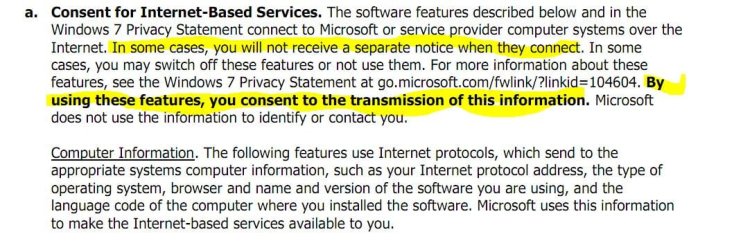
Let me show you, if you don't believe me:
Capture.JPG

can you read it?
You already agreed and signed it.
(It was taken from Window 7 Home Premium English EULA)
Available at: License Terms

Or If we want we can go into even more details:
Windows 7 Privacy Statement - Microsoft Windows (Windows 7 Privacy Highlights)
Windows 7 Privacy Statement - Microsoft Windows (Windows 7 Privacy Statement)
Windows 7 Privacy Statement - Microsoft Windows (Windows 7 Privacy Supplement)

Direct quote from them:
Some features that contact the Internet are turned on by default to make Windows 7 work better. You can choose to disable these features. To learn more about these features, see the Windows 7 Privacy Supplement.

So as you can see you have all agreed to it.
And you have no rights to say that they are your Privacy breaches.
If you think so, go ahead and sue them. You will see that any person with a bit of clue on Law can see that you have agreed to it yourself.

So, do you think I did rationalise my statement?
People should start reading all EULA they are agreeing to....
And they should at least read Privacy Policy before claiming their privacy has been breached.
Please don't be offended, I am not referring to just you.
I am sure, I am sounding too aggressive, but it's just a frustration, not anger or offence. ;)
 

My Computer My Computer

At a glance

Windows 7 Ultimate x86 SP1
OS
Windows 7 Ultimate x86 SP1
  • Like
Reactions: JMH
jav- If you find it acceptable to be forced into signing a contract that allows the pilfering of your personal information without lifting a finger to change it that is just fine, but please realize that a lot of people refuse to accept corporate bullying when it comes to their personal right to privacy.

Many of us refuse to be taken unfair advantage of and prevent the harvesting of our personal data by using a software Firewall that is so granularly programmable as to establish complete control over our personal data.

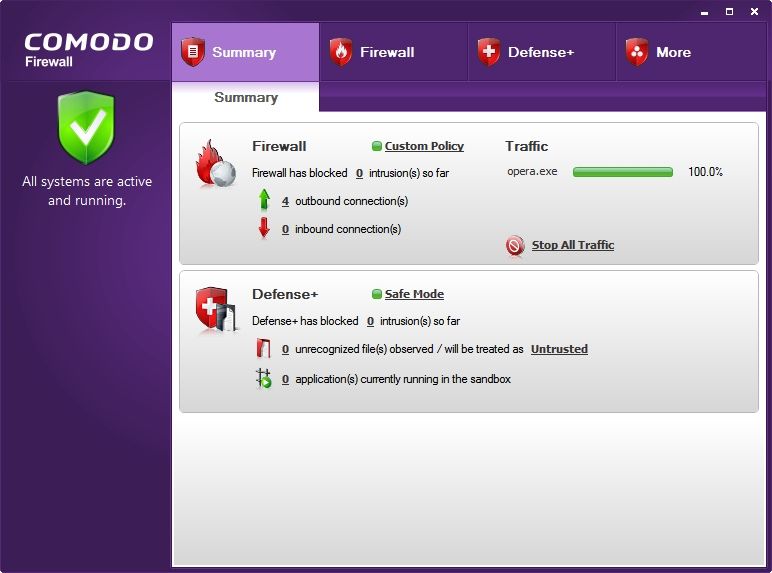
66afeafc.jpg


A properly programmed software Firewall gives the user total control over the tyranny of any privacy violating EULA that was unfairly forced upon them! My personal choice to wage war on all forms of information theft is the freeware Comodo Firewall Pro 2011 with all ports stealthed from the outside in Custom Policy Mode allowing absolutely nothing to go out without my permission!

You can either accept the pilfering of your private information passively without a fight or excercise your inalienable right to privacy from the corporate and spyware plundering of your private data with a software Firewall!

~Maxx~
.
da59fa57.png
 
Last edited:

My Computer My Computer

At a glance

Windows 7 x64 Home PremiumIntel Core i7 930 @ 2.8 Ghz Socket 1366 LGA8 GB 1366 Mhz DDR3 (PC3-10700) RAMATI Radeon 5770 1 GB DDR5 RAM
Computer Manufacturer/Model Number
HP HPE 270f
OS
Windows 7 x64 Home Premium
CPU
Intel Core i7 930 @ 2.8 Ghz Socket 1366 LGA
Motherboard
Pegatron Truckee v1.04E41
Memory
8 GB 1366 Mhz DDR3 (PC3-10700) RAM
Graphics Card(s)
ATI Radeon 5770 1 GB DDR5 RAM
Sound Card
Realtech High Definition
Monitor(s) Displays
32" Sony Bravia
Screen Resolution
1366 X 768
Hard Drives
Intel 25nm 120 GB Series 320 SSD HD Tune- 265 MBps Read/ 130 MBps Write

LaCie 1TB + 1TB RAID 0 eSATA Drive HD Tune- 160 MBps Read/ 90 MBps Write
Keyboard
Logitech Illuminated
Mouse
Logitech MX Revolution
Internet Speed
36.4 Mbps Maximum on a 37 Mbps Motorola SB501 Modem
The only time you don't need a firewall is if you are totally and permanently disconnected from the Internet. MS Windows Firewall is very good. Use it.
 

My Computer My Computer

At a glance

Systems 1 and 2: Windows 7 Enterprise x64, Wi...System 1: i7 [email protected], System 2: AMD FX-41...System 1: 8GB System 2: 8GBSystem 1: ATI FirePro V4800 System 2: Radeon ...
Computer Manufacturer/Model Number
Dell and Custom
OS
Systems 1 and 2: Windows 7 Enterprise x64, Win 8 Developer
CPU
System 1: i7 [email protected], System 2: AMD FX-4100 Zambezi 3.6G
Motherboard
System 1:Dell 06NWYK System 2: ASUS M5A97 AM3+
Memory
System 1: 8GB System 2: 8GB
Graphics Card(s)
System 1: ATI FirePro V4800 System 2: Radeon HD 6850
Sound Card
System 1: onboard System 2: onboard
Monitor(s) Displays
System1: Viewsonic HDMI 24"
Screen Resolution
System 1: 1920x1080 System 2: 1920x1080
Hard Drives
System 1: Mirrored .5B drives System 2: Seagate Barracuda ST1000DM003 1TB 7200 RPM 64MB Cache SATA 6.0Gb/s
Case
System 1: Dell System 2: Cooler Master
Internet Speed
10 MBPS
Maxxwire, sorry again. I know I was aggressive.
I am not trying to be Microsoft's advocate or anything.

All I am trying to say is that "Things you have described are not security breach"
So from security point of view you aren't accomplishing anything.

Neither me nor you have been FORCED to sign contract. You have a choice if you don't like it don't use it.
I am not saying that I like their Privacy Policy. I am not saying that I myself not breaking those regulations. I DO break them.

But the point is, I DO have a choice aswel. If I want there is big Linux world is still waiting for me.
And most importantly I do have a choice to (which is my best weapon against any EULA or Privacy Policy) just not to include any of my sensitive data.
As you can see it is simple, I don't have sensitive data, so nobody can compromise them...

But again, I do understand what you are doing, I support you in a way.
But all those examples were brought forward not to tell you that you are breaking laws or anything like that.
It was just brought forward to show that from security point of view they are NOT malicious, so they are not potential threads which are blocked by firewall.
 

My Computer My Computer

At a glance

Windows 7 Ultimate x86 SP1
OS
Windows 7 Ultimate x86 SP1
And By the way, point of my first post...

I am in noway trying to discourage anyone from using firewall.
No, I don't mean it!
If you were going to use it, please go on and use it!

I can say you, I am using firewall. I do like the idea of two way firewalls. I used them in the past and will start using it again in the near future.
Both of them are really valuable assets into your security, please go on and use it!

One of my main points on my first post was try to examine the other side of debate. As everyone was against the OP (in the skype forum) I was just trying to analyse and find out justifications to his words.

Even though I don't fully agree with him. In my opinion most of the people need inbound firewall which just does atleast basic packet filtering.

Now my second point: two-way firewall.
Yes they are really great, As I have mentioned already I did and I will use them again in near future.
All I am saying is that they are not needed for most people. I think average use doesn't really benefit from outbound protection. Because he will be unable to configure it properly and possibly will not even bother to.
So, as you can see they will be better going with just simple inbound filter.
They are not getting any benefits or become more secure with more advanced firewall suites.

All they need is just simple firewall.

Simple, That was all I meant.
Bringing up privacy complicated everything. Yes, I do take part of the guilty for this myself :(
 

My Computer My Computer

At a glance

Windows 7 Ultimate x86 SP1
OS
Windows 7 Ultimate x86 SP1
I think the more accurate term the two of you are trying to find is that in using a particular product, you have the option of agreeing or disagreeing with the policy it wishes you to abide by when using the product.

Right now the two of you are arguing literally over semantics, and quite honestly, it is making both of you look like crazed fanatics.

While yes, Microsoft's EULA is basically lawyering the right to gain access to information, it isn't 100% to violate your privacy short of what you are willing to allow. At the same time, you are not required to USE said product, but allowed to use a third party product and not agree to a EULA you are not happy with.

The point of the EULA is to cover the provider's ass from litigation from the user installing the product. As many people love to sue things, the EULA is there to pretty much state, "Hey, we are providing AB and C to you... Here are the stipulations, you have to agree not to sue us cause we gave you fair warning about this." It's about business practice and others do the same thing. The user is the one who has to agree or disagree, but it does not mean it prevents you from using a third party replacement, otherwise it would violate the Anti-trust requirement that Microsoft has to abide by with this OS and the rest of their products.

I will have to say that you guys need to at least agree that having the OS using a software firewall is recommended, regardless if it is MS or some other party for some specific reasons, all of which are with regards to security, be it from within the OS or adding another layer within your own network.
 

My Computer My Computer

At a glance

Windows 7 Ultimate x64 and Home Premium x64Intel i7 960 (3.2 GHz Quad Core)12 Gigs (Triple Channel)Alienware OEM nVidia GTX 560 Ti (1.25 Gig)
Computer Manufacturer/Model Number
Alienware Area 51 Desktop and Dell Inspirion 17R (N7010)
OS
Windows 7 Ultimate x64 and Home Premium x64
CPU
Intel i7 960 (3.2 GHz Quad Core)
Motherboard
Alienware Intel based X58
Memory
12 Gigs (Triple Channel)
Graphics Card(s)
Alienware OEM nVidia GTX 560 Ti (1.25 Gig)
Sound Card
Creative Labs X-Fi Titanium
Monitor(s) Displays
Samsung PX2370 LED 23" Monitor
Screen Resolution
1920x1080
Hard Drives
2 320 Gig SATA in Raid 1 Configuration (System/App)
1 1 Tera SATA (Games)
1 1 Tera SATA (Data/Music/Videos)
PSU
750 Watt Power Supply
Case
Alienware Area 51 Desktop
Cooling
Liquid Cooled
Keyboard
Logitech G510
Mouse
Microsoft Trackball Explorer
Internet Speed
Cable
Maxxwire, sorry again. I know I was aggressive.
I am not trying to be Microsoft's advocate or anything.

All I am trying to say is that "Things you have described are not security breach"
So from security point of view you aren't accomplishing anything.

Neither me nor you have been FORCED to sign contract. You have a choice if you don't like it don't use it.

I have access to a MAC Pro OS 10.5 and have used it often and in my humble opinion I was forced to sign the Windows 7 EULA because by comparison MAC treats the user like a hacker and if I don't have Windows 7 computing is just a big hassle with very little control over programs or the computer.

Your flagrant disregard for the supreme importance of the privacy of personal data and opinion that it is not in any way security related is frightening. As far as privacy is concerned its everyone's right and not just those who are computer adept.

I will address the Comodo Firewall Pro because I'm quite familiar with it and contrary to what you believe about software Firewalls anyone can program it to stop all unwanted outbound traffic simply by placing it in Custom Policy Mode and it will alert the user to any and all outbound traffic and all the user has to do is allow or block!

~Maxx~
.
da59fa57.png
 

My Computer My Computer

At a glance

Windows 7 x64 Home PremiumIntel Core i7 930 @ 2.8 Ghz Socket 1366 LGA8 GB 1366 Mhz DDR3 (PC3-10700) RAMATI Radeon 5770 1 GB DDR5 RAM
Computer Manufacturer/Model Number
HP HPE 270f
OS
Windows 7 x64 Home Premium
CPU
Intel Core i7 930 @ 2.8 Ghz Socket 1366 LGA
Motherboard
Pegatron Truckee v1.04E41
Memory
8 GB 1366 Mhz DDR3 (PC3-10700) RAM
Graphics Card(s)
ATI Radeon 5770 1 GB DDR5 RAM
Sound Card
Realtech High Definition
Monitor(s) Displays
32" Sony Bravia
Screen Resolution
1366 X 768
Hard Drives
Intel 25nm 120 GB Series 320 SSD HD Tune- 265 MBps Read/ 130 MBps Write

LaCie 1TB + 1TB RAID 0 eSATA Drive HD Tune- 160 MBps Read/ 90 MBps Write
Keyboard
Logitech Illuminated
Mouse
Logitech MX Revolution
Internet Speed
36.4 Mbps Maximum on a 37 Mbps Motorola SB501 Modem
Back
Top