Are There Bad (Early/Outdated) Versions of W-7 Pro?

Chaim613

New member
Local time
10:42 PM
Messages
50
Hi,
I bought a W-7 Pro DVD on eBay and installed it to remedy my original W-7 Pro O/S which was very slow. Since then the new O/S has been a disappointment.

My question is did I purchase an outdated/early version of W-7 Pro? or did I install it wrong?

Before I try the obnoxious task of re-installing the O/S, I'd like some experienced opinion about whether there might be something wrong with the O/S DVD.

In my recent O/S re-installation, I didn't see an opportunity to re-format the Hard Disk, which makes me suspicious the O/S wasn't installed correctly.

The DVD is marked SKU-FCC-00129, it doesn't give a mfg. date.

My machine is a Levono ThinkCentre M-Series desktop.

The problems that disappoint me are:
1. Improper Homegroup creation (I'm not able to share a printer, or share files despite numerous creations of a network. The old O/S shared things just fine)
2. Slowness (especially at the end of the day)

I've seen the recommended way to install the W-7 Pro O/S, and it's obvious there is a right way to install and a wrong way. I probably didn't do the job properly. Before I spend the day re-installing, I'd like to have some reassurance I'm on the right track. :)

Thank you, this is a great forum,
 

My Computer My Computer

At a glance

Windows 7 Pro 64 bit
OS
Windows 7 Pro 64 bit
There are no outdated Windows install media in the sense you apparently mean. Media made before Service Pack 1 does not include as many Windows updates and bringing it up to date after installation needs some more time, but the core Windows is the same whether installed from a DVD made back in 2009 when Windows 7 was published or one from yesterday.

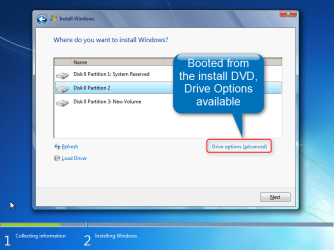
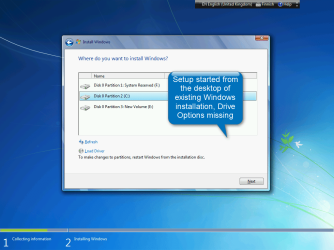
If you boot from the install media (DVD or USB) you always get the drive formatting and partitioning tools selecting Custom Install. However, if you launch Windows setup from desktop of an existing Windows installation, the Custom Install does not show drive tools.

Setup by booting from install media:

2014-03-03_16h14_38.png

Setup by launching it from existing Windows installation:

2014-03-03_16h18_16.png

A recommended way is a normal clean install: http://www.sevenforums.com/tutorials/1649-clean-install-windows-7-a.html

Kari
 

My Computer My Computer

At a glance

Windows 10 Pro x64 EN-GB1.6 GHz Intel Core i7-720QM Processor6 GBATI Mobility Radeon HD 5850 Graphics
Computer type
Laptop
Computer Manufacturer/Model Number
HP ENVY 17-1150eg
OS
Windows 10 Pro x64 EN-GB
CPU
1.6 GHz Intel Core i7-720QM Processor
Memory
6 GB
Graphics Card(s)
ATI Mobility Radeon HD 5850 Graphics
Sound Card
Beats sound system with integrated subwoofer
Monitor(s) Displays
17" laptop display, 22" LED and 32" Full HD TV through HDMI
Screen Resolution
1600*900 (1), 1920*1080 (2&3)
Hard Drives
Internal: 2 x 500 GB SATA Hard Disk Drive 7200 rpm
External: 2TB for backups, 3TB USB3 network drive for media
Cooling
As Envy runs a bit warm, I have it on a Cooler Master pad
Keyboard
Logitech diNovo Media Desktop Laser (bluetooth)
Mouse
Logitech Performance Mouse MX
Internet Speed
50/10 Mbps VDSL
Antivirus
Windows Defender 4.3.9431.0
Browser
Maxthon 3.5.2., IE11
You could download a legal copy of Windows 7 with SP1 already incorporated, burn a DVD or create a USB flash drive to install from.

If you do not have a Windows 7 installation DVD, or it's not up to the Service Pack level currently installed, you can download a legal copy with SP1 integrated from here:

Windows 7 Direct Download Links

Make sure you get the same version you have, Home Premium, Pro or Ultimate and 32 or 64 bit. Note that Basic or Starter is not available.

I recommend using ImgBurn at 4X speed (or the slowest available) to create the DVD from the downloaded .iso file. Just be careful during the install not to accidentally install some of the bundled junk that comes with it. Always take The Custom Install option.

You can do this on any computer capable of burning a DVD.

YOU MUST HAVE A VALID KEY TO INSTALL THIS .ISO.
The one on the COA sticker on your computer will work.

If you are just using the Recovery Console you do not need a key.

You can also create a bootable USB Flash drive (4GB or larger) to install Windows 7 from.
  1. Download and run Universal USB Installer Easy as 1 2 3[/*]
  2. Select Windows 7 from the first drop down list, all the way to the bottom[/*]
  3. Select the downloaded Windows 7 iso file[/*]
  4. Select your USB flash drive[/*]
  5. Click Create[/*]
For techies or folks who work on computers:

Create Windows 7 Universal ISO With All Editions Selection On Install with ei.cfg Removal Utility.

This will fit on a 6GB flash drive or can be burned to a DVD.
 

My Computer My Computer

At a glance

Windows 10 Pro X64Intel Quad Core i7-4770 @ 3.4Ghz16.0GB PC3-12800 DDR3 SDRAM 1600 MHzIntel Integrated HD Graphics
Computer type
PC/Desktop
Computer Manufacturer/Model Number
Lenovo IdeaCenter 450
OS
Windows 10 Pro X64
CPU
Intel Quad Core i7-4770 @ 3.4Ghz
Memory
16.0GB PC3-12800 DDR3 SDRAM 1600 MHz
Graphics Card(s)
Intel Integrated HD Graphics
Sound Card
Realtek HD Audio
Monitor(s) Displays
HP 22" LCD
Screen Resolution
1680 x 1050
Hard Drives
250GB Samsung EVO SATA-3 SSD
2TB Seagate ST2000DM001 SATA-2
1.5TB Seagate ST3150041AS SATA
Keyboard
Dell USB
Mouse
Lenovo USB
Internet Speed
Cable via Road Runner 3MB Upload, 30MB Download
Antivirus
Windows Defender, MBAM Pro, MBAE
Browser
Seamonkey
Other Info
UEFI/GPT
PLDS DVD-RW DH16AERSH
Hi,
I bought a W-7 Pro DVD on eBay and installed it to remedy my original W-7 Pro O/S which was very slow. Since then the new O/S has been a disappointment.

My question is did I purchase an outdated/early version of W-7 Pro? or did I install it wrong?

Before I try the obnoxious task of re-installing the O/S, I'd like some experienced opinion about whether there might be something wrong with the O/S DVD.

In my recent O/S re-installation, I didn't see an opportunity to re-format the Hard Disk, which makes me suspicious the O/S wasn't installed correctly.

The DVD is marked SKU-FCC-00129, it doesn't give a mfg. date.

My machine is a Levono ThinkCentre M-Series desktop.

The problems that disappoint me are:
1. Improper Homegroup creation (I'm not able to share a printer, or share files despite numerous creations of a network. The old O/S shared things just fine)
2. Slowness (especially at the end of the day)

I've seen the recommended way to install the W-7 Pro O/S, and it's obvious there is a right way to install and a wrong way. I probably didn't do the job properly. Before I spend the day re-installing, I'd like to have some reassurance I'm on the right track. :)

Thank you, this is a great forum,

First thing.......did you install the Windows updates? Many problems can be solved just by updating.
 

My Computer My Computer

At a glance

Windows 7 Home Premium 64 bitIntel Core i7-4790G.SKILL 8GB (2 x 4GB) DDR3 F3-10666CL9D-8GBNTAMD Radeon R7 250
Computer type
PC/Desktop
Computer Manufacturer/Model Number
Custom Build
OS
Windows 7 Home Premium 64 bit
CPU
Intel Core i7-4790
Motherboard
GA-Z87X-D3H
Memory
G.SKILL 8GB (2 x 4GB) DDR3 F3-10666CL9D-8GBNT
Graphics Card(s)
AMD Radeon R7 250
Sound Card
Realtek ALC892
Monitor(s) Displays
Samsung UN32EH5000, Dell 1703FPT
Screen Resolution
1920 x 1080, 1280 x 1024
Hard Drives
WD5003AZEX
WD10EZEX
Samsung HD103SJ
Samsung 128 GB 840 PRO
PSU
SeaSonic M12II SS-500GM
Case
Fractal Design Define R4
Cooling
Zalman CNPS9900ALED
Keyboard
Logitech K800
Mouse
Logitech M705
Internet Speed
16 Mbps
Antivirus
Avast
Browser
Firefox
Other Info
Bose Companion 2 Multimedia Speakers
Back
Top