Artec 1236 USB Scanner Drivers

Loopygram

New member
Local time
5:01 PM
Messages
9
I have followed some instructions left in another spot by Pebbly (I followed the instructions to the letter). I have tried it backwards and forwards, upside and downside and when it searches for drivers it always says it can't find them. Needless to say I am getting very frustrated as I have tried this at least 8 times since yesterday. Any other help would be greatly appreciated before I go postal.

I downloaded the latest drivers or whatever it is (I'm a bit dense in this area) from that cr.am browsing: but no matter how many times I try it just doesn't work. It says Windows can't find the drivers.

I really can't afford a new scanner and this one is perfectly fine. I sure hope someone can help me. Thank you.

Loopygram
 

My Computer

OS
Windows 7 64 bit home
I have followed some instructions left in another spot by Pebbly (I followed the instructions to the letter). I have tried it backwards and forwards, upside and downside and when it searches for drivers it always says it can't find them. Needless to say I am getting very frustrated as I have tried this at least 8 times since yesterday. Any other help would be greatly appreciated before I go postal.

I downloaded the latest drivers or whatever it is (I'm a bit dense in this area) from that cr.am browsing: but no matter how many times I try it just doesn't work. It says Windows can't find the drivers.

I really can't afford a new scanner and this one is perfectly fine. I sure hope someone can help me. Thank you.

Loopygram

1/ Download the drivers
2/ Right click on the downloaded drivers and select properties this will open a new window
3/click on the compatibility tab in the new window, click on Run this program in compatibility mode for Windows XP (Service Pack 2) click also on Run this program as administrator see picture
click on apply
 

Attachments

  • Capture.PNG
    Capture.PNG
    15.6 KB · Views: 56

My Computer

Computer Manufacturer/Model Number
Something I threw together
OS
Windows 7 Ultimate x64
CPU
Intel Core i7-2600K
Motherboard
Asus P8P67
Memory
16 GB G Skill F3-10666 CL9D-4GBRL
Graphics Card(s)
ATI Radeon HD 6870
Sound Card
ATI Radeon HDMI / Realtek ALC892
Monitor(s) Displays
2 x 22" standard monitors / LG32LC56v TV to watch films
Screen Resolution
1920 x1080
Hard Drives
2 x OCZ Vertex2 111.79GB
3 x Samsung103SJ
1 x Samsung103UJ
1 x WD3200BEVT
1 x Hitachi5K320-160
PSU
Thermaltake Toughpower Cable Management 750W
Case
Antec 300
Cooling
Noctua NH-U12P SE2 and 5 120mm Case fans
Keyboard
Microsoft Comfort Curve Keyboard 2000
Mouse
Hama M3110 / Logitech M305
Internet Speed
16000
Other Info
I have also used Fedora, Suse, Ubuntu Linux
And all other Windows from 95 to date except ME
Click on the downloaded driver to install it accept any messages from UAC
When the driver has installed reboot the computer
 

My Computer

Computer Manufacturer/Model Number
Something I threw together
OS
Windows 7 Ultimate x64
CPU
Intel Core i7-2600K
Motherboard
Asus P8P67
Memory
16 GB G Skill F3-10666 CL9D-4GBRL
Graphics Card(s)
ATI Radeon HD 6870
Sound Card
ATI Radeon HDMI / Realtek ALC892
Monitor(s) Displays
2 x 22" standard monitors / LG32LC56v TV to watch films
Screen Resolution
1920 x1080
Hard Drives
2 x OCZ Vertex2 111.79GB
3 x Samsung103SJ
1 x Samsung103UJ
1 x WD3200BEVT
1 x Hitachi5K320-160
PSU
Thermaltake Toughpower Cable Management 750W
Case
Antec 300
Cooling
Noctua NH-U12P SE2 and 5 120mm Case fans
Keyboard
Microsoft Comfort Curve Keyboard 2000
Mouse
Hama M3110 / Logitech M305
Internet Speed
16000
Other Info
I have also used Fedora, Suse, Ubuntu Linux
And all other Windows from 95 to date except ME
After the computer has restarted click on the start orb and type in Device Manager,
select Device manager from the list it will start in a new window
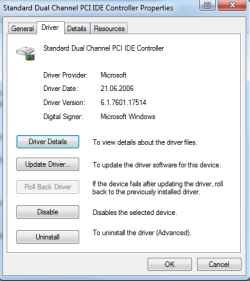
Select the scanner, which should appear as an unknown item on the list (right click) and select properties and the driver tab
(see attached picture (I do not have a scanner so the picture is very slightly different))
select the update driver button and let it search for the Artec drivers. A warning will appear regarding the lack of a digital signature. Tell Windows to install the driver anyway.
Reboot the computer
 

Attachments

  • Capture1.PNG
    Capture1.PNG
    13 KB · Views: 22

My Computer

Computer Manufacturer/Model Number
Something I threw together
OS
Windows 7 Ultimate x64
CPU
Intel Core i7-2600K
Motherboard
Asus P8P67
Memory
16 GB G Skill F3-10666 CL9D-4GBRL
Graphics Card(s)
ATI Radeon HD 6870
Sound Card
ATI Radeon HDMI / Realtek ALC892
Monitor(s) Displays
2 x 22" standard monitors / LG32LC56v TV to watch films
Screen Resolution
1920 x1080
Hard Drives
2 x OCZ Vertex2 111.79GB
3 x Samsung103SJ
1 x Samsung103UJ
1 x WD3200BEVT
1 x Hitachi5K320-160
PSU
Thermaltake Toughpower Cable Management 750W
Case
Antec 300
Cooling
Noctua NH-U12P SE2 and 5 120mm Case fans
Keyboard
Microsoft Comfort Curve Keyboard 2000
Mouse
Hama M3110 / Logitech M305
Internet Speed
16000
Other Info
I have also used Fedora, Suse, Ubuntu Linux
And all other Windows from 95 to date except ME
Click on start orb, Computer, Drive C:, Windows, twain_32, artecusb
Right click on Scan32.exe and select the Compatibility tab (just like in step 1)
Set compatibility settings on scan32.exe to Windows XP SP2 and make sure the executable can run as an administrator.
Now you can start scanning
 

My Computer

Computer Manufacturer/Model Number
Something I threw together
OS
Windows 7 Ultimate x64
CPU
Intel Core i7-2600K
Motherboard
Asus P8P67
Memory
16 GB G Skill F3-10666 CL9D-4GBRL
Graphics Card(s)
ATI Radeon HD 6870
Sound Card
ATI Radeon HDMI / Realtek ALC892
Monitor(s) Displays
2 x 22" standard monitors / LG32LC56v TV to watch films
Screen Resolution
1920 x1080
Hard Drives
2 x OCZ Vertex2 111.79GB
3 x Samsung103SJ
1 x Samsung103UJ
1 x WD3200BEVT
1 x Hitachi5K320-160
PSU
Thermaltake Toughpower Cable Management 750W
Case
Antec 300
Cooling
Noctua NH-U12P SE2 and 5 120mm Case fans
Keyboard
Microsoft Comfort Curve Keyboard 2000
Mouse
Hama M3110 / Logitech M305
Internet Speed
16000
Other Info
I have also used Fedora, Suse, Ubuntu Linux
And all other Windows from 95 to date except ME
Yes thank you. These are the exact instructions I followed but when I right click on the 'unknown' in the device manager it says it can't find the drivers. This is where the problem is. Should I point it to some place in particular? These instructions worked perfect in Windows Vista but now with this new laptop windows can't find the drivers. Thanks again for your help;.
 

My Computer

OS
Windows 7 64 bit home
Yes thank you. These are the exact instructions I followed but when I right click on the 'unknown' in the device manager it says it can't find the drivers. This is where the problem is. Should I point it to some place in particular? These instructions worked perfect in Windows Vista but now with this new laptop windows can't find the drivers. Thanks again for your help;.
Point it to look at C: windows, system32 and if that doesn't work C: windows, system32, drivers
 

My Computer

Computer Manufacturer/Model Number
Something I threw together
OS
Windows 7 Ultimate x64
CPU
Intel Core i7-2600K
Motherboard
Asus P8P67
Memory
16 GB G Skill F3-10666 CL9D-4GBRL
Graphics Card(s)
ATI Radeon HD 6870
Sound Card
ATI Radeon HDMI / Realtek ALC892
Monitor(s) Displays
2 x 22" standard monitors / LG32LC56v TV to watch films
Screen Resolution
1920 x1080
Hard Drives
2 x OCZ Vertex2 111.79GB
3 x Samsung103SJ
1 x Samsung103UJ
1 x WD3200BEVT
1 x Hitachi5K320-160
PSU
Thermaltake Toughpower Cable Management 750W
Case
Antec 300
Cooling
Noctua NH-U12P SE2 and 5 120mm Case fans
Keyboard
Microsoft Comfort Curve Keyboard 2000
Mouse
Hama M3110 / Logitech M305
Internet Speed
16000
Other Info
I have also used Fedora, Suse, Ubuntu Linux
And all other Windows from 95 to date except ME
I tried it both ways and got the same message. It can't find the drivers. I don't get it but I sure appreciate your help. Thank you Pooch.
 

My Computer

OS
Windows 7 64 bit home
I tried it both ways and got the same message. It can't find the drivers. I don't get it but I sure appreciate your help. Thank you Pooch.
when you try to install the driver and you click on browse my computer for driver software have you tried in the next window to click onlet me pick from a list of device drivers on my computer?
 

My Computer

Computer Manufacturer/Model Number
Something I threw together
OS
Windows 7 Ultimate x64
CPU
Intel Core i7-2600K
Motherboard
Asus P8P67
Memory
16 GB G Skill F3-10666 CL9D-4GBRL
Graphics Card(s)
ATI Radeon HD 6870
Sound Card
ATI Radeon HDMI / Realtek ALC892
Monitor(s) Displays
2 x 22" standard monitors / LG32LC56v TV to watch films
Screen Resolution
1920 x1080
Hard Drives
2 x OCZ Vertex2 111.79GB
3 x Samsung103SJ
1 x Samsung103UJ
1 x WD3200BEVT
1 x Hitachi5K320-160
PSU
Thermaltake Toughpower Cable Management 750W
Case
Antec 300
Cooling
Noctua NH-U12P SE2 and 5 120mm Case fans
Keyboard
Microsoft Comfort Curve Keyboard 2000
Mouse
Hama M3110 / Logitech M305
Internet Speed
16000
Other Info
I have also used Fedora, Suse, Ubuntu Linux
And all other Windows from 95 to date except ME
Drivers

I honestly can't remember if I tried that or not. I've gone through trying to install it so many times. would the driver be named 'artec'? I'm not even sure what a driver file looks like. What would be the extension? I thought when I installed the .exe that the drivers would install at the same time but don't know.
I really appreciate your help.
 

My Computer

OS
Windows 7 64 bit home
I honestly can't remember if I tried that or not. I've gone through trying to install it so many times. would the driver be named 'artec'? I'm not even sure what a driver file looks like. What would be the extension? I thought when I installed the .exe that the drivers would install at the same time but don't know.
I really appreciate your help.

That is the problem :( I do not know what it would be called, your only hope as I see it would be to ask someone who has successfully installed it.

I have to wonder if it even installed properly maybe it would be better to try again with another driver; Driver Download
 

My Computer

Computer Manufacturer/Model Number
Something I threw together
OS
Windows 7 Ultimate x64
CPU
Intel Core i7-2600K
Motherboard
Asus P8P67
Memory
16 GB G Skill F3-10666 CL9D-4GBRL
Graphics Card(s)
ATI Radeon HD 6870
Sound Card
ATI Radeon HDMI / Realtek ALC892
Monitor(s) Displays
2 x 22" standard monitors / LG32LC56v TV to watch films
Screen Resolution
1920 x1080
Hard Drives
2 x OCZ Vertex2 111.79GB
3 x Samsung103SJ
1 x Samsung103UJ
1 x WD3200BEVT
1 x Hitachi5K320-160
PSU
Thermaltake Toughpower Cable Management 750W
Case
Antec 300
Cooling
Noctua NH-U12P SE2 and 5 120mm Case fans
Keyboard
Microsoft Comfort Curve Keyboard 2000
Mouse
Hama M3110 / Logitech M305
Internet Speed
16000
Other Info
I have also used Fedora, Suse, Ubuntu Linux
And all other Windows from 95 to date except ME
That's the one I did download and install but thank you again for trying. Do you know what the extensions are on driver names after the '.' that might help me a little or are they all different? Thanks so much for your efforts. It looks like I just might have to buy another scanner. It's too bad this company went out of the scanner business but can't upgrade the drivers or have someone who can.
 

My Computer

OS
Windows 7 64 bit home
That's the one I did download and install but thank you again for trying. Do you know what the extensions are on driver names after the '.' that might help me a little or are they all different? Thanks so much for your efforts. It looks like I just might have to buy another scanner. It's too bad this company went out of the scanner business but can't upgrade the drivers or have someone who can.
Which one? there is a whole list, this could be very important!!
I understood you were supposed to download this one Artec Scanner E + Pro 3.0
and I wanted to suggest the 1236 USB because that is not working


My Computer

Computer Manufacturer/Model Number
Something I threw together
OS
Windows 7 Ultimate x64
CPU
Intel Core i7-2600K
Motherboard
Asus P8P67
Memory
16 GB G Skill F3-10666 CL9D-4GBRL
Graphics Card(s)
ATI Radeon HD 6870
Sound Card
ATI Radeon HDMI / Realtek ALC892
Monitor(s) Displays
2 x 22" standard monitors / LG32LC56v TV to watch films
Screen Resolution
1920 x1080
Hard Drives
2 x OCZ Vertex2 111.79GB
3 x Samsung103SJ
1 x Samsung103UJ
1 x WD3200BEVT
1 x Hitachi5K320-160
PSU
Thermaltake Toughpower Cable Management 750W
Case
Antec 300
Cooling
Noctua NH-U12P SE2 and 5 120mm Case fans
Keyboard
Microsoft Comfort Curve Keyboard 2000
Mouse
Hama M3110 / Logitech M305
Internet Speed
16000
Other Info
I have also used Fedora, Suse, Ubuntu Linux
And all other Windows from 95 to date except ME
I downloaded the 1236USB V 2.92 and I also downloaded the E + Pro 300 and tried both many times with the same results. I'm just so frustrated now.
 

My Computer

OS
Windows 7 64 bit home
I downloaded the 1236USB V 2.92 and I also downloaded the E + Pro 300 and tried both many times with the same results. I'm just so frustrated now.
Yes I believe you :(
One last try
Disconnect the scanner
Reboot the PC
use CCleaner - Optimization and Cleaning - Free Download to clean the PC and to Clean the registry, (two different tabs) analyse + clean/ scan for issues + and fix issues.
When the Registry cleaner asks to make backups do it, but I doubt that you will need them
Reboot
Download the E+pro 300 again cr.am browsing:
and follow the install as per the instructions
DO NOT PLUG IN THE SCANNER UNTIL AFTER YOU HAVE REBOOTED AFTER YOU HAVE INSTALLED THE PROGRAM
 

My Computer

Computer Manufacturer/Model Number
Something I threw together
OS
Windows 7 Ultimate x64
CPU
Intel Core i7-2600K
Motherboard
Asus P8P67
Memory
16 GB G Skill F3-10666 CL9D-4GBRL
Graphics Card(s)
ATI Radeon HD 6870
Sound Card
ATI Radeon HDMI / Realtek ALC892
Monitor(s) Displays
2 x 22" standard monitors / LG32LC56v TV to watch films
Screen Resolution
1920 x1080
Hard Drives
2 x OCZ Vertex2 111.79GB
3 x Samsung103SJ
1 x Samsung103UJ
1 x WD3200BEVT
1 x Hitachi5K320-160
PSU
Thermaltake Toughpower Cable Management 750W
Case
Antec 300
Cooling
Noctua NH-U12P SE2 and 5 120mm Case fans
Keyboard
Microsoft Comfort Curve Keyboard 2000
Mouse
Hama M3110 / Logitech M305
Internet Speed
16000
Other Info
I have also used Fedora, Suse, Ubuntu Linux
And all other Windows from 95 to date except ME
Ok I will try all this when I get home from work. I never thought to unplug the scanner before I installed stuff. I'll be sure to try that. Thanks for all your help and I'll let you know how it goes this evening.
 

My Computer

OS
Windows 7 64 bit home
Well I went through all the steps and its just not going to work. I guess I will have to either put out money for a new one or go without. Thanks so very much for all your help. You were awesome.
 

My Computer

OS
Windows 7 64 bit home
Hate to do a necro as my first post here, but this is the reason I even found this site, and I have the solution(way too late prolly, but it could help someone else.)
Been trying for days to get this to work on Windows 7 64bit, just wouldn't(atleast for me)... Then today I found out about 'Windows XP Mode' or 'XPM', available to anyone with windows 7 for free, installs XP as a virtual machine.
500mb download later, I have this ancient scanner working like new.

1. Install Windows XPM
2. Install Artec driver in the VM, select restart now, the VM will relaunch XP. Plug in the scanner.
3. on the menu bar, click USB, then Unidentified Device, this will 'attach' the scanner to the virtual XP.
4. Scan away.

Optional steps to make things smoother
5. on your 'Real' desktop, make a new folder named Scans or whatever
6. in the VM, go to 'My Computer/ C on (computer name)/ Users/ (user name) / Desktop', right click the Scans folder/send to/ Desktop(create Shortcut)

Now you can just drag/drop your scanned images straight to your 'real' hard drive for use in photoshop or whatever.

Hope this helps someone use their old hardware that 7 just doesn't like anymore, and hopefully nobody else will waste a week trying to get this working natively in 7x64 like I did. =p
 

My Computer

Computer Manufacturer/Model Number
Custom Build
OS
Windows 7 Ultimate x64
CPU
Intel qx9775
Motherboard
'Skulltrail' d5400xs
Memory
8gb
Graphics Card(s)
nVidia GTS 250
Sound Card
onboard
Monitor(s) Displays
32" 720p Sharp tv, 23" Envision flatpanel.
Hard Drives
1tb internal, 1tb external
PSU
850watt
Back
Top