[ASK]About booting

rusuh39

New member
Local time
6:49 AM
Messages
8
Location
China
good afternoon sir....

I want to ask about Windows 7, why at boot time to wait too long, roughly wait about 30-45 seconds to get to the starting windows. whereas before I only had to wait about 3-5 seconds could be headed to the starting windows.
please provide me feedback.
thx ..

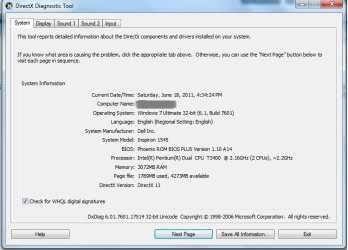
DELL INSPIRON 1545
3 G.B RAM
INTEL PENTIUM DUAL CPU T3400 @2.16GHZ 2.17GHZ
WINDOWS 7 ULTIMATE 32BIT SP1

This results from the laptop reboot
 

Attachments
  • reboot result.jpg
    reboot result.jpg
    7.6 KB · Views: 2

My Computer

OS
windows 7 ultimate 32 bit
good afternoon sir....

I want to ask about Windows 7, why at boot time to wait too long, roughly wait about 30-45 seconds to get to the starting windows. whereas before I only had to wait about 3-5 seconds could be headed to the starting windows.
please provide me feedback.
thx ..

DELL INSPIRON 1545
3 G.B RAM
INTEL PENTIUM DUAL CPU T3400 @2.16GHZ 2.17GHZ
WINDOWS 7 ULTIMATE 32BIT SP1

This results from the laptop reboot

could be anything. Can we get your complete system specs and network setup?

Thanks
 

My Computer

Computer Manufacturer/Model Number
HP Pavillion dv-7 1005 Tx
OS
Win 8 Release candidate 8400
CPU
[email protected]
Memory
4 gigs
Graphics Card(s)
Nvidia 9600M
Sound Card
HD built-in
Monitor(s) Displays
17" Wxga
Screen Resolution
1440x900
Cooling
none
Internet Speed
45Mb down 5Mb up
could be anything. Can we get your complete system specs and network setup?

Thanks

here sir.....

this is my system specs computer n network setup...
anything else u need, please tell me sirr...
thx before..
 

Attachments

  • speck kompi.jpg
    speck kompi.jpg
    49.2 KB · Views: 17
  • network setup...jpg
    network setup...jpg
    24.5 KB · Views: 8

My Computer

OS
windows 7 ultimate 32 bit
Hi rusuh39 and welcome to W7 Forums :party:

How long does it take on a cold-boot, as opposed to a restart?

If it is noticeably quicker, then we need to look at things which might be slowing down the shutdown process. The most common reason for slow shutdowns is if you have the paging (swap) file set to clear on shutdown. Check the setting with reference to Virtual Memory Paging File - Clear at Shutdown - Vista Forums and if the value is 1 set it to 0 (note that you will need to invoke the registry editor to run in elevated mode). You could also have a look here http://www.sevenforums.com/tutorials/26476-desktop-shutdown-tweaks-combined.html to see if that helps speed things up.

If the cold-boot takes nearly as long, or if the above suggestions don't help, then you need to look at things which slow down your boot process. See if Soluto reveals anything. Culprits for slow booting include such things as auto-updaters for installed programs (e.g. Adobe, etc). These can safely be disabled and updated manually. You should not disable updates for your AV software, though.
 

My Computer

Computer type
PC/Desktop
Computer Manufacturer/Model Number
Dwarf Dwf/11/2012 r09/2013
OS
Windows 8.1 Pro RTM x64
CPU
Intel Core-i5-3570K 4-core @ 3.4GHz (Ivy Bridge) (OC 4.4GHz)
Motherboard
ASRock Z77 Extreme4-M
Memory
4 x 4GB DDR3-1600 Corsair Vengeance CMZ8GX3M2A1600C9B (16GB)
Graphics Card(s)
MSI GeForce GTX770 Gaming OC 2GB
Sound Card
Realtek High Definition on board solution (ALC 898)
Monitor(s) Displays
ViewSonic VA1912w Widescreen (VGA)
Screen Resolution
1440x900
Hard Drives
OCZ Agility 3 SSD 120GB SATA III x2 (RAID 0)
Samsung HD501LJ 500GB SATA II x2
Hitachi HDS721010CLA332 1TB SATA II
Iomega 1.5TB Ext USB 2.0
WD 2.0TB Ext USB 3.0
PSU
XFX Pro Series 850W Semi-Modular
Case
Gigabyte IF233
Cooling
1 x 120mm Front Inlet 1 x 120mm Rear Exhaust
Keyboard
Microsoft Comfort Curve Keyboard 3000 (USB)
Mouse
Microsoft Comfort Mouse 3000 for Business (USB)
Internet Speed
NetGear DG834Gv3 ADSL Modem/Router (Ethernet) ~4.0 Mb/s (O2)
Antivirus
Avast! 8.0.1497
Browser
IE 11
Other Info
Optical Drive: HL-DT-ST BD-RE BH10LS30 SATA Bluray
Lexmark S305 Printer/Scanner/Copier (USB)
WEI Score: 8.1/8.1/8.5/8.5/8.25
Asus Eee PC 1011PX Netbook (Windows 7 x86 Starter)
Rusuh,

following will help us as we stumble across this thread:
UPDATE YOUR SEVENFORUMS SYSTEM SPECS


User CP (3rd item in the top menu bar) |


in left-hand column,under Your Profile, Edit System Spec |


using Speccy - System Information - Free Download
and SIW to gather info, fill in the blanks.
Do me a favor and add the word laptop or desktop to the “system manufacturer” block.
Use the “Other Info” block for Optical Reader, Mouse, touchpad, wifi adapter, speakers, monitor

Scroll down and click on the SAVE CHANGES button.


=======================

Now to your problem.

Download and run CCleaner. After running ccleaner, then run the tools portion thereof as stated below:

LIST OF STARTUP PROGRAMS USING CCLEANER


CCleaner | Tasks icon | Startup tab | click on Save to text file button (bottom right side)

Using the PAPER CLIP icon in the top panel of a Message Reply window, attach the .txt file generated by CCleaner.

======================================

Notice that their is a link to CCleaner in my sig.
 

My Computer

Computer Manufacturer/Model Number
Toshiba Satellite S875D-S7239 laptop
OS
MS Windows 7 Ultimate SP1 64-bit
CPU
AMD A10-4600M
Motherboard
AMD Pumori (Socket FT1)
Memory
6.00 GB Dual-Channel DDR3 @ 798MHz (11-11-12-28)
Graphics Card(s)
AMD Radeon HD 7660G
Sound Card
High Definition Audio Device
Monitor(s) Displays
Generic PnP Monitor (1600x900@60Hz)
Screen Resolution
1600x900@60Hz
Hard Drives
SSD 119GB Corsair CSSD-V128GB2 ATA Device
Keyboard
Standard PS/2 Keyboard
Mouse
HP Wireless Optical Mobile Mouse Model FHA-3410
Internet Speed
What the local pub, local coffee shop offers.
Other Info
Optical Drive:MATSHITA BD-CMB UJ160B ATA Device


Also have an Asus ha1002xp netbook with Win 7 Ultimate installed.
Hi rusuh39 and welcome to W7 Forums :party:

How long does it take on a cold-boot, as opposed to a restart?

If it is noticeably quicker, then we need to look at things which might be slowing down the shutdown process. The most common reason for slow shutdowns is if you have the paging (swap) file set to clear on shutdown. Check the setting with reference to Virtual Memory Paging File - Clear at Shutdown - Vista Forums and if the value is 1 set it to 0 (note that you will need to invoke the registry editor to run in elevated mode). You could also have a look here http://www.sevenforums.com/tutorials/26476-desktop-shutdown-tweaks-combined.html to see if that helps speed things up.

If the cold-boot takes nearly as long, or if the above suggestions don't help, then you need to look at things which slow down your boot process. See if Soluto reveals anything. Culprits for slow booting include such things as auto-updaters for installed programs (e.g. Adobe, etc). These can safely be disabled and updated manually. You should not disable updates for your AV software, though.


thx for u welcome sirrr..
I have no problem with the shutdown process, shutdown process as usual.but the only problem that I face when I turned on my laptop at boot time I have to wait approximately 30-45 seconds.

Rusuh,

following will help us as we stumble across this thread:
UPDATE YOUR SEVENFORUMS SYSTEM SPECS


User CP (3rd item in the top menu bar) |


in left-hand column,under Your Profile, Edit System Spec |


using Speccy - System Information - Free Download
and SIW to gather info, fill in the blanks.
Do me a favor and add the word laptop or desktop to the “system manufacturer” block.
Use the “Other Info” block for Optical Reader, Mouse, touchpad, wifi adapter, speakers, monitor

Scroll down and click on the SAVE CHANGES button.


=======================

Now to your problem.

Download and run CCleaner. After running ccleaner, then run the tools portion thereof as stated below:

LIST OF STARTUP PROGRAMS USING CCLEANER


CCleaner | Tasks icon | Startup tab | click on Save to text file button (bottom right side)

Using the PAPER CLIP icon in the top panel of a Message Reply window, attach the .txt file generated by CCleaner.

======================================

Notice that their is a link to CCleaner in my sig.


ok sirr.. check it. i have upload for u.
i just want to u know about the problem.when I turned on my laptop. The first that we face is the logo of the brand laptops, second we will be dealing with a black screen (boot),The third we will be dealing with windows starting logo,four we can see the desktop screen.
the problem on my part that underlining, why when a black screen (boot) to wait very long.
 

Attachments

My Computer

OS
windows 7 ultimate 32 bit
WIN | type MSCONFIG | ENTER |
uncheck ALL except for these two:

egui "C:\Program Files\ESET\ESET Smart Security\egui.exe" /hide /waitservice

Apoint C:\Program Files\DellTPad\Apoint.exe


APPLY and OK buttons | RESTART your computer

WIN is the key with Microsoft flag on top.


Now how are your startup times?
 

My Computer

Computer Manufacturer/Model Number
Toshiba Satellite S875D-S7239 laptop
OS
MS Windows 7 Ultimate SP1 64-bit
CPU
AMD A10-4600M
Motherboard
AMD Pumori (Socket FT1)
Memory
6.00 GB Dual-Channel DDR3 @ 798MHz (11-11-12-28)
Graphics Card(s)
AMD Radeon HD 7660G
Sound Card
High Definition Audio Device
Monitor(s) Displays
Generic PnP Monitor (1600x900@60Hz)
Screen Resolution
1600x900@60Hz
Hard Drives
SSD 119GB Corsair CSSD-V128GB2 ATA Device
Keyboard
Standard PS/2 Keyboard
Mouse
HP Wireless Optical Mobile Mouse Model FHA-3410
Internet Speed
What the local pub, local coffee shop offers.
Other Info
Optical Drive:MATSHITA BD-CMB UJ160B ATA Device


Also have an Asus ha1002xp netbook with Win 7 Ultimate installed.
WIN | type MSCONFIG | ENTER |
uncheck ALL except for these two:

egui "C:\Program Files\ESET\ESET Smart Security\egui.exe" /hide /waitservice

Apoint C:\Program Files\DellTPad\Apoint.exe


APPLY and OK buttons | RESTART your computer

WIN is the key with Microsoft flag on top.


Now how are your startup times?

yeah,I've done.
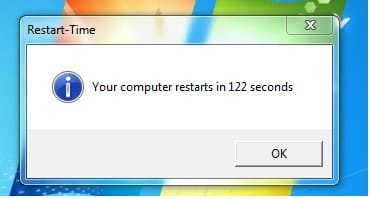
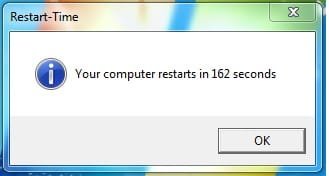
before is 162 sec. after 122 sec.
but the problem still occurs, when I turned on my laptop. The first that we face is the logo of the brand laptops, second we will be dealing with a black screen (boot),The third we will be dealing with windows starting logo,four we can see the desktop screen.
the problem on my part that underlining, why when a black screen (boot) to wait very long.
 

Attachments

  • reboot result.jpg
    reboot result.jpg
    7.6 KB · Views: 2
  • reboot result 2..jpg
    reboot result 2..jpg
    10.2 KB · Views: 1

My Computer

OS
windows 7 ultimate 32 bit
rusuh,

Disconnect your computer from the network and see what your start times are.

What software is telling you what your start times are?
 

My Computer

Computer Manufacturer/Model Number
Toshiba Satellite S875D-S7239 laptop
OS
MS Windows 7 Ultimate SP1 64-bit
CPU
AMD A10-4600M
Motherboard
AMD Pumori (Socket FT1)
Memory
6.00 GB Dual-Channel DDR3 @ 798MHz (11-11-12-28)
Graphics Card(s)
AMD Radeon HD 7660G
Sound Card
High Definition Audio Device
Monitor(s) Displays
Generic PnP Monitor (1600x900@60Hz)
Screen Resolution
1600x900@60Hz
Hard Drives
SSD 119GB Corsair CSSD-V128GB2 ATA Device
Keyboard
Standard PS/2 Keyboard
Mouse
HP Wireless Optical Mobile Mouse Model FHA-3410
Internet Speed
What the local pub, local coffee shop offers.
Other Info
Optical Drive:MATSHITA BD-CMB UJ160B ATA Device


Also have an Asus ha1002xp netbook with Win 7 Ultimate installed.
karlsnooks,

same as before sirr... :D
ohh.i forgot to tell u something.Yesterday I have upgraded the bios from A05 (if not wrong) to the A14. then boot as usual (very fast), dont know why 2-3 hours and then the boot will have to wait very long.:cry:

about the software telling you what your start times i got from here http://www.sevenforums.com/performance-maintenance/592-reboot-time.html.
 

Attachments

  • reboot result 3....jpg
    reboot result 3....jpg
    8.9 KB · Views: 1

My Computer

OS
windows 7 ultimate 32 bit
As another had mentioned, Soluto is a program which will give you some detailed info about start times. I'm not fond of this program because I had to use Autoruns.exe to totally remove this program.

But right now I'm out of ideas, so I guess Soluto is the next thing to try.
 

My Computer

Computer Manufacturer/Model Number
Toshiba Satellite S875D-S7239 laptop
OS
MS Windows 7 Ultimate SP1 64-bit
CPU
AMD A10-4600M
Motherboard
AMD Pumori (Socket FT1)
Memory
6.00 GB Dual-Channel DDR3 @ 798MHz (11-11-12-28)
Graphics Card(s)
AMD Radeon HD 7660G
Sound Card
High Definition Audio Device
Monitor(s) Displays
Generic PnP Monitor (1600x900@60Hz)
Screen Resolution
1600x900@60Hz
Hard Drives
SSD 119GB Corsair CSSD-V128GB2 ATA Device
Keyboard
Standard PS/2 Keyboard
Mouse
HP Wireless Optical Mobile Mouse Model FHA-3410
Internet Speed
What the local pub, local coffee shop offers.
Other Info
Optical Drive:MATSHITA BD-CMB UJ160B ATA Device


Also have an Asus ha1002xp netbook with Win 7 Ultimate installed.
karlsnooks,

thank you very much for your help sirr...
i hope this software can be help to complete my problem.
 

My Computer

OS
windows 7 ultimate 32 bit
karlsnooks,

i want ask u something sir.
time before you install Windows 7, the section you choose AHCI SATA or IDE?
i just check my SATA setting, i choose IDE. how do u think about this?
 

My Computer

OS
windows 7 ultimate 32 bit
Soluto is still in Beta, so that is perhaps why some people have had problems with it. That said, you could see what Autoruns for Windows has to say about programs that start automatically on your system. From that, you should be able to disable any that aren't required to start up automatically. As I stated earlier, the type of program to disable is the likes of updaters for software that you have installed (e.g. Adobe, etc). Programs pertaining to your AV software should be left alone.

This might also prove useful: Startup Programs - Enable or Disable - Vista Forums
 

My Computer

Computer type
PC/Desktop
Computer Manufacturer/Model Number
Dwarf Dwf/11/2012 r09/2013
OS
Windows 8.1 Pro RTM x64
CPU
Intel Core-i5-3570K 4-core @ 3.4GHz (Ivy Bridge) (OC 4.4GHz)
Motherboard
ASRock Z77 Extreme4-M
Memory
4 x 4GB DDR3-1600 Corsair Vengeance CMZ8GX3M2A1600C9B (16GB)
Graphics Card(s)
MSI GeForce GTX770 Gaming OC 2GB
Sound Card
Realtek High Definition on board solution (ALC 898)
Monitor(s) Displays
ViewSonic VA1912w Widescreen (VGA)
Screen Resolution
1440x900
Hard Drives
OCZ Agility 3 SSD 120GB SATA III x2 (RAID 0)
Samsung HD501LJ 500GB SATA II x2
Hitachi HDS721010CLA332 1TB SATA II
Iomega 1.5TB Ext USB 2.0
WD 2.0TB Ext USB 3.0
PSU
XFX Pro Series 850W Semi-Modular
Case
Gigabyte IF233
Cooling
1 x 120mm Front Inlet 1 x 120mm Rear Exhaust
Keyboard
Microsoft Comfort Curve Keyboard 3000 (USB)
Mouse
Microsoft Comfort Mouse 3000 for Business (USB)
Internet Speed
NetGear DG834Gv3 ADSL Modem/Router (Ethernet) ~4.0 Mb/s (O2)
Antivirus
Avast! 8.0.1497
Browser
IE 11
Other Info
Optical Drive: HL-DT-ST BD-RE BH10LS30 SATA Bluray
Lexmark S305 Printer/Scanner/Copier (USB)
WEI Score: 8.1/8.1/8.5/8.5/8.25
Asus Eee PC 1011PX Netbook (Windows 7 x86 Starter)
Providing you have suitable drivers (they should be on the motherboard disk and/or manufacturer's website), AHCI will give you better performance.
 

My Computer

Computer type
PC/Desktop
Computer Manufacturer/Model Number
Dwarf Dwf/11/2012 r09/2013
OS
Windows 8.1 Pro RTM x64
CPU
Intel Core-i5-3570K 4-core @ 3.4GHz (Ivy Bridge) (OC 4.4GHz)
Motherboard
ASRock Z77 Extreme4-M
Memory
4 x 4GB DDR3-1600 Corsair Vengeance CMZ8GX3M2A1600C9B (16GB)
Graphics Card(s)
MSI GeForce GTX770 Gaming OC 2GB
Sound Card
Realtek High Definition on board solution (ALC 898)
Monitor(s) Displays
ViewSonic VA1912w Widescreen (VGA)
Screen Resolution
1440x900
Hard Drives
OCZ Agility 3 SSD 120GB SATA III x2 (RAID 0)
Samsung HD501LJ 500GB SATA II x2
Hitachi HDS721010CLA332 1TB SATA II
Iomega 1.5TB Ext USB 2.0
WD 2.0TB Ext USB 3.0
PSU
XFX Pro Series 850W Semi-Modular
Case
Gigabyte IF233
Cooling
1 x 120mm Front Inlet 1 x 120mm Rear Exhaust
Keyboard
Microsoft Comfort Curve Keyboard 3000 (USB)
Mouse
Microsoft Comfort Mouse 3000 for Business (USB)
Internet Speed
NetGear DG834Gv3 ADSL Modem/Router (Ethernet) ~4.0 Mb/s (O2)
Antivirus
Avast! 8.0.1497
Browser
IE 11
Other Info
Optical Drive: HL-DT-ST BD-RE BH10LS30 SATA Bluray
Lexmark S305 Printer/Scanner/Copier (USB)
WEI Score: 8.1/8.1/8.5/8.5/8.25
Asus Eee PC 1011PX Netbook (Windows 7 x86 Starter)
Providing you have suitable drivers (they should be on the motherboard disk and/or manufacturer's website), AHCI will give you better performance.
so i have problem about SATA setting right?
shall i change SATA setting from IDE/AHA to AHCI?
n please tell me how to do it, because i have try before, but i cant starting windows whene i change it.
 

My Computer

OS
windows 7 ultimate 32 bit
boot into the bios.

Probably just choosing the default setting will set your bios correctly.

Consult your computer manual as how to boot into the bios.
 

My Computer

Computer Manufacturer/Model Number
Toshiba Satellite S875D-S7239 laptop
OS
MS Windows 7 Ultimate SP1 64-bit
CPU
AMD A10-4600M
Motherboard
AMD Pumori (Socket FT1)
Memory
6.00 GB Dual-Channel DDR3 @ 798MHz (11-11-12-28)
Graphics Card(s)
AMD Radeon HD 7660G
Sound Card
High Definition Audio Device
Monitor(s) Displays
Generic PnP Monitor (1600x900@60Hz)
Screen Resolution
1600x900@60Hz
Hard Drives
SSD 119GB Corsair CSSD-V128GB2 ATA Device
Keyboard
Standard PS/2 Keyboard
Mouse
HP Wireless Optical Mobile Mouse Model FHA-3410
Internet Speed
What the local pub, local coffee shop offers.
Other Info
Optical Drive:MATSHITA BD-CMB UJ160B ATA Device


Also have an Asus ha1002xp netbook with Win 7 Ultimate installed.
Back
Top