asking for help

cx1989

New member
Local time
6:45 PM
Messages
6
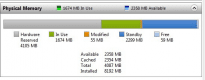
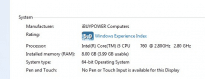
guys i got 8gb memory under win 7 64 system, but it only shows 3.99gb usable, can someone tell me what's going on?
motherboard MSI P55M-SD40
btw it's a new one i bought from ibuypower
 

Attachments

  • 1.png
    1.png
    5 KB · Views: 102
  • index.png
    index.png
    4.1 KB · Views: 102

My Computer

OS
windows 7 home premium 64 bit
guys i got 8gb memory under win 7 64 system, but it only shows 3.99gb usable, can someone tell me what's going on?
motherboard MSI P55M-SD40
btw it's a new one i bought from ibuypower


Love to help nut unfortunately the snips dont enlarge. What I think is happening is the you are just not used to the fact that win 7 takes about half of your memory and holds it for the next request. This is a good thing makes launching and changing much faster.


Ken
 

My Computer

Computer Manufacturer/Model Number
HP Pavillion dv-7 1005 Tx
OS
Win 8 Release candidate 8400
CPU
[email protected]
Memory
4 gigs
Graphics Card(s)
Nvidia 9600M
Sound Card
HD built-in
Monitor(s) Displays
17" Wxga
Screen Resolution
1440x900
Cooling
none
Internet Speed
45Mb down 5Mb up
Have you played with any settings in MSConfig by any chance?
 

My Computer

Computer Manufacturer/Model Number
Custom Build
OS
W7 RTM Ultimate x64
CPU
Intel Q8400 @ 2.66GHZ
Motherboard
Gigabyte GA-EG45M-UD2H
Memory
4GB DDR2-800
Graphics Card(s)
Gainward GTS 450 GLH 1GB Edition
Sound Card
Integrated 8 Channel
Monitor(s) Displays
AOC 23.6 Inch Widescreen LCD
Screen Resolution
1920x1080
Hard Drives
Seagate 500GB Internal
Western Digital 1TB Internal

Hitachi 1TB External
PSU
Apevia Java Power 500W
Case
Cooler Master HAF 922 Black
Cooling
Stock Intel CPU Fan
Keyboard
HP SK-2960 Multimedia Keyboard
Mouse
Logitech M350 Wireless Gaming Mouse
Internet Speed
1.5MB
Did you uncheck them yourself? Has this always been the case since you got the machine?

Only thing i can think off that might help, is ticking the max ram and setting it to 8 gig, and restarting...

let us know the result.
 

My Computer

Computer Manufacturer/Model Number
Custom Build
OS
W7 RTM Ultimate x64
CPU
Intel Q8400 @ 2.66GHZ
Motherboard
Gigabyte GA-EG45M-UD2H
Memory
4GB DDR2-800
Graphics Card(s)
Gainward GTS 450 GLH 1GB Edition
Sound Card
Integrated 8 Channel
Monitor(s) Displays
AOC 23.6 Inch Widescreen LCD
Screen Resolution
1920x1080
Hard Drives
Seagate 500GB Internal
Western Digital 1TB Internal

Hitachi 1TB External
PSU
Apevia Java Power 500W
Case
Cooler Master HAF 922 Black
Cooling
Stock Intel CPU Fan
Keyboard
HP SK-2960 Multimedia Keyboard
Mouse
Logitech M350 Wireless Gaming Mouse
Internet Speed
1.5MB
Did you uncheck them yourself? Has this always been the case since you got the machine?

Only thing i can think off that might help, is ticking the max ram and setting it to 8 gig, and restarting...

let us know the result.
after ticked the max ram and restarted computer, nothing changed in phycial memory, and mscofig shows the max ram is 0 with the check mark on
 

My Computer

OS
windows 7 home premium 64 bit
Can you set the max ram from 0 to 8192?

Then restart, see if anything changes..
 

My Computer

Computer Manufacturer/Model Number
Custom Build
OS
W7 RTM Ultimate x64
CPU
Intel Q8400 @ 2.66GHZ
Motherboard
Gigabyte GA-EG45M-UD2H
Memory
4GB DDR2-800
Graphics Card(s)
Gainward GTS 450 GLH 1GB Edition
Sound Card
Integrated 8 Channel
Monitor(s) Displays
AOC 23.6 Inch Widescreen LCD
Screen Resolution
1920x1080
Hard Drives
Seagate 500GB Internal
Western Digital 1TB Internal

Hitachi 1TB External
PSU
Apevia Java Power 500W
Case
Cooler Master HAF 922 Black
Cooling
Stock Intel CPU Fan
Keyboard
HP SK-2960 Multimedia Keyboard
Mouse
Logitech M350 Wireless Gaming Mouse
Internet Speed
1.5MB
Going to have fun with this one if it is a bios issue causing it. That board may have been made by MSI, but it was made for the OEM market and as a reslut at least according to here,

Can't find MSI P55M-SD40 on MSI

is up to the computer manufacturer (ibuypower in your case) to provide any bios updates if that is what it turns out to be.

As Ken said your images won't enlarge, but enough can be seen to see that half of the 8 GB is hardware reserved. That can usually be caused by one of 3 things,

1. The setting in msconfig that Uber Philf mentioned.

2. Memory remapping is not enabled in the bios. This setting is usually defaulted to enabled with the option either hidden or removed in most recent bioses. It probably isn't there in yours, but have a good look through every section in the bios just in case.

3. For whatever reason the board only supports up to 4 GB of ram, which again brings it back to a bios issue as the chipset on the board is more than capable of supporting 8-16 GB (or more).

If the memory remapping option isn't available, seeing as you just got it I would start with contacting ibuypower and seeing hat they have to say; even more so if it came with the 8 GB and you're only using 4 GB of it.
 

My Computer

Computer type
PC/Desktop
Computer Manufacturer/Model Number
Me
OS
Win 7 Ultimate x64
CPU
FX-8350 @ 4.6 GHz so far
Motherboard
Asus M5A97 EVO
Memory
ADATA XPG V1 Series Black 8GB DDR3 1600
Graphics Card(s)
Sapphire R9 270x Dual-X
Sound Card
Xonar DGX w/ Corsair Vengence 1300
Monitor(s) Displays
Acer S232HL Abid
Screen Resolution
1920x1080
Hard Drives
120 GB OCZ Vertex 3
500 GB Seagate 7200.12
PSU
Antec Earthwatts 650W Green
Case
Antec Three Hundred
Cooling
Cooler Master 212 EVO
Keyboard
Logitech G510
Mouse
Logitech G500s
Internet Speed
35000/3000
Can you set the max ram from 0 to 8192?

Then restart, see if anything changes..
it changes to 8192 automatically, but after i restarted, the max turned to 0. and i can;t find memory remap in BIOS, im using MSI P55M-SD40 motherboard
 

My Computer

OS
windows 7 home premium 64 bit
So nothing on memory remapping, anything to do with memory in there? Besides overclocking?
Sometimes they're under names like Memory Extension, Memory Re-Addressing etc etc?
 

My Computer

Computer Manufacturer/Model Number
Custom Build
OS
W7 RTM Ultimate x64
CPU
Intel Q8400 @ 2.66GHZ
Motherboard
Gigabyte GA-EG45M-UD2H
Memory
4GB DDR2-800
Graphics Card(s)
Gainward GTS 450 GLH 1GB Edition
Sound Card
Integrated 8 Channel
Monitor(s) Displays
AOC 23.6 Inch Widescreen LCD
Screen Resolution
1920x1080
Hard Drives
Seagate 500GB Internal
Western Digital 1TB Internal

Hitachi 1TB External
PSU
Apevia Java Power 500W
Case
Cooler Master HAF 922 Black
Cooling
Stock Intel CPU Fan
Keyboard
HP SK-2960 Multimedia Keyboard
Mouse
Logitech M350 Wireless Gaming Mouse
Internet Speed
1.5MB
thanks all the replies. probably, connecting to the manufacturer is the best option right now. thank you all appreciate
 

My Computer

OS
windows 7 home premium 64 bit
So nothing on memory remapping, anything to do with memory in there? Besides overclocking?
Sometimes they're under names like Memory Extension, Memory Re-Addressing etc etc?
dont think there is anything you listed above. but thank you anyway. i will call ibuypower tomorrow.
 

My Computer

OS
windows 7 home premium 64 bit

My Computer

Computer type
PC/Desktop
Computer Manufacturer/Model Number
Me
OS
Win 7 Ultimate x64
CPU
FX-8350 @ 4.6 GHz so far
Motherboard
Asus M5A97 EVO
Memory
ADATA XPG V1 Series Black 8GB DDR3 1600
Graphics Card(s)
Sapphire R9 270x Dual-X
Sound Card
Xonar DGX w/ Corsair Vengence 1300
Monitor(s) Displays
Acer S232HL Abid
Screen Resolution
1920x1080
Hard Drives
120 GB OCZ Vertex 3
500 GB Seagate 7200.12
PSU
Antec Earthwatts 650W Green
Case
Antec Three Hundred
Cooling
Cooler Master 212 EVO
Keyboard
Logitech G510
Mouse
Logitech G500s
Internet Speed
35000/3000
Back
Top