Aspect Ratio

clutch

New member
Local time
9:29 AM
Messages
14
Hey, I've got a NV53 series Gateway laptop brand new and I am trying to fix the aspect ratio options but I can't. Does anyone know where I can find it? I've looked everywhere and brought it to best buy and they couldn't find it either so I need help!!
 

My Computer

OS
windows 7
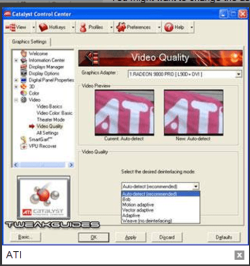
Welcome to seven forums clutch: Since youR gateway has an ATI card you can adjust scren resolution, and aspect ratio in the Catalyst Control Center if installed ATI Catalyst Control Center™ ati ccc.PNG
 

My Computer

Computer Manufacturer/Model Number
Self Built
OS
Windows 7 ultimate 64 bit / XP Home sp3
CPU
intel Core 2 Duo E8400 3.0ghz
Motherboard
Asus P5ND bios 1401
Memory
8 gigs 1066 OCZ Fata1ty
Graphics Card(s)
EVGA GTX 580 Call of Duty Black Ops Edition
Sound Card
Creative Soundblaster Audigy 2zs
Monitor(s) Displays
Asus 24in LCD's 2MS X2
Screen Resolution
1920x1080p @60Hz
Hard Drives
WD Caviar 500 Black/ WD Caviar 200 Blue
PSU
OCZ 700W GameXtreme
Case
NZXT Apollo
Cooling
Corsair H50 CPU/120mm x3 /60mm x2 /Corsair Dominator Ram
Keyboard
Logitech Bluetooth Wireless MX5000
Mouse
Logitech Bluetooth Wireless MX1000
Internet Speed
Download 19.83 Upload 0.97
Other Info
Logitech Z2300 Speakers/ Bose Noise Cancelling Headphones/Avermedia PCI-e Hybrid TV Bravo/Epson NX415 all in one/ 4 Port Powered USB Hub/ LG 10x Bluray Burner /TSST Corp DVDRW External
In addition to the above, this is directly from the CCC help file,

Setting the Video Aspect Ratio


  1. Based on the navigation system contained in the ATI Catalyst™ Control Center window, do one of the following:
    • Navigation menu—On the Graphics menu, click Avivo™ Video.
    • Navigation tree—From the tree in the Graphics Settings tab, click Avivo™ Video.
  2. Click Theater Mode.
  3. Under Theater Mode Settings select Match the source video to maintain the aspect ratio of original video.
    • Optionally, select Scale to full screen to have the source video fill the display area.
 

My Computer

Computer type
PC/Desktop
Computer Manufacturer/Model Number
Me
OS
Win 7 Ultimate x64
CPU
FX-8350 @ 4.6 GHz so far
Motherboard
Asus M5A97 EVO
Memory
ADATA XPG V1 Series Black 8GB DDR3 1600
Graphics Card(s)
Sapphire R9 270x Dual-X
Sound Card
Xonar DGX w/ Corsair Vengence 1300
Monitor(s) Displays
Acer S232HL Abid
Screen Resolution
1920x1080
Hard Drives
120 GB OCZ Vertex 3
500 GB Seagate 7200.12
PSU
Antec Earthwatts 650W Green
Case
Antec Three Hundred
Cooling
Cooler Master 212 EVO
Keyboard
Logitech G510
Mouse
Logitech G500s
Internet Speed
35000/3000
In addition to the above, this is directly from the CCC help file,

Setting the Video Aspect Ratio


  1. Based on the navigation system contained in the ATI Catalyst™ Control Center window, do one of the following:
    • Navigation menu—On the Graphics menu, click Avivo™ Video.
    • Navigation tree—From the tree in the Graphics Settings tab, click Avivo™ Video.
  2. Click Theater Mode.
  3. Under Theater Mode Settings select Match the source video to maintain the aspect ratio of original video.
    • Optionally, select Scale to full screen to have the source video fill the display area.
this is the problem i cant get there!!
 

My Computer

OS
windows 7
Also if you look at my SS, i double click on ATI Avivo Video Converter and this is the screen that i get Cache: fdsgdfgdfsgd. I have a feeling this is what im supposed to do but i have no clue how to do this and i dont want to mess up my computer lol help plz! lol
 

My Computer

OS
windows 7
Try setting CCC to advanced mode instead of basic mode.
 

My Computer

Computer type
PC/Desktop
Computer Manufacturer/Model Number
Me
OS
Win 7 Ultimate x64
CPU
FX-8350 @ 4.6 GHz so far
Motherboard
Asus M5A97 EVO
Memory
ADATA XPG V1 Series Black 8GB DDR3 1600
Graphics Card(s)
Sapphire R9 270x Dual-X
Sound Card
Xonar DGX w/ Corsair Vengence 1300
Monitor(s) Displays
Acer S232HL Abid
Screen Resolution
1920x1080
Hard Drives
120 GB OCZ Vertex 3
500 GB Seagate 7200.12
PSU
Antec Earthwatts 650W Green
Case
Antec Three Hundred
Cooling
Cooler Master 212 EVO
Keyboard
Logitech G510
Mouse
Logitech G500s
Internet Speed
35000/3000
Okay i went to advanced (still does'nt look quite like the SS that TheFabe posted) then i went to Avivo Video and this is what i got Cache: fdsfsfgdfgdg As you can see, there is an option for aspect ratio and to fit the full screen but i can't click on it!?!?!? I really appreciate any help guys thanks!!
 

My Computer

OS
windows 7
It seems like your system doesn't recognize your second display. Can you see anything in it? And remember, it needs to be set in "Clone" mode.
 

My Computer

OS
Windows XP 32bit / Windows 7 Ultimate 32bit
i dont have a second display its just thats the only place where i have an option that deal full screen or aspect ratio...

BUT what im really trying to figure out is how to get my catalyst thing to look like that ..
 

My Computer

OS
windows 7
Sorry, I am very confused. If you're dealing with your primary (single) display... maybe you only need to change your screen resolution? Try this and tell us if that's what you're searching for.
 

My Computer

OS
Windows XP 32bit / Windows 7 Ultimate 32bit
Sorry, I am very confused. If you're dealing with your primary (single) display... maybe you only need to change your screen resolution? Try this and tell us if that's what you're searching for.
nah ive tried changing my screen resolution its def my graphics card but i dont know how to get to that screen! Everyone who posts a SS of their catalyst well mine looks diff -.- why?
 

My Computer

OS
windows 7
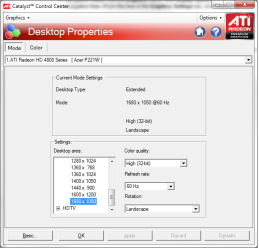
Try looking here,

cccresolution.png

P.S. The CCC comes with a fairly in depth help file, just click on the blue question mark for help file for the screen you are lookign at, or click on Options up near the top right and select Help - Help contents for the full Help file.

P.P.S. The screen shot that thefabe posted is the old style CCC, if you are using the newer ATI drivers (think it was 9.2 or 9.3 that they made the change) then yours will look like the one I posted.
 

My Computer

Computer type
PC/Desktop
Computer Manufacturer/Model Number
Me
OS
Win 7 Ultimate x64
CPU
FX-8350 @ 4.6 GHz so far
Motherboard
Asus M5A97 EVO
Memory
ADATA XPG V1 Series Black 8GB DDR3 1600
Graphics Card(s)
Sapphire R9 270x Dual-X
Sound Card
Xonar DGX w/ Corsair Vengence 1300
Monitor(s) Displays
Acer S232HL Abid
Screen Resolution
1920x1080
Hard Drives
120 GB OCZ Vertex 3
500 GB Seagate 7200.12
PSU
Antec Earthwatts 650W Green
Case
Antec Three Hundred
Cooling
Cooler Master 212 EVO
Keyboard
Logitech G510
Mouse
Logitech G500s
Internet Speed
35000/3000
Try looking here,

View attachment 43186

P.S. The CCC comes with a fairly in depth help file, just click on the blue question mark for help file for the screen you are lookign at, or click on Options up near the top right and select Help - Help contents for the full Help file.

P.P.S. The screen shot that thefabe posted is the old style CCC, if you are using the newer ATI drivers (think it was 9.2 or 9.3 that they made the change) then yours will look like the one I posted.
yup thats wat mine looks like like i said earleir i just got this laptop so it must be updated i guess umm so where do i go or where do i find aspect ratio with this?
 

My Computer

OS
windows 7
I am trying to use Windows DVD Maker to burn a DVD. The video is in widescreen (16:9) and even though I adjust the aspect ratio from 4:3 to 16:9, the DVD is burned in 4:3 and appears distorted. The funny thing is I can preview the video at the 'Ready to burn DVD' stage and the video plays in widescreen (16:9) format, however, when I proceed to burn the DVD it comes out in a distorted 4:3 ratio. Any suggestions?
 

My Computer

OS
Windows 7
Back
Top